Docker Fundamentals
Docker is a platform for developing, shipping, and running applications in containers. Containers package an application with all its dependencies, ensuring consistency across different environments.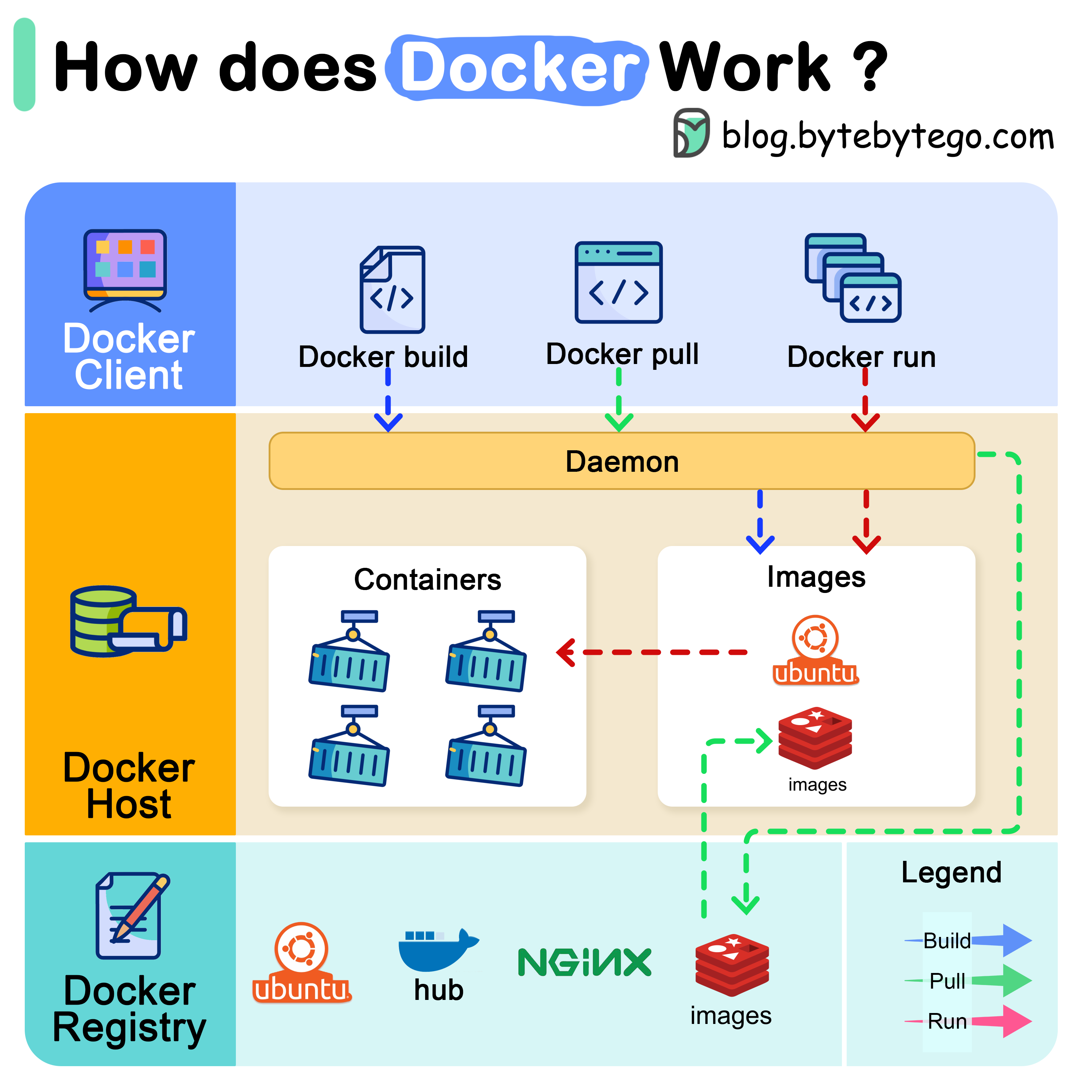
Docker Architecture
Docker has three main components that work together:Docker Client
The command-line interface that users interact with. The docker client talks to the Docker daemon
Docker Host
The Docker daemon listens for Docker API requests and manages Docker objects such as images, containers, networks, and volumes
Docker Registry
A Docker registry stores Docker images. Docker Hub is a public registry that anyone can use
How Docker Run Works
When you executedocker run, the following sequence occurs:
Essential Docker Concepts
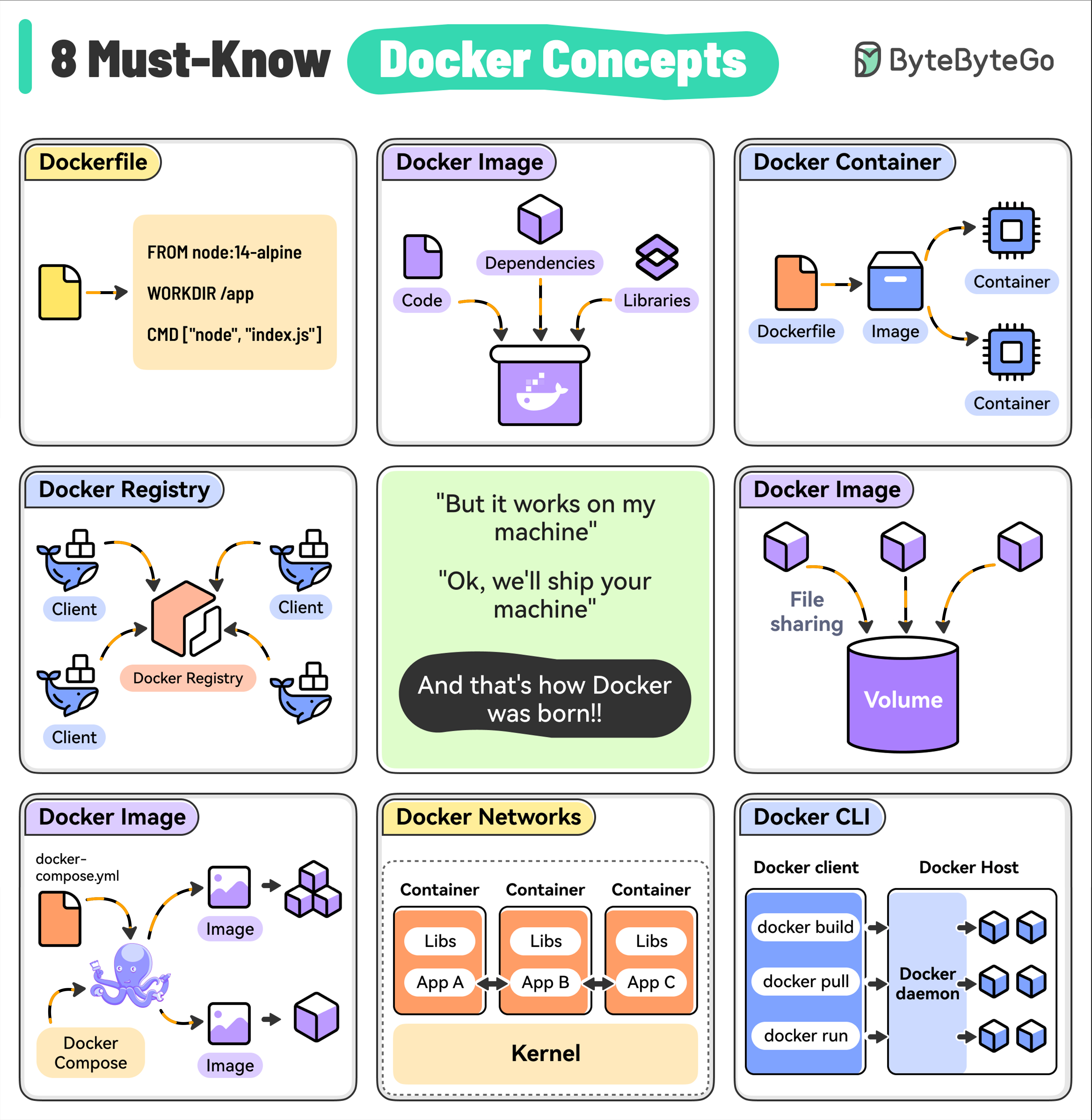
Dockerfile
Dockerfile
Contains the instructions to build a Docker image by specifying the base image, dependencies, and run command.
Docker Image
Docker Image
A lightweight, standalone package that includes everything (code, libraries, and dependencies) needed to run your application. Images are built from a Dockerfile and can be versioned.Key Characteristics:
- Immutable and portable
- Layered architecture for efficiency
- Can be versioned with tags
- Stored in registries (Docker Hub, ECR, etc.)
Docker Container
Docker Container
A running instance of a Docker image. Containers are isolated from each other and the host system, providing a secure and reproducible environment for running your apps.Key Characteristics:
- Lightweight and fast to start
- Isolated process and filesystem
- Ephemeral by default
- Can be paused, stopped, and restarted
Docker Registry
Docker Registry
A centralized repository for storing and distributing Docker images. For example, Docker Hub is the default public registry but you can also set up private registries.Popular Registries:
- Docker Hub (public)
- Amazon ECR
- Google Container Registry
- Azure Container Registry
Docker Volumes
Docker Volumes
A way to persist data generated by containers. Volumes are outside the container’s file system and can be shared between multiple containers.Benefits:
- Data persists after container removal
- Can be shared between containers
- Managed independently of containers
- Better performance than bind mounts
Docker Compose
Docker Compose
A tool for defining and running multi-container Docker applications, making it easy to manage the entire stack.
Docker Networks
Docker Networks
Used to enable communication between containers and the host system. Custom networks can isolate containers or enable selective communication.Network Types:
- Bridge (default)
- Host
- Overlay (for Swarm)
- None
Docker CLI
Docker CLI
The primary way to interact with Docker, providing commands for building images, running containers, managing volumes, and performing other operations.
Docker Best Practices
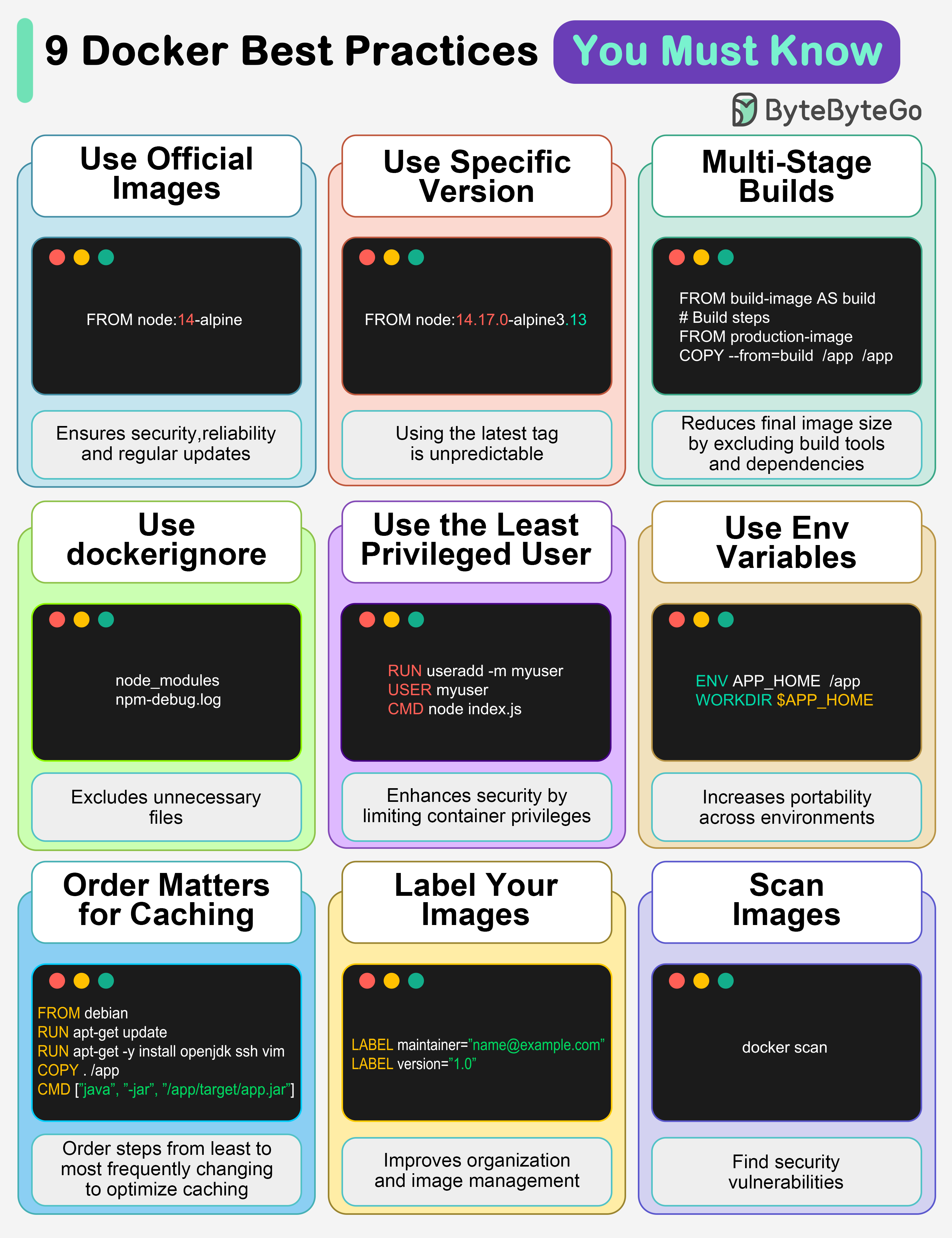
1. Use Official Images
This ensures security, reliability, and regular updates from trusted sources
2. Use Specific Image Versions
The default
latest tag is unpredictable and causes unexpected behavior. Always specify version numbers3. Multi-Stage Builds
Reduces final image size by excluding build tools and dependencies
4. Use .dockerignore
Excludes unnecessary files, speeds up builds, and reduces image size
5. Use Least Privileged User
Enhances security by limiting container privileges
6. Use Environment Variables
Increases flexibility and portability across different environments
7. Order Matters for Caching
Order your steps from least to most frequently changing to optimize caching
8. Label Your Images
It improves organization and helps with image management
9. Scan Images for Vulnerabilities
Find security vulnerabilities before they become bigger problems
Kubernetes Overview
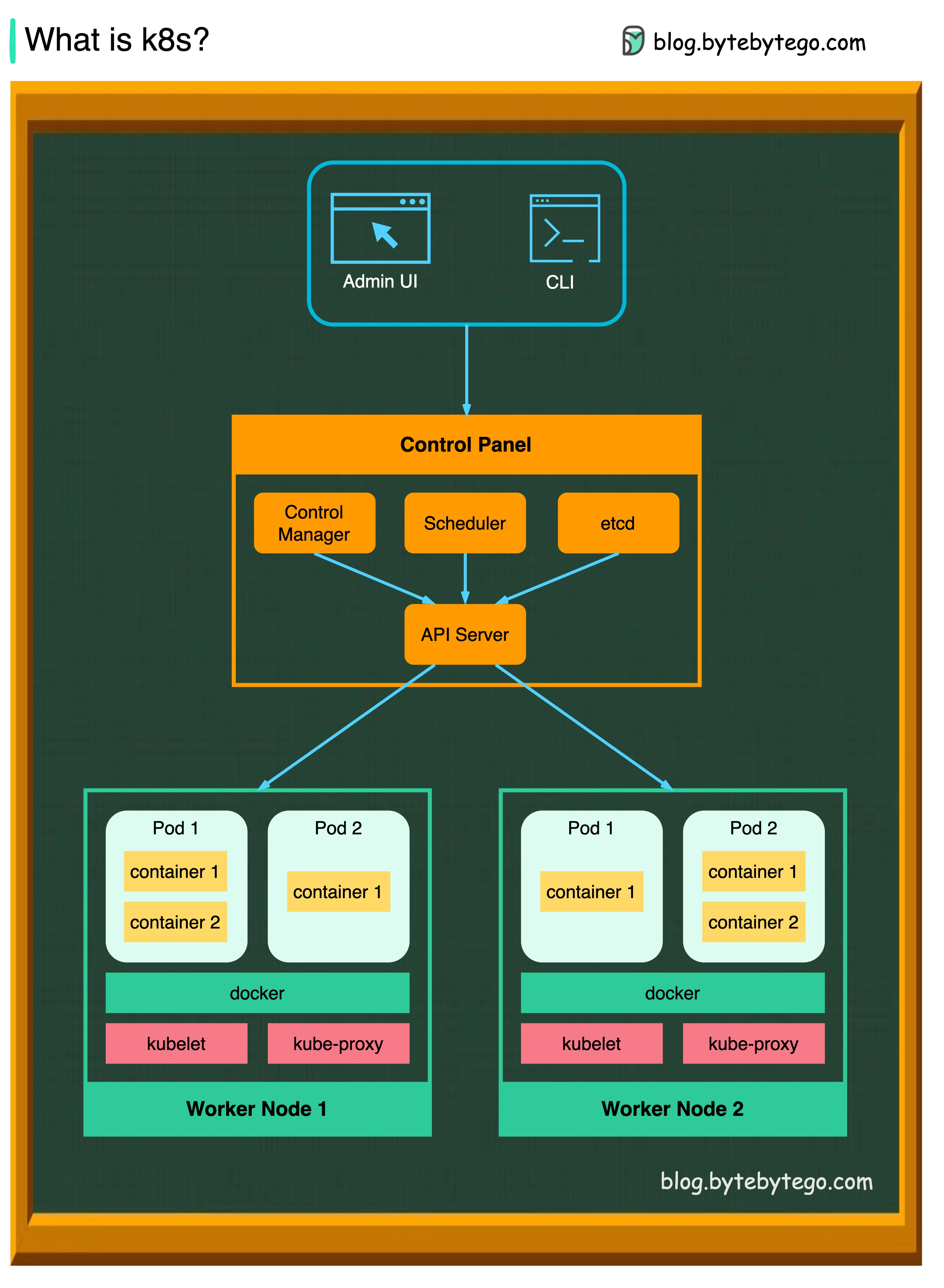
In production environments, the control plane usually runs across multiple computers and a cluster usually runs multiple nodes, providing fault tolerance and high availability.
Control Plane Components
API Server
API Server
The API server talks to all the components in the Kubernetes cluster. All the operations on pods are executed by talking to the API server.Key Functions:
- Exposes the Kubernetes API
- Front-end for the control plane
- Validates and processes REST requests
- Updates etcd with cluster state
Scheduler
Scheduler
The scheduler watches the workloads on pods and assigns loads on newly created pods.Responsibilities:
- Selects optimal nodes for pods
- Considers resource requirements
- Respects constraints and affinity rules
- Balances workload distribution
Controller Manager
Controller Manager
The controller manager runs the controllers, including:
- Node Controller: Monitors node health
- Job Controller: Manages one-off tasks
- EndpointSlice Controller: Manages network endpoints
- ServiceAccount Controller: Manages service accounts
etcd
etcd
etcd is a key-value store used as Kubernetes’ backing store for all cluster data.Characteristics:
- Distributed and highly available
- Stores cluster configuration and state
- Source of truth for the cluster
- Should be backed up regularly
Node Components
Pods
Pods
A pod is a group of containers and is the smallest unit that Kubernetes administers. Pods have a single IP address applied to every container within the pod.Key Concepts:
- Shared network namespace
- Shared storage volumes
- Ephemeral by nature
- Scaled through ReplicaSets
Kubelet
Kubelet
An agent that runs on each node in the cluster. It ensures containers are running in a Pod.Responsibilities:
- Monitors pod specifications
- Ensures containers are healthy
- Reports node and pod status
- Manages container lifecycle
Kube Proxy
Kube Proxy
kube-proxy is a network proxy that runs on each node in your cluster. It routes traffic coming into a node from the service. It forwards requests for work to the correct containers.Functions:
- Maintains network rules
- Enables service abstraction
- Load balances traffic
- Implements service networking
Kubernetes Service Types
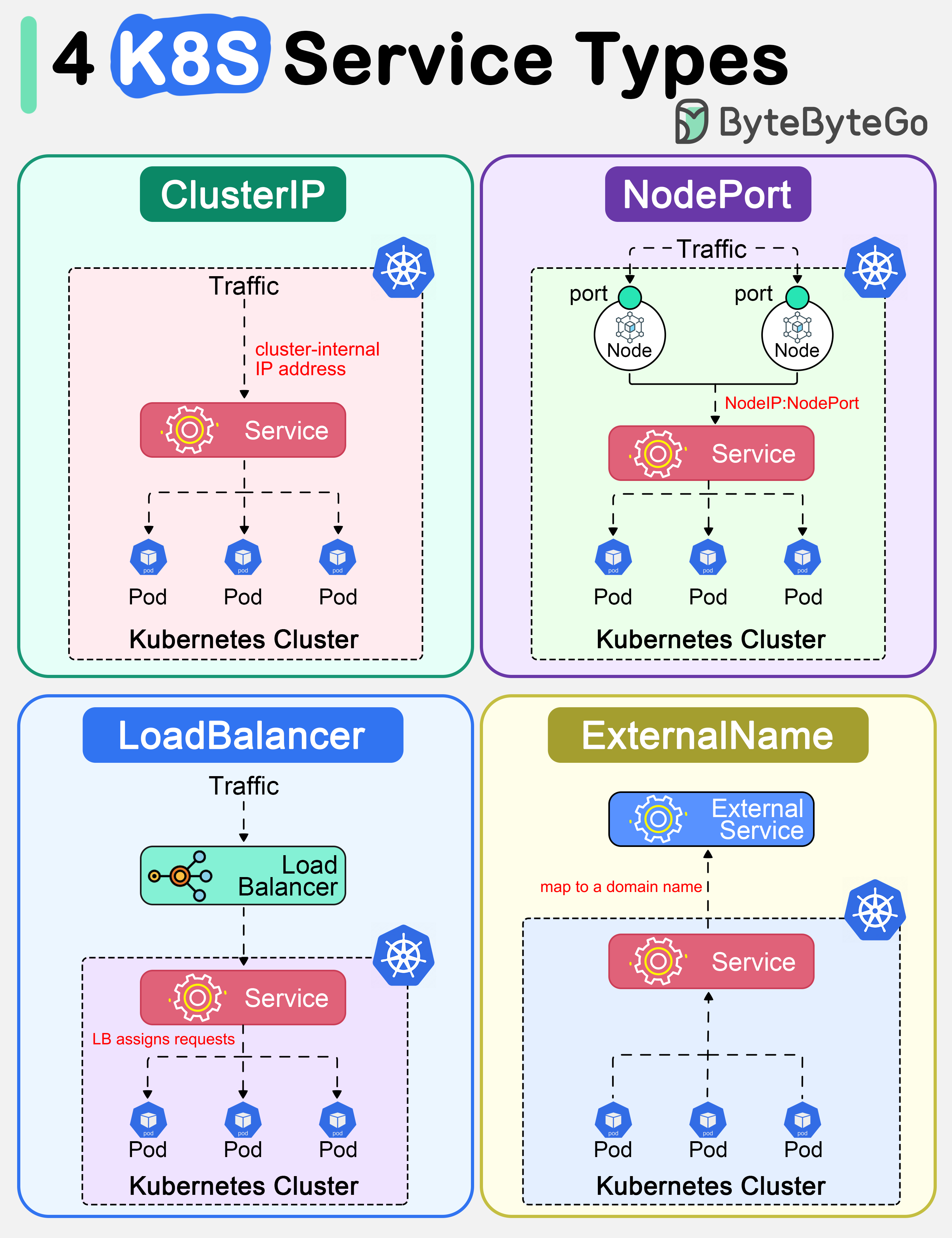
ClusterIP
Default service type. Kubernetes assigns a cluster-internal IP address to ClusterIP service. This makes the service only reachable within the cluster.Use Cases:
- Internal microservices communication
- Backend services not exposed externally
- Database connections within cluster
NodePort
Exposes the service outside of the cluster by adding a cluster-wide port on top of ClusterIP. We can request the service by
NodeIP:NodePort.Use Cases:- Development and testing
- Direct access to services
- Port range: 30000-32767
LoadBalancer
Exposes the Service externally using a cloud provider’s load balancer.Use Cases:
- Production external services
- Cloud-native applications
- Automatic load balancing
- Integrates with AWS ELB, GCP Load Balancer, etc.
ExternalName
Maps a Service to a domain name. This is commonly used to create a service within Kubernetes to represent an external database.Use Cases:
- External database connections
- Third-party API integration
- Service migration scenarios
Kubernetes Deployment Strategies
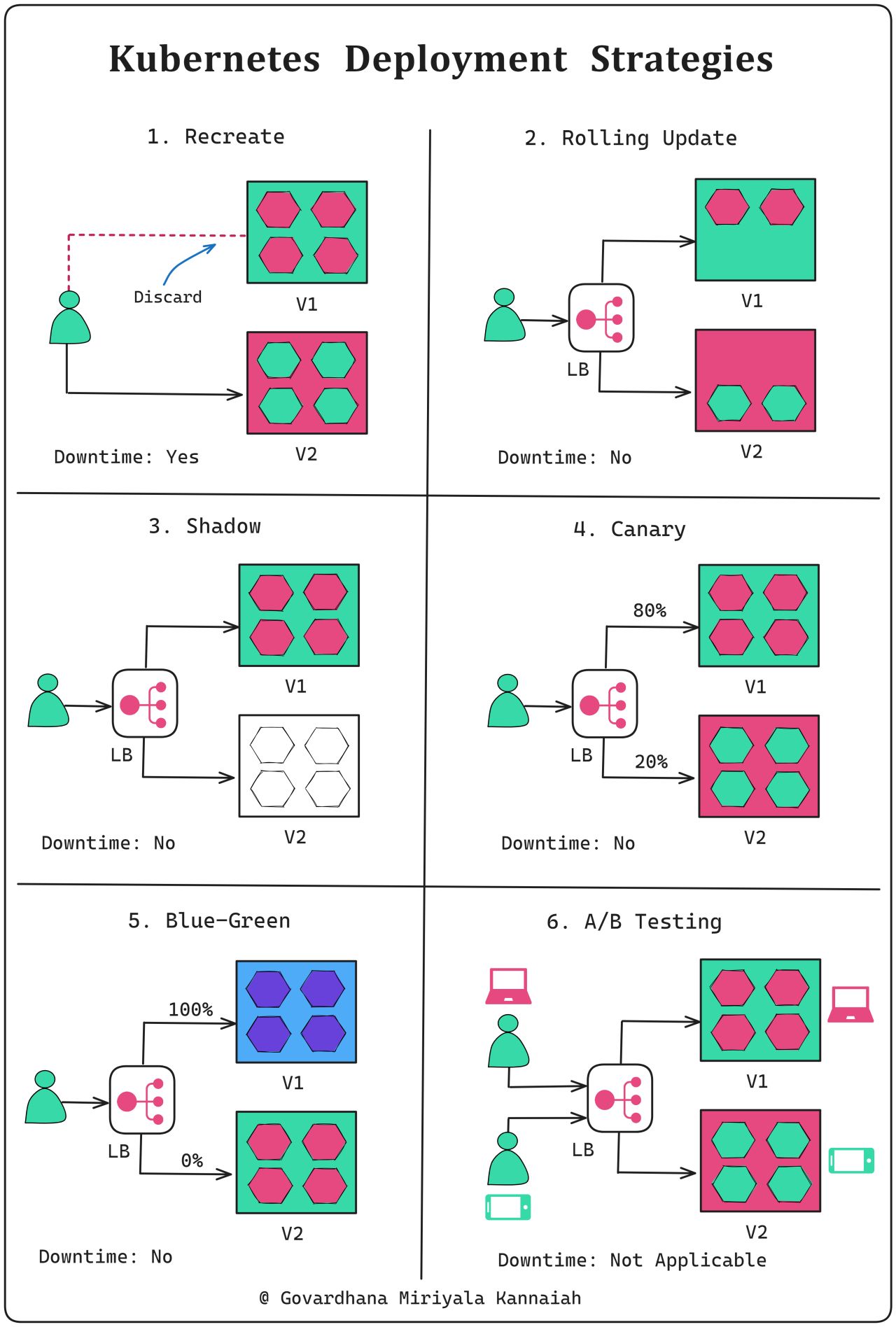
Recreate
Recreate
All existing instances are terminated at once, and new instances with the updated version are created.
- Downtime: Yes
- Use case: Non-critical applications or during initial development stages
- Risk: High
- Speed: Fast
Rolling Update
Rolling Update
Application instances are updated one by one, ensuring high availability during the process.
- Downtime: No
- Use case: Periodic releases
- Risk: Low to medium
- Speed: Medium
Shadow
Shadow
A copy of the live traffic is redirected to the new version for testing without affecting production users.
- Downtime: No
- Use case: Validating new version performance and behavior in a real environment
- Risk: Low
- Complexity: Very high
Canary
Canary
The new version is released to a subset of users or servers for testing before broader deployment.
- Downtime: No
- Use case: Impact validation on a subset of users
- Risk: Low
- Speed: Gradual
Blue-Green
Blue-Green
Two identical environments are maintained: one with the current version (blue) and the other with the updated version (green). Traffic starts with blue, then switches to the prepared green environment for the updated version.
- Downtime: No
- Use case: High-stake updates
- Risk: Low (easy rollback)
- Cost: High (requires double resources)
A/B Testing
A/B Testing
Multiple versions are concurrently tested on different users to compare performance or user experience.
- Downtime: Not directly applicable
- Use case: Optimizing user experience
- Duration: Extended (weeks to months)
- Focus: Business metrics and user behavior
Kubernetes Command Cheatsheet
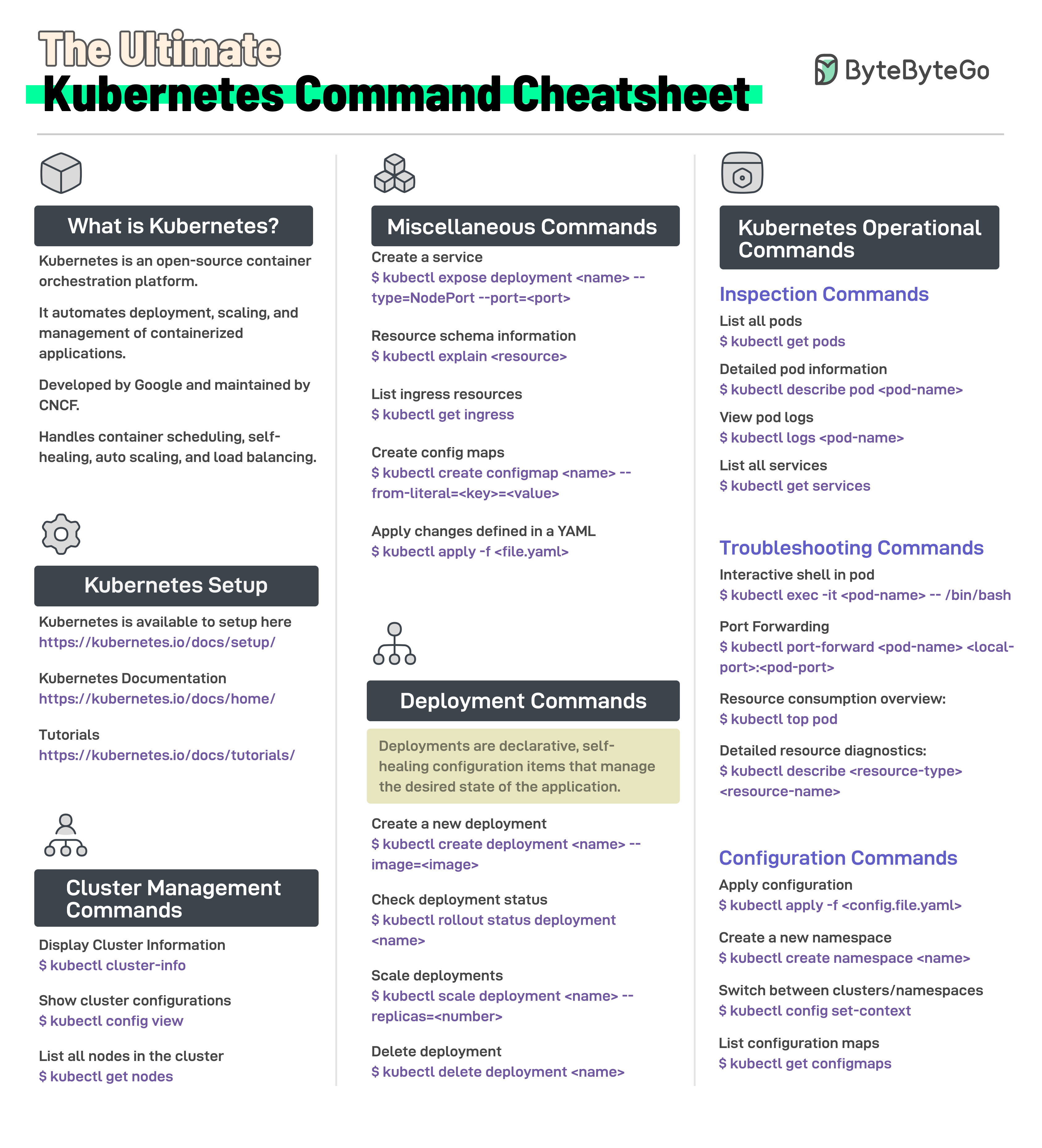
Essential Commands by Category
- Cluster Management
- Deployments
- Pods
- Services
- ConfigMaps & Secrets
Kubernetes Tools Ecosystem
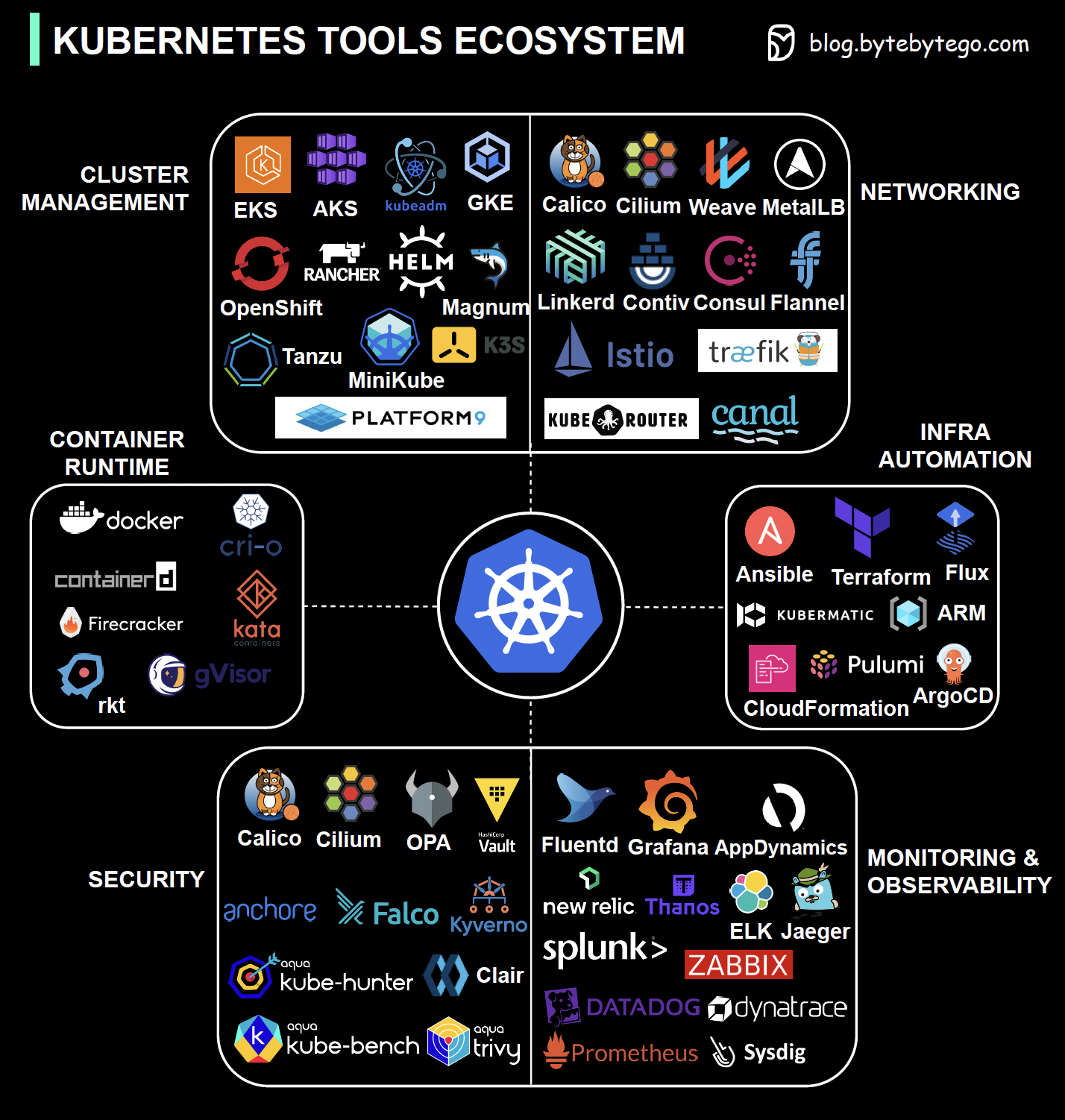
Security
Tools for authentication, authorization, encryption, and compliance
Networking
CNI plugins, service mesh, ingress controllers, and network policies
Container Runtime
Docker, containerd, CRI-O, and other container runtimes
Cluster Management
Tools for provisioning, scaling, and managing clusters
Monitoring & Observability
Prometheus, Grafana, ELK stack, and distributed tracing
Infrastructure Orchestration
Terraform, Ansible, Helm, and GitOps tools
Kubernetes practitioners need to be well-versed in these tools to ensure the reliability, security, and performance of containerized applications within Kubernetes clusters.
Key Takeaways
Docker Basics: Containers package applications with dependencies for consistency across environments
Docker Best Practices: Use official images, specific versions, multi-stage builds, and scan for vulnerabilities
Kubernetes Architecture: Control plane manages worker nodes that run containerized pods
Service Types: Choose between ClusterIP, NodePort, LoadBalancer, or ExternalName based on your needs
Deployment Strategies: Select the right strategy (Rolling, Canary, Blue-Green, etc.) based on risk tolerance and downtime requirements
Related Topics
DevOps & CI/CD
Learn about DevOps practices and CI/CD pipelines
Monitoring & Logging
Explore observability and system monitoring