How to write API documentation: a step-by-step guide
Harkirat Chahal
Growth
Share this article
Harkirat Chahal
Growth
Share this article

This guide explains how to plan, write, test, and maintain each part of your API documentation, including authentication, a focused quickstart, endpoint references, runnable code samples, error handling, and a changelog. It also shows how OpenAPI generation and Git-based reviews keep documentation aligned with API changes.
API documentation should help first-time integrators make a successful request quickly and give returning developers precise answers about parameters, responses, errors, and limits. Missing instructions or outdated endpoint details slow adoption and increase support requests.
A complete documentation set covers authentication, a focused quickstart, endpoint references, runnable code samples, realistic responses, error handling, rate limits, edge cases, and a changelog. OpenAPI generation and Git-based reviews help keep this content aligned with API changes.
This guide explains how to plan, write, test, and maintain each part of your API documentation, using Mintlify's OpenAPI generation, Git reviews, and automatic deployment features for reference. For broader context, see our API documentation guide and developer documentation best practices.
Step 1: know your audience and their tasks
The structure, level of detail, and code languages you include should reflect who uses the API and what they need to accomplish. Most API documentation serves three main reader groups.
First-time integrators: They need credentials, setup instructions, and a working request that confirms the API can support their use case. A clear quickstart guides them through this initial integration.
Returning developers: They arrive with a specific question about a parameter, response field, status code, or endpoint behavior. Reference pages should make those details easy to locate without having to read unrelated guidance.
Evaluators: Engineering leads and product managers review the API's capabilities, rate limits, security model, and maintenance quality before committing development resources.
List the three most common tasks for each group, then use those tasks to define the navigation and page hierarchy. Developers should be able to follow the integration process without having to navigate documentation organized around the codebase or internal team structure.
Step 2: document authentication first
Authentication documentation should appear near the beginning of the navigation, as developers need valid credentials to test an endpoint. Keep the page self-contained so they can configure authentication without moving between several guides.
Cover three requirements:
- Credential source: Explain where developers can create or retrieve the API key, token, or client credentials.
- Request format: Specify exactly where the credential belongs, such as the authorization header, request body, or query parameters.
- Working example: Provide a complete request that developers can copy, replace the placeholders, and run immediately.
Mintlify's trigger deployment endpoint demonstrates this structure with a Bearer token in the authorization header.
curl --request POST \
  --url https://api.mintlify.com/v1/project/update/{projectId} \
  --header 'Authorization: Bearer <token>'
The placeholders are clearly defined, and the endpoint reference identifies the required admin API key and explains where to generate it. Complete the authentication page with the exact status codes and response bodies returned for missing, invalid, or expired credentials so developers can distinguish authentication failures from endpoint errors.
Step 3: write a first-call quickstart
A quickstart should take developers from initial setup to a verified API response with as few decisions as possible. By the end, they should know that their credentials work, the endpoint is reachable, and the response matches the documentation.
Include: List the required account access, credentials, tools, and dependencies. Provide one request to a representative endpoint, followed by the expected status code and response body. Finish with links to the full endpoint reference and the next logical integration step.
Cover elsewhere: Keep optional parameters, secondary endpoints, edge cases, and architectural explanations in dedicated guides or reference pages. The quickstart should present one clear path to a working request.
Test the instructions with a developer who is unfamiliar with the API and record where they pause, encounter an error, or open another page for help. Aim for a successful request within ten minutes, then revise any step that delays completion.
Step 4: build the API endpoint reference
The endpoint reference becomes the primary lookup resource after developers complete the quickstart. Use the same structure across all endpoints so readers can scan each page without having to learn a new format.
Each endpoint page should include:
- Operation: The HTTP method, path, and a one-sentence description of the endpoint's function.
- Inputs: Path, query, and header parameters with their types, requirements, defaults, and constraints, plus the request body schema when applicable.
- Outputs: Success and error status codes with their corresponding response schemas.
- Examples: At least one complete request paired with a realistic response.
A manually written reference can work for a small API with stable endpoints. As the API grows, field names, parameters, and response schemas can change without being reflected in the documentation. Generating the reference from an OpenAPI specification reduces this drift by defining the API structure in a machine-readable JSON or YAML file that can be reviewed alongside the code.
Mintlify's OpenAPI setup guide demonstrates how authentication can be defined once in the specification. The following configuration adds Bearer authentication:
{
  "components": {
    "securitySchemes": {
      "bearerAuth": {
        "type": "http",
        "scheme": "bearer"
      }
    }
  }
}
A security field applies the scheme to the required endpoints. Mintlify uses this configuration to add authentication fields to the generated endpoint documentation and API playground. It can also render parameters, request bodies, and responses directly from the OpenAPI file.
The specification supplies the structure and schemas. Add clear descriptions, usage guidance, parameter behavior, and edge cases to help developers understand when to use each endpoint and how it behaves under different conditions.
Step 5: add code samples and responses
Developers often adapt code samples directly for their integrations, so each example should reflect the current endpoint, authentication method, headers, parameters, and payload structure. Test every sample before publication and again whenever the API changes. For patterns worth modeling, see 5 API documentation examples worth studying.
Make samples runnable: Limit placeholders to credentials, resource IDs, and values that must differ between users. Label each placeholder clearly and include all required dependencies, imports, and configuration values.
Choose languages based on usage: Include cURL as the baseline because it exposes the raw HTTP request. Add the two or three languages most commonly used by your customers, based on SDK adoption, product analytics, or support requests.
Pair requests with responses: Show a realistic response next to each example request, including the expected status code. Use representative field values and preserve the actual nesting, data types, and pagination structure so developers can implement response handling accurately.
Keep examples synchronized: Store request and response examples in the OpenAPI specification when generating the reference. Updating the examples with the associated schemas reduces inconsistencies between the reference, code samples, and API behavior.
Step 6: document errors and edge cases
Error documentation should help developers identify why a request failed and how to correct it without opening a support ticket. Cover the response structure, triggering condition, and resolution for each common failure.
Define the error format: Show the complete error schema and explain each field, including the HTTP status code, machine-readable error code, human-readable message, request ID, and validation details where applicable. Use the same response structure across endpoints whenever the API allows it.
Document common failures: For each error, specify the condition that triggers it and the steps required to resolve it. Distinguish between authentication failures, insufficient permissions, invalid parameters, unavailable resources, conflicting requests, and server errors.
Explain rate limits and retries: State the request quota, time window, and whether limits apply per account, API key, user, or endpoint. Document the headers that report quota usage, the body of a 429 response, any Retry-After value, and the recommended retry or backoff behavior.
Cover edge-case behavior: Explain pagination boundaries, empty results, timeouts, partial failures in batch operations, duplicate requests, and other conditions that may produce an unexpected response. Include example payloads where the response structure differs from the standard success case.
Step 7: keep your API documentation current
API documentation begins to drift when endpoint changes ship without corresponding updates to the specification, guides, and examples. Include documentation in the release process so developers receive accurate information as soon as the API changes.
Update the OpenAPI specification with the code
Require changes to parameters, schemas, authentication, and responses to be made in the same pull request as the API implementation. The generated reference can then reflect the updated specification upon the release's publication.
Review documentation through Git
Store documentation in a repository and review changes through pull requests. Mintlify's GitHub integration adds a preview deployment to pull requests targeting the deployment branch, allowing reviewers to test navigation, examples, and page rendering before publication. Approved changes deploy automatically when they reach the connected deployment branch.
Automate updates from code changes
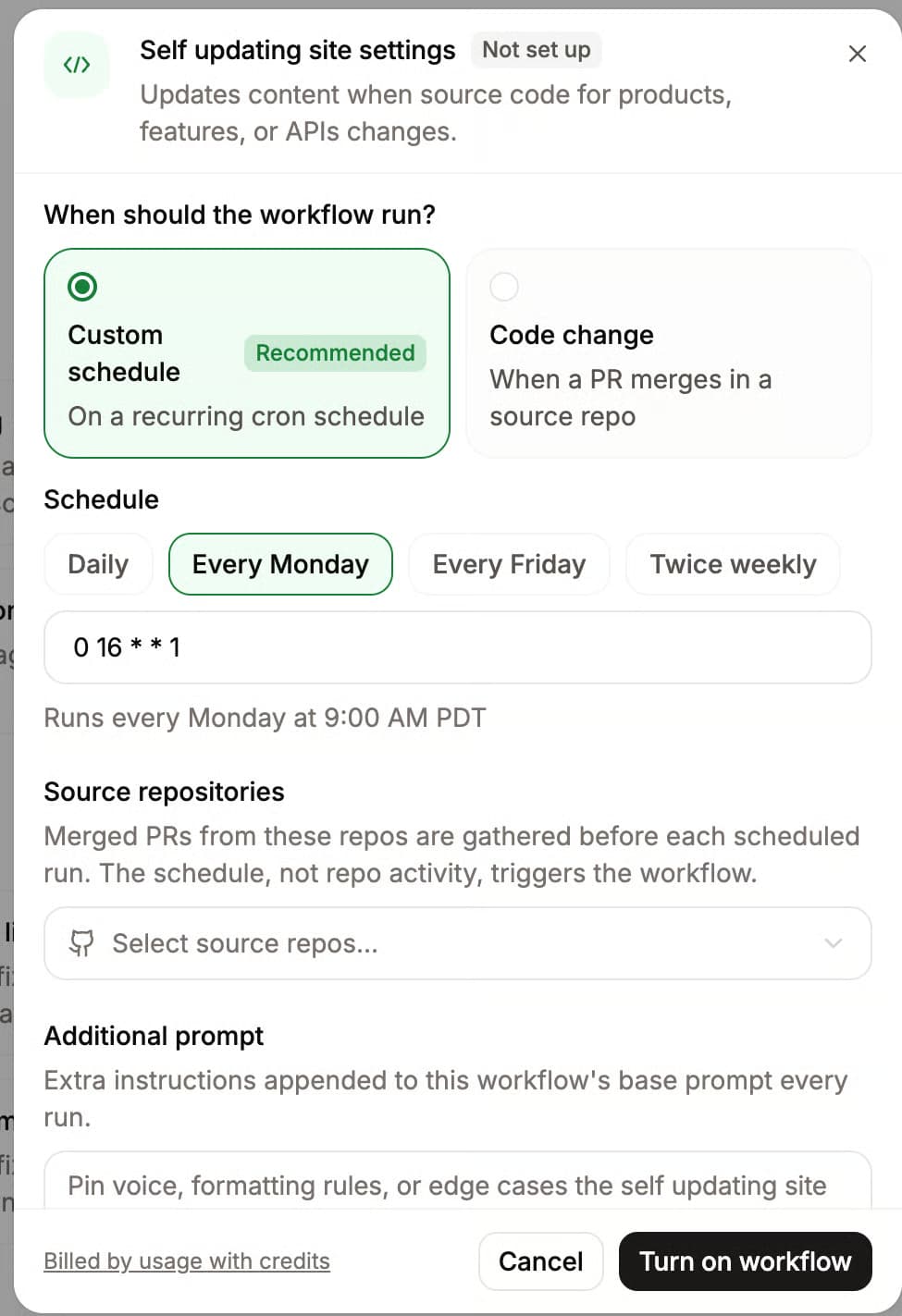
Mintlify's Automations use its documentation Agent to review merged changes in connected source-code repositories. The Update from code changes automation prepares relevant documentation updates, which teams can configure to open as pull requests for approval.
Maintain a changelog
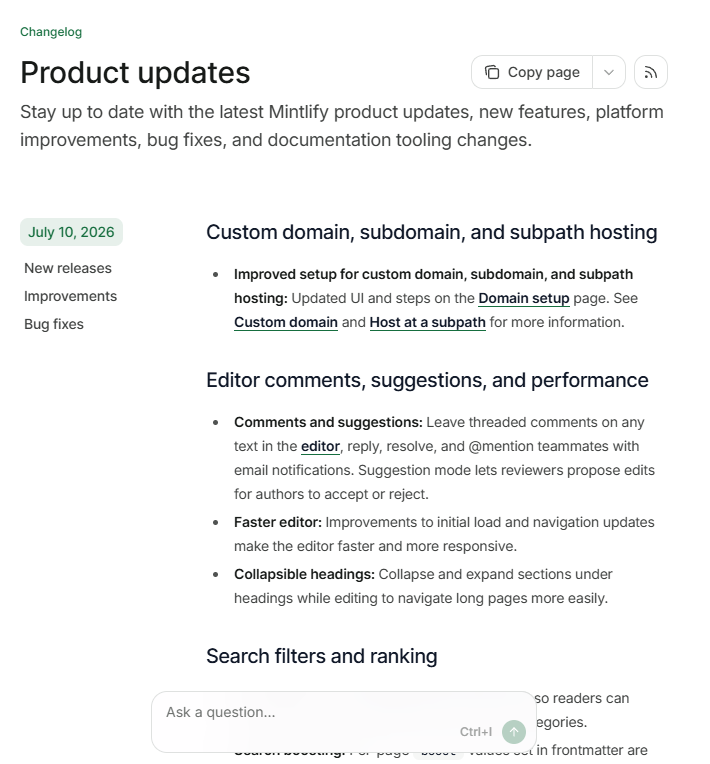
Record new and deprecated endpoints, breaking changes, authentication updates, schema changes, and required migration steps. Link each entry to the relevant reference page or migration guide. For structure and ready-to-use templates, see how to write release notes.
Assign an owner to regularly review quickstarts, guides, support requests, and outdated examples. OpenAPI generation keeps the reference aligned with the updated specification, the Agent proposes changes based on source-code updates, and Git reviews give teams control over what reaches the published documentation.
API documentation checklist
Use this checklist before publication and whenever an API release changes authentication, endpoints, schemas, errors, or usage limits.
- Audience groups and their most common integration tasks are defined
- Authentication includes the credential source and one complete, working request
- The quickstart produces a successful API response within ten minutes
- Every endpoint includes its method, path, parameters, request schema, responses, and examples
- The OpenAPI specification is validated and reflects the current API
- Code samples are tested and cover the languages customers use
- Every example request includes a realistic response and status code
- Error schemas, common failures, rate limits, retry behavior, and edge cases are documented
- The changelog covers breaking changes, deprecations, and migration requirements
- Documentation changes follow the same review process as related code changes
- A documentation owner regularly reviews guides, examples, and support-driven content gaps
Create and maintain API documentation with Mintlify
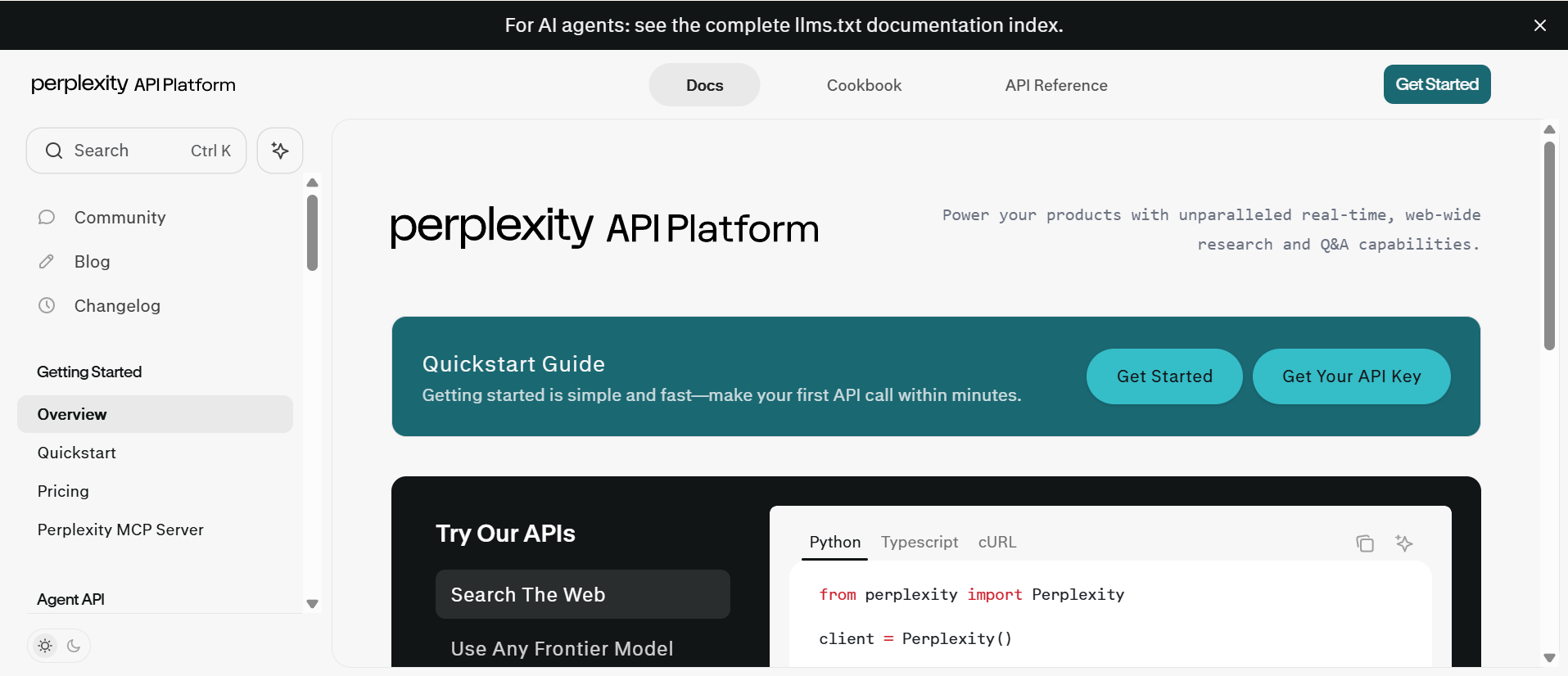
Perplexity's API documentation is built with Mintlify, keeping its reference content aligned with the deployed API.
API documentation should move through the same release process as the API itself. Test instructions against real requests, review documentation with code changes, and assign clear ownership so published guidance continues to match production behavior.
Mintlify generates API references from OpenAPI and supports Git-based reviews, preview deployments, and Automations that propose documentation updates after code changes. Teams at Anthropic, Coinbase, HubSpot, and Perplexity are among more than 20,000 companies using Mintlify. Teams can select from the available Mintlify plans based on the publishing and automation features they need.
Create your Mintlify account for free and start building your API documentation →
Frequently Asked Questions
How do I write API documentation?
Begin with a working test account and a real integration scenario. Draft the instructions while running each request in a clean environment, then ask a developer unfamiliar with the API to complete the same task without assistance. Their questions and failed attempts will reveal missing prerequisites, unclear terminology, and undocumented behavior.
What should API documentation include?
Complete documentation should support four developer needs: gaining API access, completing an initial integration, looking up exact behavior, and resolving failures or changes. APIs with asynchronous or multi-step operations may also require documentation for webhooks, event schemas, SDK guides, versioning policies, and migration instructions.
How long should API documentation be?
The API surface and integration complexity determine the required length. Give each guide one clear outcome and each reference page one operation or closely related group of operations. Use navigation, headings, and reusable examples to keep extensive documentation easy to scan.
Should I write API docs by hand or generate them?
Let an OpenAPI file supply the technical details like endpoints, parameters, and responses, and write the guidance and explanations yourself. Mintlify builds reference pages from OpenAPI and lets you edit each endpoint page with MDX, so you can still add your own notes where they help.
What makes API documentation good?
Effective API documentation is verified against real requests, easy to navigate from search, explicit about API behavior, and updated with each release. Measure its quality through time to first successful request, unsuccessful searches, negative page feedback, documentation-related support tickets, and outdated pages identified after product changes.
More to read

The Complete Guide to Quick Start Guides for Software Products
Learn how to create software quick start guides that take new users from setup to a verifiable first success, with examples and maintenance best practices.
September 11, 2026Harkirat Chahal
Growth

Troubleshooting Guide Best Practices for Software Companies
Learn how to write troubleshooting guides with symptom-based diagnosis, safe recovery steps, clear escalation paths, and ongoing maintenance.
September 11, 2026Harkirat Chahal
Growth