Technical Documentation Software: What to Look for in 2026
Cole Gottdank
GTME
Share this article
Cole Gottdank
GTME
Share this article
Technical documentation software helps teams create, publish, and maintain API references, developer guides, and product documentation. In 2026, teams need to evaluate technical documentation platforms differently because documentation now must support human developers and AI agents simultaneously, remain accurate as AI-assisted coding increases release speed, and contribute more directly to conversion across the technical buyer journey.
Technical documentation software helps teams create, publish, and maintain API references, developer guides, and product documentation. In 2026, teams need to evaluate technical documentation platforms differently because documentation now must support human developers and AI agents simultaneously, remain accurate as AI-assisted coding increases release speed, and contribute more directly to conversion across the technical buyer journey.
This guide explains what technical documentation software is, who uses it, which content types it should support, how to evaluate platforms against current requirements, and how Mintlify supports developer-facing documentation teams.
What Is Technical Documentation Software
Technical documentation software covers the full documentation lifecycle, including authoring, review, publishing, versioning, maintenance, and optimization. The scope includes API references, product guides, developer portals, onboarding walkthroughs, internal knowledge bases, and SDK documentation.
Technical documentation software differs from wikis, project management tools, and content management systems because it supports the full workflow from authoring to deployment. A wiki can store documentation, but cannot generate API references from an OpenAPI spec, run CI checks for broken links, or serve structured Markdown to AI agents. Project management tools can track documentation work, but do not produce or publish documentation.
Modern technical documentation platforms often follow a docs-as-code model, with documentation stored in a Git repository as Markdown or MDX files and reviewed through the same pull request workflow as application code. That model helps teams keep documentation aligned with the codebase and makes engineering teams more likely to contribute.
Content Types Platforms Should Support
Technical documentation software should support five common types of technical content.
| Content Type | What It Covers | What to Look for in a Platform |
|---|---|---|
| API references | Endpoint pages, parameter tables, response schemas, and authentication details | Generation from OpenAPI or AsyncAPI specs and an interactive playground for live testing |
| Getting-started guides | Step-by-step onboarding, the first API call, and authentication setup | Multi-language code examples, structured layouts, and embedded code blocks |
| Product and conceptual docs | Architecture overviews, feature explanations, and use-case walkthroughs | Flexible layouts, embedded diagrams such as Mermaid, callouts, and support for both prose and code |
| Changelogs and release notes | Breaking changes, new capabilities, and deprecations | Timestamped entries and version tagging |
| Internal knowledge bases | Engineering processes, onboarding materials, and runbooks | Access controls and support for private pages alongside public documentation in one system |
The strongest documentation platforms support all five content types within a single system. Teams that use separate tools for API references, guides, and internal documentation often end up with fragmented search, inconsistent formatting, and duplicated maintenance work.
Who Uses Technical Documentation Software
Technical documentation software supports four core groups, and each group uses the platform differently based on the work they need to do.
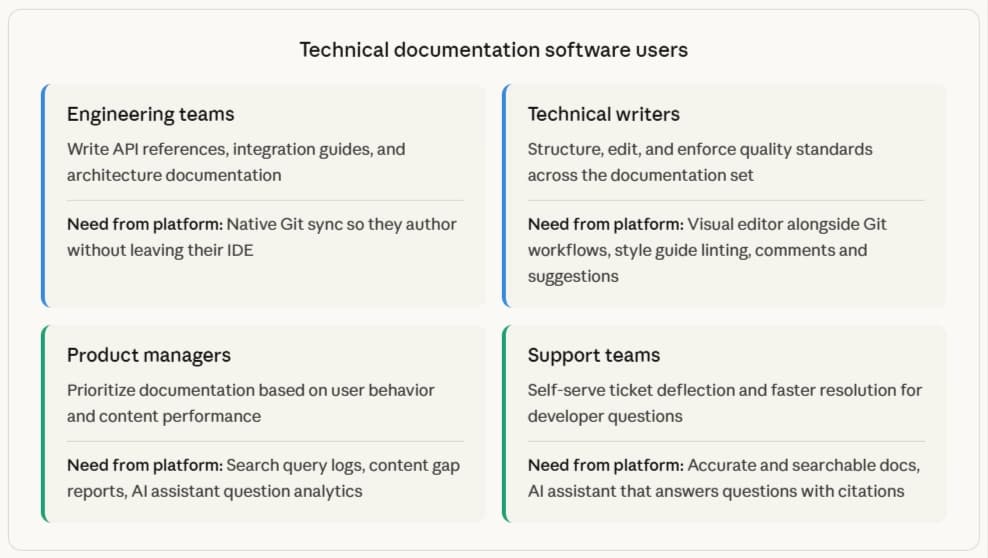
A single system that serves all four groups avoids the friction of switching between tools for different roles. Engineers need Git-native workflows, while technical writers, product managers, and support teams usually need a web editor with comments, suggestions, and performance insights.
Why Requirements Have Changed in 2026
AI agents now read documentation alongside human developers. Nearly half of documentation site traffic comes from AI agents, according to Mintlify's internal data. When a developer asks an LLM for help integrating an API, the LLM retrieves and parses the API's documentation to generate its answer. If the documentation is outdated or poorly structured, the agent gives the wrong answer, and nobody finds out because no support ticket is filed and no bounce rate alert fires. The developer attributes the failure to the product, not the docs.
Documentation decay gets worse as shipping speed increases. AI-assisted coding helps engineering teams release changes faster, but documentation still lags when updates require manual follow-up after each release. The mismatch between product behavior and documentation content grows quickly when updates stay manual, leading to outdated instructions, unnecessary support requests, and reduced trust in the product.
Technical documentation also influences conversion throughout the technical buyer journey. Developers evaluating a product during a proof of concept usually turn to documentation before they talk to sales, so the quality of getting-started guides, API references, and code examples affects whether the evaluation moves forward or stalls. Clear documentation shortens time to first value during activation and helps customers stay self-sufficient after adoption, making documentation quality a product and revenue issue, not just a support issue.
Key Features to Evaluate
Strong technical documentation platforms should include a core set of features that help teams keep documentation accurate, searchable, and easy to maintain as the product changes.
Docs-as-code authoring: Look for bi-directional Git sync so repository changes and web editor changes stay aligned, preview deployments so teams can review updates before publishing, and branch-based workflows that support pull request review. A web editor alongside Git also lets technical writers, product managers, and other non-technical contributors work without using a terminal.
API reference generation: The platform should generate interactive endpoint pages from OpenAPI and AsyncAPI specs and keep them synced as the specs change. A built-in API playground should let developers send test requests and inspect live responses without leaving the documentation.
AI-powered search and assistance: Semantic search should return relevant results even when a developer’s query does not match the exact wording in the docs. An AI assistant should answer follow-up questions, cite the documentation pages it used, and generate code examples. The software should also route unanswered questions to email or to a support team, so that documentation search can reduce support load rather than creating dead ends.
Automated documentation maintenance: Automated maintenance means the system watches for code changes, drafts documentation updates based on those changes, and opens pull requests for review. Without automated maintenance, documentation often falls behind within weeks of a release, and the cleanup work usually falls back on engineers.
AI agent readiness and GEO support: A documentation platform should work well for both AI systems and human readers. That means serving clean Markdown to agents, generating files such as llms.txt and skill.md, supporting MCP, and showing analytics that separate human traffic from AI agent traffic.
Collaboration and editorial workflows: Look for built-in comments, suggestions with accept and reject controls, alerts with email notifications, and review workflows that sync cleanly with GitHub pull requests, making it easier for engineers, writers, and product managers to review documentation within a single workflow.
Analytics and content gap identification: The platform should show page traffic, search queries, AI assistant questions, and AI agent traffic, broken down by agent type. The most useful analytics also highlight failed searches and unanswered questions so teams can see which documentation gaps need attention next.
How Mintlify Supports Documentation Teams
Mintlify meets the core requirements modern technical documentation teams need to manage developer documentation in a single system.
| Evaluation Criterion | What Mintlify Provides |
|---|---|
| Docs-as-code** authoring and collaboration** | Bi-directional Git sync with MDX files for devs, plus a web editor with comments, suggestions, @mentions, and preview deployments for mixed technical and non-technical teams |
| API reference generation | OpenAPI and AsyncAPI support, with an interactive API playground built into documentation sites |
| AI-powered search and assistance | An AI Assistant that returns cited answers from the docs and generates code examples; support for API, Slack, and Discord delivery is also available |
| Automated maintenance | A Workflows agent that monitors code changes, drafts documentation updates, and opens pull requests for review |
| AI agent readiness** and GEO** | Auto-generated llms.txt, llms-full.txt, skill.md, and MCP servers, plus Markdown delivery to agents and AI traffic analytics by agent type |
| Analytics | Page traffic, search logs, AI Assistant question logs, and an analytics dashboard that helps teams spot content gaps |
Anthropic, Cursor, Perplexity, and Zapier use Mintlify for their documentation. Zapier reported a 20% increase in traffic and developer adoption after switching to Mintlify.
→ Start with Mintlify’s free tier to create developer documentation that is easier to manage as your product evolves.
→ See how Mintlify stacks up against the competition in our overview of the best technical documentation software.
Frequently Asked Questions
What is the best technical documentation software for developer teams?
Mintlify is the best technical documentation platform for developer teams that need docs-as-code workflows, generated API references, AI-powered search, and support for AI-ready documentation on a single platform. Mintlify brings authoring, publishing, maintenance, and discovery into a single system, making developer documentation easier to manage as products evolve.
What types of content can technical documentation software handle?
A full technical documentation platform should support API references, SDK guides, getting-started tutorials, product documentation, changelogs, internal knowledge bases, and onboarding materials. Mintlify supports all of these content types in one system through MDX-based authoring, reusable snippets, code blocks, Mermaid diagrams, math support, and embedded content.
How does technical documentation software reduce support costs?
AI-powered assistants answer developer questions directly in the docs, deflecting tickets before they reach a support queue. Mintlify's assistant cites specific pages in its answers, and teams can configure an email redirect for queries the assistant can't resolve. Analytics surfaces searches that return no results, so teams close documentation gaps before those searches generate repeat tickets.
Should technical documentation software support AI agent readiness?
AI agents already read documentation on behalf of developers, so documentation platforms need to serve content in a format AI systems can use reliably. Mintlify supports AI agent readiness through Markdown delivery for agents, machine-readable files, MCP support, and analytics that separate AI agent traffic from human traffic.
More to read
What Is Technical Documentation Software?
Many engineering teams still rely on documentation tools that were not designed for developer documentation, leading to outdated API references, getting-started guides without interactive code examples, and changelogs tracked in spreadsheets that stop being updated after a release.
April 20, 2026Cole Gottdank
GTME
7 best software documentation tools in 2026
A comparison of seven software documentation tools across end-to-end platforms, docs-as-code tools, and API-first tools to help teams find the right fit.
March 13, 2026Cole Gottdank
GTME