AGENTS.md vs CLAUDE.md: how coding agents find docs
Harkirat Chahal
Growth
Share this article
Harkirat Chahal
Growth
Share this article
A developer guide to AGENTS.md, CLAUDE.md, skill.md, llms.txt, and MCP: why repository instructions and product docs belong in separate files, how coding agents use each one during a task, how to keep AGENTS.md and CLAUDE.md in sync, and how to set up an agent-ready docs stack.
AI coding agents are now part of daily software development work. In JetBrains' 2026 Developer Ecosystem Survey of more than 15,000 developers, 90% reported using AI coding agents at work at least weekly. But developers don't all use the same tools. One developer could be using Claude Code or GitHub Copilot, another Cursor, and someone else trying Codex.
For engineering teams, this means multiple coding agents in the same codebase. Every agent needs to know how to run your tests, which conventions you follow, and what to leave alone. Codex and Cursor support AGENTS.md, while Claude Code primarily uses CLAUDE.md.
Agents also need access to documentation for the external APIs, SDKs, and services they're working with. That documentation needs to be accurate and accessible, regardless of which coding agent a developer uses. Coding agents find that documentation through skill.md, llms.txt, and Model Context Protocol (MCP). If you publish an API or SDK, those formats are also how agents find your docs.
This guide explains why repository instructions (AGENTS.md and CLAUDE.md) and product docs (skill.md, llms.txt, and MCP) belong in separate files, how coding agents use each, and how to set them up to support different development workflows.
What to know about agent context files
- AGENTS.md and CLAUDE.md provide repository instructions for coding agents. They tell coding agents how to navigate a project, follow coding conventions, and run tests.
- Claude Code now supports AGENTS.md as a fallback. Since version 2.1.277, it can load AGENTS.md when a project does not have its own applicable CLAUDE.md instructions.
- skill.md, llms.txt, and MCP provide access to product knowledge. They help agents understand external tools, discover docs, and retrieve relevant information.
- Keeping repository instructions separate from product docs makes both easier to maintain. Developers can manage project rules, while documentation teams expose current product knowledge through agent-friendly formats.
Agent context files at a glance
Coding agents need two types of context to complete development tasks. The first is repository context, which includes information about your codebase, development conventions, project structure, and testing requirements. The second is product knowledge, which explains how the external APIs, SDKs, and services your application depends on work.
AGENTS.md and CLAUDE.md provide repository context. Your team writes them, they live next to your code, and they load in every session.
skill.md, llms.txt, and MCP provide product knowledge. A vendor or platform team publishes them on a docs site, and the agent reaches for them only when a task needs them. For example, a repository instruction tells an agent where to place webhook handlers, while an external API reference explains how to verify webhook signatures.
The table below compares all five formats by where they live, which agents read them, and when they load.
| File | Where it lives | Which agents read it | When it loads |
|---|---|---|---|
| AGENTS.md | Repo root, plus subdirectories in a monorepo | Codex, Cursor, GitHub Copilot, and many more; Claude Code as a fallback | Session start; nested files when the agent works there |
| CLAUDE.md | Repo root, .claude/, subdirectories, ~/.claude/ | Claude Code | Session start; subdirectory files on demand |
| skill.md | The product's docs site, installed into your agent | Claude Code, Codex, Cursor, and dozens more through the skills CLI | When a task matches the skill's description |
| llms.txt | /llms.txt on the docs site | Any agent that can fetch a URL | When the agent needs to find a page |
| MCP server | A hosted endpoint, such as /mcp | Any MCP client, including Claude Code and Cursor | When the agent calls one of its tools |
To see how the two types of context work together, let's walk through a task that needs both.
How a coding agent finds context
Suppose you are working on a Node.js application and want to integrate a fictional payment provider called Acme.
You ask your coding agent:
"Add webhook handling for Acme payments. Verify incoming webhook signatures, store successful payment events, and write tests for the implementation."
The agent can inspect your codebase, but the code alone may not tell it everything it needs to know. It needs to understand your project's architecture and testing requirements and Acme's current documentation to determine how webhook signatures work, which event types to handle, and what incoming payloads look like.
1. The agent reads your repository instructions
When the agent starts working, it discovers the instruction files supported by its environment. For example, your repository might contain an AGENTS.md file with guidance like this:
# Project instructions

## Architecture

- Express routes live in src/routes.
- Webhook handlers belong in src/webhooks.
- Use the existing database repository layer.

## Testing

- Run npm test after making changes.
- Add unit tests for new webhook handlers.

## External integrations

- Consult the provider's official documentation.
- Verify webhook signatures before processing events.
This gives the agent a starting point. It knows where to implement the webhook handler, how the application is structured, and which tests to run. But the agent still doesn't know how Acme's API works. That information comes from Acme's documentation, starting with its agent skill.
2. The agent loads product guidance
In this example, let's assume we've installed Acme's agent skill and configured our coding agent to use it. When the task involves Acme's API, the agent loads the skill for guidance on authentication, integration patterns, and common mistakes. For this webhook integration, it tells the agent to verify the signature on every event before processing it.
3. The agent retrieves the relevant docs
The agent now needs implementation details: the headers used for signature verification and the expected webhook payload structure. It fetches Acme's llms.txt file, finds the webhook reference pages in the index, and reads them. If the agent is connected to Acme's MCP server, it can instead search the docs for the signature header and payload fields directly.
With that documentation, the agent implements the handler, adds tests, and checks the changes against your repository instructions.
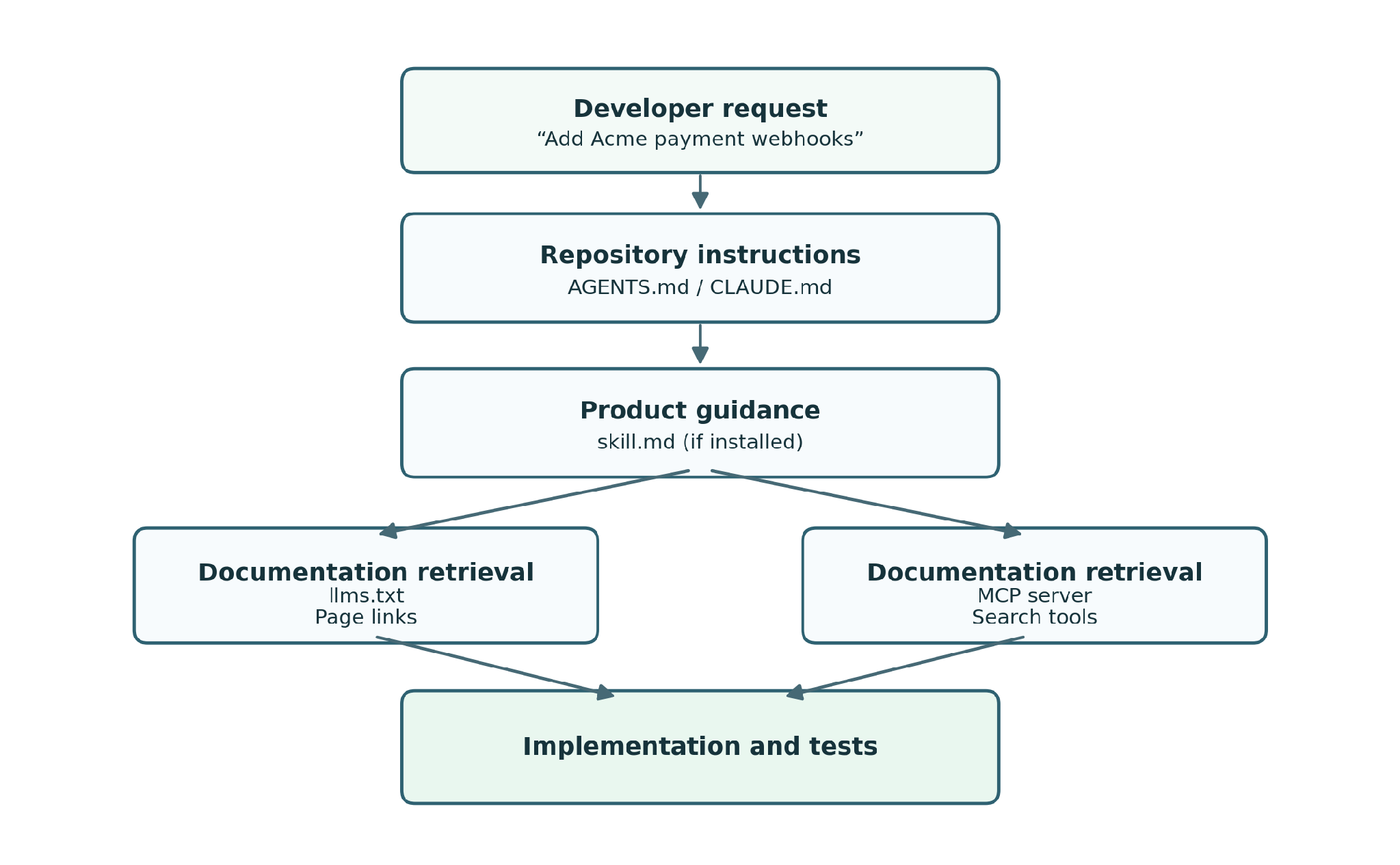
Example flow showing how a coding agent can combine repository instructions and product docs.
The order of steps 2 and 3 changes from agent to agent. Some agents don't support skills, and an agent can only query an MCP server it's connected to. That makes configuration important. Which sources an agent can access depends on its supported features, available tools, and connected documentation resources.
However, every task like this one needs the same two things: instructions for your repository and accurate documentation for the product. The rest of this guide covers how to set up each one, starting with your repository.
AGENTS.md vs CLAUDE.md
Consider the first part of the workflow above: giving coding agents instructions about your repository. If your team uses multiple coding agents, you need a way to communicate shared development rules without rewriting them for every tool. Two common formats are AGENTS.md and CLAUDE.md.
What is AGENTS.md?
AGENTS.md is an open format for providing instructions to coding agents. It is a Markdown file in the repository root that contains guidance on how agents should work with the project. It defines how to install dependencies, which commands to use for building and testing, where different components belong, and what checks to complete before submitting changes.
You can also place AGENTS.md files in subdirectories to provide more specific instructions. In a monorepo, for instance, the root file might describe shared development standards, while separate files in frontend and backend directories provide package-specific commands.
What is CLAUDE.md?
CLAUDE.md serves a similar purpose to AGENTS.md but is designed specifically for Claude Code. It contains project conventions, build commands, testing requirements, and other persistent instructions. Claude Code also supports features such as importing additional files using the @ syntax and maintaining local instructions through CLAUDE.local.md. For an example, see the CLAUDE.md template in Mintlify's Claude Code guide.
Does Claude Code read AGENTS.md?
Yes. Since version 2.1.277, Claude Code has supported AGENTS.md as a fallback for project instructions (2.1.281 on Amazon Bedrock, Google Vertex AI, Microsoft Foundry, LLM gateways, and sessions with telemetry turned off). Under its default configuration, Claude Code loads applicable AGENTS.md files when a project does not have its own CLAUDE.md instructions.
If the project already contains an applicable CLAUDE.md, .claude/CLAUDE.md, or CLAUDE.local.md, Claude Code uses those instructions instead of automatically loading both formats. See Anthropic's AGENTS.md implementation notes for the exact discovery behavior.
How to keep AGENTS.md and CLAUDE.md in sync
For teams using multiple agents, maintain shared development instructions in AGENTS.md and import them into CLAUDE.md. That gives other compatible agents the shared instructions while leaving room for Claude-specific guidance.
In AGENTS.md:
- Use TypeScript for new application code.
- Run npm test before submitting changes.
- Add tests for new API endpoints.
In CLAUDE.md:
@AGENTS.md

# Claude-specific instructions

- Follow the existing conventions for organizing Claude Code skills.
One thing to remember is that in a monorepo, a single CLAUDE.md at the root switches off every AGENTS.md below it. The same goes for CLAUDE.local.md, which is usually gitignored. If you keep a private one, you lose the AGENTS.md instructions everyone else gets.
Instead of an import, you can create a symbolic link (symlink) so that CLAUDE.md points directly to AGENTS.md. Both filenames then reference the same instructions. However, symlinks can introduce portability issues, particularly in Windows environments, and do not provide a convenient place for additional Claude-specific instructions. Claude Code also has a claude-md-and-agents-md mode that loads both files, but each developer sets it for themselves in /config, so it doesn't travel with the repo. The @AGENTS.md import does.
skill.md, llms.txt, and MCP
Repository instructions only solve part of the context problem. Consider the Acme integration again. Your AGENTS.md might instruct the agent to consult Acme's docs before implementing payment webhooks. But it does not guarantee the coding agent can find that documentation or retrieve the information needed for the task.
Instead, make product documentation available separately to allow coding agents to retrieve relevant information when they need it. This is where skill.md, llms.txt, and MCP come in.
skill.md: guidance for using a product
A skill.md file provides structured guidance on how agents should use a particular product. It describes recommended workflows, implementation patterns, configuration requirements, and common mistakes. Docs sites publish it at a standard /.well-known/ path, where tools like the skills CLI find it from the docs URL.
llms.txt: a structured docs index
While a skill.md provides guidance on using a product, llms.txt helps agents discover its documentation. The file is a Markdown index, hosted at the root of a docs site, containing links to important resources such as authentication guides, webhook references, and event schemas. See real llms.txt examples from companies like Anthropic, Vercel, and Cloudflare.
MCP: direct access to documentation
The Model Context Protocol allows AI applications to connect to external services through standardized interfaces. For docs, an MCP server can expose tools that agents use to search for information relevant to their current task. For example, an agent connected to a provider's docs server might search for guidance on verifying webhook signatures in Node.js.
llms.txt vs MCP: which should you use?
Both help agents access documentation, but they work differently. llms.txt provides a structured index of available content. Agents or tools can fetch the file, identify relevant pages, and retrieve them separately. MCP provides a queryable interface. Once an agent has a configured connection, it can call the server's tools to search for information. The two approaches support different workflows, so most sites should offer both.
Best practices for an agent-ready stack
Giving coding agents the right context also means keeping that information organized and up to date. Three practices cover most of it:
- Keep product docs out of AGENTS.md. Use AGENTS.md for shared repository instructions and CLAUDE.md for Claude-specific guidance, and leave API references and SDK guides in the docs built to serve them. Pasted docs take up context in every session and go stale as external APIs change.
- Review instruction files as your codebase changes. An instruction file loses value when it references commands, directories, or conventions that no longer exist. Update it when you change your workflow, project structure, or testing tools, and add CI checks to catch broken commands and links.
- Keep external docs current. Even a well-configured agent writes the wrong code from outdated API docs. Make docs updates part of your development workflow, especially when API behavior, authentication, or SDK functionality changes.
The first two practices are up to your team. The third is the one teams struggle with. In Mintlify's 2026 State of Knowledge report, only 24% of 329 respondents said product changes reach their docs the same day.
Make your docs agent-ready with Mintlify
Supporting multiple coding agents doesn't have to mean maintaining separate docs for each one. Your team writes AGENTS.md and CLAUDE.md, and Mintlify handles the product docs they point to.
Mintlify automatically generates these from your published docs:
- llms.txt: A structured index that helps AI tools find your docs pages. Mintlify also generates llms-full.txt, which combines your entire docs site into one file for tools that can handle more context.
- skill.md: Product-specific guidance that agents install and use during relevant tasks. On Pro and Enterprise plans, public docs sites get one at a standard
/.well-known/path, regenerated whenever your docs change. Agents connected to your MCP server can also use it as an MCP resource without installing anything. - MCP server: A hosted interface that lets agents query your docs directly.
All three stay in sync with your published docs, so there are no separate copies to update. Agent analytics show which agents visit your docs, which pages they request most, and what they search for. That tells you which pages to keep most accurate, where your docs have gaps, and which agents your users actually work in.
Mintlify also helps with the third practice, keeping docs current. Autopilot, an always-on agent in beta on Pro and Enterprise plans, reads your repos and the context around them: Slack, your project tracker, support tickets, and feature flags. It drafts the docs updates and opens a pull request for your team to review. With the Admin MCP server, coding agents edit pages, leave suggestions for your team to accept, and publish small fixes from their development environment.
Frequently Asked Questions
Should I symlink CLAUDE.md to AGENTS.md?
You can, but importing AGENTS.md into CLAUDE.md is generally more flexible. It avoids potential symlink portability issues and allows you to add Claude-specific instructions without duplicating shared rules.
What's the difference between AGENTS.md and skill.md?
AGENTS.md provides instructions for working within a repository, including project conventions, build commands, and testing requirements. A product skill.md provides guidance on using a particular tool or service, such as an API or SDK.
How does Mintlify make docs discoverable to coding agents?
Mintlify generates three agent-ready formats from your published docs: an llms.txt index that helps agents find the right pages, a skill.md with guidance on using your product (Pro and Enterprise plans, public docs sites), and a hosted MCP server agents can query directly.
Can Mintlify update docs automatically when code changes?
Yes. Autopilot, Mintlify's always-on agent (in beta on Pro and Enterprise plans), reads your repos along with context from Slack, your project tracker, and support tickets. It drafts the docs update and opens a pull request for your team to review. Nothing ships until someone on your team merges it.
More to read
How to create Markdown versions of your docs
Learn how to generate Markdown versions of your docs, serve them through .md URLs and content negotiation, and test caching, authentication, and parity before each release.
October 26, 2026Harkirat Chahal
Growth
How to help AI agents find the right page after a 404
Learn how to help AI agents recover from 404s with real status codes, Markdown error bodies, index links, related-page suggestions, and redirects for HTML and .md URLs.
October 26, 2026Harkirat Chahal
Growth