How to help AI agents find the right page after a 404
Harkirat Chahal
Growth
Share this article
Harkirat Chahal
Growth
Share this article

AI coding agents can request outdated or invented documentation URLs even when the information they need is available on your site. Without useful recovery guidance, a missing-page response can lead to repeated guesses and unnecessary requests.
This guide explains how to choose status codes for missing, retired, and moved pages, build Markdown error responses with index links and related-page suggestions, and preserve old HTML and .md URLs through redirects. It also covers testing recovery paths and handling restricted documentation.
Mintlify provides built-in recovery for missing Markdown pages, with documentation indexes and redirect configuration managed in the same project. Get started with Mintlify to help coding agents recover from missing URLs and reach your current documentation.
Why AI agents request URLs that don't exist
An agent may start with a URL supplied in a prompt, copied from another source, or generated from the model’s learned patterns. It can request that address before reading your site’s navigation or checking which pages are available.
URLs recalled or invented by the model
A model can reproduce a documentation address it encountered during training after that page has moved. It can also combine familiar section names and URL patterns into a plausible path that was never published. An invented URL is one form of AI hallucination, so a failed request does not necessarily mean your documentation previously contained that page.
Pages moved during a restructure
Renaming a file or moving it into another folder can leave existing references pointing to an obsolete address. Updating your navigation does not update links in older articles, repository READMEs, bookmarks, or saved conversations.
On Mintlify, changing a file’s path changes its public URL, so redirects for moved pages should accompany the move. Editing the page title or sidebar title in frontmatter controls the displayed text without requiring a file rename.
Guessed Markdown and index routes
Agents may infer where a site serves Markdown or documentation indexes without first finding a published link. In Mintlify’s Docs URL Benchmark, Claude Code and Codex requested .md and llms.txt routes that were unavailable under the tested serving conditions. Agents reading plain Markdown without an index pointer also constructed incorrect page paths.
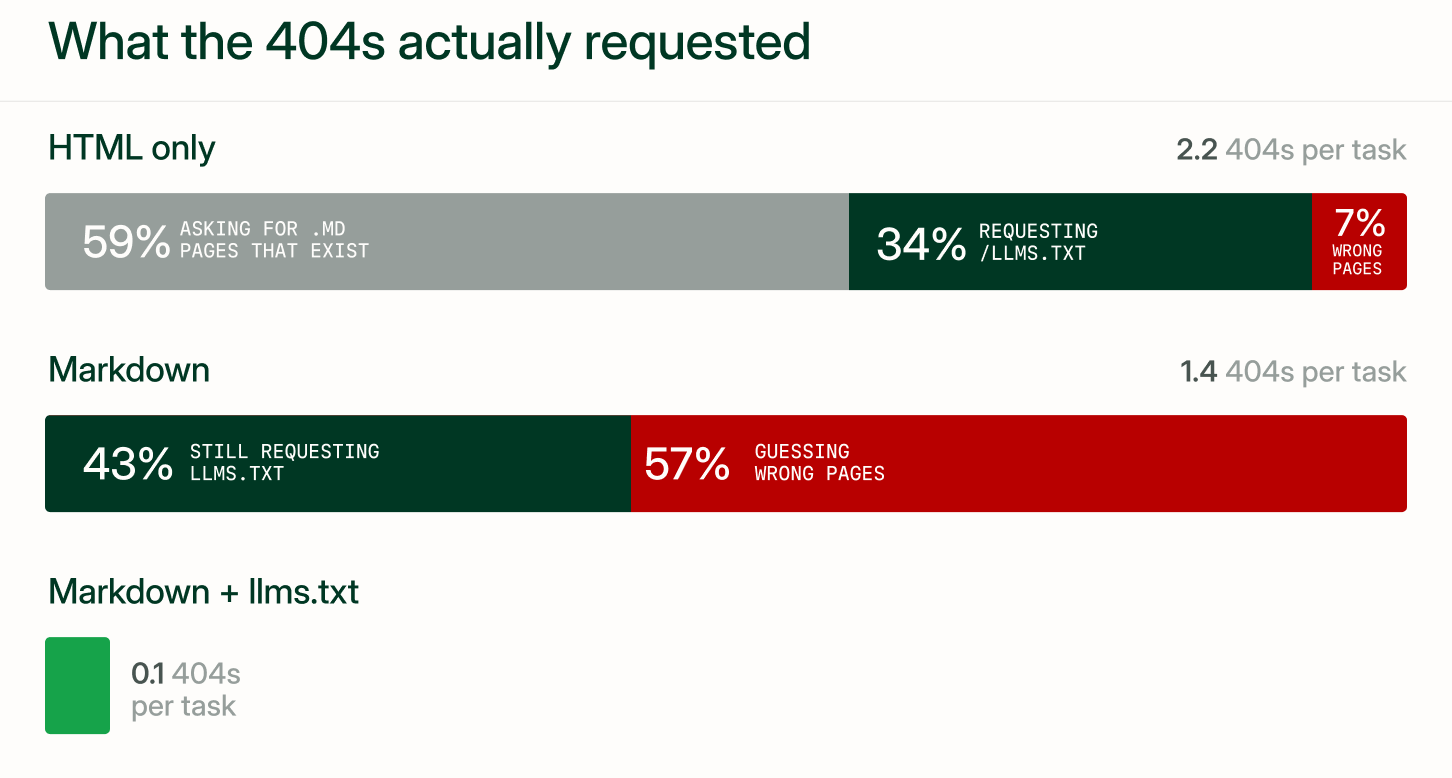
These requests can fail even when the underlying documentation is available. Before treating a frequently requested URL as missing content, compare it with your current page inventory and previous paths to identify moved pages or unsupported route variants.
Soft 404s and why they break agent recovery
A soft 404 presents a missing page as a successful response, commonly by returning 200 OK with an error message. Google’s guidance on 404 errors also warns against redirecting missing URLs to the homepage. For an agent trying to retrieve a specific guide, both patterns can obscure the failed request and make recovery harder.
| Response pattern | How it can disrupt agent recovery |
|---|---|
| 200 OK with “Page not found” content | The fetch tool may report success, leaving the agent to recognize from the body that it received an error page. |
| Redirect to the homepage | The agent receives general site content without a clear replacement for the requested topic and may need to restart discovery. |
A redirect remains useful when its destination replaces the requested page. The problem is sending unrelated missing paths to a general landing page simply to avoid returning an error.
Configure Mintlify’s custom 404 page through errors.404 in docs.json. Set redirect to false to display the error page for missing URLs. On public sites, Mintlify analyzes the requested path and suggests semantically related pages. You can also customize the title and add helpful links through the description, which supports MDX formatting.
"errors": {
  "404": {
    "redirect": false,
    "title": "I can't be found",
    "description": "What ever **happened** to this _page_?"
  }
}
Before merging, use a preview deployment to request a deliberately invalid URL and inspect its HTTP status, response body, and any redirects. Confirm that the missing page returns 404 and gives the client useful recovery links.
Choosing between 404, 410, and redirects
Choose the status code according to the page’s history and whether a suitable replacement exists. Error responses should provide recovery guidance in the body, and redirects should identify their destination in the Location header.
| Page state | Status code | What the response should provide |
|---|---|---|
| The path never existed and has no clear equivalent | 404 Not Found | A brief error message and links to available documentation |
| A frequently requested misspelling or guessed path has one clear, lasting match | 308 Permanent Redirect | The matching page’s URL in the Location header |
| The page was permanently retired without a replacement | 410 Gone, where your hosting setup supports it | A retirement message and links to documentation that remains available |
| The page is unavailable, but permanence is uncertain | 404 Not Found | Recovery guidance without claiming the removal is permanent |
| The page moved permanently | 308 Permanent Redirect | The new page’s URL in the Location header |
| The page is temporarily served at another address | 307 Temporary Redirect | The temporary destination’s URL in the Location header |
A server can also return 404 to withhold a resource’s existence, so the response may reflect an access restriction on protected documentation.
Before redirecting a recurring guessed path, confirm that the destination answers the intended question. Similar wording alone is insufficient, especially when pages describe different API versions or features.
Mintlify’s redirect configuration defaults to 308 when permanent is omitted or set to true. Set it to false for 307, as shown in this docs.json fragment. Both codes preserve the original HTTP method when the client follows the redirect.
"redirects": [
  {
    "source": "/source/path",
    "destination": "/destination/path",
    "permanent": false
  }
]
What a 404 response body should include
An agent-facing error body should make the next useful request easy to identify. Use clear headings and descriptive links to separate recovery instructions from the error message, keeping navigation menus, promotional content, and interactive search controls out of the Markdown response.
Match the format the client requested. Mintlify’s Markdown export supports .md URLs and requests with Accept: text/markdown or Accept: text/plain. The following example retrieves an existing page as Markdown and demonstrates the header an agent can also send when requesting an unfamiliar path.
curl -L -H "Accept: text/markdown" https://mintlify.com/docs/ai/markdown-export
When the requested Markdown page does not exist, Mintlify returns a 404 with a Markdown recovery body. Its documented example places the index instructions first, followed by a brief failure statement and related-page links.
> ## Documentation Index
>
> Fetch the documentation index at: https://example.com/docs/llms.txt
> Use this file to discover all available pages before exploring further.
> For broader context, fetch the full documentation at: https://example.com/docs/llms-full.txt (large file).

# Page Not Found

The requested page could not be found.

## Related topics

- [Getting started](https://example.com/docs/getting-started.md)
The response distinguishes a suggested destination from a confirmed replacement. An agent can inspect a related page or consult the index without being silently redirected to a potentially irrelevant topic. Mintlify includes up to three related-page suggestions on public sites.
Linking the documentation index in 404 responses
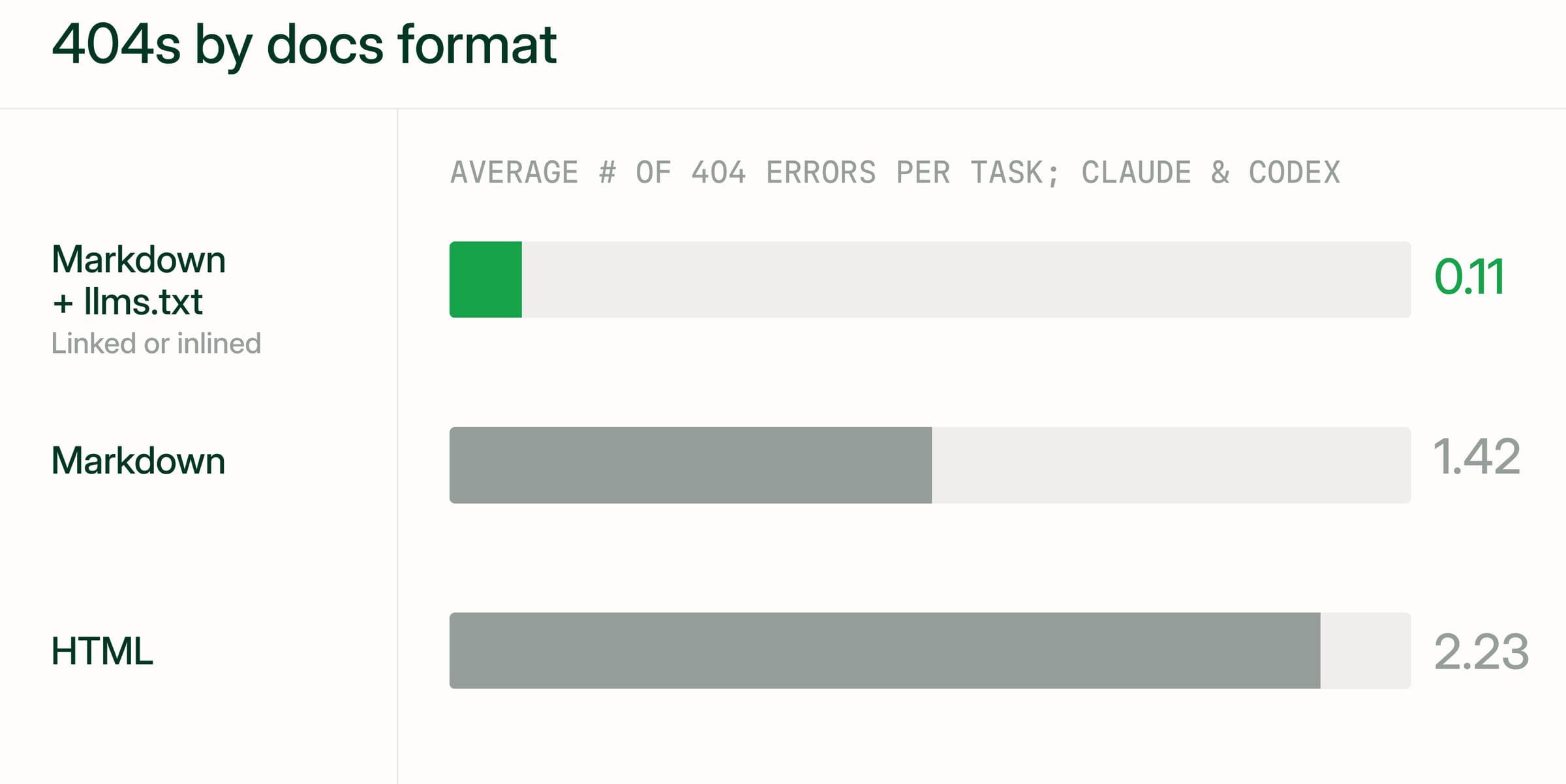
Mintlify’s Docs URL Benchmark compared four documentation formats across 2,400 runs on 20 sites. Average 404 responses per task fell from 2.23 with HTML to 0.11 with Markdown that linked to llms.txt. Linking the index achieved comparable recovery results to embedding its contents in every page, with lower token usage. Answer accuracy remained in the mid-to-high 90s across formats, making retrieval efficiency the main improvement.
Offer targeted and broad retrieval
Use llms.txt to help an agent select individual pages. Mintlify includes page titles, available descriptions, and .md links, so the agent can evaluate a destination before fetching its contents.
Keep llms-full.txt available for tasks requiring broader context. Because it combines documentation content into one file, identify it as a large download so the agent can decide whether the task warrants retrieving it.
Keep nested index routes reachable
Mintlify limits each generated llms.txt index to 100,000 characters. Larger indexes become directories linking to smaller files under /_llms/, and those files can link to further indexes. Recovery therefore depends on the entire linked structure remaining reachable.
For documentation behind a reverse proxy, forward generated index routes under the configured base path. A site hosted at /docs uses /docs/_llms/*. Forwarding /docs/* already covers those requests, but a granular path allowlist must include them explicitly. Test the links returned by the public index to confirm that an agent can reach the page lists.
Advertise the index in response headers
Mintlify’s discovery headers expose index locations on regular pages, Markdown responses, and 404 responses. Clients that inspect headers can find the index before parsing the body. The documented example for a root-hosted site also advertises other agent resources.
Link: </llms.txt>; rel="llms-txt", </llms-full.txt>; rel="llms-full-txt", </.well-known/api-catalog>; rel="api-catalog", </.well-known/mcp/server-card.json>; rel="mcp-server-card", </.well-known/agent-card.json>; rel="agent-card", </.well-known/agent-skills/index.json>; rel="agent-skills"
X-Llms-Txt: /llms.txt
On subpath-hosted sites, advertised paths include the base-path prefix. Confirm that each advertised resource actually exists before relying on it, since the API catalog, for example, is served only when download-spec is enabled.
Related-page matching and result count
Match suggestions to the intended task
Mintlify’s 404 page uses an agent to analyze the requested path and retrieve semantically related documentation. Markdown error responses draw suggestions from the same search, which means a renamed page remains a useful candidate even when its current URL uses different wording.
Evaluate suggestions against the task implied by the missing path. A request for /guides/verify-webhook-signature should lead toward signature verification instructions. A page about creating webhook subscriptions shares relevant words but may leave the original question unanswered. Check product version and SDK language when those details affect the instructions.
Keep results focused and descriptive
Each suggestion in a 404 response should offer a credible next step, since weak matches can send an agent through unnecessary requests. For a custom matching implementation, allow an empty suggestion list when no destination is sufficiently relevant and retain the documentation index for broader discovery.
Give destination pages clear titles so agents can distinguish their purpose before following a link. Frontmatter descriptions also improve the information available in llms.txt, where Mintlify uses the first paragraph of each description, truncated at 300 characters. Describe the specific operation the page explains, such as verifying a signature or rotating a signing secret.
Test matching quality across failed paths
Use a small test set covering several failure patterns.
-
Misspellings to check whether recognizable typing errors lead to the intended topic.
-
Historical paths to check whether renamed or reorganized content remains discoverable.
-
Invented paths with product terms to assess whether suggestions address the implied task.
-
Unrelated paths to identify misleading recommendations when no useful match exists.
Follow the suggested Markdown links and assess whether their content answers the implied question. Record relevance separately from whether the URLs load successfully.
Redirect maps for moved pages and Markdown URLs
A redirect map connects old documentation paths to their current destinations. Include the HTML address and its Markdown variants in migration testing so agents following older references can still retrieve the intended content.
Update routes and internal links together
When moving or renaming documentation pages, update the navigation, add redirects, and replace internal references to the old paths in the same change. Keep the redirects in place for links outside your control, which continue pointing at the old paths long after the move.
Use wildcards for consistent section moves
Mintlify supports wildcard redirects when a section moves and the remaining page paths stay consistent. This docs.json fragment maps the /beta/ section to /v2/.
"redirects": [
  {
    "source": "/beta/:slug*",
    "destination": "/v2/:slug*"
  }
]
The rule sends /beta/introduction to /v2/introduction. Add individual mappings for pages whose names also change, since the wildcard preserves the captured path. Mintlify sets no hard limit on redirect entries, but very large arrays can slow deployments and become difficult to review.
Test HTML and Markdown requests
Mintlify applies redirects on preview deployments, where you can inspect their behavior before merging. You can also preview locally with mint dev, which applies the configured redirect rules.
For the example above, check each retrieval method against the intended destination.
| Request | Expected final content |
|---|---|
| /beta/introduction with Accept: text/html | The HTML page at /v2/introduction |
| /beta/introduction.md | The Markdown export for /v2/introduction |
| /beta/introduction with Accept: text/markdown | The Markdown export for /v2/introduction |
Inspect the redirect status, Location header, and final response body. Follow the complete chain to detect circular rules, unnecessary intermediate redirects, or a Markdown request that ends on an HTML page.
Validate destinations before merging
Run mint broken-links --check-redirects to confirm that redirect destinations in docs.json resolve to valid paths. The command checks only the configured destinations, so live requests remain necessary to verify HTTP statuses, redirect chains, and returned formats.
Mintlify’s CI checks can also flag broken internal links on GitHub pull requests. Include redirect validation and link checks in your documentation linting workflow so a page move is reviewed alongside the references it affects.
Request and response examples for common 404s
The following examples use a public documentation site to show what an agent should receive and how it can continue after each request.
Invented page path
An agent requests /guides/rotate-api-key as HTML, but that path never existed. The relevant instructions are published at /security/api-keys.
The response should retain the 404 status and offer the API keys guide as a related destination. The agent can evaluate that suggestion before acting on its instructions, or retrieve llms.txt through the advertised discovery headers.
Guessed .md path
An agent requests /api/rate-limits.md, assuming the rate-limit guide lives under /api/. The published Markdown page is actually /reference/rate-limits.md.
Mintlify’s Markdown 404 response provides index links and may suggest the published rate-limit page. The agent can follow that .md link directly or locate the guide through the index, avoiding further guesses about directory names.
Moved page
A webhook guide moves from /setup/webhooks to /guides/webhooks. An agent follows an older reference to /setup/webhooks.md.
The configured permanent redirect should send that request to /guides/webhooks.md, where the agent receives the current guide as Markdown. Test the HTML address separately to confirm that /setup/webhooks also reaches its replacement. The destination should contain the moved instructions, with the requested format preserved throughout retrieval.
Removed page
An agent requests /v1/password-auth after that authentication method has been retired without a replacement page.
Return 410 where the hosting layer supports it, or 404 otherwise, with a brief retirement explanation and links to available documentation. The explanation is especially useful when the status is 404, since that code alone does not establish permanent removal. The agent can then inspect supported authentication methods and determine whether the task requires a different implementation.
404 handling on authenticated docs sites
Recovery responses must respect the permissions protecting the documentation. Mintlify omits related-page suggestions from Markdown 404 responses on authenticated sites and retains the documentation links, preventing suggestions from exposing restricted page information.
The response an agent receives depends on the requested resource and its authentication state.
| Request context | Mintlify’s behavior |
|---|---|
| Anonymous index request on a partially protected site | Generated llms.txt and llms-full.txt files remain public and contain public pages only. |
| Anonymous index request on a fully protected site | Both index files require authentication. |
| Signed-in user requests a page outside their permitted groups | The page returns 404. |
| Signed-out visitor requests a JWT-protected page | The login flow preserves the requested destination in a redirect parameter for use after authentication. |
Custom indexes also respect authentication. If a custom file links to a nonpublic page, anonymous visitors receive the generated public version. A recovery link therefore provides a route to documentation without expanding the visitor’s permissions.
For clients that can authenticate, Mintlify advertises OAuth-protected resource metadata in the Link header with rel="oauth-protected-resource". Compatible tools can use that metadata to discover authentication information. A fetch tool that cannot complete the login flow may otherwise stop at the login page.
Mintlify’s search MCP server provides public retrieval through /mcp and permission-scoped retrieval through /authed/mcp. Users connect the authenticated endpoint to their AI tool and sign in with existing credentials. Server-side workflows can use MCP client credentials, with groups assigned when access to group-restricted pages is required.
On partially protected sites, publish instructions for connecting agents to protected documentation on a public page. Explain the connection process and access requirements so authorized users have a route to the private material.
Sensitive content needs protection at the page level.
The Visibility component’s sign-in and group rules hide content in the browser, but the hidden content is still delivered to the client. Place sensitive information on a separate page and configure page-level group restrictions, as shown in this frontmatter example.
---
title: 'Admin dashboard'
groups: ['admin']
---
With authentication configured, this page requires membership in the admin group. Its Markdown export follows the same restriction. Test both formats with an authorized account and an account outside the required group.
404 page best practices for AI agents
Before publishing changes to documentation routes or error handling, test a small set of invented, moved, retired, and restricted URLs against this checklist.
-
Accurate status codes. Confirm that unmapped URLs return 404 and retired pages return the intended 404 or supported 410 response. Check for accidental 200 responses or homepage redirects.
-
Working redirects. Verify that permanently moved HTML and .md URLs redirect to the correct replacement pages, with no loops or unnecessary intermediate stops.
-
Reachable discovery links. Follow the index links in error bodies and response headers, including nested
/_llms/links, and confirm that they use the correct documentation base path. -
Relevant suggestions. Inspect public Markdown 404 responses for up to three useful destinations. Follow each suggestion and check whether its content addresses the requested topic.
-
Correct response format. Request missing pages through .md URLs and Accept: text/markdown, then inspect the body to confirm that the client receives Markdown.
-
Focused recovery content. Check the raw Markdown response for clear error text and actionable links, with navigation menus, interactive controls, and promotional content excluded.
-
Consistent access restrictions. Verify that authenticated-site Markdown 404 responses omit related-page suggestions. Test protected pages with permitted and unpermitted accounts to check both HTML and Markdown access.
-
Validation before and after release. Run mint broken-links --check-redirects before merging, then repeat live HTTP checks after deployment to verify the published behavior.
How Mintlify handles agent 404 recovery
Mintlify generates Markdown pages and documentation indexes from the same project so that agents can discover newly published content without a separately maintained index. Its 404 recovery responses give agents index links and, on public documentation sites, up to three related pages to explore when a requested Markdown URL is missing.
When content moves, you can include redirect rules in the same change as the updated pages and navigation. Running mint broken-links --check-redirects validates internal links and redirect destinations, while CI checks flag broken internal links during pull request review. Both checks run before changes reach readers, which keeps URL maintenance inside the normal review process.
After publication, mint score checks a public site’s agent readiness, including whether index links resolve and content negotiation returns Markdown. Traffic analytics then show which AI platforms access your documentation and which pages they visit. The score confirms that agents can find the site, and the analytics show what they do once they arrive.
Perplexity, Replit, and Harvey are among the companies using Mintlify for their documentation.
Get started with Mintlify to publish documentation that helps coding agents recover from missing URLs and find the pages they need. If you already maintain a documentation site, talk to the Mintlify team about migrating your content and preserving existing URLs.
Frequently Asked Questions
What is the difference between a 404 and a soft 404?
A true 404 reports the failure in the HTTP status code, while a soft 404 displays a ‘Not found’ message but returns 200 OK. Because the visible error text looks the same in both cases, inspect the status and redirect chain in your browser’s network panel to check whether a missing URL reports failure or silently leads elsewhere.
Do 404 errors hurt SEO for documentation sites?
A growing 404 count does not automatically indicate an SEO problem. Prioritize errors affecting pages you still intend people to find, especially URLs in your sitemap or links from other documentation. Random invented paths usually need no repair. Search Console’s URL inspection can help identify where a reported URL was discovered and whether your own site still points to it.
How do coding agents avoid stale training data when fetching API references?
Give the agent access to the publisher’s documentation and ask it to verify the API or SDK version before proposing an implementation. Connecting to Mintlify’s search MCP server lets compatible agents search indexed documentation and retrieve pages during a task. Confirm that the agent actually used the retrieved reference, since making a tool available does not guarantee it will be called.
Should 404 responses differ for humans and AI agents?
Both audiences need a clear explanation and a usable next step, but browser interactions should not be the only way to recover. A search box can help a person, yet an agent reading the response directly needs ordinary links it can follow without clicking controls or executing JavaScript. Test recovery through both a browser and a direct Markdown request.
How can docs teams see which URLs AI agents fail to reach?
Use request logs that include paths and response statuses, then group missing URLs by frequency and when the failures began. Compare recurring paths with recent page moves and known inbound links to decide what needs attention. When identifying agent requests, combine user-agent and IP evidence where available, since headers alone can be misleading. Request counts also represent attempts, so repeated failures may come from a single client.
More to read

How to help AI coding agents find your docs
Learn how to help AI coding agents find the right docs page with llms.txt indexes, page links, stable URLs, crawler access, Markdown routes, and retrieval checks.
October 26, 2026Harkirat Chahal
Growth
MCP vs API: what an MCP server adds to your API
Learn what an MCP server adds to an existing API, from tool discovery and filtered responses to docs search, with practical examples of how developers use each.
October 25, 2026Harkirat Chahal
Growth