How to create Markdown versions of your docs
Harkirat Chahal
Growth
Share this article
Harkirat Chahal
Growth
Share this article
Documentation pages combine instructions with navigation, styling, and interactive elements that can complicate content extraction by AI tools. A Markdown version gives agents a more direct way to read the documentation, provided it retains the code examples, parameters, and other details needed to complete a task.
This guide compares generating Markdown during the docs build, generating it when a client requests a page, and converting HTML at the edge. It then explains how to serve the exports through .md URLs and content negotiation, make them discoverable through llms.txt, and test content accuracy, caching, and authentication before each release.
Mintlify handles Markdown delivery automatically, with exports that follow each page’s authentication rules. Its Git-native docs-as-code workflow publishes documentation for developers and AI agents from one project. Start with Mintlify to get .md URLs, content negotiation, and a generated llms.txt index without building them yourself.
Choose how to generate Markdown from your docs
Compare the approaches by their access to source content, control over conversion, and the work required to keep exports current.
| Approach | How it works | Strengths | Limitations |
| Build time | The docs build produces HTML and Markdown from the same source files. | Both versions can ship together, and static exports are easy to cache. | MDX components and generated pages need conversion rules that preserve their content. |
| Request time | The server generates Markdown from source files or a content store when a client requests it. | Supports CMS content that changes independently of a site build. | Uncached requests require processing, and cached exports need invalidation when content changes. |
| Edge conversion | A CDN or edge function converts the origin’s HTML response into Markdown. | Adds Markdown delivery without changing the docs build. | Output depends on the HTML markup and converter. Content added later by browser JavaScript is absent from that response. |
For documentation maintained in a repository, use build-time generation as the default. Before rolling out your chosen approach across the site, inspect its output on a representative page containing tabs, custom components, and API details to identify conversion gaps.
Map .md endpoints to canonical page URLs
A .md endpoint lets any HTTP client request Markdown without setting special headers. For example, the page at /docs/quickstart can expose its Markdown version at /docs/quickstart.md.
Define one mapping rule: Specify how section index pages, trailing slashes, locale prefixes, and version prefixes translate into Markdown URLs. Reuse that rule in the router, the llms.txt generator, and automated checks so they all point to the same endpoints.
Return a complete Markdown response: A successful request should return status 200, a Content-Type of text/markdown; charset=utf-8, and a non-empty body containing the page’s documentation. Treat an empty response or an HTML fallback as an export failure, since the status alone would suggest the request succeeded.
Identify the canonical HTML page: Include a Link response header with rel="canonical" pointing to the absolute HTML URL. This signals the preferred version for search indexing without redirecting clients away from the Markdown content they requested.
Preserve Markdown redirects: When a page moves, configure its old .md URL to redirect to the new .md URL. Redirecting it to the HTML page would change the requested format, and updating only the browser-facing route would leave existing Markdown links broken. Include both formats when planning documentation redirects.
Handle missing pages: Return status 404 when a Markdown page does not exist, with a Markdown body that points to llms.txt and relevant public pages. Agents can then recover from the 404 without mistaking the missing page for a successful response. Mintlify’s Markdown exports provide these recovery links automatically.
Serve Markdown with Accept header content negotiation
With content negotiation, a page’s canonical URL returns Markdown to any client that asks for it. The server reads the Accept header to choose a representation so that the same address can serve documentation to an agent and a rendered page to someone browsing the site.
Parse the Accept header for text/markdown
Keep HTML as the default when the header is absent or contains only a wildcard such as */*. Require an explicit Markdown preference before switching formats, since browser requests can include wildcards too.
Parse quality values, written as q, when comparing formats. A missing value means 1, and q=0 means the format is unacceptable. Choose Markdown when its value is higher than HTML’s, and HTML when the reverse is true. HTTP semantics give header order no weight, so equal values need a server policy, such as favoring explicitly requested Markdown.
You can also support clients that explicitly request text/plain, as Mintlify does. When a page has no Markdown representation, return HTML if the client accepts it, or use a 406 Not Acceptable response when your implementation strictly honors the requested formats.
Both representations from a negotiated URL should include Vary: Accept, which tells caches that the request header affects the response. Keep format selection separate from user-agent identification, since a client’s name does not reliably indicate which representation it accepts.
Verify how AI agents request your docs
Capture the Accept headers that your readers’ AI tools send, along with the Content-Type each request receives, to confirm whether content negotiation delivers Markdown to those tools. Keep .md links available through your documentation index so clients without a Markdown preference can also retrieve the exported pages.
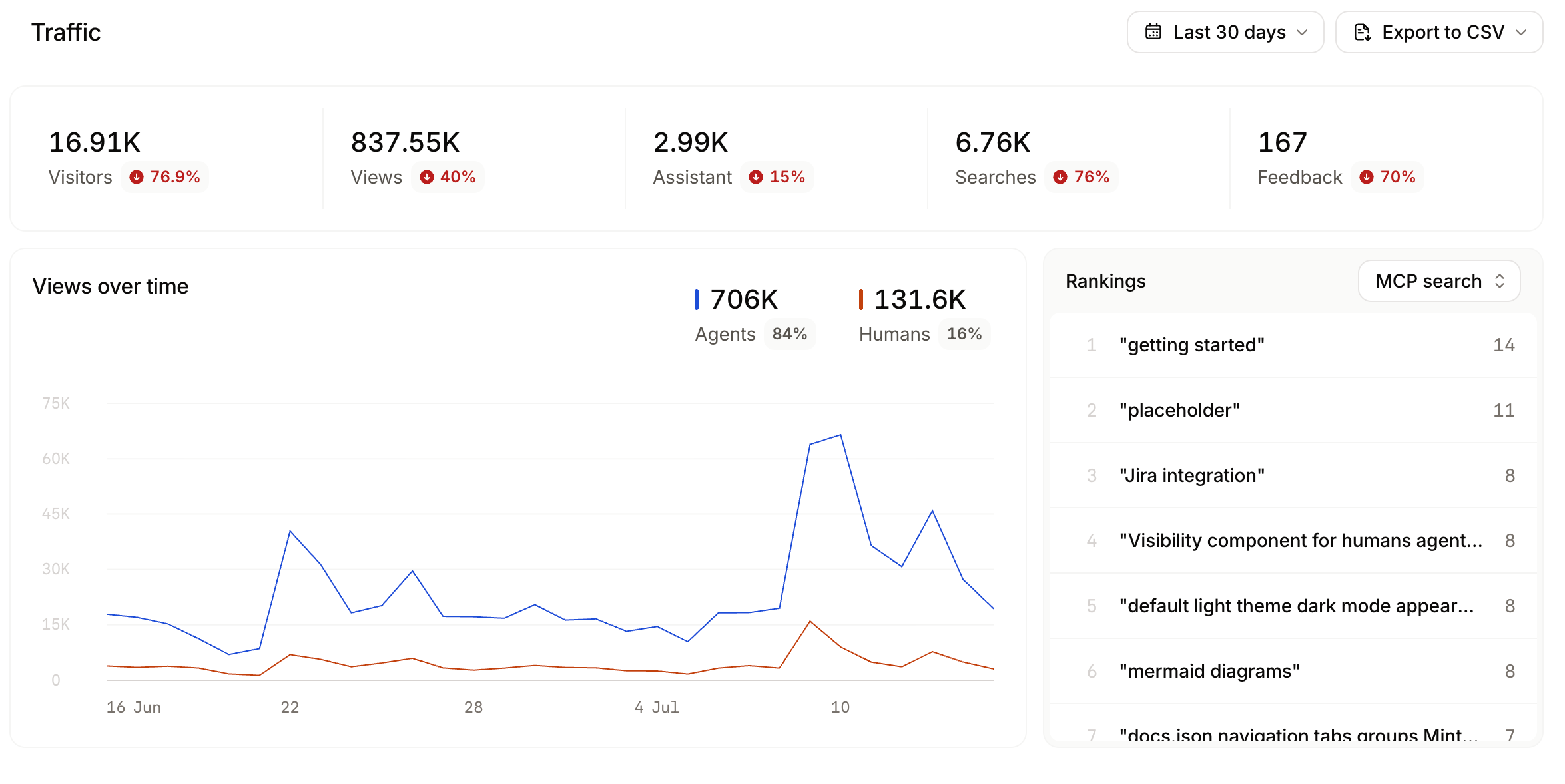
Mintlify’s traffic analytics identifies human and agent activity. For the request details needed to verify format selection, How to track AI traffic to your documentation explains how to collect and analyze delivery logs.
Preserve content fidelity in Markdown export
Define what each page element should become in Markdown so the export retains the instructions, examples, and reference details a reader needs. Use the following rules when configuring or reviewing the conversion.
| Element | What the Markdown version should preserve |
| Headings | The heading hierarchy, with one page-level H1. |
| Code blocks | Complete fenced blocks, language tags, and filenames where provided. |
| Tabs and code groups | Every content variant in source order, with its identifying label. |
| Callouts | The message and its meaning, including whether it is a warning, note, or prerequisite. |
| Tables | Headers and row relationships, using Markdown table syntax where suitable. |
| Custom components | Meaningful text and attributes, with a text equivalent for essential interactive content. |
| API reference pages | Methods, endpoint paths, authentication requirements, parameter definitions, response examples, and error codes. |
| Images | Image references and descriptive alt text, with essential visual information also explained in the surrounding text. |
| Links | Destinations that resolve correctly from the exported page’s URL. |
Handle tabs and MDX components
Exporting every tab can make a page substantially longer than its browser view suggests. Check the resulting size against the limits of the clients you support, and split extensive language-specific instructions into separate pages when necessary.
MDX components can carry information in their tags and properties, so stripping all JSX may remove parameter names, types, or other useful details. Decide which components can remain readable as source and which need conversion into text.
Mintlify’s custom React components render in the browser and are absent from the initial HTML. For essential instructions, use prose or built-in components that render on the server so HTML-based conversion can access them.
Separate interactive features from reference content
In an API playground, browser users configure requests and inspect live responses. The exported reference must remain usable without those controls, through documented examples or the relevant API specification.
Some instructions also need to differ by audience. A developer may follow a dashboard click path, and an agent may need the corresponding API operation. With Mintlify’s Visibility component, authors can show the click path to human readers and the API operation to agents. Exclude these audience-specific blocks from parity checks so they do not register as missing content.
Configure Vary headers and CDN caching for Markdown
A public .md URL serves one format, so it can be cached by its own address. A canonical URL that serves both HTML and Markdown needs a cache policy that distinguishes the representations. Keep Vary: Accept on both responses, and verify how your CDN uses that header when storing and retrieving content.
Normalize the Accept header in the cache key
Using the complete Accept string as a cache key can create separate entries for requests that ultimately receive the same format. At the edge, derive a format value such as html or markdown using the same negotiation rules as the origin, then include it in the CDN cache key.
This normalization must account for explicit media types, quality values, and your tie-breaking policy. Preserve any other cache dimensions your site requires, such as language or content encoding.
Verify CDN support for negotiated responses
Check whether the CDN honors Vary: Accept automatically or requires a cache rule that includes the selected format. Even when the origin selects the correct format, the CDN can still return a cached response in the wrong one.
Request the same production URL with a browser-style Accept header and with Accept: text/markdown. Inspect the returned Content-Type and body, then repeat the requests after the cache has warmed and in the opposite order. Each request should continue to receive its intended representation.
If the CDN cannot distinguish the formats, bypass caching for negotiated responses or serve Markdown exclusively through .md URLs.
Refresh both formats when content changes
Set cache lifetimes according to how long your documentation can remain stale. Validators such as ETag and Last-Modified can make revalidation cheaper after an entry expires, provided they describe the representation being served.
When a deployment changes a page, purge its HTML and Markdown entries, including the separate .md route and negotiated variants. Verify the updated content through the production CDN, so the check covers the delivery path your readers use.
For Mintlify documentation hosted under a subpath, follow the reverse proxy configuration. Its routing guidance disables proxy caching for documentation paths, including generated /_llms/ indexes.
Apply the same authentication rules to Markdown routes
Adding .md to a protected page’s URL must preserve its sign-in requirements and group restrictions. Apply the same authorization policy across every route that can deliver the content.
Authorize before exporting: Check the requester’s identity and page permissions before serving HTML, Markdown, or a full-site export such as llms-full.txt. In a custom implementation, reuse the authorization logic across these handlers so a new export route cannot bypass an existing restriction.
Return accurate failure statuses: For direct Markdown requests, use 401 when authentication is required and 403 when the requester lacks permission, or return 404 for both when the site should hide whether a restricted page exists. Avoid returning a sign-in form with status 200, since an automated client may treat it as successfully retrieved documentation.
Prevent shared caching: Use Cache-Control: private for protected responses to prevent storage in shared caches. When the response should also stay out of browser caches, use no-store. Configure the CDN to respect these directives alongside the access checks.
Distinguish visibility from access control: Mintlify’s sign-in and group visibility rules hide content from view, but the browser still receives that content. Put sensitive information on a separate page protected by page authentication. Markdown exports use the signed-out view and omit blocks intended only for signed-in readers or specific groups.
Check indexes and recovery links: Public documentation indexes, exports, sitemaps, and error-page suggestions must not reveal restricted content. On partially authenticated Mintlify sites, public llms.txt and llms-full.txt files reflect public pages only. Sites using authentication also omit related-page suggestions from Markdown 404 responses.
Provide authenticated agent access: Agents working with private documentation need a retrieval path that carries the user’s permissions. Mintlify’s search MCP server provides an authenticated /authed/mcp endpoint that scopes results to the requester’s access rights. On partially authenticated sites, the public /mcp endpoint remains available for public content.
Run Markdown and HTML parity checks on every deploy
A browser review can miss a broken or incomplete Markdown export. Run a dedicated validation job against each preview deployment, using an inventory of pages intended for export, including protected pages tested with the appropriate permissions.

Add the Markdown validation job alongside your existing documentation linting, which on Mintlify includes built-in CI checks for broken internal links and Vale prose rules. Configure the job as a required merge check so a failed export blocks the merge before publication.
| Check | Passing result |
| Route coverage | Each expected .md route returns 200, the correct Markdown content type, and a non-empty documentation body for an authorized requester. |
| Content negotiation | The canonical URL returns the format selected by its Accept rules, with Vary: Accept on both HTML and Markdown responses. |
| Content parity | Shared headings, instructions, API fields, and examples survive export. Exclude audience-specific blocks from the comparison and normalize prose formatting without removing meaningful code whitespace. |
| Code fences | Every fenced code block closes correctly, preserving the example and separating it from the surrounding instructions. |
| Page size | Each export stays within the configured size budget for the clients you support. |
| Redirects | Old Markdown URLs resolve to the intended new Markdown URLs without loops or unexpected HTML responses. |
| Access control | Unauthenticated or unauthorized requests to protected routes return the expected denial status and expose no restricted content. |
Fail the job when essential instructions, parameter definitions, or code examples disappear from the export. Reports should name the affected page and the missing content so reviewers can restore it without comparing the entire site by hand.
After release, repeat route, negotiation, and access checks through the production CDN, then confirm that changed pages return their updated content. A weekly run can also catch failures introduced by infrastructure changes between documentation deployments.
For an independent review of the live site, run Mintlify’s Agent Score, which reports on Markdown availability, discoverability, page-size risks, content structure, redirects, and access.
Help AI agents find your Markdown routes
An agent that lands on one documentation page needs a way to find related instructions. Provide discovery links that connect the page to its Markdown version and the wider documentation index.
-
List Markdown URLs in llms.txt: Include page titles and short descriptions so agents can identify relevant content before fetching it. Mintlify’s generated documentation index links directly to .md pages.
-
Link to the index near the top of each export: Place the llms.txt pointer before the main content so clients that truncate long responses can encounter it early. Mintlify adds this pointer automatically.
-
Advertise the Markdown alternative in HTML: Add a link element with rel="alternate" and type="text/markdown" pointing to the corresponding export. Clients that parse the HTML page can follow that element to the Markdown version.
-
Expose the index through response headers: Advertise llms.txt through an HTTP Link header, including on Markdown and 404 responses. Mintlify also supplies an X-Llms-Txt header for tools that recognize it.
-
Let readers copy or open Markdown: Enable Copy page and View as Markdown in Mintlify’s contextual menu so developers can paste a page into their AI tools or open its Markdown export directly.
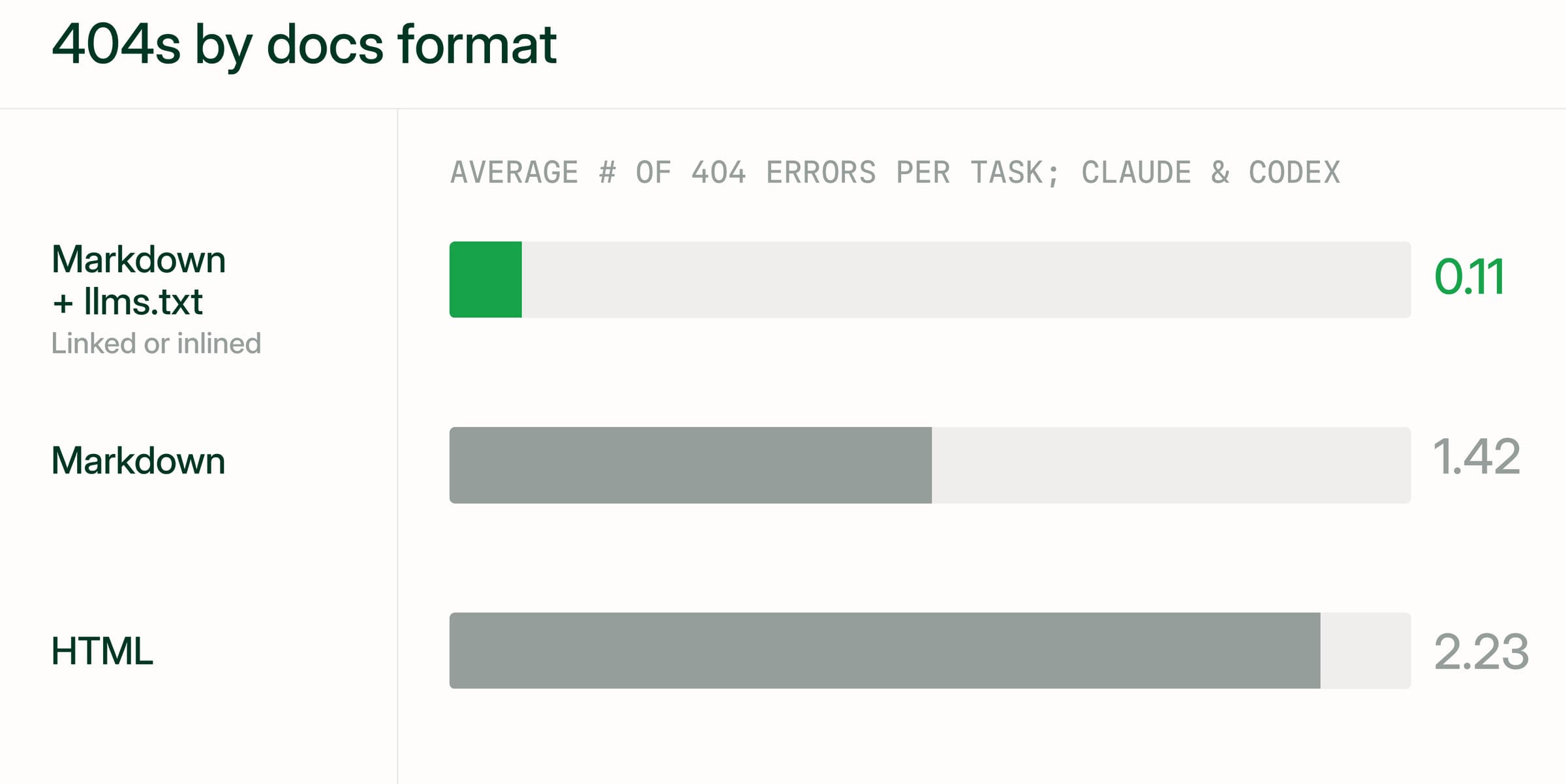
Mintlify measured how format and llms.txt links affect agent navigation across 2,400 agent runs on 20 documentation sites, using Claude Code and Codex. Agents averaged 2.23 HTTP 404 errors per task with HTML, compared with 0.11 when Markdown included a link to llms.txt. Answer accuracy stayed similar across formats, while failed requests dropped and navigation became more efficient.
How Mintlify serves Markdown for AI agents
Mintlify generates Markdown for documentation pages automatically and serves it through .md URLs and content negotiation, while its 404 recovery system points agents from missing pages to available documentation. Site settings and page frontmatter control what each export includes and which pages appear in the generated indexes.
Retrieve a published page as Markdown
You can inspect an export by appending .md to a page URL or requesting Markdown through the Accept header.
curl -L -H "Accept: text/markdown" https://mintlify.com/docs/ai/markdown-export
Customize the context agents receive
For generated API reference pages, Markdown exports include the full OpenAPI or AsyncAPI specification by default. Set markdown.schema to false in docs.json when you want to omit that specification from the output.
Use markdown.instructions to add guidance that applies across the documentation, such as which API version to cite, which SDK to prefer, or which terminology to use. Mintlify includes this guidance in an Agent Instructions block on every exported page and in both llms.txt and llms-full.txt. The Markdown configuration reference documents both settings.
Review the generated documentation index
Mintlify builds its generated indexes from the site’s default language and version and takes each page’s description from its frontmatter, so clear descriptions help agents distinguish related pages before fetching them. When a page is missing from an index, check the hidden-page settings, since navigation and indexing configuration determine which pages appear.
When an automatically generated llms.txt would exceed 100,000 characters, Mintlify splits it into linked indexes under /_llms/. You can also supply a custom root-level llms.txt or llms-full.txt, which replaces the corresponding generated file and gives you responsibility for maintaining its contents.
More than 20,000 companies use Mintlify, including Anthropic, Coinbase, Replit, and AT&T.
Get started with Mintlify to publish Markdown versions of your docs alongside your website through one documentation project.
Frequently Asked Questions
Should docs serve Markdown through .md URLs or content negotiation?
Serve both, since a .md link works for tools that cannot customize request headers and content negotiation works for clients that already have the standard page URL. Mintlify serves both routes without extra configuration.
Does serving Markdown versions of docs affect SEO?
Markdown URLs can compete with HTML pages in search results unless indexing rules point search engines to the preferred version. Mintlify marks its Markdown responses with X-Robots-Tag: noindex, nofollow, allowing agents to retrieve the exports without presenting those URLs as additional search results. The HTML pages still need complete content and consistent SEO metadata.
What Content-Type should a Markdown response use?
Use text/markdown; charset=utf-8 for a UTF-8 Markdown response. Hosting rules or fallback routes can attach different metadata to a .md URL, so check the headers the client receives, including after redirects, to confirm that they accurately describe the returned body.
Why does a CDN serve Markdown to browsers after enabling content negotiation?
The cache may be reusing a Markdown response for requests that should receive HTML. Compare the origin’s response with the CDN’s response to find which layer selects the wrong format. If the origin selects the correct format, review the CDN cache key and clear existing entries after correcting the configuration so previously stored responses do not continue reaching browsers.
How do you test whether docs serve Markdown correctly to AI agents?
Alongside automated delivery checks, give an agent a small task that requires information from two documentation pages, such as finding an authentication requirement and a required parameter. Confirm that it discovers the pages, retrieves complete content, and cites the correct sources. A task-based test can reveal client-specific truncation or navigation failures that successful HTTP responses alone cannot reveal.
More to read

How to help AI agents find the right page after a 404
Learn how to help AI agents recover from 404s with real status codes, Markdown error bodies, index links, related-page suggestions, and redirects for HTML and .md URLs.
October 26, 2026Harkirat Chahal
Growth

How to help AI coding agents find your docs
Learn how to help AI coding agents find the right docs page with llms.txt indexes, page links, stable URLs, crawler access, Markdown routes, and retrieval checks.
October 26, 2026Harkirat Chahal
Growth