Enterprise Documentation: Build In-House or Buy a Platform?
Harkirat Chahal
Growth
Share this article
Harkirat Chahal
Growth
Share this article
Enterprise teams can usually launch a documentation site quickly. The long-term cost comes from maintaining documentation infrastructure that stays secure, reliable, searchable, AI-readable, and current. This guide compares what an in-house build requires, what ongoing ownership costs, and when buying is the better decision.
Enterprise teams can usually launch a documentation site quickly. The long-term cost comes from maintaining documentation infrastructure that is secure, reliable, searchable, AI-readable, and up to date as products, security requirements, and AI interfaces change.
Building in-house makes sense when documentation must run in an air-gapped or on-premise environment, when the docs experience needs custom rendering or security behavior that a standard platform cannot support, or when documentation is part of the product being sold.
For most enterprise teams, Mintlify is the stronger choice because it provides security controls, managed infrastructure, multi-product documentation, AI-ready outputs, MCP support, analytics, and migration support without turning documentation into a permanent internal platform. This guide compares what an in-house build actually requires, what ongoing ownership costs are, and when buying an enterprise documentation platform is the better decision.
Why enterprises consider building documentation in-house
For startups, building documentation infrastructure usually competes with product shipping because engineering capacity is limited. But enterprise teams often have platform engineers who can launch a documentation site quickly, which makes an internal build feel practical, responsible, and easier to control.
The build argument usually starts with security because platform and security teams want to control where documentation content lives, how internal pages are protected, which vendor systems enter the trust boundary, and how access policies are enforced. Those concerns are valid, especially when documentation includes private product information, internal guidance, or customer-specific content.
The higher cost appears after launch, when the documentation site still needs authentication, permissions, search, previews, analytics, compliance evidence, AI-readable outputs, and uptime support for as long as the product exists. The initial build may take a few weeks, but the company then owns the roadmap, maintenance, and security work indefinitely.
What an in-house documentation build has to support
An in-house documentation build may sound simple when the goal is to publish pages, but the scope expands once the system must support enterprise documentation workflows. The list below covers the capabilities a team has for planning, building, securing, and keeping running across the full documentation lifecycle.
AI assistant: An in-house AI assistant must answer questions with cited sources, support selected text and code, retrieve from multiple content sources, and include evaluation and observability to detect and fix hallucinations.
Search: Enterprise search needs full-text and semantic retrieval, real-time index updates, fuzzy matching, analytics, version-aware results, product-level filtering, user-aware filtering, clean chunking, and ongoing ranking improvements.
Abuse prevention: AI chat and user feedback need off-topic detection, abuse classification, prompt-injection detection, rate limiting, per-thread message caps, and CAPTCHA support.
Content infrastructure: The authoring layer needs bidirectional Git sync, MDX support, reusable snippets, zone pivots, LaTeX, HTML embeds, and a component library large enough to support technical documentation at scale.
Agent-assisted workflows: AI-assisted authoring adds another layer of maintenance: sandboxed agent environments, CVE patching, kernel upgrades, context research before drafting, CLI validation, scheduled workflows, push-triggered workflows, pull request creation, and documentation drafts from merged code.
Reliable infrastructure: The hosting layer needs fast builds for large content sets, retry and timeout policies, durability, observability, per-branch previews, per-PR previews, automatic preview teardown, and edge-hosted serving that matches the production renderer.
AI consumption: AI-readable documentation requires generated llms.txt, llms-full.txt, skill.md, and AGENTS.md files, plus sitemap and robots.txt upkeep, markdown export, markdown served directly to agents, open-in-ChatGPT, Claude, and Perplexity actions, and one-click MCP server installation.
Content checks: Quality control needs changelog checks, translation workflows, style linting, broken-link detection, accessibility checks, and MDX syntax validation.
MCP server: A working MCP layer requires hosted user and admin servers, a search tool that works across MCP clients, authentication enforcement, user group enforcement, MCP analytics, real-time index updates, and read- and write-scope controls for each tool.
Authentication and compliance: Enterprise access requires SAML SSO, OIDC, OAuth, JWT, SCIM provisioning, group-based access control, SOC 2-grade infrastructure, GDPR and CCPA compliance, and deployment practices aligned with a secure development lifecycle.
Visual editor: Non-technical contributors need frontend editing, multiplayer collaboration, comments, suggestions, and bidirectional Git sync back to source.
Feedback and analytics: Documentation measurement needs AI-agent feedback, per-page feedback, auto-tracked product events, dashboards, analytics integrations, and API access for querying usage and feedback data.
Enterprise documentation requirements continue to expand after launch because the system must track changes across AI models, protocols, content, security, and deployment workflows. Model upgrades can break prompts and evaluation baselines, MCP specifications can change, search indexes need rechunking as content changes, abuse classifiers need retuning, and deployment pipelines need regular maintenance. Every AI tool update, API change, and security requirement becomes another engineering task for the internal team.
The cost of an in-house build becomes clearer when the first version still leaves major platform capabilities unfinished. One Fortune 500 team spent roughly 500 developer hours and about $80,000 building a static site generator in-house, and analytics, user feedback, caching, a visual editor, an API playground, authentication, an AI assistant, MCP support, integrations, and self-updating documentation were still left to build. The first build is only the upfront cost, because long-term ownership incurs greater expenses.
What in-house documentation costs at scale
The cost of building documentation in-house stems from the ongoing ownership required for each capability. Every security control, access workflow, reliability target, and AI-readiness feature needs maintenance from engineers whose primary responsibility is the core product.
| Capability | What owning it requires | Ongoing cost |
|---|---|---|
| SSO and SAML | Integrating each enterprise identity provider, mapping groups to roles, and updating integrations when providers change | Recurring engineering work tied to customer IT requirements |
| Role-based access control | Building granular permission models and read-only roles, then keeping permissions accurate as teams reorganize | Permission mistakes can become security incidents |
| Audit logging | Recording who changed content, when changes happened, and how review records are stored and accessed | Storage, retention policies, and review tooling are maintained internally |
| Compliance evidence | Running an audit program, collecting evidence continuously, and renewing certifications such as SOC 2 | Annual audit fees plus the internal time required for preparation |
| Penetration testing | Commissioning external security tests and fixing issues in the documentation system | Another internet-facing surface to test with each release |
| Uptime near 99.99% | Running redundant infrastructure, on-call coverage, and incident response for the docs site | Pager load for a team whose main product is not documentation |
| Multi-product information architecture | Designing navigation and versioning across several products in one documentation experience | Increasing structure and maintenance work as the product suite grows |
| Global editing workflows | Supporting contributors across time zones with previews, reviews, and publishing controls | Process and tooling work competing with core product work |
| AI-readiness layer | Generating machine-readable docs, running an MCP server, and keeping retrieval current | A fast-moving maintenance area tied to AI tools, protocols, and retrieval behavior |
The recurring cost lands on the same teams responsible for core product infrastructure, but the documentation system does not create a unique competitive advantage. For most enterprises, buying these capabilities is more practical than assigning internal teams to build, secure, and maintain them indefinitely.
What Mintlify provides for enterprise documentation
An enterprise documentation platform should reduce the engineering effort required for security, access control, uptime, AI readiness, and migration. Mintlify provides those requirements as managed parts of the documentation system, so internal teams do not have to build and maintain separate infrastructure around the docs site.
Security and compliance posture
Mintlify runs a security and compliance program and publishes current certifications and controls in its trust center. Security teams can review documented evidence for the documentation platform without building a separate audit program for an internal docs system.
Access control and authentication
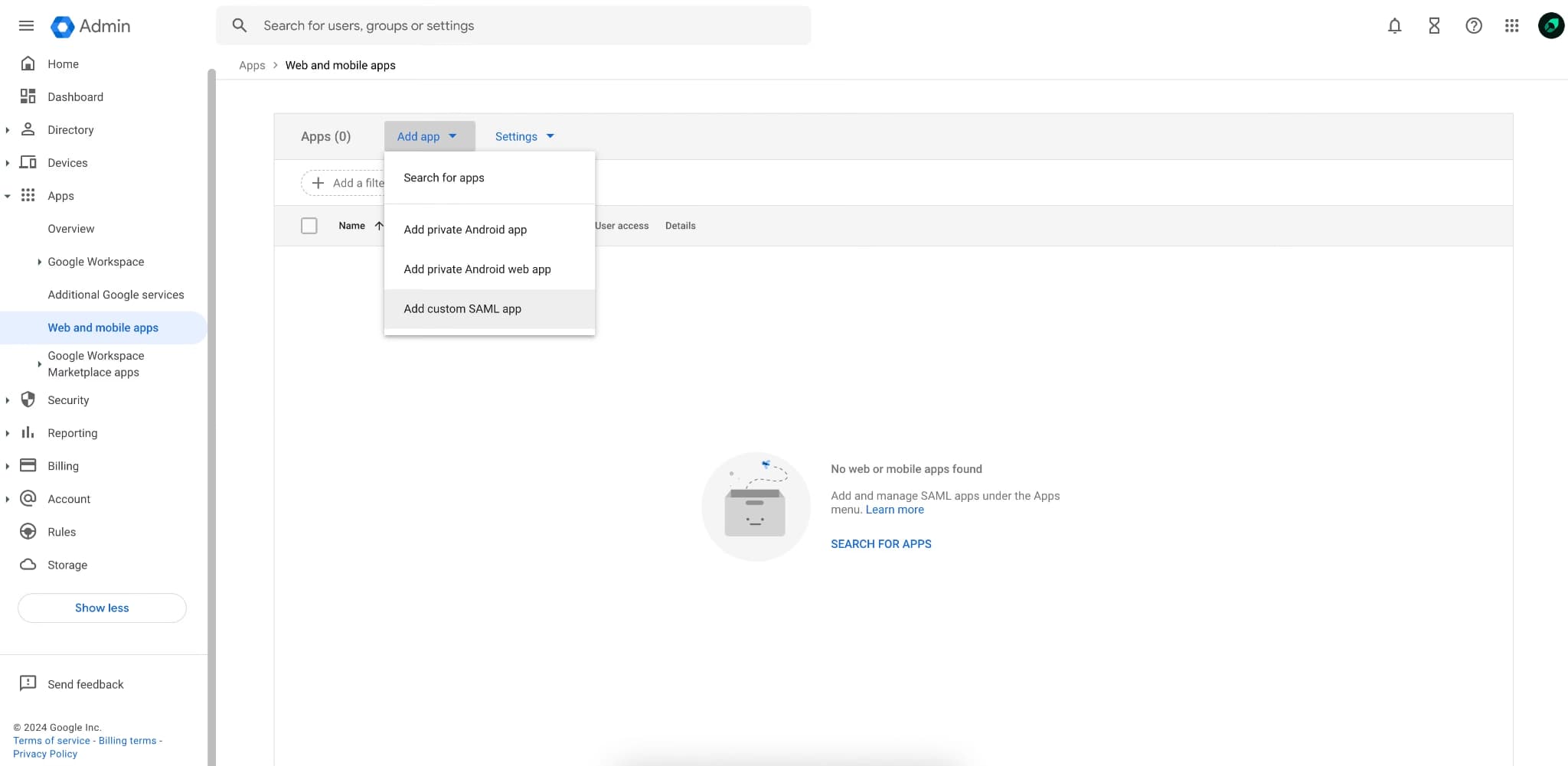
SSO, role-based access control, and read-only viewer roles are accessible from the Mintlify dashboard. Internal docs, public docs, and customer-facing docs can share one system while keeping editing, viewing, and administrative access separate.
Reliable hosting and scale
Mintlify runs at 99.99% uptime and supports large documentation sites with thousands of pages, global contributors, and daily updates. Enterprise teams get the reliability layer without running separate hosting, monitoring, and incident response for documentation.
Authoring and publishing workflows
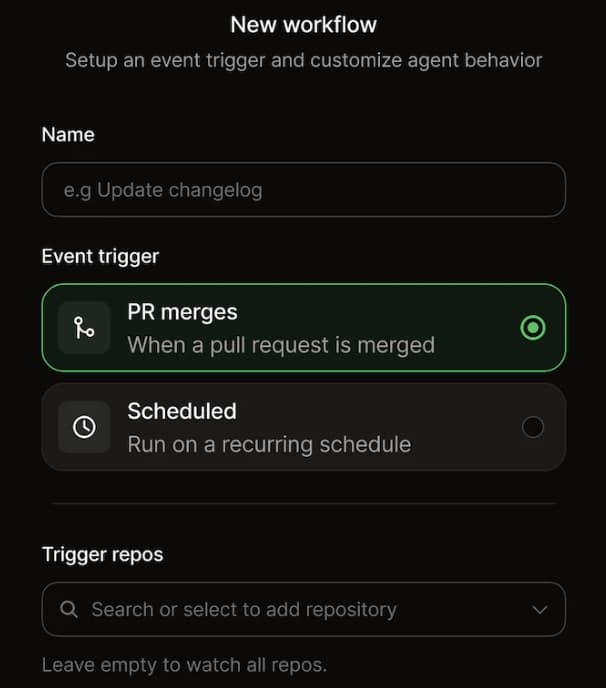
Mintlify supports technical and non-technical contributors through Git-based workflows, frontend editing, reusable content, previews, validation, and collaborative review. Documentation teams can keep engineering review where it belongs while giving product, support, and marketing contributors a usable editing workflow.
Search, AI assistant, and AI-ready documentation
Mintlify provides search, an in-docs AI assistant, AI-readable outputs such as llms.txt and llms-full.txt, and MCP support. Developers and AI tools can retrieve current documentation from the same source, without requiring the internal team to build and maintain a separate retrieval layer.
Analytics and feedback
Mintlify gives teams visibility into documentation usage, page-level feedback, AI-assisted interactions, and user behavior through built-in analytics and integrations. Documentation teams can see what readers use, where users get stuck, and which areas need improvement.
Migration without a rebuild
The Switch program imports existing content, so migration does not have to start with a blank documentation site. Many teams begin with a 2 to 4-week pilot using an API reference or a getting-started guide, then move to the broader documentation set with support from Mintlify's team.
How security review changes the build-or-buy decision
When platform and security leaders argue for building documentation in-house, the concern is usually control over content, access, vendors, and audit evidence. An internal build can give a company direct control over those areas, but the company also takes responsibility for securing a new internet-facing application. The documentation system then needs its own threat model, penetration tests, access controls, audit records, incident response process, and ongoing review as the product and security requirements change.
Buying an enterprise documentation platform gives security teams a reviewable system with existing controls, vendor documentation, and third-party evidence. The review still needs to cover certifications, SSO, RBAC, audit evidence, hosting, data residency, and support processes, but reviewers are evaluating an enterprise product designed to meet those requirements. A custom documentation system starts with fewer vendor dependencies, but the internal team has to create, prove, and maintain the controls itself.
Mintlify has already cleared review for companies with strict security and scale requirements. Anthropic maintains documentation for the Claude API, MCP, and Claude Code on Mintlify. LevelBlue, AT&T's cybersecurity division, moved from a legacy documentation system to Mintlify. Coinbase consolidated developer documentation on Mintlify and reduced update time from 20 minutes to about 60 seconds. Those examples show why buying can satisfy enterprise review while reducing the security program an internal team has to operate for documentation.
Documentation as the AI interface
At enterprise scale, documentation now shapes how developers and AI assistants understand a large product surface. Mintlify builds the AI interface into the documentation system, so teams do not need to maintain a separate retrieval layer for the docs.
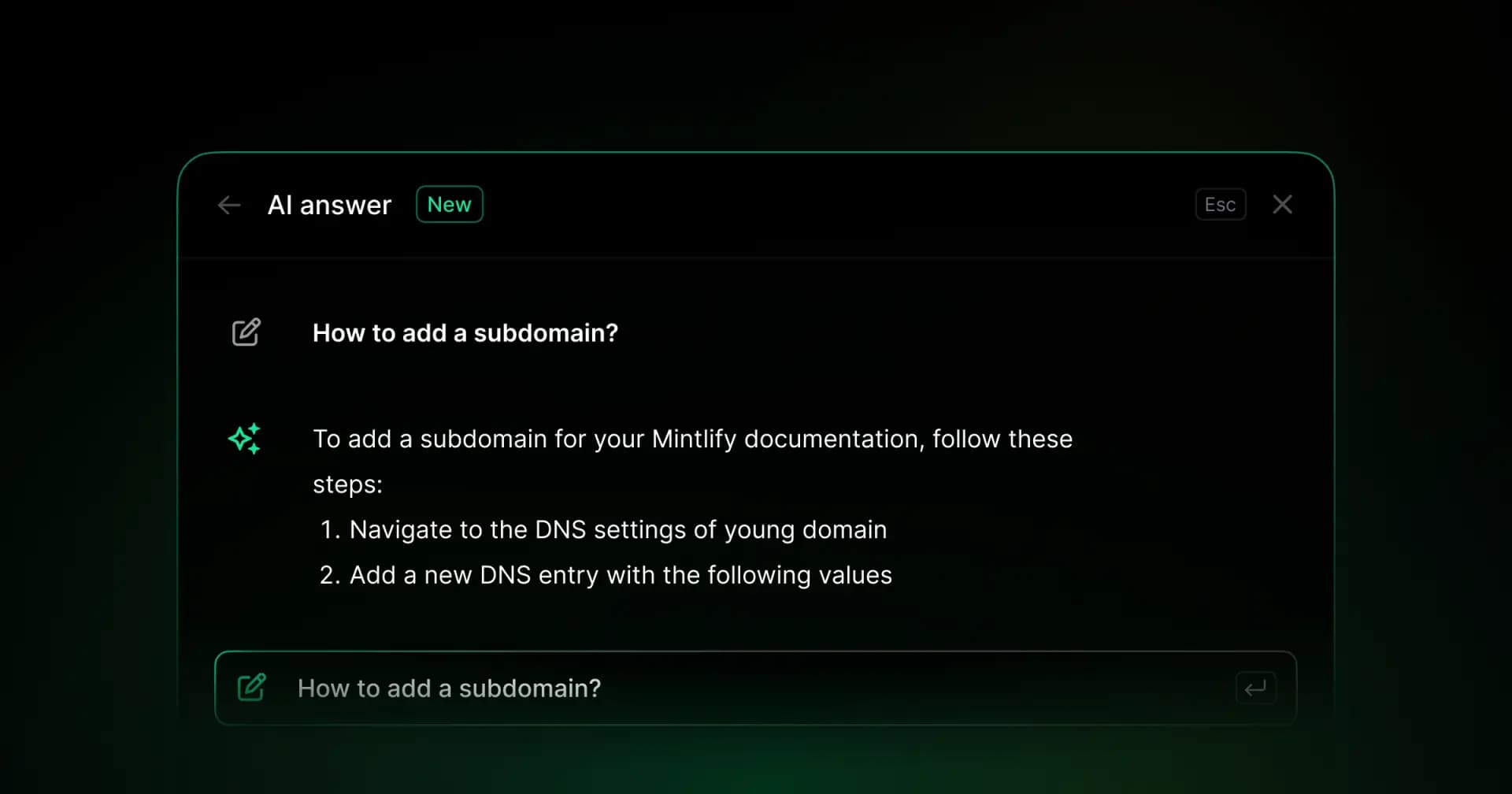
Mintlify's AI assistant answers user questions within the documentation experience, helping reduce the number of questions that reach support or engineering. Mintlify's MCP server also exposes documentation to AI tools, so an assistant running in a developer environment can retrieve current answers from the source documentation. A single Mintlify instance can support multiple products, helping enterprise teams avoid maintaining separate documentation systems for each product line.
Anthropic shows how large that usage can become. Its documentation on Mintlify serves more than two million monthly active developers across Claude API, MCP, and Claude Code, and Anthropic worked with Mintlify on the llms.txt and llms-full.txt standards for AI documentation ingestion. For a complex enterprise product, documentation has become the shared source of truth for customers, developers, and AI assistants. An in-house build has to recreate that interface and keep the underlying AI retrieval layer up to date over time.
When building documentation in-house makes sense
Buying with enterprise controls is the right default for most enterprise documentation teams, but some requirements can still justify an internal build.
Hard air-gapped or on-premise requirements: Some organizations in defense, government, or regulated infrastructure cannot send documentation content or traffic to a third-party cloud. When a security policy requires fully air-gapped or on-premise hosting and a vendor cannot meet that requirement, an internal build may be necessary. Confirm the hosting and data residency options during the security review before making that decision.
Custom rendering or security behavior: Some products need documentation rendering, interactivity, permission logic, or security behavior that standard documentation platforms do not support. When those requirements are central to the user experience or security model, owning the documentation stack can be justified.
Documentation as the product: Some companies sell the documentation experience itself or treat the documentation layer as a core product surface. When customers are paying for that experience, and the company needs control down to the rendering layer, building in-house can be worth the long-term maintenance cost.
Build enterprise documentation with Mintlify
For most enterprises, the build-or-buy decision comes down to ownership. Building in-house gives the company full control, but it also makes it responsible for security reviews, access management, uptime, AI readiness, migration work, and every platform update after launch. Mintlify gives documentation teams the enterprise controls and AI-ready documentation infrastructure without turning the docs site into another internal platform.
Anthropic, Coinbase, HubSpot, Zapier, and AT&T already use Mintlify for documentation that must support enterprise security reviews, large product surfaces, and developer adoption. Book a demo with Mintlify's enterprise team to review your security requirements, migration scope, and documentation setup.
Frequently Asked Questions
Does buying pass enterprise security review
Buying documentation infrastructure can pass an enterprise security review when the vendor already supports the controls reviewers need to assess. Mintlify provides enterprise security features such as SAML SSO, role-based access control, and viewer roles, and companies including Anthropic, Coinbase, HubSpot, Zapier, and AT&T use Mintlify for documentation. That does not remove security review, but it gives reviewers an existing enterprise product to evaluate instead of asking internal engineers to build a new documentation system from scratch.
How a documentation platform handles SSO and SAML
Mintlify supports self-serve SAML SSO for Okta and Microsoft Entra, with setup managed from the dashboard. Enterprise teams can integrate documentation access with existing identity systems, reducing the custom authentication work that an internal documentation build would otherwise require.
How access control and permissions are managed
Mintlify supports role-based access control and viewer roles for enterprise customers. Admins can separate editing, viewing, and administrative access, so internal teams, reviewers, and stakeholders can collaborate without giving every user permission to change production documentation.
How audit and compliance requirements are supported
Mintlify maintains SOC 2 compliance and has ISO 27001 and GDPR compliance in progress. During security review, enterprise teams should confirm the latest certifications, audit evidence, access controls, and data-handling details via Mintlify's trust center and enterprise security docs.
Self-hosting and data-residency requirements
Enterprise teams should confirm hosting and data residency requirements directly during the security review. A hard air-gapped or on-premises mandate can still necessitate an internal build when a hosted documentation platform does not meet the organization's policy. For teams without that mandate, Mintlify removes the hosting, uptime, and infrastructure maintenance work from the internal documentation team.
Migrating documentation without a rebuild
Teams moving to Mintlify can use migration tooling, migration documentation, or hands-on help through the Switch program. Many teams start by moving a focused area, such as an API reference or getting-started guide, then expand the migration once the structure, workflows, and review process are clear.
Serving multiple products and global teams
Mintlify can support large, multi-product documentation environments with managed hosting, access controls, AI-ready docs, AI traffic analytics, and collaboration workflows. Anthropic maintains documentation for Claude API, MCP, and Claude Code on Mintlify, which shows how a single documentation system can serve multiple product surfaces without requiring separate internal platforms for each product.
More to read
Startup Documentation: Should You Build Your Own or Use a Product?
For startups, the documentation build-or-buy decision usually comes down to engineering time. Free frameworks look inexpensive, but search, CI, AI-readability, deployment, styling, and maintenance drain scarce engineering hours that would otherwise go to the product.
June 3, 2026Harkirat Chahal
Growth
Best Docusaurus Alternatives in 2026
Docusaurus is a strong open-source framework for engineering teams that want full control over a React-based documentation site. The challenge starts when a ...
May 12, 2026Harkirat Chahal
Growth