How to help AI coding agents find your docs
Harkirat Chahal
Growth
Share this article
Harkirat Chahal
Growth
Share this article
An AI coding agent can reach your documentation and still miss the page that answers a developer’s question. When essential instructions sit across several pages without clear navigation, the agent may guess URLs, encounter errors, or proceed with incomplete information.
This guide explains how to connect documentation indexes, page links, and redirects so agents can navigate from an entry URL to the correct source. It also covers crawler access, authentication, Markdown delivery, and retrieval tests that confirm whether agents find the pages needed for a task.
Mintlify automatically publishes documentation indexes, Markdown pages, and discovery headers from one docs project, reducing the work required to maintain these entry points as content changes. Get started with Mintlify to help coding agents discover and use your product documentation.
How AI documentation discovery works for coding agents
Mintlify’s midyear traffic report attributed 66% of measured web traffic across Mintlify-powered documentation to agents, which makes the path an agent takes to a page worth understanding in detail. During direct web retrieval, a coding agent may start with a URL from a developer’s prompt, a search result, or previously learned information. Many fetch tools read the server response without executing browser JavaScript, so the available content can differ from what a person sees on the page. Mintlify’s guide to tracking AI traffic to documentation explains how to identify agent visits and the pages they request using server-side logs.
From that starting page, the agent needs enough information to locate any additional instructions. Mintlify’s Docs URL Benchmark observed Claude Code and Codex attempting .md and /llms.txt URLs that the test sites did not serve. Those failed requests show how missing discovery routes can create extra work before an agent reaches a useful source.
The following layers determine what an agent can discover and retrieve.
| Discovery layer | What the agent needs | What can go wrong |
|---|---|---|
| Documentation index | Page titles, descriptions, and links that help identify relevant sources. | The agent guesses paths or selects an unrelated page. |
| Page links | Connections to the index, prerequisites, and related instructions. | The landing page provides no route to information needed elsewhere. |
| Stable URLs | Working entry points and redirects for moved content. | Previously published links lead to missing pages. |
| Crawl access | Crawler rules and bot controls that admit intended clients, with content available in the server response. | The client receives a block page, an interactive challenge, or an incomplete page shell. |
| Authentication | A clear public boundary and a supported way to authenticate for protected content. | An authorized user’s agent cannot retrieve the documentation it needs. |
| Markdown routes | A text representation that preserves the page’s useful content. | The client must extract instructions from surrounding HTML, increasing processing and response-size overhead. |
A retrieval test checks these routes against a known source page, helping you distinguish a discovery failure from an error in how the agent interprets or uses the documentation.
Documentation indexes, llms.txt, and sitemaps
| File | What it contains | Useful for | Limitation |
|---|---|---|---|
| llms.txt | Page titles, descriptions, and links grouped by section. | Selecting a source for a specific question. | The client must follow links to read the actual documentation. |
| llms-full.txt | The Markdown content of included pages in one file. | Loading a documentation collection into context or a retrieval pipeline. | Large exports can exceed response or context limits and contain material unrelated to the task. |
| sitemap.xml | Indexable URLs, with optional metadata such as modification dates. | Helping crawlers enumerate pages. | It lacks the task descriptions available in llms.txt. |
Mintlify generates both text files and the sitemap automatically. For a site that needs a custom directory, create and host an llms.txt file with a site title, a summary, and grouped links with page descriptions.
Serve indexes at predictable URLs
Mintlify exposes llms.txt at the documentation project’s root and at /.well-known/llms.txt. For documentation hosted at example.com/docs, the reverse proxy configuration supports optional domain-root routes that forward /llms.txt and /llms-full.txt to their /docs equivalents. Those optional routes serve clients that expect the index at the domain root.
Write descriptions that help agents select a page
Use the description field in each page’s frontmatter to identify the task and relevant scope, such as the API version or SDK. Mintlify uses the first paragraph and truncates it at 300 characters, so place distinguishing details early and describe what the reader can accomplish. Pages without descriptions appear as links with titles alone.
Keep large indexes navigable
Mintlify limits each automatically generated llms.txt index to 100,000 characters. When the directory grows beyond that limit, groups of links move into files under /_llms/, and the main index points to them. Generated index links use .txt URLs, with .md alternatives also available.
A directory entry can take the following form.
> The links below point to documentation indexes. Follow each `/_llms/` index recursively until you reach documentation pages.

## Indexes

- [API reference (250 pages)](https://docs.example.com/_llms/api-reference.txt): Endpoint documentation for the example API
Forward the generated /_llms/ routes through any proxy or path allowlist so clients can follow the complete directory.
Check which pages the index includes
Mintlify’s generated index files cover the default language and default version. Review hidden-page and indexing settings when an expected page is absent, since hidden pages and pages marked noindex: true are excluded by default. Essential public documentation should appear in navigation, or have an explicit indexing configuration that makes it discoverable.
Page links to the llms.txt index and related pages
Link every page to llms.txt
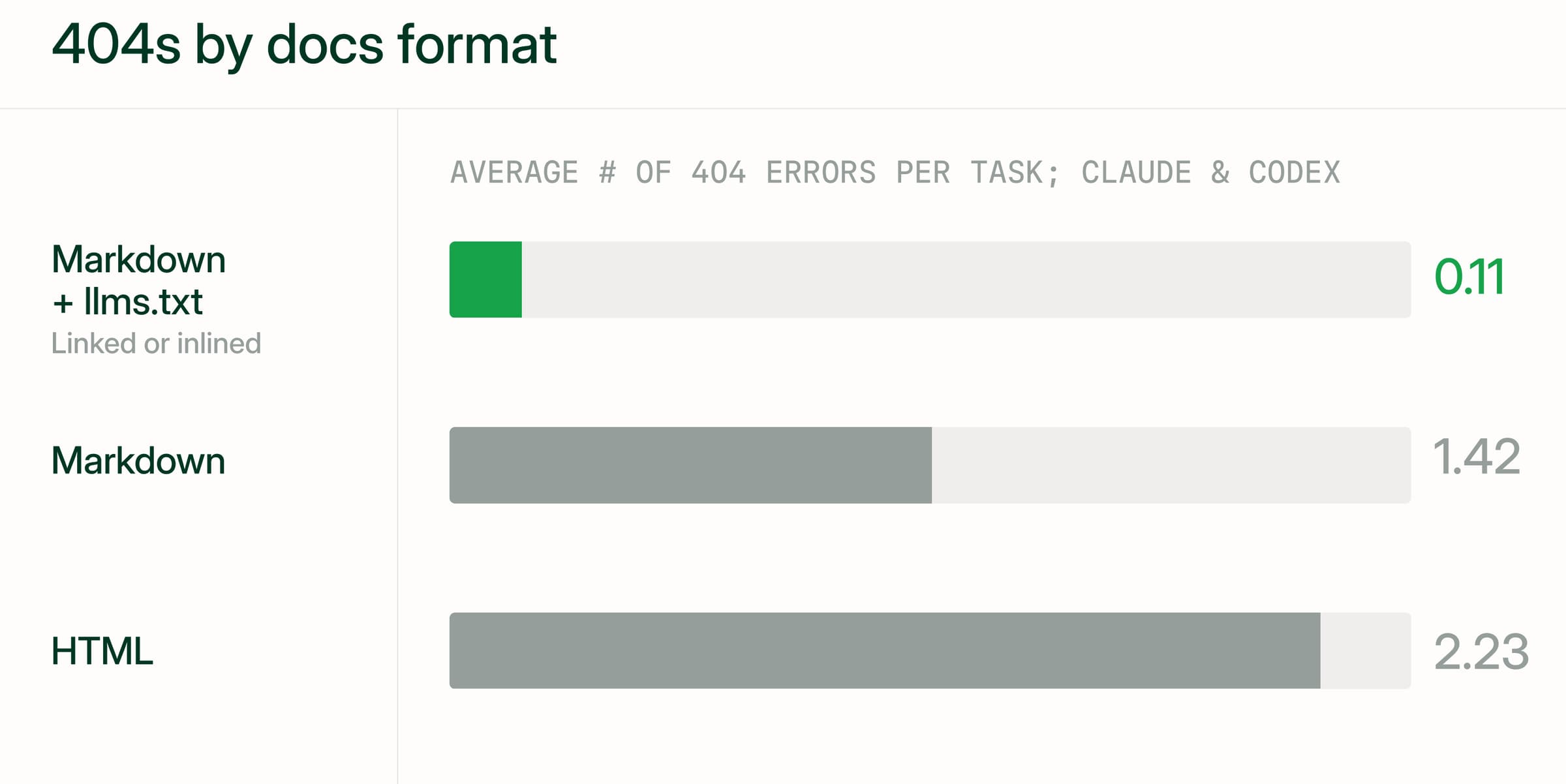
Mintlify tested index links across 2,400 agent runs on 20 documentation sites. Agents averaged 2.23 HTTP 404 errors per task on HTML pages, 1.42 on plain Markdown, and 0.11 when the Markdown included a link to llms.txt. Linking also consumed fewer tokens than embedding the complete index in every page.
Place the index pointer near the top of each Markdown page so it remains visible when a client truncates a long response. Mintlify adds this pointer automatically and advertises the index through response headers, including on Markdown and 404 responses. For a root-hosted site, the index-related headers include the following.
Link: </llms.txt>; rel="llms-txt", </llms-full.txt>; rel="llms-full-txt", </.well-known/api-catalog>; rel="api-catalog", </.well-known/mcp/server-card.json>; rel="mcp-server-card", </.well-known/agent-card.json>; rel="agent-card", </.well-known/agent-skills/index.json>; rel="agent-skills"
X-Llms-Txt: /llms.txt
Link Related Pages for Multi-Step Tasks
Connect pages in the order a developer would need them. An endpoint reference can link to authentication prerequisites near the relevant request example and to troubleshooting guidance beside its error responses. Descriptive anchors such as “verify webhook signatures” give agents more information about the destination than generic labels such as “learn more.”
In Mintlify’s dashboard, enable Show related topics under General, then choose Automatic or Manual mode. Automatic suggestions use the current page’s title to search the documentation index. Manual mode displays only the links supplied in that page’s related frontmatter field, which also overrides automatic suggestions when present.
The following example curates related pages for an authentication guide.
---
title: 'Authentication'
related:
  - /api-playground/overview
  - /deploy/authentication-setup
  - /organize/hidden-pages
---
Inspect the published Markdown as part of review to confirm that the intended prerequisite and related-page links are available in the content agents retrieve.
Stable entry points and URLs after restructures
Documentation URLs remain in repository READMEs, package listings, older articles, and saved conversations after a site changes. Preserve those entry points during a restructure so existing references continue to lead readers and agents to useful content.
Define stable entry points
Keep consistent URLs for the documentation home page, quickstart, API reference, documentation index, and API specification. Publish these addresses in repository documentation and SDK package metadata, where developers and coding agents can encounter them before visiting the site.
Mintlify serves specification files from their paths in the docs repository. Enabling download-spec also publishes an API catalog at /.well-known/api-catalog, which compatible clients read to discover the available OpenAPI specifications.
Redirect moved and renamed pages
Map moved pages to their corresponding replacements. For deleted content, add a redirect when another page answers the same need, and use a missing-page response when no suitable replacement exists.
Mintlify defines redirects in docs.json and uses permanent 308 responses by default. A wildcard rule can preserve the remaining path when an entire section moves, as shown in this configuration fragment.
"redirects": [
  {
    "source": "/beta/:slug*",
    "destination": "/v2/:slug*"
  }
]
This rule maps /beta/introduction to /v2/introduction. Add individual mappings for pages whose names also change, since a wildcard cannot infer their new destinations. Redirects also apply on preview deployments, where reviewers can check the resulting navigation before release.
Run mint broken-links --check-redirects through the Mintlify CLI to validate configured redirect destinations. Include that validation in your documentation linting workflow alongside Mintlify’s CI checks for broken internal links. Live HTTP checks should separately confirm the redirect status, destination, and behavior at the old hostname.
Example of fixing agent 404s after a migration
Suppose a documentation migration moves docs.example.org/setup/webhooks to example.com/docs/configure/webhooks. Review the following paths before retiring the old site.
| Migration concern | What to verify |
|---|---|
| Old hostname | Requests to the original address redirect to the intended page on the new host. |
| Renamed sections | Section rules preserve unchanged page names, with individual mappings for exceptions. |
| Markdown URLs | Previously published .md links reach the corresponding Markdown exports. |
| Documentation indexes | Root-level index routes remain reachable, and their page links use the correct /docs prefix. |
| Unmapped URLs | Missing pages return a genuine 404 with links that help clients recover. |
Mintlify’s 404 recovery page provides a fallback for unmatched paths. Missing Markdown pages return links to llms.txt and llms-full.txt, plus up to three related-page suggestions on sites without authentication.
AI crawler access, bot blocking, and rendering
A valid documentation URL can still lead an agent to a blocked response, an interactive challenge, or a page missing its main content. Check crawler permissions, firewall rules, and rendering separately, since each can interrupt retrieval at a different point.
Robots.txt rules for AI user agents
AI services use different clients for model training, search indexing, and page requests initiated by users. Decide which activities your documentation should support, then review the relevant user agents individually. Blocking a training crawler does not automatically require blocking search or retrieval.
A robots.txt file communicates crawling rules to clients that follow the protocol; it does not enforce access restrictions or protect private content. Check each client’s documented policy before assuming a rule also governs requests initiated by users.
Mintlify’s generated robots.txt allows crawlers by default. You can add a custom file at the root of your project to restrict particular bots or paths. The following example disallows the placeholder bot BadBot across the site and asks other compliant crawlers to avoid /private/.
User-agent: BadBot
Disallow: /

User-agent: *
Disallow: /private/
The generated file also includes Content-Signal directives for model training, search indexing, and AI input. The ai-input signal covers uses such as retrieving documentation to generate an answer.
User-agent: *
Content-Signal: ai-train=yes, search=yes, ai-input=yes
Mintlify serves a custom robots.txt unchanged, so include any content signals you want to retain alongside your crawler rules.
Bot protection and firewall rules
An allowed crawler can still encounter CDN or firewall restrictions. Interactive browser challenges are particularly problematic for HTTP fetch tools, because a request can receive challenge text, sometimes with a successful status code, while the documentation remains unread.
Review blocked requests before adjusting firewall rules. Where your CDN supports verified bot identification, use that verification when granting exceptions, since a User-Agent string alone can be impersonated. Apply suitable rate limits and check that permitted clients can retrieve public documentation without completing an interactive challenge.
For documentation behind a reverse proxy, preserve the original User-Agent and client IP headers when forwarding requests to Mintlify. Replacing those values can interfere with agent identification and traffic attribution.
Pages that require JavaScript to render
HTTP fetch tools that do not execute JavaScript can read only the content returned by the server. To check an important page, retrieve its HTML with a command-line HTTP client and look for a distinctive sentence from the main body. A successful status code alone does not establish that the instructions are present.
On Mintlify, most built-in components render on the server, while most custom React components render in the browser, so essential instructions inside them can be missing from the initial HTML. Keep those instructions in page content or reusable MDX snippets imported as content, which render on the server. Check the published response after introducing custom components around prerequisites, configuration steps, or code examples.
What AI agents can reach on protected docs
A developer’s access to documentation does not automatically give their coding agent the same permissions. Check what the agent can retrieve anonymously, then provide an authenticated connection for tasks that depend on protected content.
| Access model | Available without credentials | Requires authentication |
|---|---|---|
| Public | Public pages, their Markdown routes, documentation indexes, and public MCP search | No login requirement |
| Partially protected | Public pages and Markdown routes, indexes containing public content, and public MCP search | Protected pages and permission-scoped MCP search |
| Fully protected | The login flow | Documentation pages, both index files, the sitemap, and robots.txt |
On fully authenticated Mintlify sites, requests for the sitemap and robots.txt redirect to login.
Fully protected docs
For interactive coding assistants, Mintlify’s authenticated search MCP server provides access through the /authed/mcp endpoint. Users add the endpoint to their AI tool and sign in with their existing credentials. Search results respect each user’s group permissions, so the assistant retrieves only the content that the user is authorized to see while the documentation stays private.
Server-side agents and CI workflows can use MCP client credentials when nobody is available to complete an interactive login. Create a credential in the Docs MCP section of project settings, assign any required groups, and exchange the credential for an access token. Mintlify REST API keys cannot authenticate to the MCP server.
Make the connection discoverable by publishing the authenticated endpoint with setup instructions. Mintlify’s contextual menu can also expose MCP connection options from documentation pages. Authenticated sites advertise OAuth-protected resource metadata in the Link header with rel="oauth-protected-resource", which points compatible clients to the authentication details.
Partially protected docs
Partial authentication lets agents complete initial integration tasks using public documentation. Keep the quickstart, authentication requirements, and relevant troubleshooting instructions public where your access policy permits, with customer-specific material behind sign-in.
Mintlify requires authentication for pages by default once authentication is enabled. To make an individual page public, add the following frontmatter.
---
title: 'Public page'
public: true
---
You can also set "public": true on a navigation group in docs.json to publish the whole group.
Custom discovery files need attention when they reference protected pages. If a custom llms.txt or llms-full.txt links to any nonpublic page, Mintlify serves that custom file only to authenticated users. Anonymous visitors receive the generated version containing public content.
A user who signs in but lacks a page’s required group receives a 404. When public documentation links to restricted material, identify the access requirement in the link text, such as “Enterprise configuration guide, sign-in and enterprise access required,” so readers can distinguish a permission restriction from a broken link.
Markdown routes and content negotiation for agents
Mintlify automatically publishes a Markdown version of each documentation page, which carries the page’s text and code without the site’s navigation markup and scripts. Clients can request Markdown by appending .md to a page URL or sending Accept: text/markdown or Accept: text/plain to the normal URL. Requesting a format through the Accept header is called content negotiation.
The following command retrieves the Markdown version of Mintlify’s export documentation through content negotiation.
curl -L -H "Accept: text/markdown" https://mintlify.com/docs/ai/markdown-export
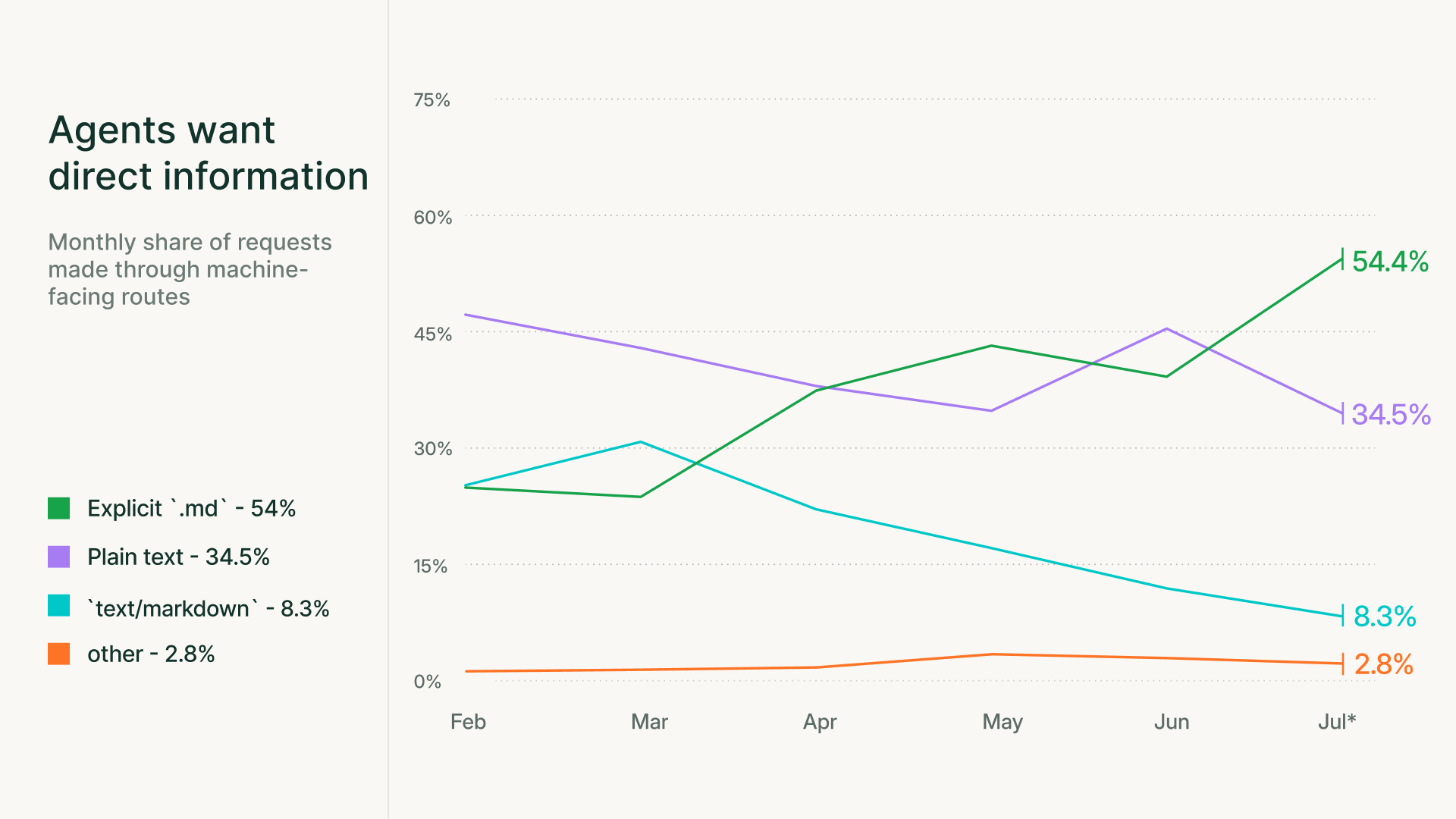
Both request patterns remain useful. Mintlify’s midyear traffic report found that direct .md requests increased from 25.1% to 54.4% of explicit machine-route requests between February and July 2026. Requests negotiating text/markdown declined from 25.2% to 8.3% over the same period. These percentages describe the distribution within explicit machine routes, rather than all agent traffic. Keep both retrieval methods working when configuring proxies or changing documentation routes.
For API reference pages, Markdown exports include the full OpenAPI or AsyncAPI specification by default, so an agent reads the schemas alongside the written explanation. If that specification makes the response unnecessarily large for your use case, set markdown.schema to false in docs.json to omit it.
Review instructions that depend on browser interactions as well. Mintlify’s Visibility component lets a page present dashboard instructions to human readers and API instructions in Markdown. Content marked for="agents" appears in Markdown output, and content marked for="humans" is excluded. Use audience-specific instructions where the action differs, keeping shared prerequisites and technical facts available to both audiences.
Confirm agents find the correct source
A documentation site can pass availability checks and still send an agent through several wrong pages before it reaches the answer. Test both the published routes and the agent’s path through them, recording whether the agent retrieves the correct source for a specific task.
Run access checks on discovery files
Start with anonymous requests to the content intended to be public. Use the configured documentation base path, such as /docs, and test additional root-level routes when you publish or advertise them. Protected resources need separate checks with authorized credentials.
| Check | Request | Pass condition |
|---|---|---|
| Documentation indexes | Fetch llms.txt and llms-full.txt at their published URLs | Successful responses containing the expected index and documentation content |
| Split indexes | Recursively follow the /_llms/ links in llms.txt | Every linked index resolves, including indexes nested within other indexes |
| Markdown route | Append .md to a known page URL | A 200 response containing that page’s Markdown content |
| Content negotiation | Request a page with Accept: text/markdown, then Accept: text/plain | Both requests return the expected Markdown content |
| Header discovery | Inspect response headers on a page and a missing URL | Advertised index links resolve and use the correct base path |
| Crawler rules | Inspect the domain’s /robots.txt | Rules permit the crawlers and documentation paths you intend to support |
| Redirects | Request a sample of old URLs | The expected redirect status and a final destination containing the correct replacement page |
| Anonymous access | Fetch public pages without session cookies or authorization credentials | Main page content appears without a login redirect or interactive challenge |
If llms.txt returns 404 but llms-full.txt remains available, check Mintlify’s project-wide indexing setting. Enabling Don’t index project disables llms.txt, including its .well-known route, but leaves llms-full.txt accessible. Review the setting before treating the response as a routing failure.
For a public documentation site, mint score checks index availability and links, content negotiation, crawler rules, and other agent-readiness requirements. Authenticate with mint login before running the command.
# Score your default subdomain
mint score

# Score a specific site
mint score docs.example.com
You can also submit a public documentation URL through Mintlify’s Agent Score, which evaluates documentation against the AFDocs standard. Use readiness scores to identify technical issues, then test retrieval with tasks that reflect how developers use your product.
Test retrieval with task prompts
Build a small, repeatable test set around important developer tasks. For each task, identify the pages containing the required information before asking an agent to find them.
-
Define the task and acceptable sources. Use a realistic prompt, such as implementing webhook signature verification. Record every page that provides a valid answer, including the intended product version.
-
Control the starting conditions. Give the agent the documentation home URL without revealing the answer page. Keep the prompt, model, available tools, and starting context consistent when comparing documentation changes.
-
Capture the retrieval path. Record requested URLs and response statuses through an agent tool transcript or a dedicated proxy. Repeat each task in fresh sessions to account for variation between runs.
-
Measure source discovery. Record whether the agent fetched an acceptable page, how many requests it needed, how many 404 responses it encountered, and whether it retrieved the wrong version. Assess the generated answer separately.
-
Compare results after changes. Rerun the same tasks after changing navigation, indexes, redirects, or access rules. Investigate tasks that require more requests or stop reaching the expected sources.
Mintlify’s open-source Docs URL Discovery Bench provides a reusable setup that routes agent fetches through a local proxy and records retrieval metrics. Its dataset accepts multiple answer paths, so a run is scored correctly when more than one page answers the question.
Monitor agent traffic after changes
Use Mintlify’s traffic analytics to review which pages agents request after a release. Agent attribution uses IP addresses and user agents to approximate traffic sources, so a page view counts a request and says nothing about whether the task succeeded. The mint analytics stats command also reports human and agent traffic separately.
When an important page receives few agent views, review its index description and incoming links, then test a task that requires that page. Save comparable reporting periods through analytics exports to track changes alongside your retrieval results.
Agents connected to Mintlify’s search MCP server can also use submit_feedback to report incorrect, outdated, or confusing documentation. These reports appear alongside human submissions in the dashboard’s Detailed feedback card. Agent feedback is currently in beta, and ordinary web fetches do not connect an agent to the feedback tool.
Build discoverable documentation for AI agents with Mintlify
Every page published on Mintlify ships with its Markdown export, its entry in the generated indexes, and its discovery headers. When you update an authentication guide, those agent-facing copies update in the same deploy, so developers and agents keep reading the same current instructions.
Connected coding assistants can use the hosted search MCP server to find relevant pages and retrieve their contents. Mintlify’s WebMCP support also exposes documentation tools directly to compatible browser agents. Those agents can search, read pages, and retrieve the documentation index without first configuring a connection to the hosted MCP server.
More than 20,000 companies use Mintlify, including Anthropic, Microsoft, Coinbase, and Replit.
Get started with Mintlify to publish documentation that coding agents can discover and retrieve. For documentation already hosted elsewhere, talk to the Mintlify team about migrating your site.
Frequently Asked Questions
What makes documentation for AI agents discoverable?
Documentation is easier to discover when page titles, descriptions, and links use the terms developers include in their requests. Name the relevant product, SDK, API version, and operation clearly. Name the product, SDK, API version, and operation in titles and descriptions. A title like ‘Advanced setup’ leaves an agent guessing, while a title that names the operation and the SDK lets the agent match the page to a prompt before opening it. Include common alternative terms where they help connect a developer’s wording to your terminology.
Do AI coding agents read llms.txt automatically?
Support varies by tool and task, so publishing the file does not guarantee an agent will consult it. For important implementation work, ask the agent to retrieve the current product documentation and identify its sources. Inspect the tool transcript to confirm which pages it read, since an agent can cite a plausible documentation URL it never fetched.
Should you block AI crawlers in robots.txt?
Evaluate training, search, and user-requested retrieval separately. You may want public API guides available to coding assistants while declining training use where providers offer separate controls. After changing crawler rules, test the specific assistant and retrieval tool your users depend on. A robots.txt rule states your intent, and a live request shows whether that client honored it.
How can you see which AI agents are crawling your documentation?
Review request identifiers alongside the requested paths, timestamps, and response statuses. Named user agents can help identify a service, but custom clients and intermediaries can leave requests unattributed. In Mintlify’s agent traffic breakdown, review the HTTP clients and Other categories alongside named providers so unfamiliar clients remain part of your analysis.
How do you make a changelog discoverable to AI coding assistants?
Give release entries clear dates and versions, name the affected endpoints or SDKs, and link to the updated instructions. Mintlify’s subscribable changelogs also provide an RSS feed for public documentation at the changelog URL with /rss.xml appended. Because feed entries exclude code, components, and HTML, use the rss property to supply a useful text description when an update relies on those elements. An assistant or monitoring integration must explicitly consume the feed to receive updates.
Can AI agents access documentation behind a login?
Access is possible when the agent’s retrieval tool supports the site’s authentication method and has the required permissions. Verify the connection with one page the agent should reach and one it should be denied. A correctly refused page confirms that group permissions apply to the agent’s session, which a successful login leaves untested. Also confirm which tool made the request, since an authenticated MCP connection does not automatically authenticate a separate web-fetch tool.
More to read
MCP vs API: what an MCP server adds to your API
Learn what an MCP server adds to an existing API, from tool discovery and filtered responses to docs search, with practical examples of how developers use each.
October 25, 2026Harkirat Chahal
Growth
The Mintlify skill for Claude Code, Cursor, and Codex
Install the Mintlify agent skill so Claude Code, Cursor, or Codex can set up, write, and customize your Mintlify docs with the right config, components, and CSS.
October 22, 2026Harkirat Chahal
Growth