Startup Documentation: Should You Build Your Own or Use a Product?
Harkirat Chahal
Growth
Share this article
Harkirat Chahal
Growth
Share this article
For startups, the documentation build-or-buy decision usually comes down to engineering time. Free frameworks make the first version look inexpensive, while search, CI, AI-readability, deployment, and maintenance drain scarce hours. This guide breaks down what an internal build costs and when a startup should still own the stack.
For startups, the documentation build-or-buy decision usually comes down to engineering time. Free frameworks make the first version look inexpensive, while search, CI, AI-readability, deployment, styling, and maintenance quickly drain scarce engineering hours that would otherwise go to the product.
Building in-house can still make sense when the documentation experience is part of the product being sold, when the docs double as a live product demo, or when a specific architectural requirement needs a custom documentation stack.
Mintlify gives startups docs as code, branded documentation, AI-ready outputs, AI-assisted writing, Git-based workflows, and managed infrastructure without turning documentation into another system for engineers to maintain. This guide breaks down what an internal build costs, what buying changes, how AI fits into the workflow, and when a startup should still own the documentation stack.
The real cost of building documentation at a startup
Free tools can make a custom documentation site look inexpensive at first. Docusaurus, MkDocs, and a Next.js plus MDX setup do not require a large software budget, but the real cost comes from the engineer-weeks needed to choose the stack, customize the site, ship the first version, and keep the system working after launch.
An engineer still has to evaluate frameworks, theme the site around the brand, wire up search, and configure CI so documentation changes deploy cleanly. After launch, the same engineer keeps fixing broken builds, improving search relevance, and updating the layer that helps AI tools read the documentation as AI interfaces change. For a small startup, every hour spent maintaining documentation infrastructure takes time away from product work.
The staffing risk increases when a single engineer is the only person who understands the documentation infrastructure. If the original engineer leaves, a five-person company may inherit a system no one else can maintain, and documentation work slows down until another teammate relearns the stack.
What a startup documentation build has to support
Building documentation infrastructure creates an ongoing product surface for the startup. The team has to own the systems below for as long as developers, customers, support teams, and AI tools depend on the docs.
The product surface the team has to own
A modern documentation site needs capabilities across content infrastructure, search, AI workflows, access control, reliability, quality checks, and analytics. Each category has to be planned, built, tested, deployed, and maintained.
Content infrastructure: The base layer needs bidirectional Git sync, MDX support, reusable snippets, zone pivots, LaTeX, HTML embeds, and a component library large enough to support technical documentation.
Search: Search needs full-text retrieval, semantic retrieval, a search API, real-time index updates, fuzzy matching, ranking improvements, keyword optimization, version-aware results, product-level scoping, user-aware scoping, clean chunking, analytics, and filtering that separates human traffic from AI traffic.
AI assistant: An AI assistant must answer questions with cited sources, respond to selected text and code, retrieve information from multiple sources, and include evaluation and observability to detect and fix hallucinations.
AI consumption layer: AI-readable documentation needs llms.txt, llms-full.txt, skill.md, AGENTS.md, current sitemap.xml and robots.txt files, Markdown export, agent-readable Markdown pages, open-in-ChatGPT, Claude, and Perplexity actions, and MCP installation flows.
MCP server: A working MCP layer needs hosted user and admin servers, a search tool for MCP clients, authentication enforcement, user group enforcement, per-tool read and write scopes, real-time index updates, and analytics for MCP searches.
Agent-assisted workflows: AI-assisted authoring needs a sandboxed environment, CVE patching, kernel and runtime upgrades, context research before drafting, CLI validation before pull requests, PR creation, scheduled workflows, push-triggered workflows, and auto-drafted docs from merged PRs.
Reliable infrastructure: The hosting layer needs fast builds for large content sets, retry and timeout policies, durability, observability, per-PR previews, per-branch previews, automatic preview teardown, and edge-hosted serving that matches production rendering.
Authentication and compliance: Internal or customer-facing docs need SAML SSO, OIDC, OAuth, JWT, SCIM, group-based access control, SOC 2-compliant infrastructure, GDPR and CCPA handling, and SDL-compatible deployment practices.
Abuse prevention: Public AI inputs need off-topic detection, abuse classification, prompt-injection detection, rate limiting, per-thread message caps, feedback abuse detection, and CAPTCHA.
Visual editor: Non-technical contributors need frontend editing and multiplayer collaboration that still syncs cleanly with Git.
Content checks: Quality control needs changelog checks, translation support, style linting, broken-link detection, accessibility checks, and MDX syntax validation.
Feedback and analytics: Documentation teams need per-page feedback, AI agent feedback, auto-tracked events, a built-in analytics dashboard, analytics integrations, human-versus-AI traffic filtering, and API access to query the data.
The maintenance work that keeps coming back
Several components of a custom documentation stack require ongoing engineering work because the surrounding AI, search, security, and deployment systems continue to evolve.
Model upgrades: Major model providers release upgrades several times a year, and each upgrade can affect the prompts, answers, and evaluation baselines behind an AI assistant.
MCP specification changes: The Model Context Protocol continues to evolve, so compatibility and tool-calling behavior need ongoing updates.
Agent sandbox upkeep: A sandboxed agent environment needs CVE patches, kernel upgrades, runtime upgrades, updated tool-calling practices, integration maintenance, and security controls for LLM data flows.
Generative engine optimization: Documentation visibility in ChatGPT, Perplexity, Claude, and similar tools requires ongoing optimization as AI systems evolve in how they select, cite, and rank sources.
Search reindexing: Content updates require rechunking and reindexing to keep search and retrieval results accurate.
Pipeline maintenance: Deployment pipelines, preview builds, llms.txt, and llms-full.txt generation need updates as the documentation set grows.
Classifier drift: Abuse classifiers need retraining as new abuse patterns appear across AI chat and user feedback.
Ecosystem changes: Platform updates, AI tool changes, API updates, and specification changes become recurring engineering tickets for the startup.
A reference point from a Fortune 500 build
One Fortune 500 team spent 500 developer-hours building a static site generator and still had major platform capabilities left unfinished, including analytics, user feedback, caching, a visual editor, an API playground, authentication, an AI assistant, MCP support, integrations, agent editors, and self-updating documentation. A startup with a small engineering team reaches the same wall much faster because every infrastructure task competes directly with the features customers are waiting for.
How fast startups can launch documentation with Mintlify
The clearest difference between building and buying is how quickly useful documentation goes live. With Mintlify, a startup can connect its repository, deploy the docs, and get a branded, searchable site within the same week the team decides to start.
A custom build takes longer because the framework choice, theming, search, CI, and AI-readability layer all have to be in place before the documentation system is ready for real use, and every step draws down hours the team would rather spend shipping the product.
Mintlify removes that setup sequence and gives the team a working documentation system from the start. The startup can spend the first week improving content, examples, onboarding flows, and product clarity rather than building infrastructure around the docs.
Keep docs as code in Mintlify
The main concern with buying documentation software is usually workflow control. Engineers do not want a separate CMS that pulls documentation away from Git, pull requests, version history, and CI checks.
Mintlify stores documentation as Markdown and MDX files in the Git repository, so engineers can update docs through the same review process they already use for application code. Changes move through pull requests, version control tracks every edit, and CI can validate documentation changes before deployment.
Mintlify also gives non-engineering contributors a web editor with browser-based editing, live previews, continuous Git sync, and collaboration workflows that can still move through pull requests for review. Product, support, and developer relations teams can contribute to documentation without breaking the Git-based workflow engineers rely on.
That Git-based structure also keeps the documentation system flexible as the startup grows. Engineers can contribute directly; non-technical teammates can use supported editing workflows; and AI tools can work on files in the repository without requiring the team to maintain the docs infrastructure itself.
Let AI help write and maintain your documentation
Keeping documentation in MDX within a Git repository provides startups with two AI authoring workflows.
Mintlify Agent: Available on Pro and Enterprise plans, Mintlify Agent can take requests from a prompt, a Slack thread, a Linear issue, or a file attachment. The Agent researches existing documentation, connected repositories, and relevant context, then plans the update, writes or revises the content, runs Mintlify CLI checks, and opens a pull request for review. The Agent never commits directly to the main branch, so every change still moves through the team's review process.
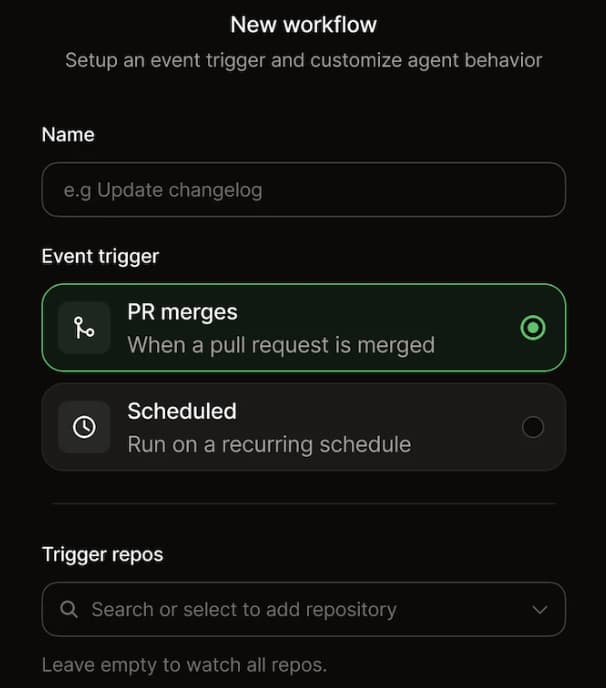
Teams can also use Mintlify Workflows to run the Agent on a schedule or when a repository is pushed. That gives startups a way to automate recurring maintenance tasks, documentation gap checks, and draft updates after product changes without assigning an engineer to handle each task manually.
Coding agents in the repository: Because Mintlify docs are MDX files with a docs.json config in Git, coding agents can read the repository, edit documentation files, and commit changes through the normal development workflow. With branch protection enabled, the agent opens a pull request for review before deployment. A CLAUDE.md file can define house style, front matter rules, and Git practices so that AI-generated edits follow the team's documentation standards.
The result is a documentation workflow that fits how startups already ship products. Engineers can document features in the same pull request as the code change, while Mintlify Agent can handle larger updates, recurring maintenance, and documentation tasks that need repository context. A small team can keep docs accurate without hiring a dedicated writer or assigning engineers to maintain the authoring infrastructure.
Documentation quality that grows with your startup
For a startup, documentation is often the first serious product experience a developer evaluates. The docs need to look complete, load quickly, explain the product clearly, and remain readable by the AI assistants developers use during research and implementation.
Mintlify helps small teams publish branded, AI-ready documentation with Git-based authoring, llms.txt, MCP support, and managed infrastructure from the start. A Mintlify documentation site can support a seed-stage team and continue to support later growth, so the company does not have to rebuild its docs as the product, audience, or contributor base expands.
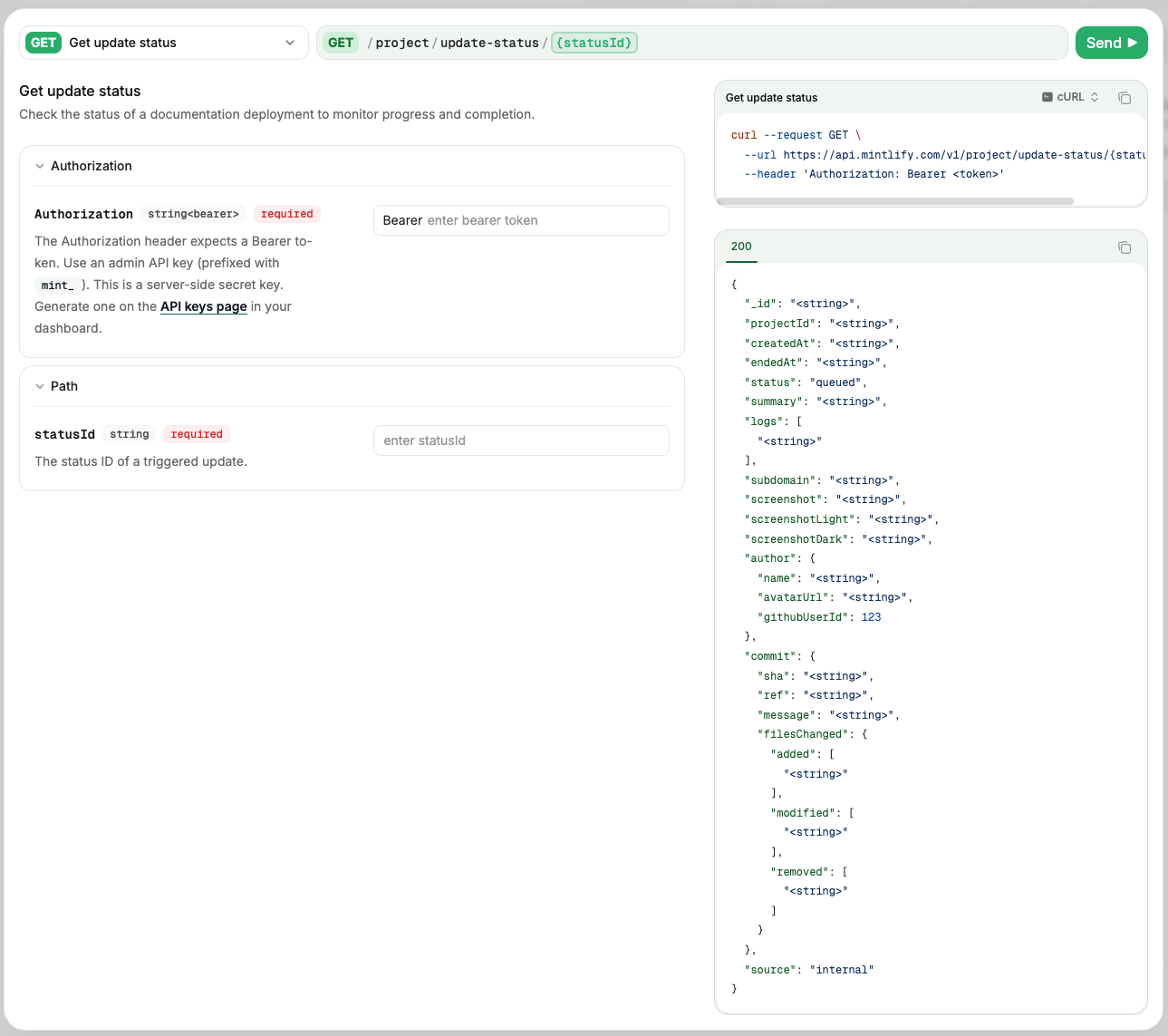
For API-first startups, Mintlify also supports OpenAPI-based API documentation, an interactive API playground, authentication settings, and generated SDK code examples. Developers can test endpoints inside the docs and move from reading to implementation without leaving the documentation experience.
Mintlify's analytics help teams see how visitors use the docs, what users search for, how readers interact with the assistant, and where feedback points to missing or unclear content. Startups can use that data to improve onboarding, API references, and high-friction pages as the product grows.
A startup competing for developer attention needs reliable documentation before the first sales call, demo, or support conversation. Startups such as Resend, CrewAI, and Dub run their docs on Mintlify.
When a startup should build its own
Building documentation in-house makes sense when the documentation experience is part of the product's value. A startup building a CMS, documentation tool, or developer tool where docs act as the live product demo may need deeper control over rendering, interactivity, and product-specific behavior.
A custom build can also make sense when the startup has a clear architectural requirement that a managed documentation product cannot support. When documentation architecture directly affects the product experience, owning the documentation stack can justify the engineering cost.
Most startups do not need that level of control. The bigger risk is spending engineer weeks on custom documentation infrastructure before the product, onboarding flow, and developer experience are mature. A startup can migrate away from Mintlify later if the documentation requirements outgrow the platform, but lost engineering time during the early product stage is harder to recover.
Start with the Mintlify Startup Program
For venture-backed startups, the Mintlify Startup Program removes the budget concern that often slows down documentation decisions. Eligible startups get 50% off Pro for one year. YC alumni get the same 50% off annual offer, while current YC companies get 12 months of Pro free.
Apply to the Mintlify Startup Program to launch startup documentation with docs-as-code, AI authoring, managed hosting, search, MCP support, and Git-based workflows in one system.
Frequently Asked Questions
How fast a startup can get docs live
A startup can connect its repository and deploy documentation in minutes, then spend the rest of the week improving content, examples, and onboarding. A custom build usually takes longer because an engineer has to choose a framework, theme the site, configure search, set up CI, and prepare the AI-readability layer before the docs are useful.
Will a startup outgrow Mintlify
Mintlify supports startups from early-stage through later growth, so the same documentation system can continue as the product, team, and developer audiences expand. A startup can still migrate later if its documentation requirements become unusually custom, but building a full docs stack too early usually costs more engineering time than a young team can spare.
Can engineers keep their Git workflow
Mintlify stores documentation in Markdown and MDX in the repository, so engineers can update docs via pull requests, version control, and CI checks. The workflow stays close to the application code while Mintlify handles hosting, previews, search, and the supporting documentation infrastructure.
Can non-engineers contribute to the docs
Mintlify supports browser-based editing and collaboration workflows, so product, support, marketing, and developer relations teams can help improve documentation without working directly in Git. Engineering teams can still maintain review controls through pull requests and Git sync.
Can AI write and maintain documentation
Yes, with review. Mintlify Agent can research existing docs and connected repositories, draft or update content, run CLI checks, and open a pull request for review. The Agent does not commit directly to the main branch, so AI-generated documentation changes still move through the team's normal approval process.
Can coding agents write to the docs repo
Because Mintlify docs are MDX files with a docs.json config in Git, coding agents like Claude Code, Cursor, and Windsurf can read the repository, edit documentation files, and follow the same branch or pull request workflow used for code. A CLAUDE.md file can define house style, front matter rules, and Git practices so that agent-written updates stay consistent.
What the Mintlify Startup Program includes
The Mintlify Startup Program gives eligible venture-backed startups 50% off Pro for one year. YC alumni get the same offer, and current YC companies get 12 months of Pro free. The program helps early teams launch branded, AI-ready documentation without incurring the full platform cost at launch.
More to read
Best Docusaurus Alternatives in 2026
Docusaurus is a strong open-source framework for engineering teams that want full control over a React-based documentation site. The challenge starts when a ...
May 12, 2026Harkirat Chahal
Growth
Mintlify vs Docusaurus: Which Documentation Platform Should You Choose in 2026?
Docusaurus is a strong open-source choice for teams that want full React control, self-hosting, and the engineering capacity to maintain their own documentat...
May 12, 2026Harkirat Chahal
Growth