What is an API playground? How interactive API documentation works
Harkirat Chahal
Growth
Share this article
Harkirat Chahal
Growth
Share this article

An API playground lets developers authenticate, send requests, inspect live responses, and copy working code directly from API documentation. Learn how OpenAPI powers the experience, how requests are routed, and what to evaluate when adding a playground.
Without an API playground, a developer evaluating an API may need to copy a cURL snippet, find credentials, replace placeholder values, and switch to a terminal before seeing a real response. Each extra step creates another opportunity for the evaluation to stop before the first successful request.
Static API references still work for endpoints that should not execute from a documentation page, and standalone API clients, mock servers, and sandboxes serve different stages of development. An embedded API playground is most useful when developers need to move directly from understanding an endpoint to testing it in the same browser tab.
This guide explains how API playgrounds work, how specifications and request routing power them, what to evaluate, and how to add one to your API documentation. Mintlify generates interactive API references from an OpenAPI specification, giving developers a single place to authenticate, enter parameters, send requests, inspect responses, and copy working code.
What is an API playground?
An API playground is an interactive request builder embedded directly in API documentation. It lets developers configure and send real HTTP requests to a live API, then inspect the response on the same page that explains the endpoint's parameters and behavior.
Mintlify generates an interactive API playground from your OpenAPI specification, so the request fields, authentication inputs, parameters, and code samples come from the API definition itself. When the specification changes, Mintlify can regenerate the reference from the same source, helping keep the playground aligned with the API.
What a developer does inside an API playground
A typical playground guides the developer through the full request-and-response flow without requiring them to leave the API reference.
Select an endpoint: Navigation generated from the API specification organizes available operations by tag or resource, so the developer can open the endpoint they want to test.
Authenticate: The playground displays credential fields based on the API's security definitions, including API keys passed through headers, query parameters, or cookies, as well as bearer tokens and basic authentication.
Fill in parameters and the request body: Path parameters, query parameters, headers, and body fields appear as typed inputs with required fields clearly marked. Nested objects and arrays can expand into their own field groups.
Send the request: With the required values in place, the playground assembles the HTTP request and sends it to the base URL defined in the API specification.
Inspect the response: The returned status code, headers, and body appear directly on the page. Mintlify renders the response based on its Content-Type, so supported images, audio, and video appear in the right formats rather than as raw output.
Copy working code: The playground can generate request examples in configured languages using the values entered for the request, turning a successful test into code developers can carry into their implementation. Mintlify also supports adding SDK-specific code samples when the API is primarily consumed through an SDK.
API playground compared with a static API reference
A static API reference documents the API contract, including endpoints, parameters, authentication requirements, request formats, and expected responses. An API playground lets developers execute those requests from the same page.
If the documented behavior is unclear, developers can send the request directly from the reference and compare the live result with the documentation. The returned status code, headers, and response body show what the API actually did, making incorrect assumptions or documentation gaps easier to spot.
For endpoints that should stay non-interactive, such as internal APIs or operations that shouldn't be triggered from a documentation page, Mintlify's simple playground display keeps the endpoint visible and copyable without exposing the request builder.
How an OpenAPI specification powers an interactive API playground
An OpenAPI playground is generated from the API definition rather than maintained as a separate interface. Each request field, authentication option, server URL, and example maps back to the OpenAPI specification, so the specification's quality directly affects what developers see and can test. Mintlify supports OpenAPI 3.0 and 3.1 specifications in JSON or YAML.
Endpoint definitions and parameter schemas: The paths object defines the available operations, HTTP methods, and parameters, including their types, formats, required status, and descriptions. The playground turns these definitions into request inputs, so a parameter with a clear description gives developers more context than a field defined only by its type.
Server and base URL definitions: The servers field tells the playground where to send requests. Multiple server URLs appear as a dropdown, which helps developers switch between environments. Without a server URL, the playground cannot send a live request and falls back to simple display mode.
{
  "servers": [
    {
      "url": "https://api.example.com/v1"
    }
  ]
}
Authentication methods: The securitySchemes component defines how users authenticate, and the security field applies the configured scheme to the relevant operations. Mintlify generates the corresponding authentication inputs for API keys passed through headers, query parameters, or cookies, as well as bearer tokens and basic authentication.
{
  "components": {
    "securitySchemes": {
      "bearerAuth": {
        "type": "http",
        "scheme": "bearer"
      }
    }
  }
}
Examples and response schemas: Schema examples can prefill request values, giving developers something concrete to test, and response schemas show the expected response structure before a request is sent. The x-default extension can prefill authentication fields for apiKey and HTTP bearer schemes. For other schema properties, x-default is applied when api.examples.prefill is set to true.
File uploads: OpenAPI 3.1 specifications can describe uploaded files as string schemas with a binary contentMediaType. The playground recognizes these definitions as file inputs and sends the selected files in multipart/form-data requests.
AsyncAPI schemas for event-driven endpoints: REST-style request and response flows do not cover every API. For WebSocket APIs, Mintlify can generate reference pages from an AsyncAPI schema, extending the interactive reference to connection-oriented endpoints alongside REST APIs.
How an API playground sends requests
An API playground sends real requests to the API, so the request path affects security, authentication, and the configuration required on the API side. Mintlify provides two ways to handle these calls through its API playground settings.
Proxied requests: By default, Mintlify routes playground requests through its proxy servers because proxy is set to true. This avoids requiring browser-side CORS configuration for the API. Teams using a reverse proxy in front of a custom docs domain should make sure it permits playground traffic to Mintlify’s request endpoint, since blocking the required request method will prevent calls from completing.
Browser-direct requests and CORS: Setting proxy to false sends the request directly from the developer’s browser to the API. This can be necessary when authentication depends on the browser or when the API requires headers that the proxy cannot forward. The API must then accept cross-origin requests from the documentation site, including the required origins, methods, headers, and preflight requests.
Credential handling: For browser-direct requests, the credentials setting determines whether browser-managed cookies, authorization headers, and TLS client certificates are included. It defaults to false and applies only when the proxy is disabled, making it relevant for APIs using cookie-based sessions or similar browser-managed authentication.
Sandbox and production environments: The OpenAPI servers array determines where playground requests go. Putting a sandbox URL first makes it the default environment and still lets developers select production when needed. A sandbox is particularly useful for APIs where a test request could charge money, provision infrastructure, send messages, or trigger another real-world action.
Controls for destructive endpoints: Teams can keep an API reference public without making every operation executable. Mintlify’s auth display mode limits the interactive playground to authenticated users, and combining it with group-based authentication can further restrict access to specific users.
{
  "paths": {
    "/admin/users": {
      "post": {
        "summary": "Create admin user",
        "x-mint": {
          "metadata": {
            "playground": "auth",
            "groups": ["admin"],
            "public": true
          }
        }
      }
    }
  }
}
For operations that should not appear in the generated reference, x-hidden removes the endpoint page.
The role of API playgrounds in evaluation and onboarding
API playgrounds are useful at two early stages of the developer journey. During evaluation, they help developers confirm that the API works for their use case before committing to an integration. During onboarding, they provide a working request that developers can use as the starting point for implementation.
Reach the first successful request faster: Before investing in an integration, developers often want to confirm that they can authenticate, send a valid request, and receive the expected response. A playground keeps the endpoint description, credentials, parameters, and request execution on one page, removing much of the setup required for that first call.
Evaluate the API before building: Developers can inspect response structures, verify field names against their own data model, and test edge cases against the live API before setting up a separate client or application.
Find unclear documentation earlier: A failed playground request can reveal confusing parameter names, undocumented required fields, or error messages that do not explain what went wrong. In Mintlify, individual playground parameters have anchor links, so developers and support teams can share a direct link to the field causing the problem.
Move from testing to integration: Once a request succeeds, developers can lift the generated code into their application as a tested starting point. API teams that provide SDK examples can take this further by showing language-specific client code alongside the endpoint, reducing the work required to translate a raw HTTP request into the SDK a developer actually uses.
Mintlify powers the API documentation for Anthropic, Resend, and Perplexity, where endpoint references are paired with quickstarts, code samples, and response examples that help developers move from evaluation into implementation. Mintlify’s guide to API documentation examples breaks down how these documentation experiences handle authentication, quickstarts, references, code samples, and responses.
What to evaluate in an API playground
A playground can look polished and still create problems during real API use. A useful test is whether developers can authenticate, build realistic requests, understand responses, recover from failures, and keep using the playground as the underlying API changes.
Authentication support: Confirm that the playground supports the authentication methods your API actually uses, including API keys in headers or query parameters, bearer tokens, and basic authentication. Custom authentication deserves extra attention because a request builder that cannot reproduce the real authentication flow will fail before developers can meaningfully test the endpoint.
Generated code samples: Check which languages are available, how optional parameters are handled, and whether generated examples can be replaced with manually written ones when needed. In Mintlify, api.examples.languages controls the languages shown, defaults determines whether optional parameters appear, and autogenerate can be disabled so only manually supplied x-codeSamples or <RequestExample> examples remain.
{
  "api": {
    "playground": {
      "display": "interactive"
    },
    "examples": {
      "languages": ["curl", "python", "javascript"],
      "defaults": "required",
      "prefill": true
    }
  }
}
Request and response clarity: Test more than a simple endpoint. Deeply nested request bodies, arrays, and multi-level objects reveal whether the request form stays readable as the schema grows more complex. The response should also be easy to scan without forcing developers to untangle a large block of unstructured output.
Realistic example data: Prefilled values are most useful when they resemble data developers would actually send. Meaningful identifiers, email addresses, enum values, and request bodies make the playground easier to understand than placeholders such as string or foo. Because these values come from schema examples, improving them starts in the API specification.
Error handling: Send an intentionally invalid request and inspect what comes back. Developers should be able to see the status code, error body, and enough request context to understand what failed. A playground that explains only successful responses leaves developers without useful guidance when integration problems begin.
Specification synchronization: Check how API changes reach the generated reference. A specification stored in the documentation repository can redeploy with a Git push, but a specification hosted at an external URL doesn't trigger that deployment event. Mintlify recommends calling its Trigger deployment endpoint from the same CI workflow that updates the hosted specification so the reference does not fall behind the API.
Access control: Test who can view the reference, who can execute requests, and whether those restrictions work at the endpoint level. Also check what users can access outside the rendered page. Mintlify notes that downloaded OpenAPI specifications are not filtered by authentication groups, so authenticated users who can download the specification may receive endpoints outside the subset shown to their group.
API playgrounds compared with API clients, mock servers, and sandboxes
| Tool | What it does | Best used for | Typical user | Calls a live API? | What it requires |
|---|---|---|---|---|---|
| API playground | Lets developers configure and send requests directly from the API documentation | API evaluation and onboarding | Developers reading the docs | Yes | A valid API specification with a servers entry |
| API client | Stores and organizes requests, environments, credentials, collections, and test scripts | Building and debugging an active integration | Developers implementing the API | Yes | An installed client, API credentials, and request configuration |
| Mock server | Returns predefined responses from an API specification or fixture set without using the real backend | Pre-release development, testing, and partner integration | Developers, partner teams, and QA | No | An API specification or fixture set |
| Sandbox | Provides an isolated API environment with test credentials and data | Safely testing real workflows with side effects | Developers testing payments, messaging, provisioning, or similar operations | Yes, against a non-production environment | A separate environment and test data |
A typical workflow may use all four at different points. Developers can test an endpoint in the playground, point it to a sandbox for safe live requests, move successful calls into an API client during implementation, and use a mock server when the real backend is not yet available. For teams deciding where to publish an interactive reference, Mintlify’s guide to API documentation platforms covers the available options in more detail.
Adding an API playground to your documentation
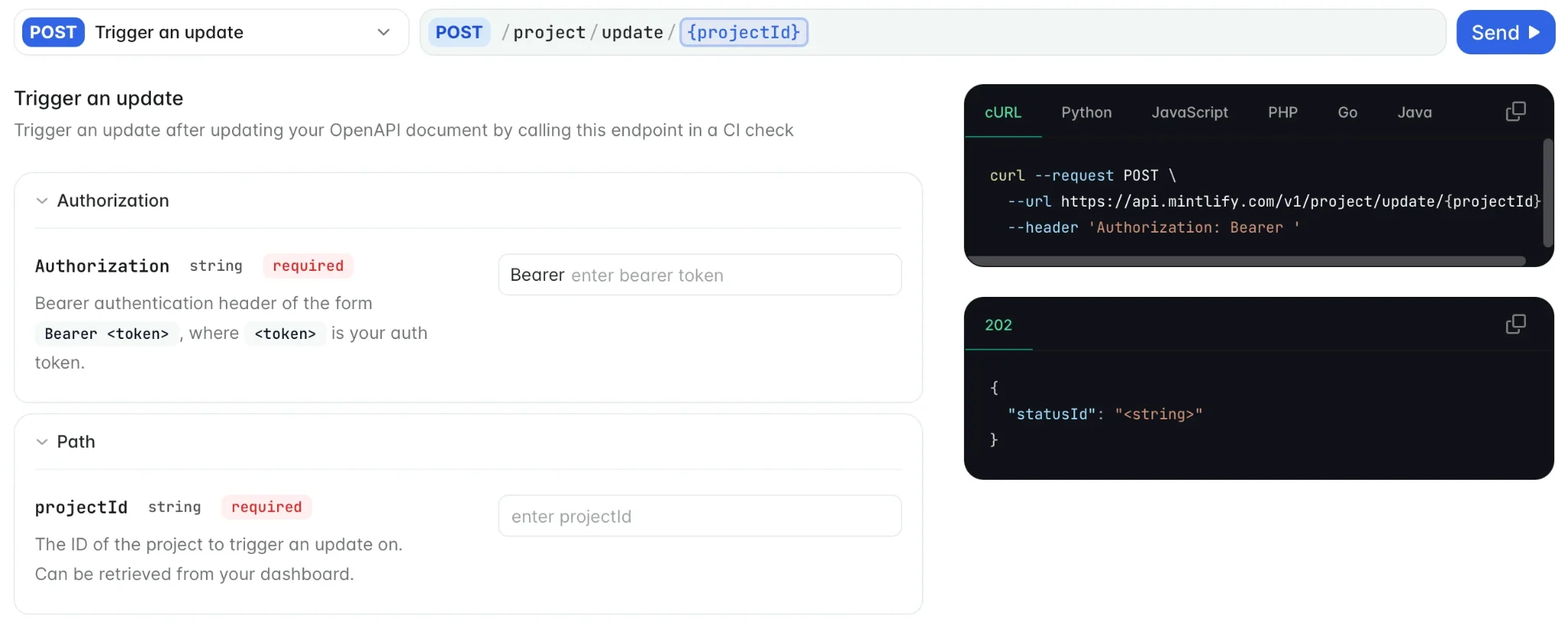
Mintlify can generate the playground from the same OpenAPI specification that defines your API reference. The setup involves validating the specification, connecting it to your documentation, and configuring how developers can interact with the generated endpoint pages.
Step 1: Validate your OpenAPI specification
Start with a valid OpenAPI 3.0 or 3.1 file in JSON or YAML. Check that the specification includes a servers entry for the request destination and the required securitySchemes definitions for authentication. Mintlify’s mint validate command can validate the documentation build and referenced OpenAPI specifications before deployment.
Step 2: Connect the specification to your documentation
Reference the OpenAPI specification from the appropriate navigation element in docs.json. You can generate pages for every endpoint in the specification or limit the reference to selected operations. The OpenAPI setup guide covers multiple specifications, specification inheritance, and per-endpoint customization with x-mint.
Step 3: Configure the playground experience
Choose how developers should interact with the generated reference, including the display mode, code sample languages, example prefilling, and request routing. Keep proxying enabled unless the API needs browser-direct requests and is configured to handle CORS.
Once the specification is connected, Mintlify uses its endpoint definitions to generate the reference pages and interactive request experience. Specifications stored in the documentation repository can stay aligned with the reference through the normal deployment process.
Start building your API reference with Mintlify →
FAQs: What Is an API Playground and How Interactive API Documentation Works (2026)
What is the difference between an API playground and Swagger UI?
Swagger UI is a standalone interface for exploring and testing an OpenAPI specification. An API playground serves a similar testing purpose but can live inside a broader documentation site, so developers can move between guides, endpoint references, search, authentication, and live requests without switching tools.
Does an API playground need an OpenAPI specification?
Not always, but an OpenAPI specification is the most practical way to generate and maintain one. Mintlify can also create API reference pages from configuration in docs.json, and AsyncAPI can be used for WebSocket documentation. Using a specification keeps the interactive reference tied to the same source that defines the API.
Are API playground requests sent to production?
Only if the configured server points there. Teams can make a sandbox or staging environment the default and leave production as an optional selection, which is safer for APIs that create charges, send messages, provision resources, or otherwise change real data.
Can you restrict who uses the API playground?
Yes. The documentation page can remain visible while request execution is limited to authenticated users or specific groups. For endpoints that should never be executable from the docs, the playground can be switched to a non-interactive display mode.
How do API playground code samples stay accurate?
Generated samples stay accurate when the API specification and published documentation stay synchronized. If the specification lives in the docs repository, updates can flow through the normal deployment process. If it is hosted elsewhere, the deployment needs to be triggered when the specification changes so the examples don’t lag behind the API.
More to read

The Complete Guide to Quick Start Guides for Software Products
Learn how to create software quick start guides that take new users from setup to a verifiable first success, with examples and maintenance best practices.
September 11, 2026Harkirat Chahal
Growth

Troubleshooting Guide Best Practices for Software Companies
Learn how to write troubleshooting guides with symptom-based diagnosis, safe recovery steps, clear escalation paths, and ongoing maintenance.
September 11, 2026Harkirat Chahal
Growth