SDK documentation best practices: from quickstart to migration guides
Harkirat Chahal
Growth
Share this article
Harkirat Chahal
Growth
Share this article

How to document an SDK beyond the API reference: pair generated SDK references with task-based guides for installation, authentication, error handling, and upgrades, test code samples against supported versions, and publish guides and references together so developers and AI agents find everything in one place.
Teams invest time and resources in SDKs to make their APIs easier to use, but the same care often doesn't go into the accompanying SDK documentation. This means developers can look up every method in the reference and still not know how to get your SDK working.
Good SDK docs pair technical references with task-based guides and working code examples, so developers can get their integrations running without digging through source code or GitHub issues. This guide explains what that looks like, with real examples and best practices for keeping your docs accurate as the SDK changes.
Key points for SDK documentation
- Pair generated SDK references with task-based guides for core tasks like installation and authentication so that developers can go from setup to a working integration as quickly as possible
- Test code samples against supported SDK versions to catch outdated or broken examples
- Use Mintlify to publish generated SDK references and task-based guides together, so developers and AI agents find instructions and technical details in one place
What is SDK documentation?
An SDK wraps an API in language-specific libraries and tools, so developers can call methods instead of building HTTP requests by hand. SDK documentation is the collection of resources that helps developers build applications and integrations with an SDK.
These docs include two main categories of content: SDK references (technical specifications) and SDK guides (task-based instructions) that cover everything from getting started to migrating between versions.
| Doc type | What it includes |
|---|---|
| SDK reference | Classes, methods, functions, parameters, return types, and exceptions |
| Getting-started guides | Installation, configuration, authentication, and a first working example |
| Tutorials and use-case guides | Step-by-step instructions for completing specific tasks |
| Code samples and example projects | Working code snippets and sample applications |
| Error handling and troubleshooting | Common errors, SDK-specific exceptions, and solutions |
| Changelogs and migration guides | Updates, breaking changes, deprecations, and upgrade instructions |
For example, SDK docs might show a Python developer how to create a customer record by calling the SDK's create_customer() method. The API reference for the underlying API would show the HTTP endpoint that method calls, along with its required parameters and response format.
Together, these resources help developers understand how to complete a task with the SDK and check the API's requirements when they need more detail. For a look at how other teams present the API side, see these API documentation examples.
Why the API reference isn't enough
An API reference explains how individual API requests work, but it doesn't show developers how to complete tasks using the SDK.
API references typically leave out practical instructions such as:
- How to install and configure the SDK
- How to authenticate using the SDK
- How to manage errors and troubleshoot problems
- How to upgrade when the SDK changes
- How to complete tasks involving multiple SDK methods
A developer might find the right API endpoint in the reference but still not know how to initialize the SDK client or pass in their credentials. When the first request fails with an authentication error, nothing in the reference explains why, so they're left reading source code to work out what the SDK expects.
The step-by-step instructions and working examples in SDK guides supplement the API reference, so developers can finish their integrations without piecing together instructions from multiple sources.
How to document an SDK
To document an SDK, cover the four areas where developers most often get stuck: installation, authentication, error handling, and upgrades between versions. Each section below explains what to include, with steps and examples from the OpenAI and Stripe SDKs.
Installation and quickstart
A quickstart should move developers and AI agents from an empty project to a first successful request as quickly as possible.
Step 1: Give developers the installation command for each supported package manager, along with the requirements they need to meet first, such as:
- Supported language versions
- Dependencies
- Operating system or platform requirements, if applicable
Step 2: Explain any setup needed before the first request, such as getting an API key. Then show how to initialize the SDK client and call a method.
The OpenAI Python SDK README provides a useful example. It includes a pip install command and a basic usage example showing how to create a client and make a request.
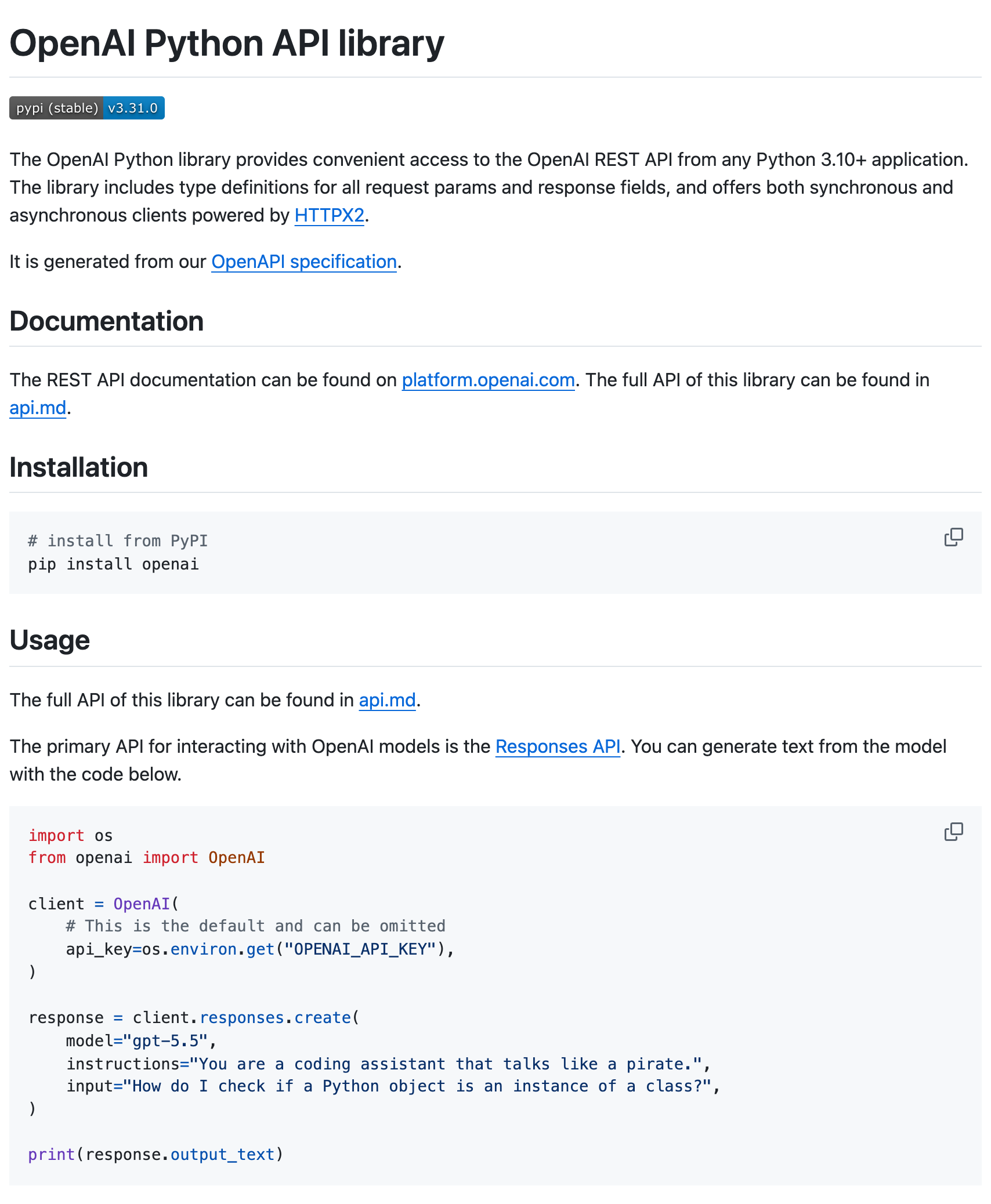
The OpenAI Python SDK README shows the supported Python version, the install command, and a first request. From the OpenAI Python SDK README.
Step 3: Show the expected result. A successful response gives developers something to check against their own output.
Note: Keep advanced configuration in separate guides. Someone trying the SDK for the first time shouldn't have to work through every available client option before making a request.
Authentication and configuration
Authentication and configuration guides should explain how developers pass credentials to the SDK and control how it connects to the API.
Step 1: Show developers how to obtain the credentials required to access the API and provide them to the SDK client. List any scopes or permissions those credentials need.
The Stripe Node.js SDK README is a good example of how to walk developers through authentication. It points readers to the Stripe Dashboard for their secret key, then shows how to pass the key to the client and make a first request.
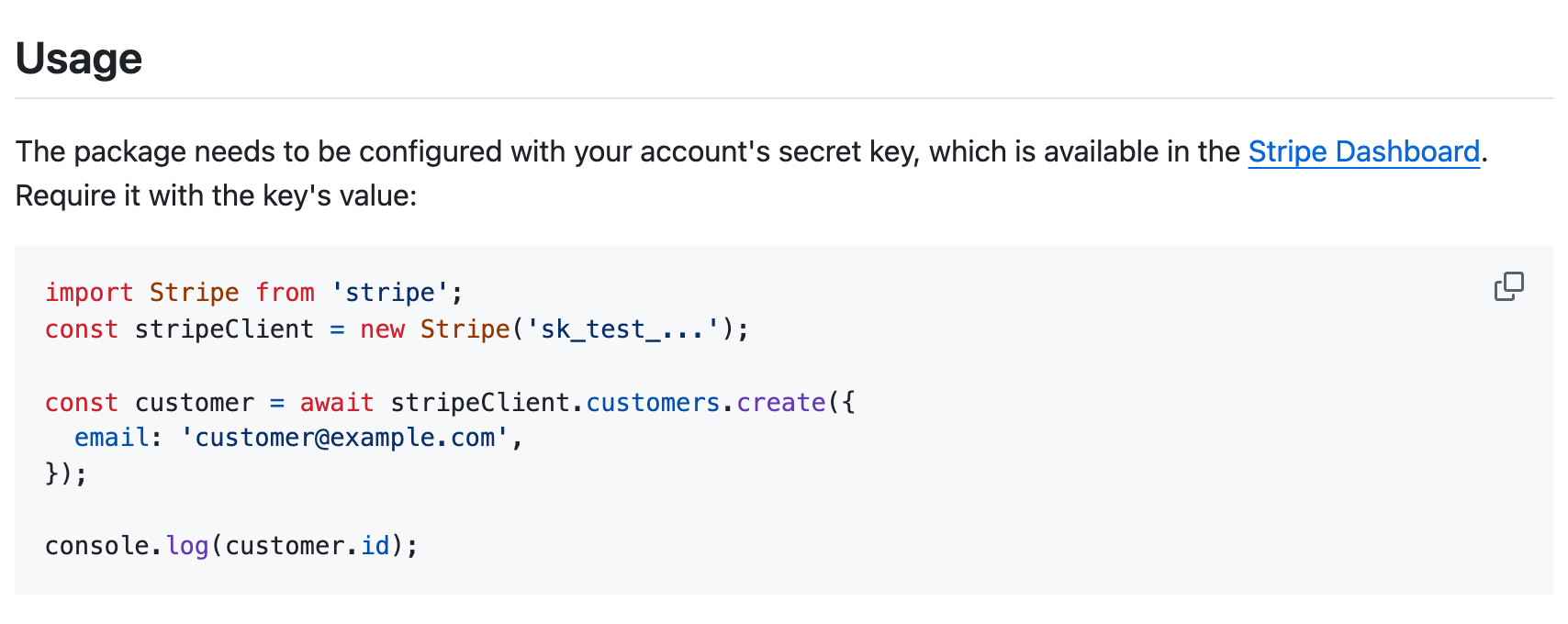
The Stripe Node.js SDK README shows where to find a secret key and how to initialize the client with it. From the Stripe Node.js SDK README.
If the SDK supports token refresh, document whether it handles expired tokens automatically or requires the application to refresh them.
Step 2: Explain the configuration. Document the SDK's commonly used settings, which may include:
| Setting | What it controls |
|---|---|
| Base URL | Which API server the SDK connects to |
| Request timeout | How long the SDK waits for a response |
| Environment | Whether requests go to a test or production environment, if supported |
Step 3: Include working code examples and security guidance. Use the SDK's actual methods and settings in your examples. Show developers how to read credentials from environment variables (where applicable) and explain how to keep secret keys out of source code.
Make sure authentication and configuration examples match the SDK's language and version because implementation details can vary.
Error handling and troubleshooting
Documentation for error handling and troubleshooting should tell developers how to respond when an SDK operation fails, and how to diagnose and fix problems.
Step 1: Document how the SDK handles errors. Identify the errors developers are likely to encounter, including authentication failures, invalid parameters, timeouts, and rate limits. For each error, explain what causes it, how it appears in the SDK, and what developers should do to fix it. Include actual exception names or error messages where possible.
For example, if a developer receives an HTTP 429 response because they've exceeded an API's rate limit, an SDK guide needs to answer questions such as:
- Which exception will their code receive?
- Does the SDK retry automatically?
- Which errors trigger automatic retries?
- What happens when those retries fail?
- Can developers change the retry settings?
For operations that create or update data, explain how developers can avoid duplicate requests when retrying.
The OpenAI Python SDK documents SDK exceptions, retries, and timeouts. Its error-handling example shows developers how to catch particular exceptions in Python.
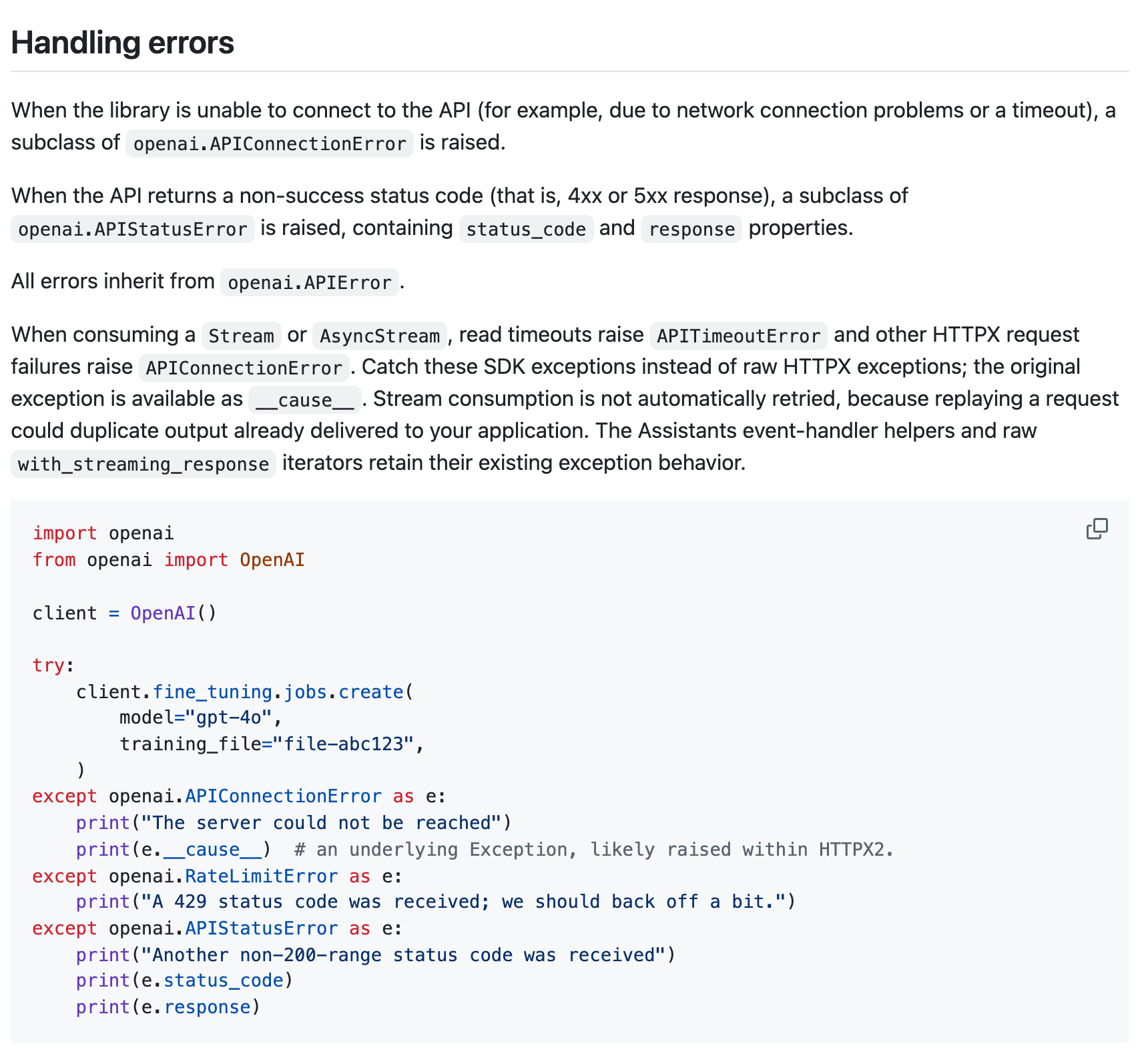
The OpenAI Python SDK error-handling example. From the OpenAI Python SDK README.
Step 2: Document how to troubleshoot SDK problems. Cover dependency and configuration issues, along with any other problems that could prevent the SDK from working. For each problem, explain how developers can identify the cause and resolve it. If the SDK fails to initialize because an API key is missing, include the command developers can use to check whether the required environment variable is set.
Versioning, changelogs, and migration guides
SDK documentation needs to explain what changes between releases, how developers should update their integrations, and where to find instructions for the version they're using.
Step 1: Maintain a changelog. Record the changes introduced in each SDK release and identify the affected version so developers can determine which updates apply to them.
Changes may include:
- New features
- Bug fixes
- Deprecations
- Breaking changes
Step 2: Write migration guides that show developers how to update their code after breaking changes.
For example, when an SDK release renames a method, include:
- The SDK version that introduced the change
- The old method and its replacement
- Before-and-after code examples
- Any changes to parameters or return values
If upgrading also requires changes to client configuration or dependencies, explain those as well. For a full walkthrough of deprecation timelines and migration guides on the API side, see our API deprecation guide.
The Stripe Node.js SDK v22 migration guide groups each breaking change under its own heading and pairs it with before-and-after code, so developers can find the changes that affect them and see exactly what to update.
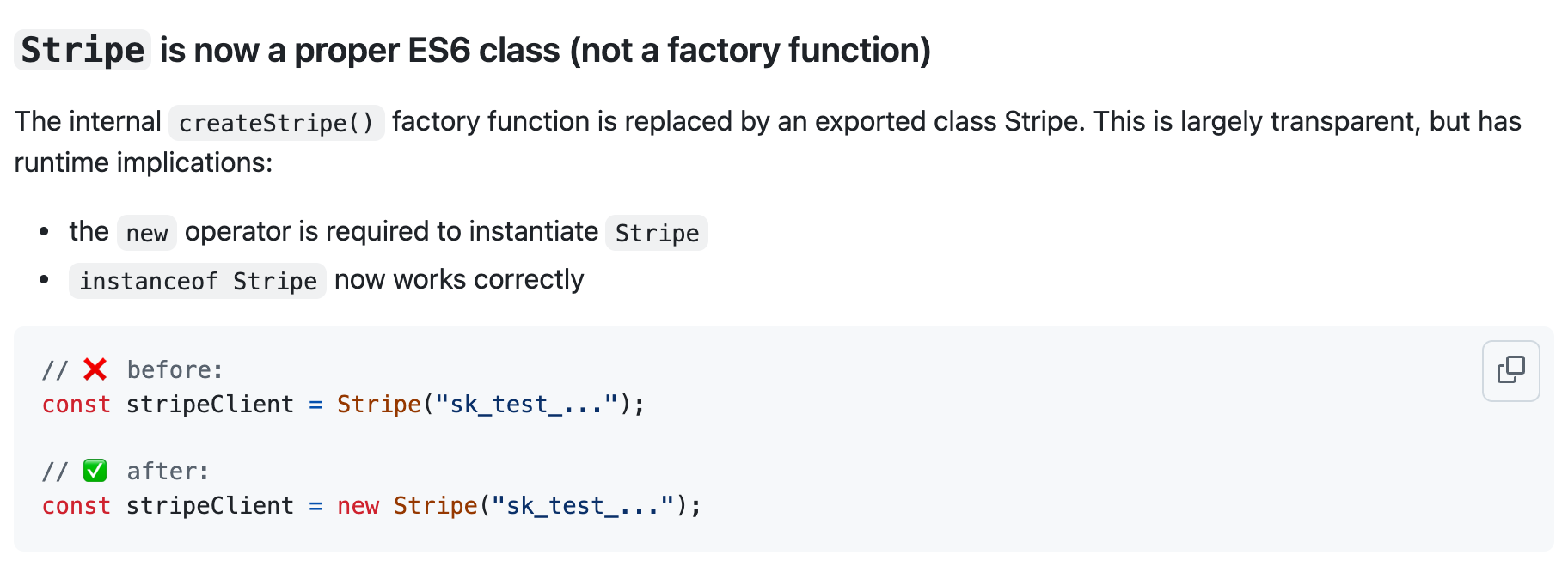
The Stripe SDK migration guide shows a breaking change and the updated code. From the Stripe Node.js SDK v22 migration guide.
Step 3: Make version-specific docs accessible. Keep documentation for older SDK versions available while those versions are supported. Label them clearly so developers maintaining existing integrations don't accidentally follow instructions for a newer release.
For instance, the stripe-node wiki lists each major SDK version alongside the API version it uses and links to the matching changelog or migration guide, so developers can find the right instructions for the version they're on.
SDK documentation best practices
Help your developers find accurate instructions and get their integrations working faster by following these best practices.
Keep SDK guides and references in sync
Update SDK guides, tutorials, and code examples whenever changes to the SDK affect their accuracy. Generated references usually update with the SDK, but guides don't, so they're the most likely to fall out of date. Git-based documentation workflows can help teams manage documentation changes alongside code updates.
Test code examples
Test code samples against the SDK versions they claim to support and include examples in automated tests when possible. For example, a continuous integration (CI) workflow can install the documented SDK version and run code samples against a test environment to catch examples that no longer work.
Organize guides around developer tasks
Organize SDK guides and tutorials around developer tasks, using headings such as "Configure authentication" or "Handle rate limits" so developers can find the instructions they need. Link to the relevant SDK reference pages so developers can look up the methods used in your examples.
Provide examples for each supported language
Give developers runnable examples in the language they're using. Use tabbed code examples to let readers switch between supported languages and see how to complete the same task with each SDK.
Make docs accessible to AI agents
Structure your SDK docs so AI coding agents can find and read accurate instructions and code examples. Keep the content current and clearly identify which SDK language and version it applies to. An llms.txt file and an MCP server give agents a direct way to find and query your docs.
Publish SDK guides and references with Mintlify
Mintlify brings your SDK docs together on a single site, with task-based guides alongside generated SDK references, giving developers and AI agents one place to find instructions and technical details.
Instead of building reference pages by hand, you can import output directly from TypeDoc, DocFX, Javadoc, Sphinx, or phpDocumentor. Mintlify turns those classes, interfaces, modules, and functions into searchable, cross-linked pages automatically.
To show developers and agents how to make calls in practice, you can add SDK code snippets right on your API reference pages, either written by hand or synced automatically through Speakeasy.
Frequently Asked Questions
What's the difference between SDK docs and API docs?
API docs cover the API's endpoints, request formats, and usage. SDK docs show developers how to use a particular software development kit through practical instructions and language-specific examples.
Can SDK docs be generated automatically?
Tools can generate SDK reference pages from source code or docs output. Task-based guides, troubleshooting instructions, and migration examples require additional writing and review.
What should an SDK quickstart include?
An SDK quickstart should include installation requirements, the installation command, authentication setup, a working code example, and the expected result.
More to read

What is an API playground? How interactive API documentation works
Learn how API playgrounds turn OpenAPI specifications into interactive documentation, with live requests, authentication, responses, and code examples.
September 7, 2026Harkirat Chahal
Growth

Redocly alternatives: 6 better OpenAPI documentation tools in 2026
A comparison of six Redocly alternatives across OpenAPI ingestion, SDK support, hosting, AI readiness, and pricing, with guidance on which fits an API documentation program.
July 31, 2026Harkirat Chahal
Growth