Self-Hosted or Managed Documentation: When Open Source Is Worth the Work (and When It Isn't)
Harkirat Chahal
Growth
Share this article
Harkirat Chahal
Growth
Share this article
Open source documentation frameworks can work well when a team wants full control over the stack, but the larger cost appears after launch. This guide compares self-hosted and managed documentation across hosting, search, AI features, security, and maintenance ownership, and shows when each approach makes sense.
Open source documentation frameworks like Docusaurus, MkDocs, and Nextra can work well when a team wants full control over the documentation stack. The larger cost usually appears after launch, when engineers have to keep hosting, dependencies, previews, AI features, security updates, and deployment workflows running.
Self-hosting is worth the effort when the docs need custom product behavior, strict infrastructure control, or an environment that a hosted vendor cannot support. For teams that mainly need polished, searchable, AI-ready documentation, managed documentation usually makes better use of engineering time.
Mintlify handles the documentation setup for teams while keeping the Git-based workflow developers already use. Teams can publish branded docs quickly, keep content in MDX, connect a repository, use built-in search and AI features, and start for free without asking engineers to maintain the documentation infrastructure.
Self-hosted vs managed documentation ownership
A self-hosted documentation setup makes your team responsible for the systems behind the docs. Engineers configure the theme, set up search, manage hosting and SSL, patch dependencies, maintain deployment workflows, and support any AI features connected to the documentation.
A managed documentation platform moves those responsibilities to the vendor. The platform handles hosting, search, deployments, security updates, and AI infrastructure, while your team focuses on writing, organizing, and improving the documentation.
The ownership difference becomes clearer after launch. In a self-hosted setup, every search update, dependency patch, theme change, hosting issue, and AI feature update needs an internal owner. A skilled engineering team can make open-source docs look polished and work well, but maintaining that quality requires ongoing engineering effort.
For most teams, open source documentation tools are capable enough for the job. The decision they actually face is who owns the maintenance behind the documentation experience over time.
What self-hosting open source documentation requires
Choosing an open source framework and publishing a static site is only the first step in self-hosting documentation. Once documentation supports developers, AI tools, internal teams, and product updates, your team owns the systems that keep the docs searchable, accurate, secure, and usable over time.
Search and indexing: Your team needs to run full-text search, semantic search, filters, indexing, chunking, and result-quality checks. Documentation updates also require reindexing to keep search results accurate after new pages, API changes, or structural edits.
AI search and assistant infrastructure: An AI assistant needs retrieval, cited sources, hallucination checks, prompt evaluation, answer observability, and abuse prevention. Model behavior can change after provider updates, so your team also needs to retune prompts, rerun evaluations, and confirm that the assistant still answers using the correct documentation sources.
Sandbox and runtime security: A docs assistant that can answer technical questions may need a sandbox environment with package runtimes, toolchain support, kernel updates, CVE patching, and controls for data sent to language models. Prompt-injection protection, spam detection, and rate limiting also need continuous updates as abuse patterns change.
MCP and AI consumption: AI agents need structured access to documentation through an MCP server, scoped read and write permissions, llms.txt, llms-full.txt, skill.md, and one-click setup flows for tools such as Cursor and VS Code. Maintaining MCP compatibility becomes part of the documentation stack.
GEO and AI answer visibility: Documentation now competes for citations in tools such as ChatGPT, Claude, and Perplexity. A self-hosted setup requires ongoing work on content structure, metadata, and answer engine visibility so that AI systems can find, interpret, and cite the docs correctly.
Authoring and publishing workflows: A production-ready docs setup needs fast builds, branch-based previews, pull request workflows, deployment automation, reusable snippets, full MDX support, bidirectional Git sync, and validation before changes go live.
Agent-assisted documentation updates: If your team wants AI agents to draft, update, or validate documentation changes, self-hosting also requires workflows that connect agents to repositories, enforce review rules, run content checks, and create pull requests.
Content quality checks: Your team needs broken-link detection, accessibility checks, grammar and spelling checks, preview testing, and safeguards that catch documentation issues before publishing.
Visual editing and collaboration: A self-hosted stack may also need a visual editor for non-technical contributors, review workflows for writers, and publishing controls that allow product, support, and documentation teams to contribute without relying solely on Git.
Analytics and feedback: Strong documentation needs per-page analytics, reader feedback, search insights, and signals that show where users get stuck. In a self-hosted setup, your team has to build or connect those systems and keep the feedback loop usable.
Security, authentication, and compliance: Private docs, enterprise docs, and internal knowledge bases often need authentication, role-based permissions, SAML SSO, OIDC, SCIM, SOC 2 controls, dependency patching, and secure hosting operations.
One example Mintlify documented shows how quickly the work expands: a Fortune 500 team spent 500 developer hours and $80,000 building an internal static site generator. Even after that build, analytics, per-page feedback, caching, an API playground, a visual editor, authentication, an AI assistant, a hosted MCP server, integrations, agent editors, and self-updating docs were still unfinished.
Open-source tools can remove licensing costs, but they do not remove operating costs. The work moves into engineering time, and every capability your documentation needs has to be built, secured, connected, and maintained internally.
What Mintlify's managed platform handles for you
A managed documentation platform turns the build-and-maintain workload into a service. With Mintlify, your team gets the core systems a self-hosted setup would require engineers to build, connect, secure, and update over time.
Search, AI answers, and agent access
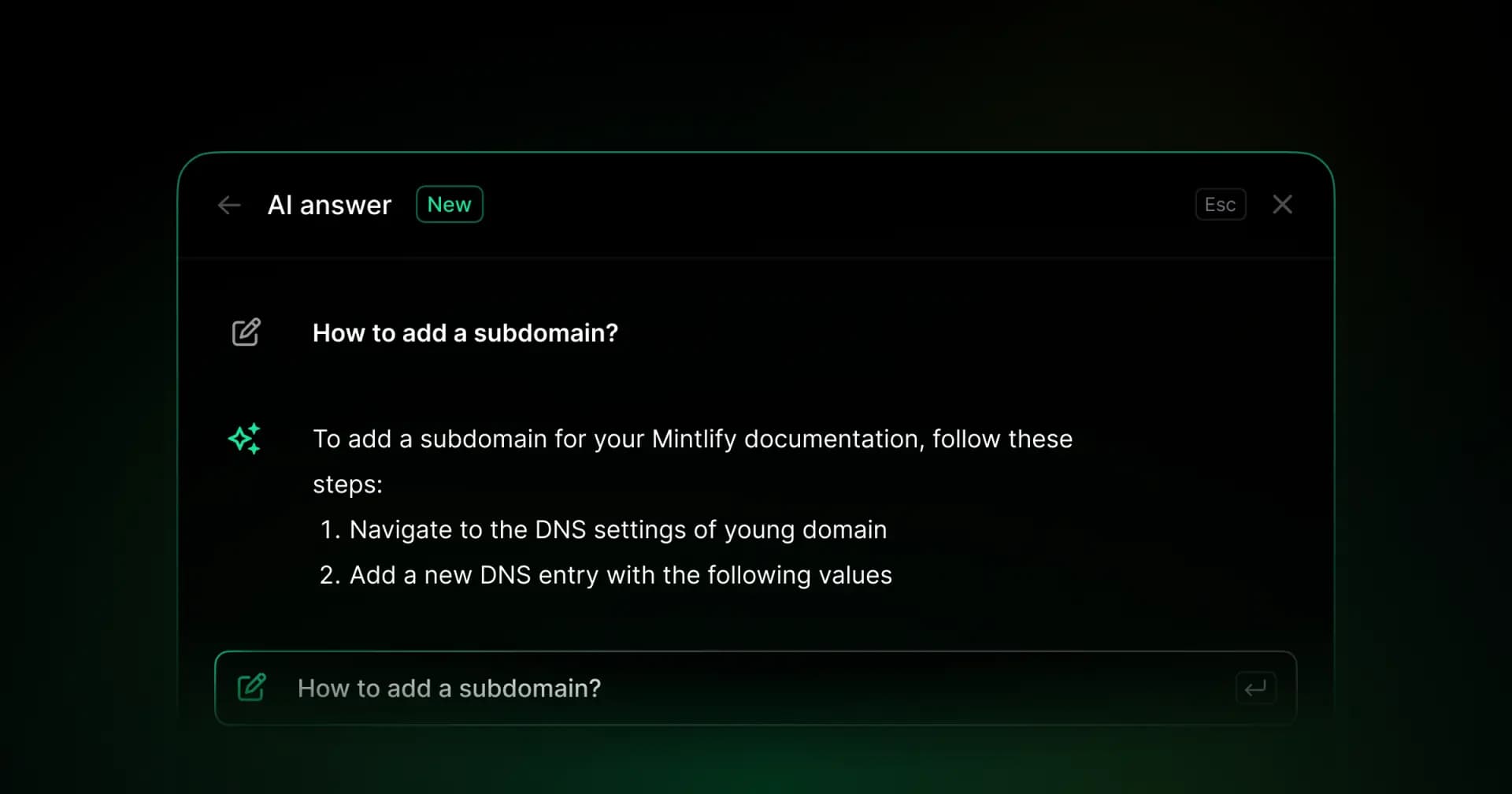
Built-in search updates as documentation changes, so your team does not need to maintain a separate indexing pipeline. Mintlify also includes an AI assistant with cited answers, a hosted MCP server, llms.txt, llms-full.txt, and skill.md support. The contextual menu gives readers direct options to open a page in ChatGPT, Claude, or Perplexity, and to install MCP in Cursor or VS Code. These options give humans and AI agents structured ways to find and use the same documentation.
AI agents and documentation workflows
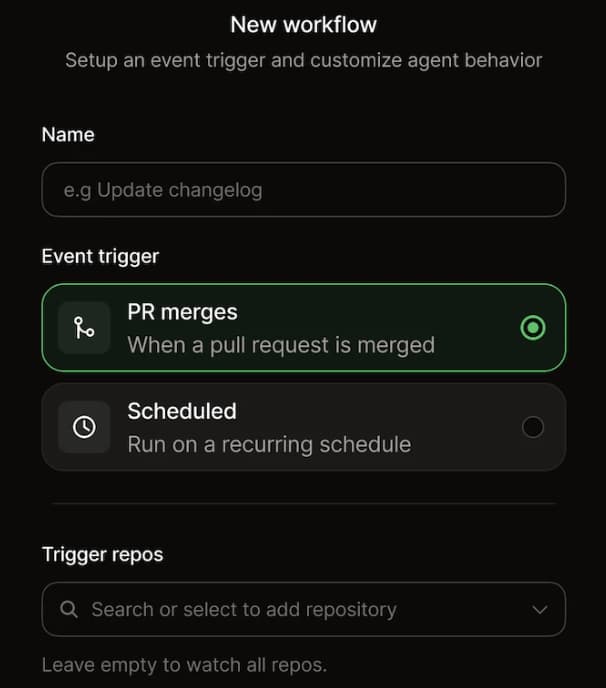
The Mintlify Agent can research existing docs and connected repositories, plan documentation updates, write or revise content, run checks, and open pull requests for review. Workflows can automate recurring documentation work, such as refreshing examples when an API changes. Agent-assisted updates still go through the same review process your team already uses, keeping automation useful without giving up editorial control.
Hosting, deployments, and previews
Teams can connect to a Git repository and publish documentation without managing servers, SSL, or custom deployment infrastructure. The GitHub integration deploys changes on push, creates pull request previews, and keeps publishing in sync with the review process that developers already use.
Design, components, and editing
The documentation site looks branded without a custom design project. Themes, fonts, custom domains, reusable components, MDX support, and white labeling cover the presentation layer. The visual editor gives writers and product teams a practical way to update pages without relying on engineers for every copy, layout, or content change.
API docs and product documentation workflows
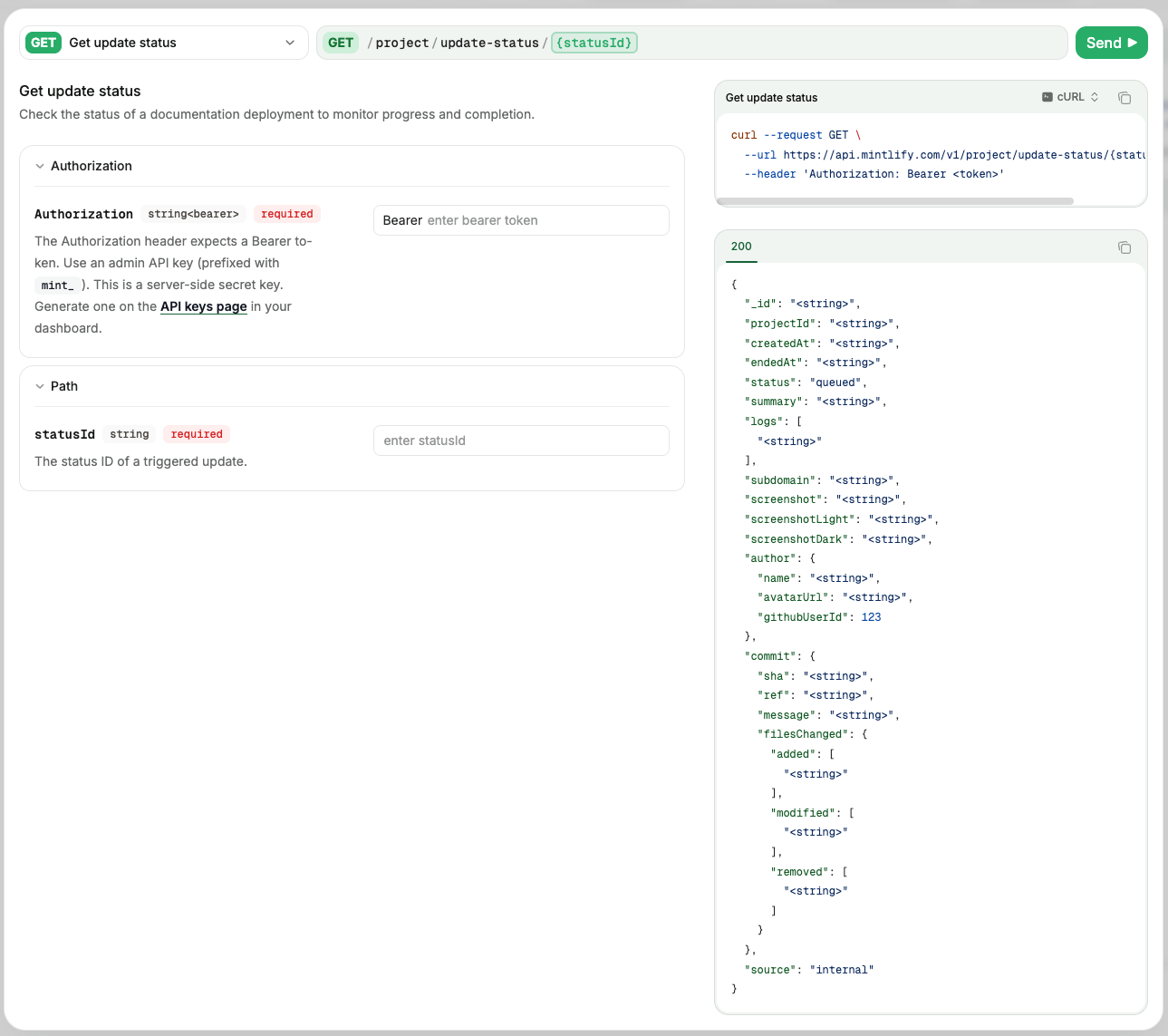
OpenAPI and AsyncAPI support, an API playground, reusable snippets, and product-connected workflows help teams keep guides and reference docs closer to the product. Readers can test endpoints, reuse examples, and move from conceptual documentation to API details without your team having to stitch together separate tools.
Analytics, AI traffic, and feedback
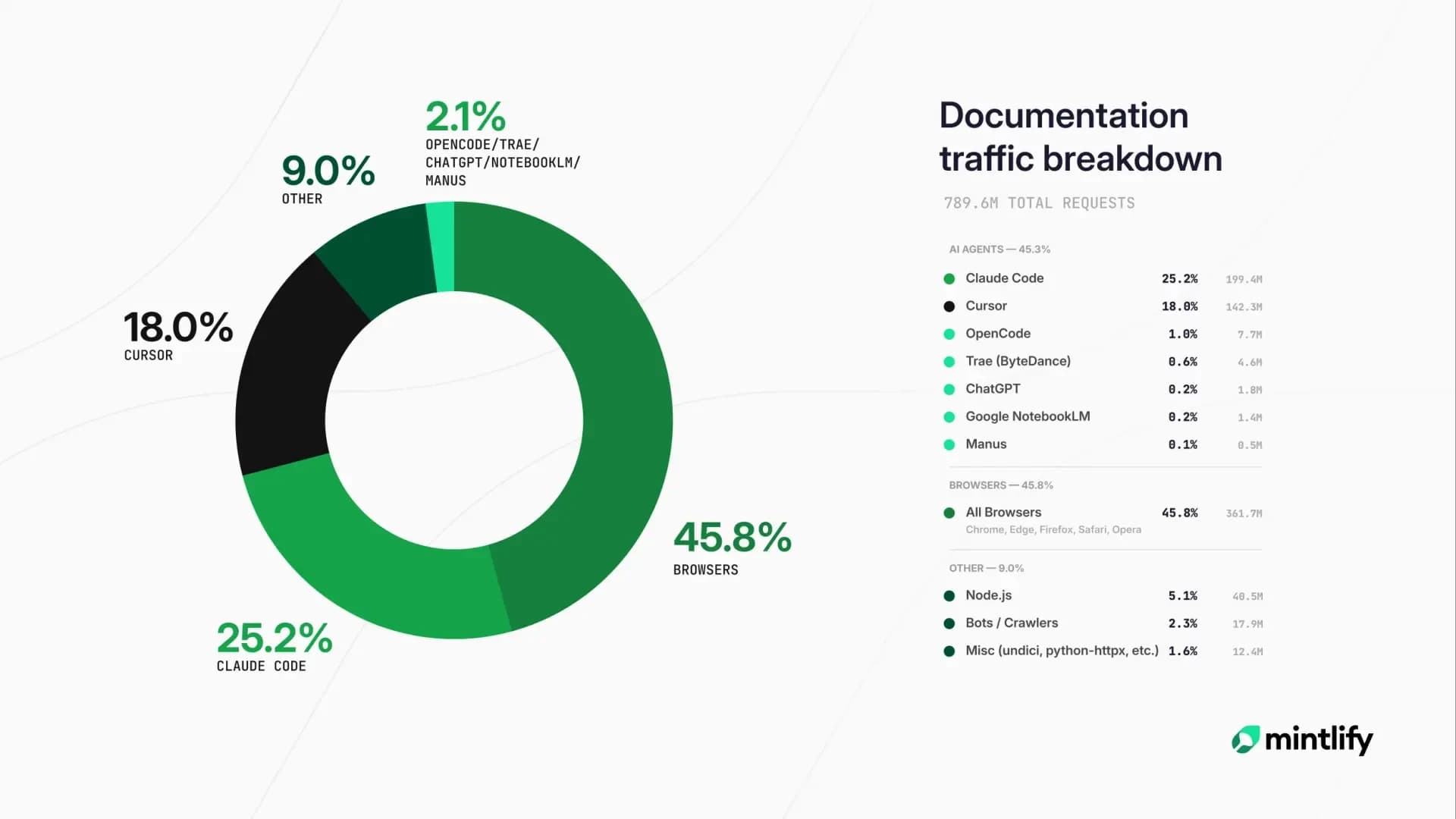
Mintlify gives teams visibility into how readers and AI agents use the docs. Documentation analytics, AI traffic insights, agent analytics, advanced insights, and per-page feedback help teams understand which pages get used, where readers struggle, how AI systems interact with the docs, and which content gaps need attention. Those signals make the feedback loop broader than page views alone.
Content quality and reliability
Broken-link checks, grammar checks, spelling checks, preview deployments, and content validation help teams catch issues before updates go live. These checks reduce the manual review workload and make it easier to maintain documentation quality as more people contribute.
Security and access control
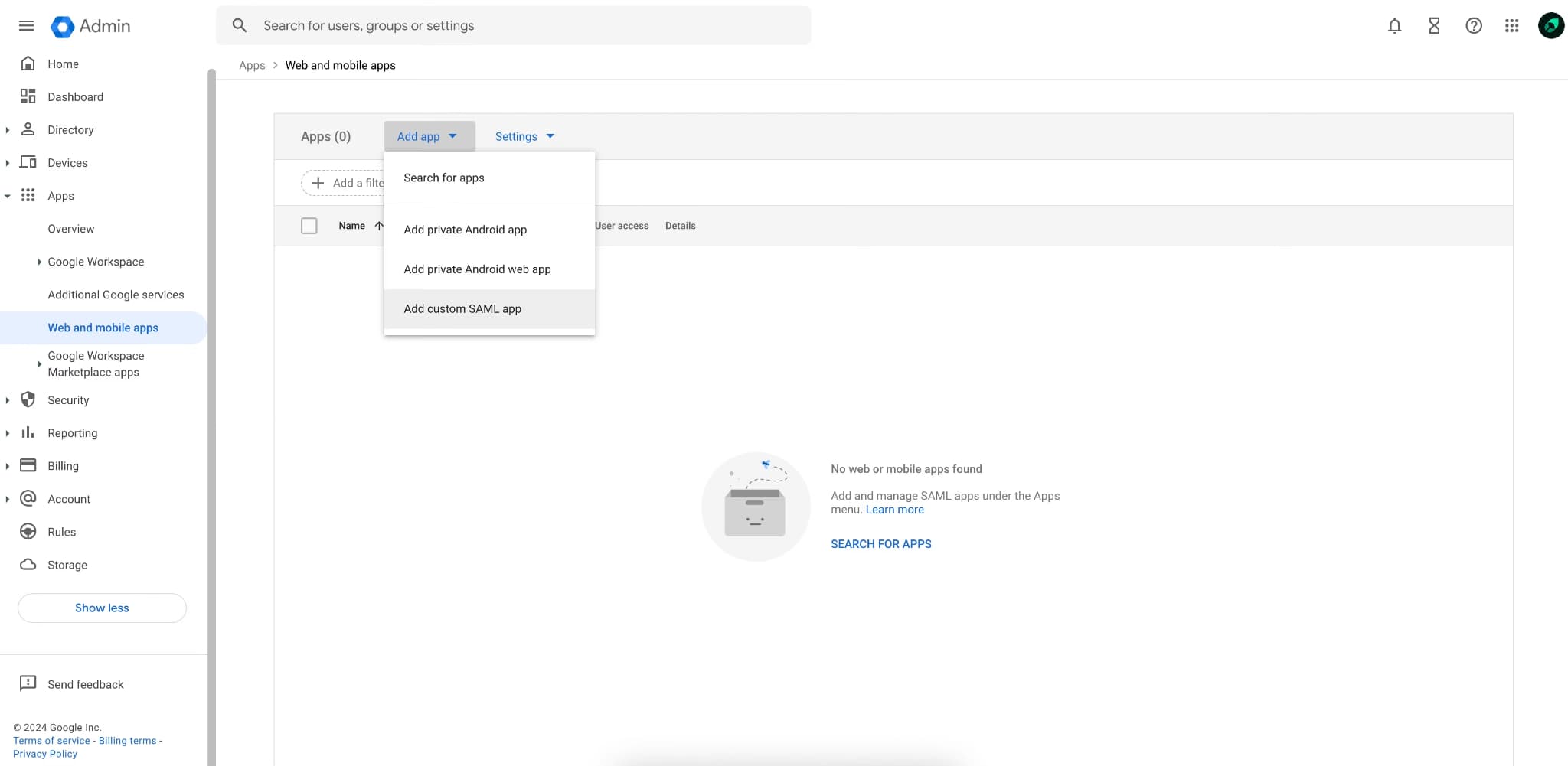
Authentication, role-based permissions, SSO, enterprise security support, and hosted infrastructure reduce the burden of operating a private or enterprise documentation stack. Your team still controls access and content, while Mintlify handles the infrastructure layer behind those controls.
Free starting point
Mintlify's Starter plan gives teams a free way to start with the full platform, including the web editor, authentication, MCP server, and API playground. Teams can publish a working documentation site first, then upgrade to Pro or Enterprise for AI features such as the Assistant, writing agent, and workflows, along with enterprise controls, advanced insights, agent analytics, or migration support.
Mintlify covers the work that would otherwise sit across engineering, design, DevOps, security, and documentation operations. Your team keeps control of the content, review process, and Git workflow, while Mintlify handles the infrastructure and AI-native systems behind the docs experience.
Start free and publish managed docs from your Git workflow with Mintlify →
How Mintlify keeps your docs-as-code workflow
One of the main reasons teams choose open source documentation is the docs-as-code workflow. Content lives in the repository, changes move through pull requests, and documentation follows the review process developers already use. Moving to a managed platform should not mean giving up that workflow.
With Mintlify, documentation stays as MDX files in your Git repository. Changes still move through branches, pull requests, version control, and CI. The GitHub integration deploys on every push, builds a preview for each pull request, and respects branch protection rules so protected branches stay under your team's control.
Mintlify also adds AI authoring without bypassing review. The Mintlify Agent can research existing docs and connected repositories, plan updates, write or revise content, run Mintlify CLI checks, and open a pull request for your team to review. The agent never commits directly to the main branch, and teams can configure its behavior via an AGENTS.md file or by triggering work from Slack, Linear, or a pull request.
Coding agents can work inside the same repository workflow. Claude Code, Cursor, and Windsurf can edit MDX files and commit through Git, while Claude Code can read a CLAUDE.md file at the root of the docs so documentation updates follow your team's structure and style. Mintlify keeps the docs-as-code model intact while taking on the hosting, deployment, and infrastructure work behind the documentation site.
When self-hosting open source is the right call
A managed documentation service fits most teams, but self-hosting still makes sense when control is the main requirement. Open-source documentation tools are strongest when your team needs to own the rendering layer, infrastructure decisions, or the compliance environment directly.
Your documentation is part of the product: If the docs site itself is a product surface, self-hosting gives your team full control over how the experience works. Custom reading flows, unusual page behavior, or product-specific interactions may need direct ownership of the documentation stack.
Your team needs custom rendering or infrastructure: Some teams need components, build behavior, hosting rules, or deployment patterns that a managed vendor does not support. Open-source frameworks give engineers direct access to change those components without waiting on a vendor roadmap.
Your organization has strict residency or air-gap requirements: Some regulated environments require documentation to remain within internal infrastructure or to run without external hosted services. In those cases, self-hosting may be the only workable option.
Your team already has a platform group that wants ownership: If internal tooling is part of an engineering team's role, owning the docs stack can fit how the organization operates. The maintenance work becomes an intentional investment rather than an unexpected drain on product engineering.
How to choose between self-hosted and managed documentation
The decision usually comes down to what your team wants to own.
Choose self-hosting when your documentation requires custom product behavior, unusual infrastructure, strict residency controls, or an internal platform team ready to own the system long-term.
Choose managed documentation when your team wants to keep engineers focused on product work, give writers a faster publishing workflow, and avoid maintaining search, hosting, AI features, deployments, previews, analytics, and security updates internally.
Start with Mintlify's managed documentation
Documentation should be easy to publish and update, and reliable enough for developers to use every day. Mintlify gives teams a managed documentation setup with branded pages, fast publishing, MDX in Git, built-in search, AI assistant, MCP, analytics, feedback, and security features. The infrastructure stays handled inside Mintlify, so engineering time can stay focused on the product.
Mintlify already supports documentation for teams with demanding developer audiences. Anthropic uses Mintlify for Claude API, MCP, and Claude Code docs, reaching millions of developers each month. Coinbase moved its developer documentation to Mintlify and reduced publishing time from about 20 minutes to about 1 minute. Perplexity, Anaconda, and Resend also run their docs on Mintlify.
Start free with Mintlify's Starter plan, connect your repository, and publish managed documentation without giving up your Git workflow.
Frequently Asked Questions
Is self-hosting expensive if the software is free
Free open-source software removes the license fee, but your team still pays in engineering time. Engineers need to set up the docs stack, keep dependencies patched, maintain search, support publishing workflows, and handle any AI or security layers connected to the documentation. Self-hosting can still be cost-effective when your team needs full control, but the cost lies in internal maintenance rather than a platform subscription.
Can we keep our Git workflow
Mintlify keeps documentation as MDX files in your Git repository, so updates can still move through branches, pull requests, reviews, and CI. Your team maintains the docs-as-code workflow while Mintlify handles hosting, previews, search, and the systems that power the published site.
Is open source documentation less secure
Security depends on how the documentation stack is operated. A self-hosted setup gives your team direct control, but it also means your team owns patching, hosting security, access controls, and dependency updates. A managed platform like Mintlify handles the hosted infrastructure and security operations for you, reducing the maintenance burden for teams without dedicated platform support.
Does Mintlify have a free tier
Yes. Mintlify's Starter plan gives teams a free way to publish documentation and use core features such as the web editor, search, authentication, MCP server, and API playground. AI features such as the Assistant, writing agent, and workflows are available on the Pro and Enterprise plans, so teams can start with the free plan, then upgrade when they need those features or additional controls.
Can we migrate off a managed platform later
With Mintlify, your documentation content stays in your own Git repository as MDX files. Since your team keeps the source files, moving to another documentation setup later is simpler than rebuilding content from a closed content system.
More to read
Best Code Documentation Tools 2026
Code documentation breaks because it lives separately from the code it describes. Every merged PR or API change widens the gap between what the code does and what the docs say.
June 3, 2026Harkirat Chahal
Growth
Best Confluence Alternatives 2026
Confluence works well for internal wikis, meeting notes, and Atlassian-connected workflows. Customer-facing documentation needs a different setup: branded public pages, fast search, API documentation support, structured reviews, and AI-ready delivery.
June 3, 2026Harkirat Chahal
Growth