Troubleshooting Guide Best Practices for Software Companies
Harkirat Chahal
Growth
Share this article
Harkirat Chahal
Growth
Share this article

A troubleshooting guide should start with a failure the customer can recognize and lead them through a clear path to recovery. Strong guides use exact error text, affected versions, likely causes, safe diagnostic steps, visible checkpoints, and a final verification that the product is working again. Topics should come from real failure evidence such as support tickets, failed documentation searches, product telemetry, and customer feedback.
This guide explains how to source troubleshooting topics, structure diagnosis and recovery paths, define escalation and ownership, and keep guides accurate as the product changes. Mintlify supports symptom-based troubleshooting pages with structured components, version-aware navigation, analytics for identifying content gaps, and validation for links and cross-references.
What Is a Troubleshooting Guide?
A troubleshooting guide starts with a failure the customer can observe and leads them through diagnosis to a confirmed recovery. The reader should first be able to recognize that the page matches the problem they are seeing, usually through a symptom, error message, or other visible signal. The guide then narrows the likely cause through ordered checks, provides the corrective action, and ends with a clear way to confirm that normal operation has returned. If the fix does not work, the guide should also tell the reader what to do next.
Troubleshooting Guides vs. User Guides, FAQs, and Knowledge Base Articles
| Content type | Reader need | Typical scope |
|---|---|---|
| Troubleshooting guide | Recover from a specific failure | Starts with an observable symptom, narrows the cause, and ends with a verified recovery or escalation path |
| User guide | Learn how to use a feature successfully | Documents the expected workflow when the product is working normally |
| FAQ | Get a concise answer to a common question | Covers behavior, limits, pricing, policy, or other short questions without a diagnostic sequence |
| Knowledge base article | Resolve a broader support or account issue | Can cover how-to tasks, account topics, policies, and recurring ticket patterns |
Troubleshooting Guide Readers: Customers, Support Agents, and AI Assistants
Customers usually arrive with the symptom in front of them, such as an error message, failed request, or broken UI state. Troubleshooting pages should use the same language customers see in the product so they can find the relevant entry without knowing which internal component caused the failure.
Support agents often start with information already captured in a ticket. They need to jump directly to the next diagnostic check and reuse the documented resolution without rewriting it for the customer.
AI assistants retrieve individual sections when answering support questions. Mintlify’s AI assistant uses agentic retrieval and cites the documentation it draws from, so each troubleshooting entry should make sense when retrieved on its own. Symptom-first headings, explicit preconditions, and inline warnings keep the same entry usable for customers, support agents, and AI retrieval.
Source Troubleshooting Topics From Real Failure Evidence
Support ticket volume and escalation patterns
Group closed tickets by the resolution support applied, then measure how often each resolution appears and how long those tickets stayed open. Repeated resolutions point to known fixes that customers could potentially complete without support, and longer resolution times help identify failures that consume more support or engineering effort.
Failed searches in your documentation
Search data captures the language customers use when something breaks. Mintlify analytics reports total query volume, top searches, and low-confidence searches. The mint analytics search command also returns search queries, hit counts, and click-through rates from the terminal. Searches that repeatedly fail to surface useful results point to troubleshooting topics the documentation does not yet cover.
Product telemetry and error logs
Compare recurring error identifiers by frequency, version, environment, and associated ticket volume. An error that appears frequently with few support requests may already be easy to recover from. An error that generates a ticket almost every time needs a documented recovery path.
Customer feedback and community reports
Forum threads, community channels, onboarding notes, and unanswered assistant questions can surface failures that never become formal tickets. Mintlify’s assistant conversation analytics records each conversation with an answered or unanswered resolution status, so recurring unanswered questions can reveal troubleshooting topics missing from the documentation.
Define the Problem in User-Observable Terms
Lead with the symptom the customer can see
Title each troubleshooting entry with the behavior the customer can observe, then explain the likely cause inside the entry. Mintlify’s API playground troubleshooting page uses headings such as “All of my OpenAPI pages are completely blank” before explaining that Mintlify may be unable to find the OpenAPI document or that the document may be invalid.
Include exact error text and error codes
Reproduce error strings exactly as the product returns them, including capitalization, punctuation, status codes, and identifiers. Customers often paste the visible error directly into documentation search. Resend’s error reference pairs identifiers such as missing_api_key with the HTTP status, returned message, and suggested action, giving readers several precise ways to match the failure.
Specify affected versions and environments
State which product versions, plans, operating systems, or deployment environments the troubleshooting entry covers. Mintlify’s API playground guidance, for example, specifies that OpenAPI 2.0 documents are unsupported and directs users to convert the document to OpenAPI 3 when that version causes blank API pages.
Set explicit problem boundaries
Clarify which failure cases the entry covers and route different failure modes to the appropriate diagnostic path. Mintlify separates a standard failed OpenAPI fetch from intermittent build failures caused by CI publishing the specification after the build starts, so readers can go straight to the troubleshooting path that matches what they are seeing.
Order Diagnostic Steps by Likelihood and Safety
Rank likely causes before edge cases
Start with the most common and least disruptive checks, then move toward network, certificate, and infrastructure causes. For a single blank OpenAPI page, Mintlify first checks for a misspelled openapi field in the page metadata before moving to filename mismatches across multiple specifications.
Change one variable per step
Each diagnostic step should change one setting, file, or permission. Changing several variables at once makes it difficult to identify which action resolved the failure and leaves less useful evidence if the issue later reaches support.
Give each step a visible result
Tell readers what result confirms whether a diagnostic check passed or failed. Mintlify’s validation flow sends users to the Swagger editor, where a green border after validation confirms that the OpenAPI document is valid. The reader can use that result to decide whether to continue to the next cause.
Branch explicitly when paths diverge
When a check can produce different outcomes, label each outcome with a clear next step. Explicit branches prevent readers from repeating completed checks and keep each diagnostic path moving toward either recovery or escalation.
Confirm That Normal Operation Has Returned
A troubleshooting path should end by repeating the action that originally failed and checking that it now succeeds under the same conditions. A successful intermediate check is useful, but the final verification should confirm that the customer can complete the workflow they came to recover.
For example, Mintlify’s OpenAPI troubleshooting guidance asks readers to verify that a specification can be downloaded from outside their network when diagnosing a failed fetch during a build. That reproduces the build environment and gives the reader a meaningful recovery check.
Close with an observable end state such as the page rendering correctly, the request returning 200, or the expected artifact appearing. The reader should leave the guide knowing the original failure is resolved.
Document Risk, Reversibility, and Stop Conditions
Mark risky actions: Label steps that delete data, rotate credentials, change production configuration, or cannot be easily reversed. Tell readers what they should save or record first so they understand the impact before applying the fix.
Place security warnings inline: Security constraints should appear beside the action they affect. Browserbase’s BYOS setup guide, for example, tells readers to store the generated external ID securely and requires IAM role names to begin with browserbase-. Adding both requirements during role setup helps prevent configurations that later fail or expose sensitive credentials.
Define stop conditions: Some failures cannot be resolved through customer-side configuration. Resend’s error reference directs readers who encounter application_error to retry later and check the status page if the error persists. A clear stop condition prevents readers from continuing to change their setup when the failure is on the service side.
Flag incompatible paths: State when a recovery or configuration option cannot satisfy a specific security, compliance, or technical constraint, and provide the available alternatives. Readers should know before completing a long setup path if the final configuration cannot meet their requirements.
Design the Escalation Path and the Evidence It Requires
Name the escalation route: Tell readers exactly where to go when self-service troubleshooting ends. Browserbase’s BYOS setup guide directs configuration submissions to an account manager or support, so readers know which team should receive the request.
List the required evidence: Specify what the support request should contain before the reader submits it. For BYOS configuration, Browserbase asks for the role ARN, external ID, project IDs, and bucket details. Troubleshooting tickets can follow the same pattern with the request or session ID, timestamp and timezone, product version, environment, and exact error text.
Record completed checks: Ask readers to include the diagnostic steps they already ran and the causes those checks ruled out. That gives the support team a useful starting point and avoids repeating the same troubleshooting sequence after escalation.
Assign Troubleshooting Guide Ownership Across Teams
Support: Use ticket volume and resolution patterns to prioritize troubleshooting topics, then review drafts against the language customers actually use. Support agents can also confirm whether a published entry resolves the ticket type it was created for.
Engineering: Verify the documented cause, confirm that recovery steps are safe in production, and review stop conditions against actual system behavior. Engineering approval helps prevent plausible-looking fixes that could corrupt state or create a second failure.
Product: Flag changes to error messages, defaults, permissions, configuration fields, and other product behavior that can invalidate existing troubleshooting guidance. Documentation needs those changes before the corresponding release ships.
Documentation: Own the entry structure, symptom phrasing, navigation placement, cross-links, and review cadence. The documentation team also decides when to retire outdated troubleshooting entries.
Maintain Troubleshooting Guides Against Product Releases
Review with every relevant release: Add troubleshooting content to the release checklist so any behavior change a recovery path depends on triggers a review of the affected guide. Updating the affected guide before release prevents customers from following stale diagnostic steps.
Keep guidance version-aware: Mintlify’s navigation configuration supports a versions array in docs.json for separating documentation by product version. Use site-level versions when older releases need their own documentation structure, and add version notes inside an entry when the same failure requires different fixes across supported versions.
Use feedback and resolution signals: Page feedback can identify troubleshooting entries that readers find unhelpful, and search behavior can reveal titles that fail to match the symptom customers actually search for. Tickets submitted after a customer has already visited the troubleshooting page provide an even stronger signal that the published recovery path did not resolve the failure.
Make Troubleshooting Content Findable and Connected
Put the symptom in titles and headings
Use the words customers are likely to search when a failure occurs, such as the visible error, broken behavior, or failed action. Customers can describe what appeared on screen long before they can name the internal service behind it.
Index exact error text
Error identifiers, status codes, and message strings reproduced exactly serve a second purpose here: site search and search engines return a direct match when a customer pastes the error into the search box.
Link troubleshooting and feature documentation
Feature documentation should point to troubleshooting entries for known failures, and each troubleshooting entry should link back to the configuration or reference page needed to understand the fix. Two-way links keep recovery guidance connected to the product documentation customers may need afterward.
Keep entries accessible to AI agents
Mintlify-hosted sites publish an llms.txt index that gives AI agents and assistants a map of available documentation pages. Self-contained troubleshooting entries can then be retrieved with the symptom, conditions, and recovery steps intact.
Troubleshooting Guide Examples
Different failure surfaces call for different troubleshooting structures, as the examples below show.
Resend: Error reference
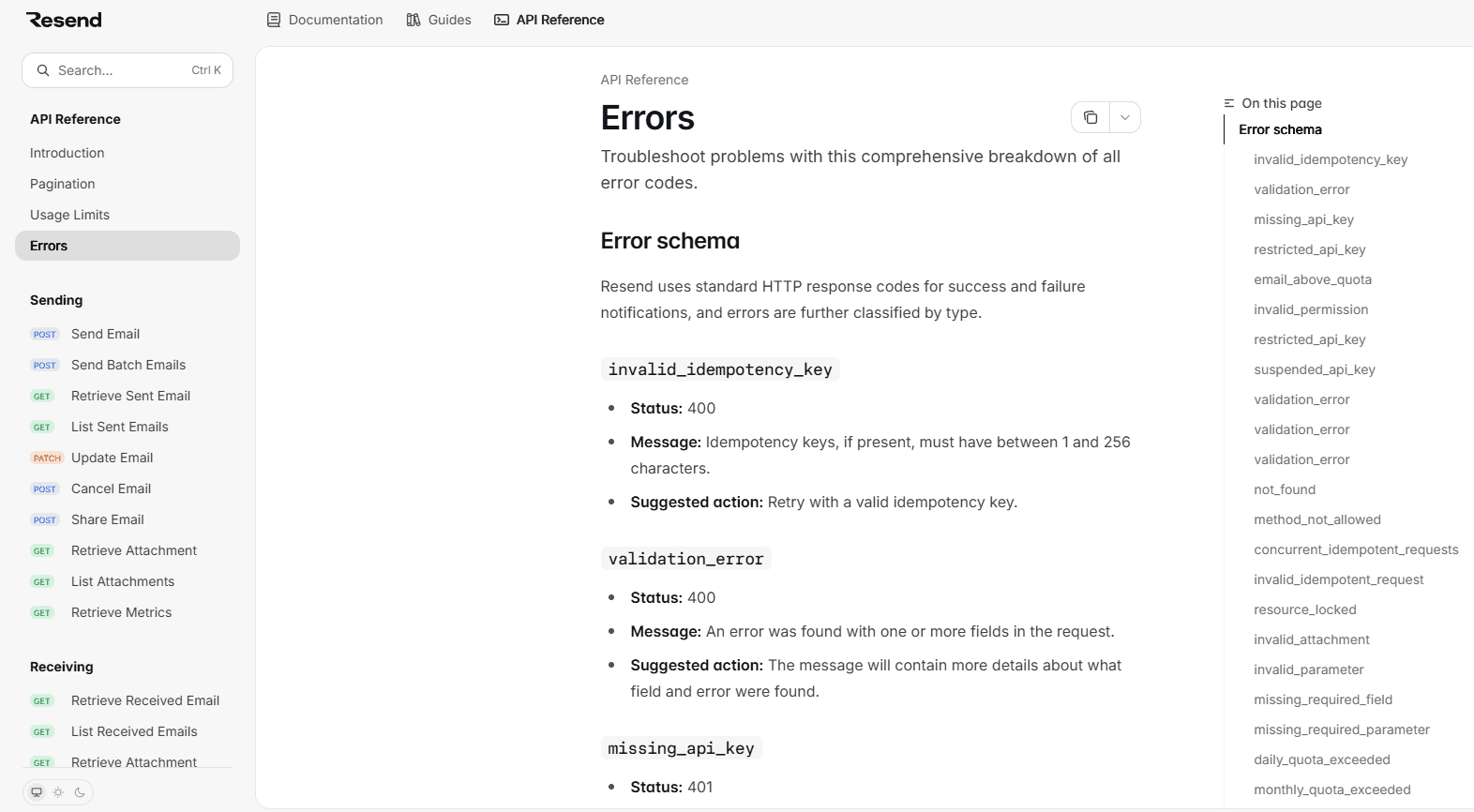
Resend’s error reference organizes failures by stable error identifiers and pairs each one with its HTTP status, message, and suggested action. Errors that need more explanation link to separate knowledge base articles, keeping the reference page scannable without losing access to deeper recovery guidance. Products that already return stable error codes get the most from an error-reference layout.
Browserbase: Troubleshooting inside a setup guide
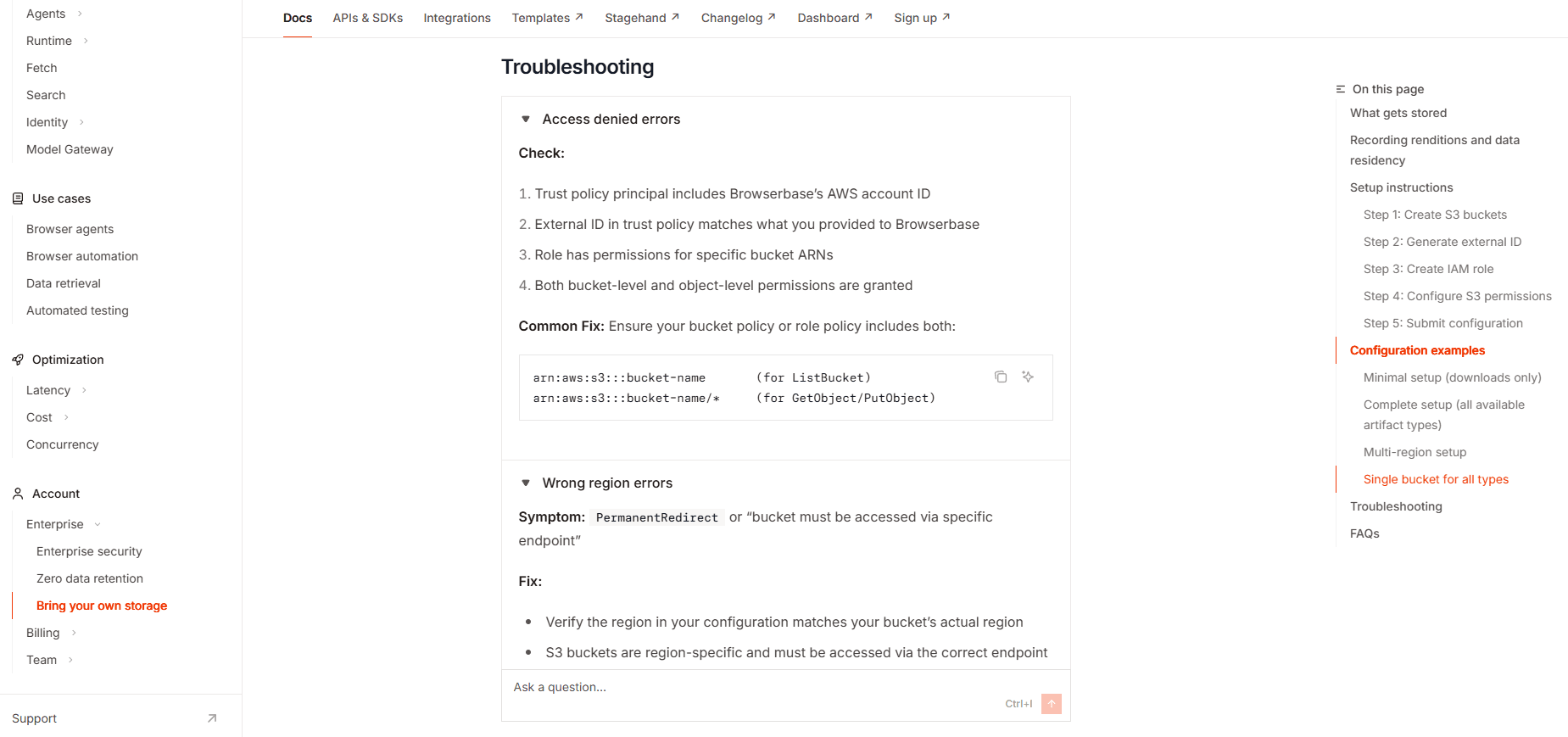
Browserbase places troubleshooting directly inside its BYOS setup guide, after the configuration steps readers have just completed. Each failure is broken into checks and a corresponding fix, so readers can diagnose setup-specific problems without leaving the workflow. This structure suits configuration processes where most failures occur around the same setup path.
Mintlify: Symptom-based troubleshooting
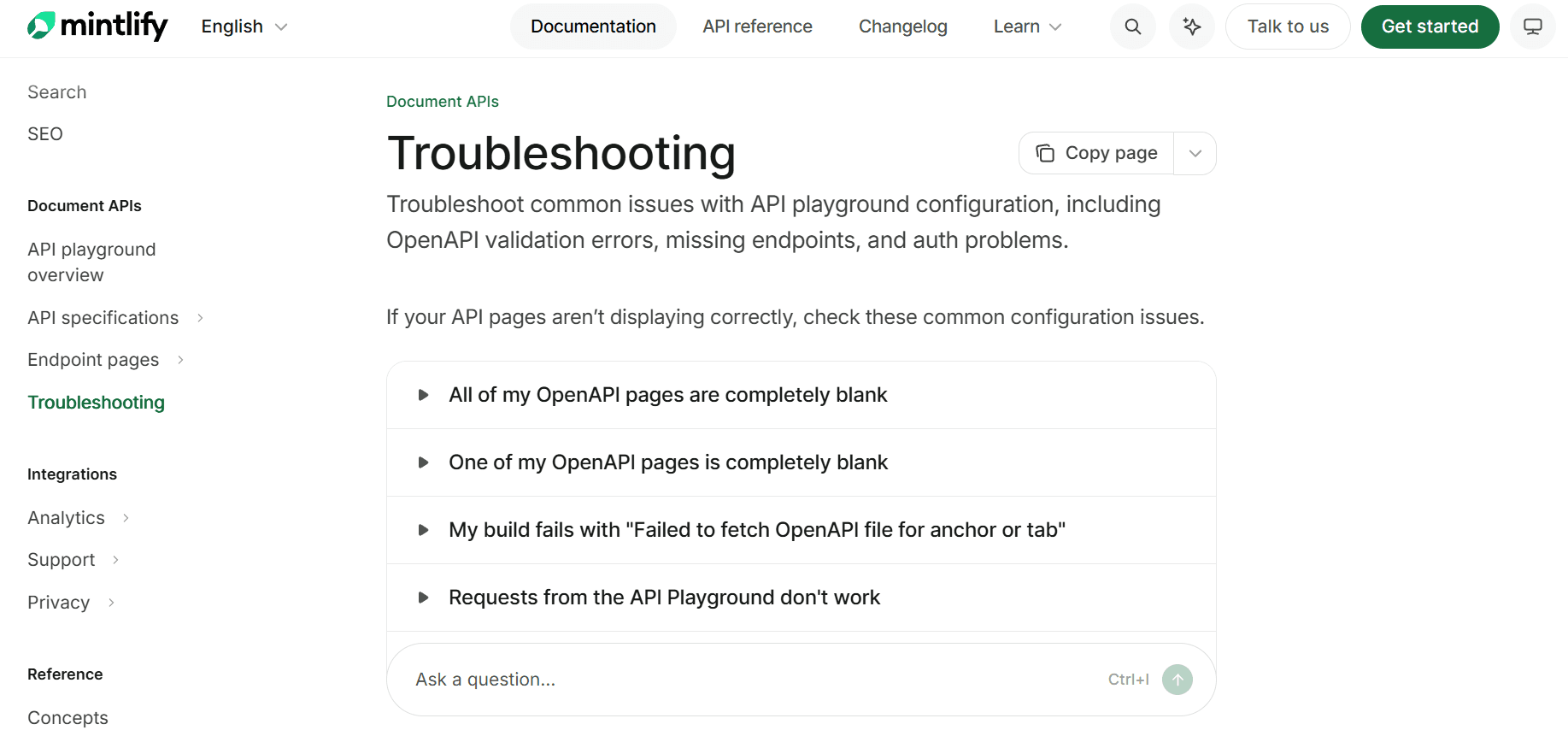
Mintlify’s API playground troubleshooting guide groups separate failure symptoms into expandable accordion entries. Readers can scan for the behavior they are seeing and open only the relevant diagnosis and recovery steps. Accordion entries suit product areas with several independent failure modes and no single diagnostic sequence.
Common Troubleshooting Guide Mistakes
Organizing entries by internal component names
Use the symptom or failed action in the title. A page named after an internal service forces customers to identify the cause before they can find the troubleshooting guidance meant to diagnose it.
Collecting unrelated failures on one page
Keep troubleshooting pages scoped to a feature or workflow. Mixing unrelated authentication, billing, deployment, and configuration failures makes specific fixes harder to scan, deep-link, and retrieve independently.
Building instructions around screenshots
Write the complete instruction in text and use screenshots only as visual confirmation. Interface images can become outdated after UI changes, so the recovery path should remain usable without them. Mintlify follows this pattern by pairing written conversion steps with a screenshot of the Swagger Editor menu.
Assuming permissions the reader may not have
State any owner, admin, or role requirements before the affected step and provide a route for readers who lack that access. A troubleshooting path stops working when the reader reaches a required action they aren't permitted to perform.
Grouping different causes under one error name
Keep separate entries when the same identifier can represent different failures. Resend’s error reference lists validation_error under multiple HTTP statuses with different messages and suggested actions, helping readers match the exact failure before applying a fix.
Publish and Maintain Troubleshooting Guides in Mintlify
Step 1: Keep troubleshooting content in the docs repository
Mintlify stores documentation as MDX files in Git, so troubleshooting updates can follow the same review process as product and documentation changes. Use the Git-based workflow to review recovery steps through pull requests before publishing them.
Step 2: Structure symptoms and recovery guidance
Use Accordions to organize multiple symptoms into a scannable page and Callouts to place warnings, risks, or short recovery notes beside the relevant step. Accordions also support direct links to individual entries, which helps support teams share a specific fix.
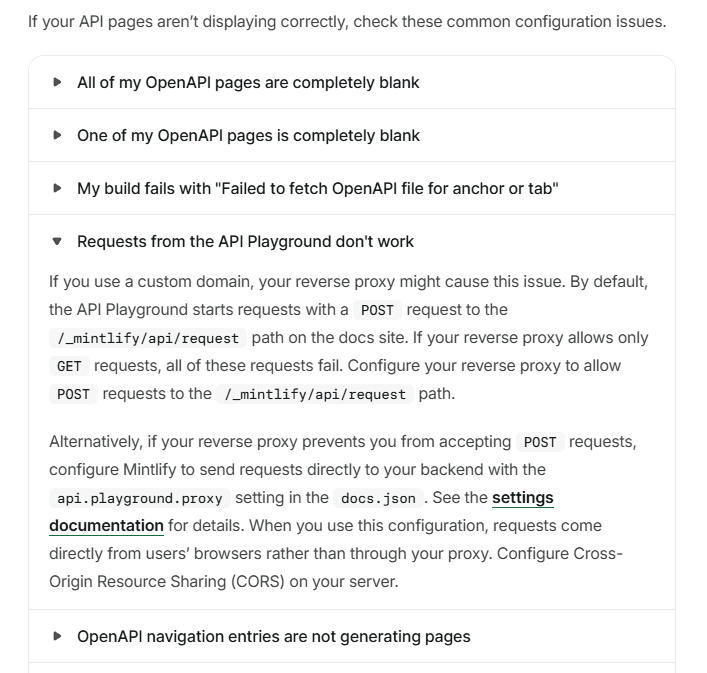
Step 3: Publish version-specific guidance
Configure versioned navigation with the versions array in docs.json when supported releases require different troubleshooting instructions. Readers pick their version once, and the current guidance stays free of version-specific branches.
Step 4: Find missing and underperforming troubleshooting content
Use Mintlify analytics to review search queries and page feedback for failures customers cannot resolve. Assistant conversation data can also surface questions that existing troubleshooting pages do not answer successfully.
Step 5: Validate troubleshooting updates before publishing
Run mint validate to validate the documentation build and mint broken-links to catch broken links before release. Adding these checks to CI helps keep escalation routes and cross-links to related product documentation working as troubleshooting pages change.
Build troubleshooting documentation with Mintlify →
FAQs: Troubleshooting Guide Best Practices for Software Companies
How many failure modes should one troubleshooting page cover?
Group failures around a single feature or workflow so readers can scan symptoms in the same context. One page can cover many related failure modes if each entry is easy to identify and access.
Should troubleshooting content live in the documentation site or the help center?
Product failures tied to APIs, configuration, integrations, or feature behavior belong in the documentation site, close to the technical content readers may need during recovery. Account, billing, and policy issues fit better in the help center because they usually depend on support processes rather than product implementation details.
How do you measure whether a troubleshooting guide is working?
Compare support ticket volume for the documented failure before and after publishing the guide, then track how often customers still open tickets after visiting it. Search behavior, page feedback, and resolution rates can provide additional signals on whether readers find the page and complete the recovery path successfully.
Who should write the first draft of a troubleshooting entry?
The first draft can come from the person closest to the failure, often the support agent who resolved recurring tickets or the engineer who diagnosed the underlying issue. The documentation team can then shape the draft around the customer-visible symptom, organize the diagnostic sequence, and send the technical details back for review before publication.
What happens to a troubleshooting entry after engineering fixes the bug?
Keep the entry available for as long as customers may still use an affected product version, and identify the release where the bug was resolved. Once those versions are no longer supported, retire the troubleshooting content and redirect its URL so links from older support tickets, community discussions, and search results continue to lead somewhere useful.
More to read

The Complete Guide to Quick Start Guides for Software Products
Learn how to create software quick start guides that take new users from setup to a verifiable first success, with examples and maintenance best practices.
September 11, 2026Harkirat Chahal
Growth

8 best context engineering tools for coding agents in 2026
Compare eight context engineering tools for coding agents across documentation, code search, project knowledge, web research, and evaluation.
September 7, 2026Harkirat Chahal
Growth