Mintlify vs Docusaurus: Which Documentation Platform Should You Choose in 2026?
Harkirat Chahal
Growth
Share this article
Harkirat Chahal
Growth
Share this article
Docusaurus is a strong open-source choice for teams that want full React control, self-hosting, and the engineering capacity to maintain their own documentat...
TL;DR
Docusaurus is a strong open-source choice for teams that want full React control, self-hosting, and the engineering capacity to maintain their own documentation infrastructure. Mintlify is the stronger managed choice for teams that want production-ready documentation design, built-in hosting, semantic search, analytics, API playgrounds, native AI features, and an in-docs assistant, all without custom plugin setup or ongoing infrastructure maintenance.
This guide compares Mintlify and Docusaurus across setup, design, AI readiness, API documentation, search, analytics, customization, pricing, and migration so teams can choose the documentation platform that fits their workflow.
Quick Comparison: Mintlify vs Docusaurus
| Dimension | Mintlify | Docusaurus |
|---|---|---|
| Hosting model | ✅ Managed hosting included | ❌ Self-hosted (Vercel, Netlify, AWS, etc.) |
| Setup time | ✅ Hours | ❌ Days to weeks |
| Design out of the box | ✅ Production-ready layout, navigation, typography, and docs components included | ⚠️ Classic theme included; production sites usually require front-end customization |
| AI features built in | ✅ llms.txt, skill.md, MCP server, in-docs assistant, AI traffic analytics | ❌ None native; available via plugins |
| API playground | ✅ Interactive playground from OpenAPI 3.0+ | ⚠️ Requires plugins like Redoc |
| Search | ✅ Semantic search included | ⚠️ Requires Algolia DocSearch or similar |
| Analytics | ✅ Page analytics, search analytics, AI assistant logs, and AI agent traffic analytics included | ❌ Bring your own analytics stack (GA4, Plausible, etc.) |
| Versioning | ✅ Native | ✅ Native |
| SSO and RBAC | ✅ Included on Enterprise | ❌ Build your own auth layer |
| Customization | ⚠️ MDX with custom React components | ✅ Full React framework control |
| Pricing | Free to start, Enterprise custom | Free framework, plus engineering time and infra costs |
| Open source | ❌ Proprietary platform | ✅ MIT licensed |
Build fully managed, AI-ready documentation with Mintlify →
Why documentation platform choice is changing in 2026
Mintlify's internal traffic data shows nearly half of the documentation site traffic now comes from AI agents alongside human readers. ChatGPT, Claude, Perplexity, Cursor, and Windsurf all read documentation to answer developer questions. When a developer asks Claude how to authenticate against a particular API, Claude reads the company’s documentation and produces an answer based on the available product context.
As AI assistants become another primary reader of product documentation, docs platforms need to support both human navigation and machine-readable retrieval. Documentation content needs to be easy for AI systems to parse, retrieve, and cite through structured Markdown, clear indexes, and machine-readable entry points. If an AI system struggles to read the documentation, developers are more likely to receive incomplete or unreliable answers.
Mintlify natively supports AI-readable documentation delivery. Every page is served to AI agents in both Markdown and HTML, reducing token usage and improving parsing accuracy. Mintlify auto-generates and hosts llms.txt, llms-full.txt, and skill.md, the structured indexes that AI systems use for ingestion and capability discovery. Mintlify also auto-generates an MCP server for each documentation site, so Claude, Cursor, and similar tools can connect directly and pull the current product context.
Docusaurus can be configured to support some of the same outputs through community plugins and custom build steps, but engineering teams own the setup, validation, and long-term maintenance. The quality of AI retrieval depends on how consistently those plugins, build scripts, and generated files are maintained as the documentation changes.
When Docusaurus is the right call
Docusaurus is the better fit in three situations.
Teams that need deep React-level customization: Docusaurus is a React framework first and a documentation tool second. Teams building documentation with custom routing logic, a proprietary design system integrated at the framework level, or unusual layout requirements get full control over the frontend.
Teams committed to self-hosting and open-source ownership: Some organizations have compliance requirements, infrastructure mandates, or internal policies against vendor-managed documentation systems. Docusaurus deploys to any environment that supports a static site, and the source is MIT-licensed. Teams that need to keep the documentation stack in-house can use Docusaurus without adding a proprietary documentation platform.
Teams with engineering capacity to maintain documentation infrastructure: A Docusaurus site requires someone to handle hosting, search configuration, plugin updates, AI integration work, analytics setup, and the design system. For teams with a dedicated developer experience or platform team, Docusaurus can work well when documentation infrastructure is already part of the engineering roadmap.
When Mintlify is the right call
Mintlify is the better fit in five common situations.
Teams that want a production-ready documentation site on day one: Mintlify includes default layouts, navigation, typography, and documentation components, so teams can publish a customer-facing docs site within hours without designing the frontend from scratch.
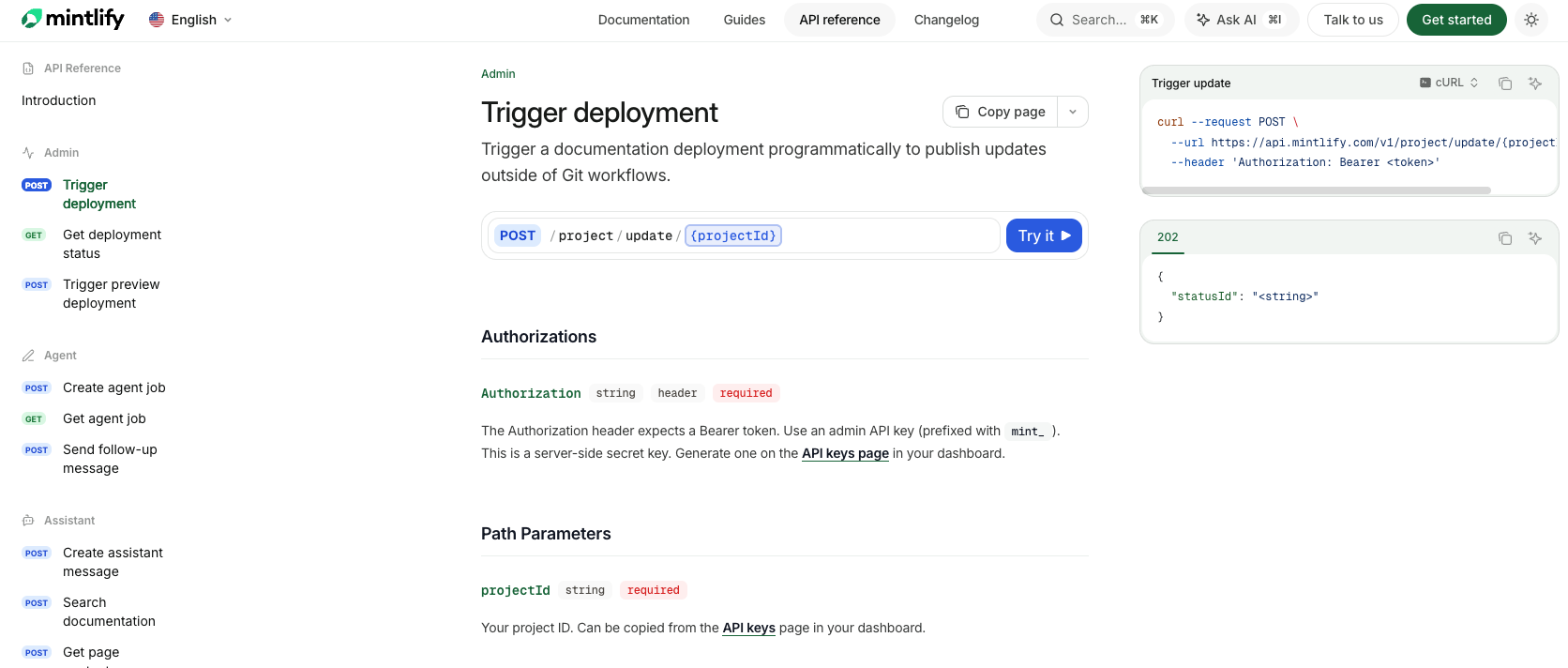
API-first companies that need an interactive playground: Mintlify generates API reference pages from OpenAPI specifications and includes a configurable playground where developers can authenticate, send requests, and inspect live responses without leaving the docs. AsyncAPI is also supported for WebSocket documentation.
Teams that want documentation AI assistants can read accurately: llms.txt, llms-full.txt, skill.md, MCP server generation, and Markdown content negotiation are native across every plan. Documentation written on Mintlify is structured to be accurately retrieved by ChatGPT, Claude, Perplexity, and similar systems without additional plugin setup.
Teams shipping faster than documentation can keep up: Mintlify Workflows is an autonomous agent that monitors a code repository, drafts documentation updates when code changes ship, and opens pull requests for human review. The agent runs on Claude inside sandboxed environments and follows the same review process a documentation team would use. Workflows help keep documentation aligned with current code without adding a manual documentation step to every release.
Teams that want hosting, search, and analytics included: A Mintlify subscription includes hosting, semantic search, page analytics, and AI agent analytics. Teams do not need to configure Algolia, set up GA4 separately, or maintain a custom deployment pipeline.
Customers using Mintlify today include Anthropic, Cursor, Perplexity, Zapier, Browserbase, Baseten, Trophy, and OneSignal. Zapier reported a 20% increase in documentation traffic and adoption after switching to Mintlify.
For teams evaluating Mintlify, the free Hobby plan includes a custom domain, API playground, Git sync, search, LLM optimizations, and custom CSS or JavaScript, while the Pro trial lets teams test higher-tier features without a credit card.
Mintlify vs Docusaurus: Feature-by-feature comparison
Design and out-of-the-box experience: Mintlify provides a production-ready default theme, a rich MDX component library with cards, accordions, tabs, callouts, Mermaid diagrams, math rendering, and embeds, plus configuration through a single docs.json file. A team can publish a branded documentation site in an afternoon without building the frontend system first.
Docusaurus ships with the Classic theme, but most production deployments customize the theme, layout, and components to match the company’s product experience.
Hosting and deployment: Mintlify hosts the documentation site on its infrastructure with a custom domain, preview deployments on every pull request, and automatic builds when changes are pushed to the connected Git repository. Docusaurus produces a static build that teams deploy to Vercel, Netlify, AWS, GitHub Pages, or another host. The team manages DNS, SSL, build pipelines, monitoring, and deployment reliability.
Setup time: Connecting a Git repository, adding a docs.json file, and pushing the first MDX page on Mintlify can take a few hours, including custom domain setup. A Docusaurus deployment usually takes longer because the team also needs to select a host, configure search, theme the site, connect analytics, and set up the release workflow while writing the first content.
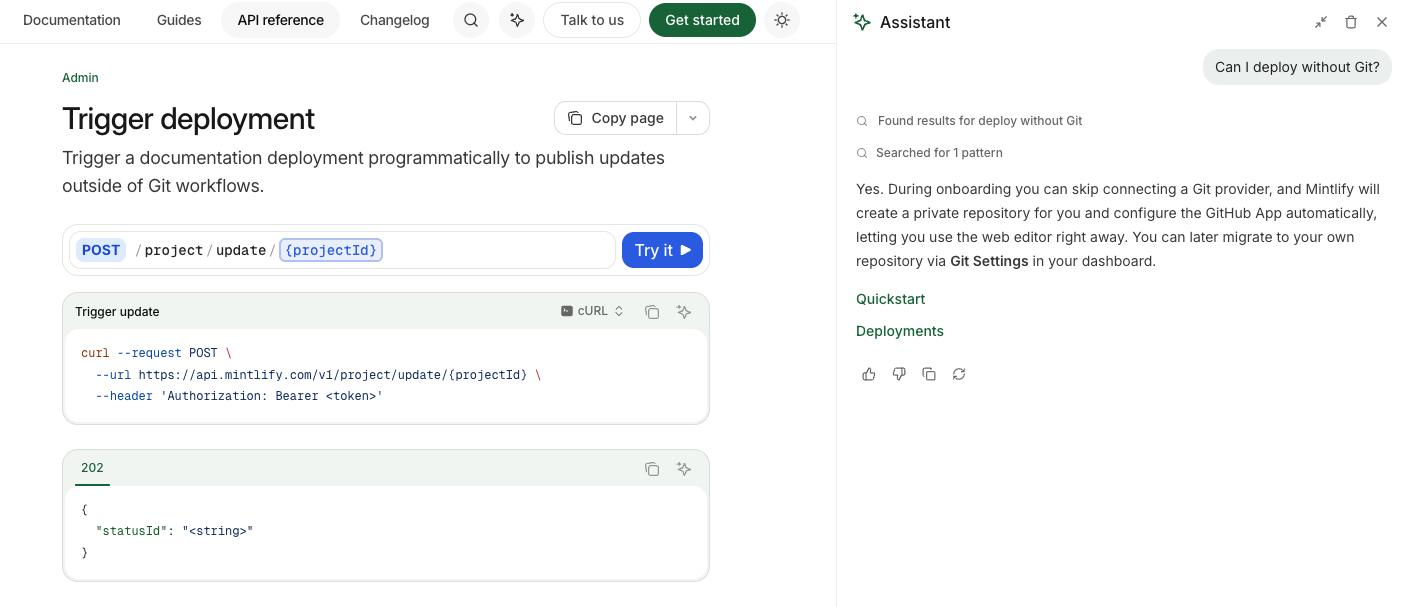
AI features and AI readability: Mintlify and Docusaurus differ most on AI readiness. Mintlify automatically generates llms.txt and llms-full.txt as structured indexes for every page. Mintlify auto-hosts skill.md so AI agents can understand what the documentation covers, and it generates an MCP server for the documentation site so AI tools can connect directly. Every page is available in Markdown by appending .md to the URL, providing AI agents with a structured target for parsing. The in-docs AI assistant uses agentic RAG with tool calling and cites sources with navigable links. AI traffic analytics show which agents are reading which pages and where they stop.
Docusaurus does not include these capabilities natively. Community plugins can support some AI-readable outputs, but engineering teams need to assemble, test, and maintain the AI retrieval setup themselves.
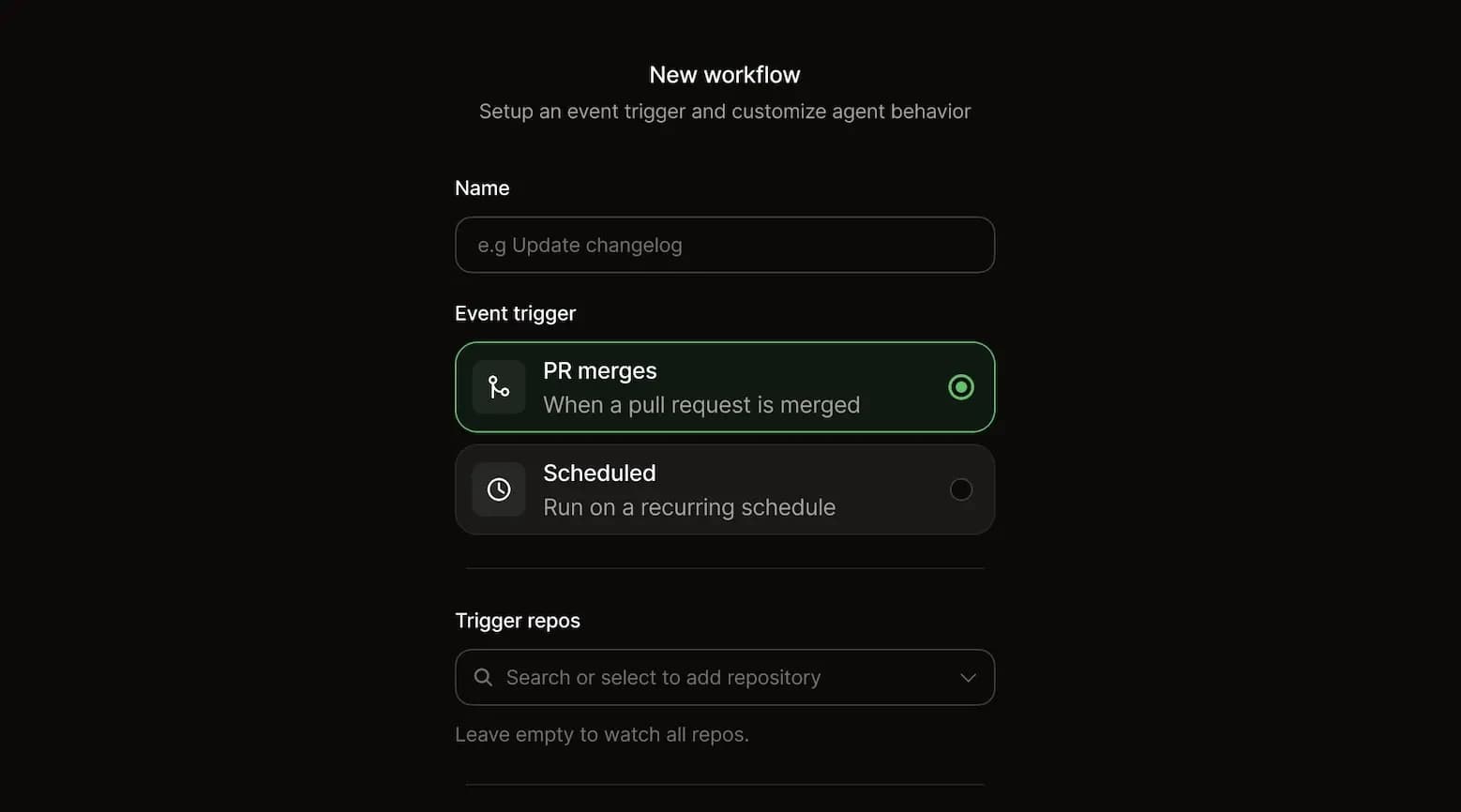
Documentation maintenance and agent workflows: Mintlify includes an AI documentation agent that researches existing docs, connected repositories, and web context; drafts or updates documentation; validates changes with Mintlify CLI checks; and opens pull requests for review. Mintlify Workflows can run the agent on a schedule or after repository push events to handle recurring maintenance tasks such as changelog drafts, API reference updates, style audits, and documentation updates for new features.
Docusaurus does not include an equivalent documentation agent or workflow automation layer, so teams manage documentation maintenance through their own engineering, docs, or release processes
API documentation and playground: Mintlify generates endpoint pages from an OpenAPI spec using its scraper CLI, includes an interactive API playground with multi-language code samples, and supports SDK code samples through Speakeasy and Stainless integrations.
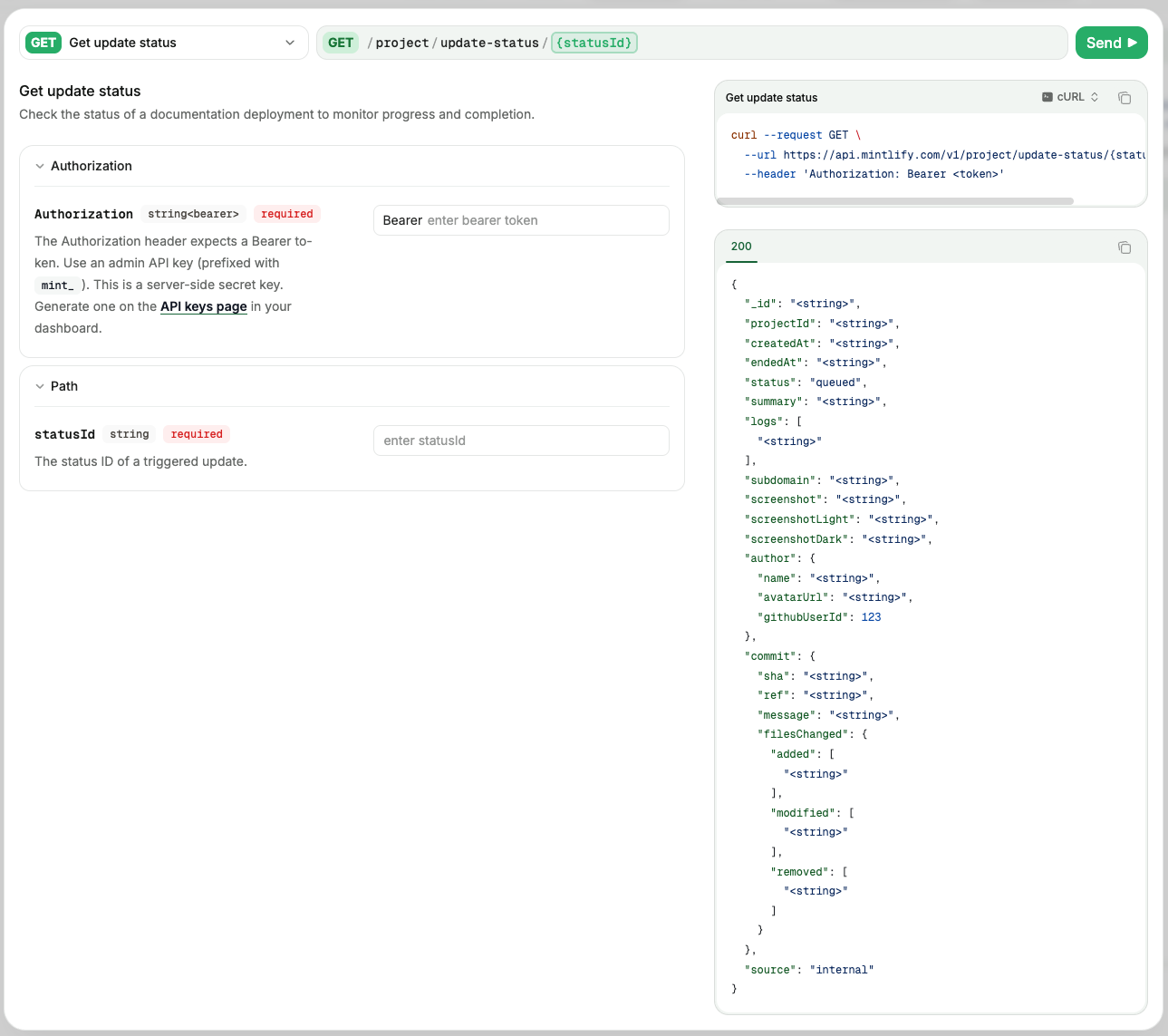
Docusaurus does not include an API playground by default. Teams usually add Redoc or a similar plugin and use the plugin’s rendering as the reference experience.
Search: Mintlify includes semantic search that interprets user intent and surfaces relevant pages even when the query wording does not match the documentation. Docusaurus is most often paired with Algolia DocSearch, which the team configures and maintains.
Analytics: Mintlify provides page traffic, search query data, AI assistant question logs with user ratings, AI agent traffic by agent type, and content gap identification when searches return no results. Analytics integrations, including GA4, Mixpanel, Amplitude, PostHog, Segment, and more, are available for teams that want to forward data elsewhere.
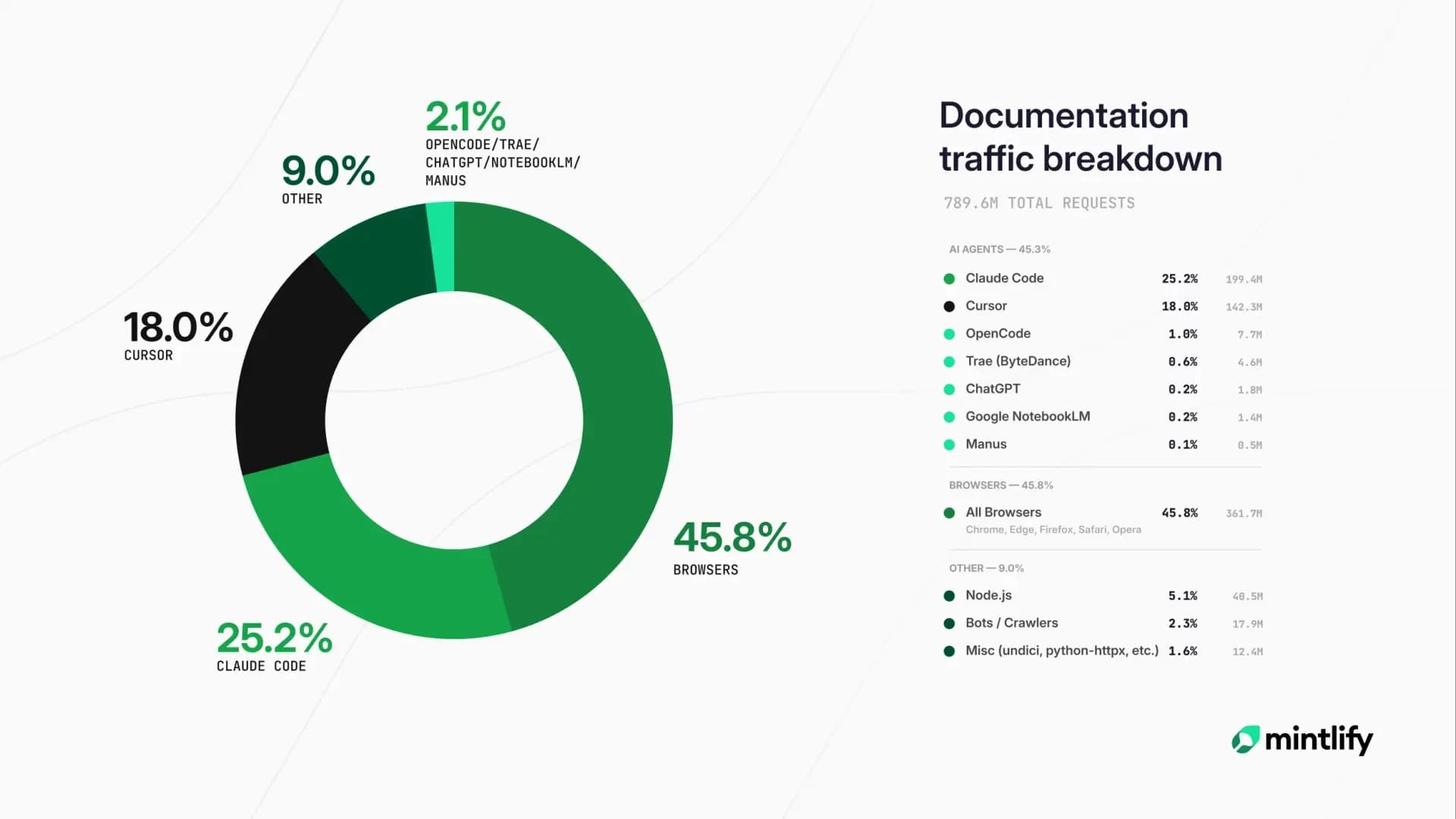
Docusaurus relies on the analytics tool that the team integrates separately.
Versioning: Both Mintlify and Docusaurus support versioned documentation. Mintlify handles versioning through the docs.json configuration. Docusaurus has a mature versioning system that snapshots the full documentation tree for each release.
SSO and access control: Mintlify Enterprise includes SAML and OIDC SSO, role-based access control with admin, editor, and viewer roles, audit logs, and authentication for personalized content, including API key prefilling, plan-based content visibility, and JWT-based user attributes. Docusaurus has no native authentication layer, so private documentation requires a separate authentication gateway.
Customization: Docusaurus gives teams deeper frontend control when they need to write custom React code across the site. Mintlify supports custom React components inside MDX pages, custom CSS and JavaScript across all plans, and headless mode through Astro for teams that want a custom frontend while keeping Mintlify for content management and AI-readable documentation delivery.
Mintlify vs Docusaurus Pricing
Mintlify uses a two-tier pricing model. The free Hobby plan covers the basics for individuals, side projects, and early-stage documentation sites, including a custom domain, an API playground, Git sync, search, LLM optimizations, and custom CSS or JavaScript. Enterprise is custom-priced and adds analytics, the AI assistant, preview deployments, password protection, grammar checks, SSO, RBAC, authentication for personalized content, PDF exports, white-labeling, audit logs, and unlimited members.
Docusaurus is free as an open-source framework, but the total cost depends on the infrastructure and engineering work around it. Teams still need to pay for hosting, connect analytics, configure search, maintain plugins, handle AI integration, and keep the documentation frontend up to date. Algolia DocSearch is free for qualifying open-source projects, but commercial documentation sites may need a paid Algolia plan or another search service.
For a small team with front-end engineering support and a simple documentation site, Docusaurus can stay inexpensive. As the documentation footprint grows across API references, AI-readable outputs, search, analytics, and access control, the cost shifts from software spend to engineering time and maintenance. Mintlify natively includes all these requirements in the subscription, making pricing easier to forecast for teams that want a managed documentation infrastructure.
| Dimension | Mintlify | Docusaurus |
|---|---|---|
| Platform fee | Free Hobby plan, custom Enterprise | $0 framework |
| Hosting | Included | Self-managed |
| Search | Included | Algolia DocSearch or another search service |
| AI features | Included | Custom plugin and build-step work |
| Engineering setup | Hours | Days to weeks |
| Ongoing maintenance | Handled by Mintlify | Handled by the team |
Migrating from Docusaurus to Mintlify
Most Docusaurus content moves to Mintlify with limited rework, because both platforms are MDX-based and Git-native.
The main steps in a migration are content conversion, configuration mapping, and component replacement. MDX files transfer over with minor frontmatter adjustments, since Mintlify uses a simpler frontmatter schema (title, description, icon, sidebar position) than the full Docusaurus set. Sidebar configuration in sidebars.js maps to the navigation array in docs.json. OpenAPI specifications used in a Docusaurus deployment can be reused directly; Mintlify's scraper CLI generates endpoint pages from the same spec in seconds.
Custom React components written for Docusaurus need a small amount of adaptation to work inside Mintlify's MDX environment, since Mintlify provides its own component library for common patterns (cards, tabs, accordions, callouts) that often replace custom components built earlier. The Algolia DocSearch configuration is dropped during migration because Mintlify natively supports semantic search.
Migration timelines depend on the size of the documentation. Trophy migrated a full documentation site from a different platform to Mintlify in roughly one week. A small Docusaurus site with under 100 pages can usually be migrated in a weekend, while a larger site with extensive custom theming and many bespoke React components usually requires a longer migration window. Teams evaluating a full migration can also use Mintlify Switch, which combines migration tooling with white-glove support for moving documentation at scale.
Mintlify vs Docusaurus: Which one should you choose?
The choice between Mintlify and Docusaurus depends on how much documentation infrastructure the team wants to own.
Docusaurus fits teams that want React-level control, open-source ownership, and self-managed deployment. The framework gives engineering teams direct control over routing, theming, hosting, plugins, and frontend customization, but the same team also owns search, analytics, AI-readable outputs, access control, and ongoing maintenance.
Mintlify is for teams that want a managed documentation platform with hosting, search, analytics, API playgrounds, AI-readable outputs, and migration support. Teams can still write in MDX, manage content through Git, customize the docs experience, and publish API references from OpenAPI specs, while Mintlify handles the infrastructure around the documentation site.
Choose Docusaurus when documentation infrastructure is part of the engineering roadmap. Choose Mintlify when the goal is to publish and maintain customer-facing documentation without building the platform layer internally.
Teams can start on Mintlify’s free Hobby plan or a no-card Pro trial, then compare the managed workflow against their current documentation process before migrating the full site.
FAQs: Mintlify vs Docusaurus
Can I keep my existing Markdown when moving from Docusaurus?
Existing Markdown and MDX files can be moved to Mintlify with minimal frontmatter updates because Mintlify uses MDX as its native content format. Most content does not require manual rewriting, so migration work typically focuses on navigation, components, and configuration.
Does Mintlify support custom React components?
Mintlify includes built-in components for common documentation patterns and supports custom React components inside MDX pages when teams need bespoke UI. Teams that need full frontend control can also use Mintlify in headless mode through the Astro integration, while keeping Mintlify for content management and AI-readable documentation delivery.
How long does migration from Docusaurus to Mintlify usually take?
Migration timelines depend on site size, custom theming, and the number of bespoke React components in the existing Docusaurus setup. Small to mid-sized documentation sites often move in a few days to two weeks. Mintlify also supports larger migrations through its Switch program.
What about Algolia or DocSearch I already have set up?
Mintlify includes semantic search by default, so teams usually retire Algolia DocSearch after migration. Search no longer needs a separate service, custom configuration, or ongoing maintenance once the docs site runs on Mintlify.
How does Mintlify handle AI retrieval differently from a Docusaurus site with AI plugins?
Mintlify handles AI retrieval as a native documentation workflow. Every site automatically generates llms.txt, llms-full.txt, and skill.md, hosts an MCP server, and serves Markdown to AI agents alongside HTML. A Docusaurus site can support some AI-readable outputs through plugins and custom build steps, but engineering teams own setup, testing, and maintenance as the documentation changes.
More to read
The Complete Guide to Quick Start Guides for Software Products
Learn how to create software quick start guides that take new users from setup to a verifiable first success, with examples and maintenance best practices.
September 11, 2026Harkirat Chahal
Growth

Troubleshooting Guide Best Practices for Software Companies
Learn how to write troubleshooting guides with symptom-based diagnosis, safe recovery steps, clear escalation paths, and ongoing maintenance.
September 11, 2026Harkirat Chahal
Growth