The Complete Guide to Quick Start Guides for Software Products
Harkirat Chahal
Growth
Share this article
Harkirat Chahal
Growth
Share this article
A quick start guide takes one clearly defined new user from a known starting point to a single outcome they can verify on their own. Every step should move the reader toward that first success, with prerequisites stated up front, predictable setup failures handled where they occur, and optional configuration moved outside the main path.
The guide should be short enough to complete in one sitting and specific enough to work on the first attempt. Effective quickstarts also account for platform or framework variants, show the expected result, and direct readers to deeper documentation afterward. Mintlify helps teams build quick start guides with structured components for steps, variants, code examples, and inline guidance. Git-based publishing and page-level analytics support ongoing updates and performance tracking.
What a quick start guide is
A quick start guide is a short documentation page that helps a new user complete one focused task and finish with a visible result. GitHub’s quickstart content model recommends keeping the path to about five minutes or 600 words, with only the essential steps required to complete the workflow. More complex tasks belong in a tutorial.
One outcome per guide: Build the quickstart around a single completion point the reader can verify. Adding a second outcome lengthens the path and introduces another place where the reader can stall before reaching the first success.
Start with action: Quickstart readers already understand what they want to try, so the page can move directly into the first required action instead of explaining why they should use the product or feature.
Move deeper material elsewhere: Architecture explanations, configuration catalogs, authentication alternatives, and edge cases belong in other documentation types. Mintlify’s documentation content types guidance covers when to use tutorials, how-to guides, reference pages, and explanations so the quickstart can stay focused on the first working result.
Quick start guide vs. tutorial, how-to guide, and reference
Each documentation type serves a different reader need and success condition.
| Content type | Reader arrives | Scope | Success condition |
|---|---|---|---|
| Quick start guide | Ready to try the product | One workflow with only the essential steps | The product returns a visible result |
| Tutorial | Ready to learn | One project with explanation along the way | The reader understands how the workflow works |
| How-to guide | Already using the product | One specific task | The task is completed |
| Reference | Looking for a specific detail | Full technical surface area | The reader finds the information they need |
A quickstart should stay on one working path and link out when the reader needs deeper explanation, alternatives, or reference detail.
Define the reader and the first success
A quick start guide should target one clearly defined reader. “Backend developer with an existing Node.js project” or “support lead with admin access” gives the guide a usable starting point. A broad audience usually adds extra conditions and branches that slow down readers who don't need them.
The first success should be something the reader can verify without help. A returned response ID, deployed URL, live session, or received email gives clear proof that the product worked. A generic confirmation such as “Setup complete” is too weak because it shows that setup finished without confirming that the product can perform the task the reader came to try.
Choose an outcome that demonstrates the core product capability. If a guide ends after authentication succeeds, the reader knows the credentials work but hasn't used the feature itself. State the completion point before step one so the reader knows exactly what they will have by the end of the guide. Mintlify’s guide on understanding your audience can help define the reader before you write the path.
Set prerequisites and the starting state
List every requirement the reader needs before step one, including accounts, credentials, runtime versions, permissions, and any plan limits that affect the workflow. Resend’s Node.js quickstart places the API key and verified domain requirements before the first instruction, so readers know exactly what they need before starting.
Make each prerequisite easy to verify. A runtime requirement should include a version check, and a missing credential should link directly to the setup page that creates it. Mintlify’s quickstart specifies Node.js v20.17.0 or higher before the CLI path, with the CLI installation guide available for full setup and troubleshooting.
Keep optional configuration outside the first-success path. Custom domains, team invitations, and production hardening can wait until the reader has completed the core workflow. Mintlify follows this pattern by deploying to a working .mintlify.app subdomain first and moving custom domain setup to the next step.
Map the minimum viable path
Work backward from the outcome and keep only the actions required to reach it. Anything that does not move the reader closer to the completion state, including optional parameters, alternative installation methods, configuration flags, and background concepts, should move to deeper documentation.
Set a time and step budget before drafting. Perplexity’s quickstart, for example, promises an API key and first call in under three minutes, which gives writers and reviewers a clear limit for what belongs on the page.
If the product supports several entry points, choose the workflow most new users will need first. Keep that path complete and direct readers to alternative workflows after they reach the first successful result.
Write runnable steps with expected output
Make every step runnable: Commands and code examples should work with minimal editing. Asking the reader to replace one credential is reasonable, but requiring values from several other pages breaks the quickstart path.
Provide usable inputs: Test credentials, sandbox endpoints, and sample payloads remove setup the reader would otherwise have to improvise. Resend, for example, uses a documented test address so readers can send a real request without first preparing a separate recipient.
Show expected output: Place the expected response close to the step that produces it so readers can immediately confirm whether their result matches. Perplexity shows an example response beneath its API examples, while Resend ends the first send with a returned data object. Finish the guide with one clear success checkpoint that confirms the product worked.
Use visuals where they reduce uncertainty: Code blocks and screenshots can reassure readers at steps where the correct action or result is difficult to recognize from text alone.
Also read: How and when to use images, screenshots, and videos in documentation
Support language, framework, and platform variants
Use tabs when only the syntax changes: If the workflow stays the same across languages or platforms, keep the variants inside the same step. Perplexity, for example, presents one API flow across Python, TypeScript, and cURL, with separate authentication tabs for macOS/Linux and Windows.
Split guides when the workflow changes: Separate quickstarts make more sense when installation, setup, or execution differs enough to create distinct paths. Browserbase maintains separate quickstarts for Stagehand, Playwright, Puppeteer, and Selenium because each framework follows a different setup and control flow.
Offer the simplest path first: Browserbase also provides a Playground that runs a browser session without local setup, so readers can see the product work before choosing a framework-specific path.
Keep the primary path visible: Place variants inside the step they affect. Starting with a platform or framework matrix forces readers to choose a path before they have enough context to decide.
Prevent and recover from common setup failures
Anticipate predictable failures: Missing credentials, incorrect environment variables, runtime version mismatches, insufficient permissions, and rate limits are common enough to address before readers encounter them.
Put prevention at the failing step: Place the relevant warning or check beside the instruction most likely to trigger the problem. Resend’s Node.js quickstart names the environment variable used for the API key at setup, so readers can correct the configuration before running the request.
Keep inline recovery short: One known cause with a clear fix can stay on the page. Longer diagnostic procedures interrupt the quickstart and belong in dedicated troubleshooting documentation, which matches GitHub's quickstart content model: troubleshooting stays optional on the page itself, with a link out when diagnosis takes more than a brief fix.
Hand off to deeper documentation
Recap the result: Close the quickstart with one sentence confirming what the reader has completed. That gives the finished task a clear endpoint and sets up the next action.
Limit the next steps: Keep the handoff to two or three actionable next steps, with at least one path into deeper conceptual documentation. A short set of options helps readers continue without turning the end of the quickstart into another navigation menu.
Route readers by intent: When a product has several surfaces, organize the handoff around what the reader wants to do next. Perplexity closes its quickstart with separate paths for its APIs, while Browserbase uses a decision aid to help readers choose the appropriate API before continuing.
Separate progress from recovery: Troubleshooting links belong beside the step where a failure can occur. The final handoff should point readers toward the next useful task, concept, or reference page.
Also read Mintlify’s guide to creating API documentation to understand how guides and reference content can work together across a documentation set.
Quick start guide examples
The examples below use different onboarding paths, but each keeps the first success concrete and moves deeper configuration beyond the initial workflow.
Resend: Send emails with Node.js
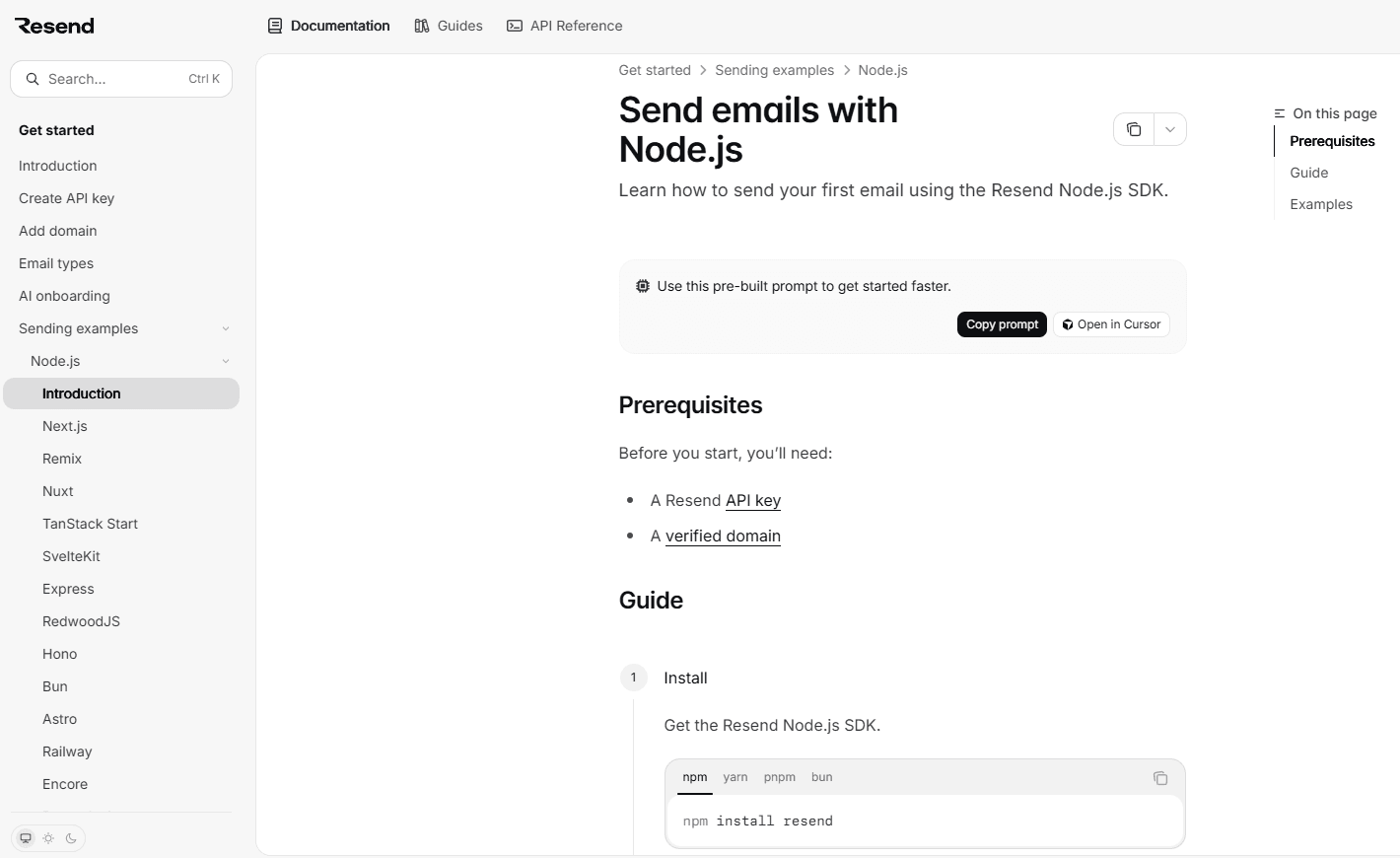
Resend’s Node.js quickstart puts two prerequisites before a three-step path covering SDK installation, API key setup, and the first email. A documented test address removes the need to prepare a separate recipient, and the returned data object gives readers immediate confirmation that the request succeeded. Attachments, scheduling, templates, and other capabilities appear after that first send.
Browserbase: Run your first browser session
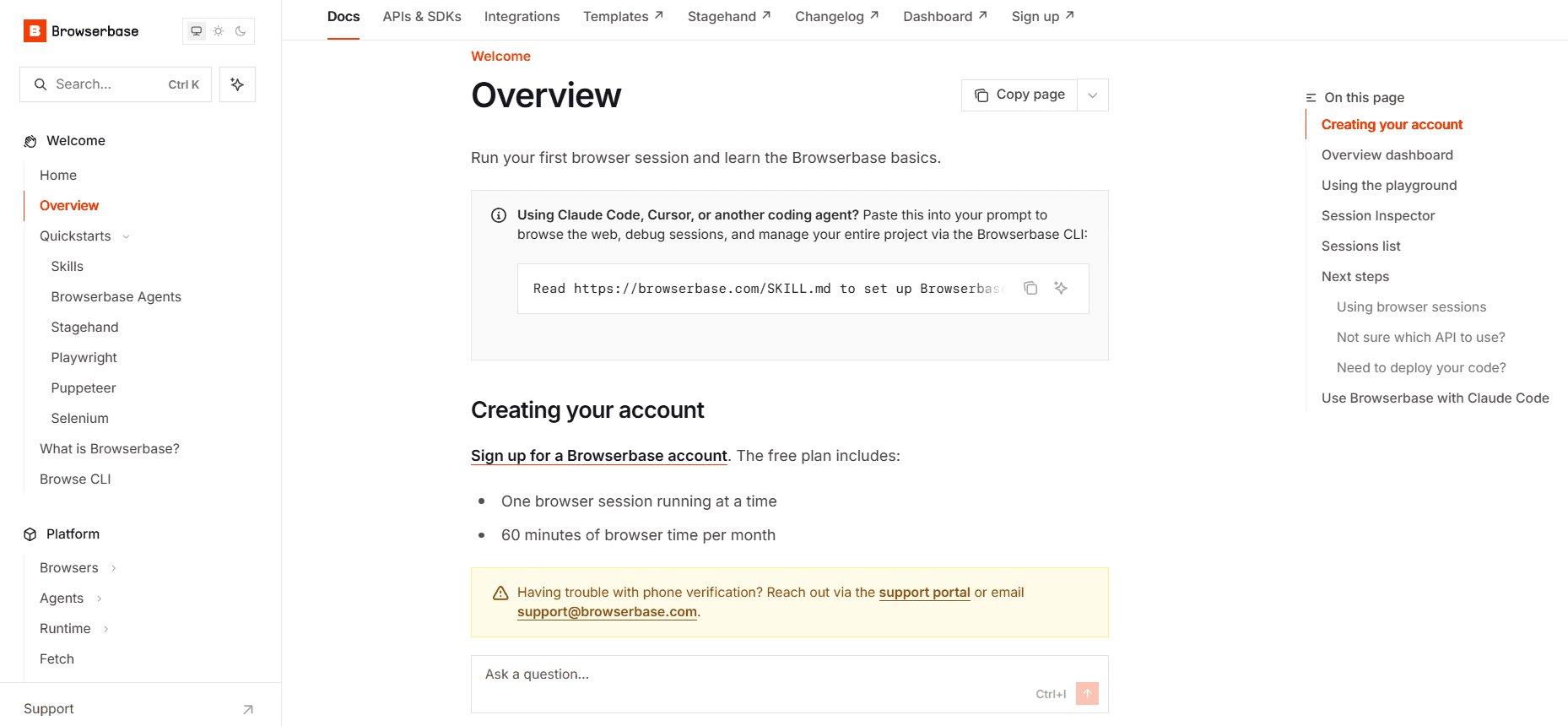
Browserbase removes local setup from the first experience through its getting started guide. Readers can run a browser session in the Playground and inspect the result through Session Inspector before choosing a framework or configuring a local project.
Perplexity: Quickstart
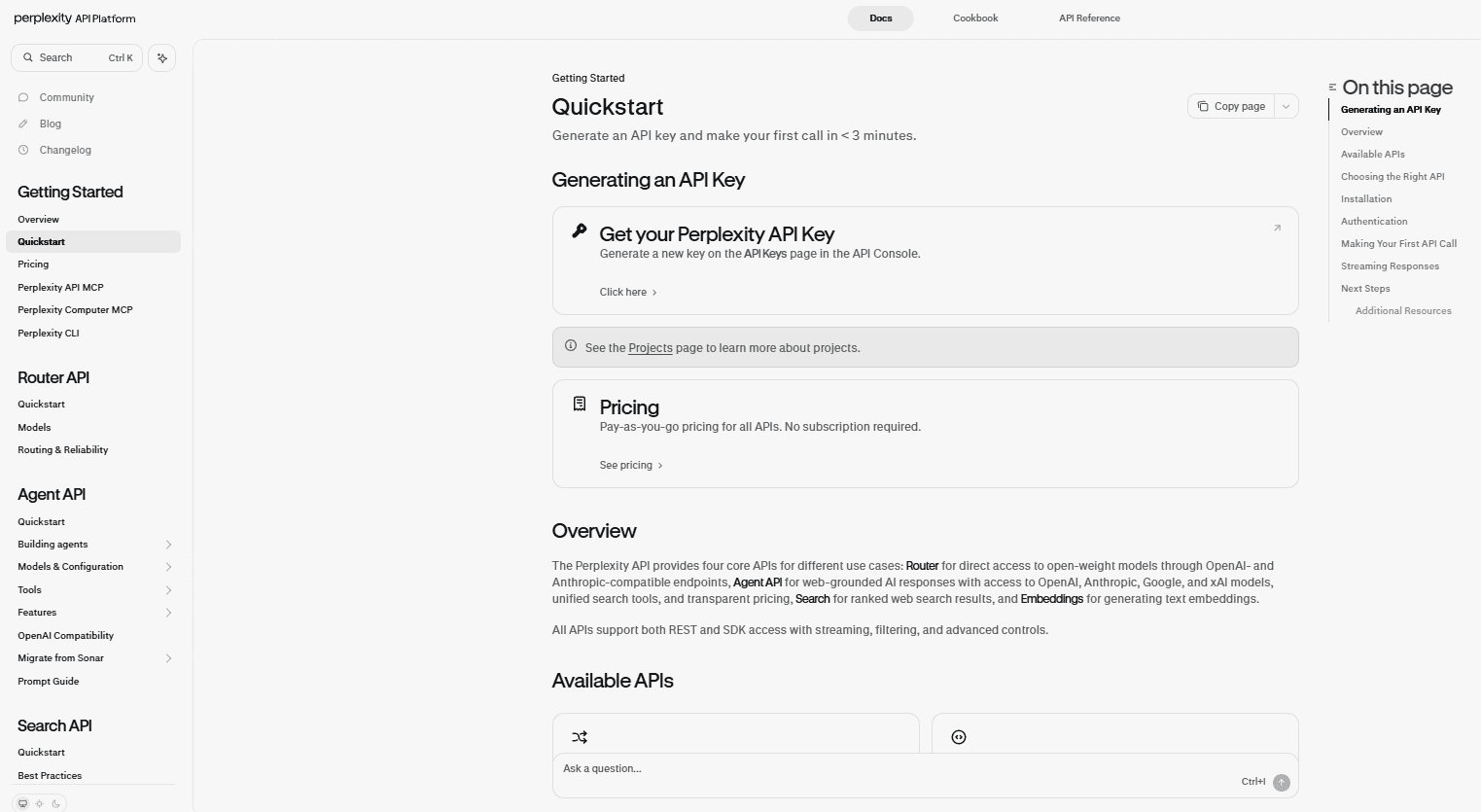
Perplexity's quickstart sets a clear expectation of reaching the first API call in under three minutes. Python, TypeScript, and cURL variants keep language choice on the same path, and each example includes a sample response so readers know what a successful call returns before moving on to streaming, model selection, and the individual API guides.
Mintlify: Quickstart
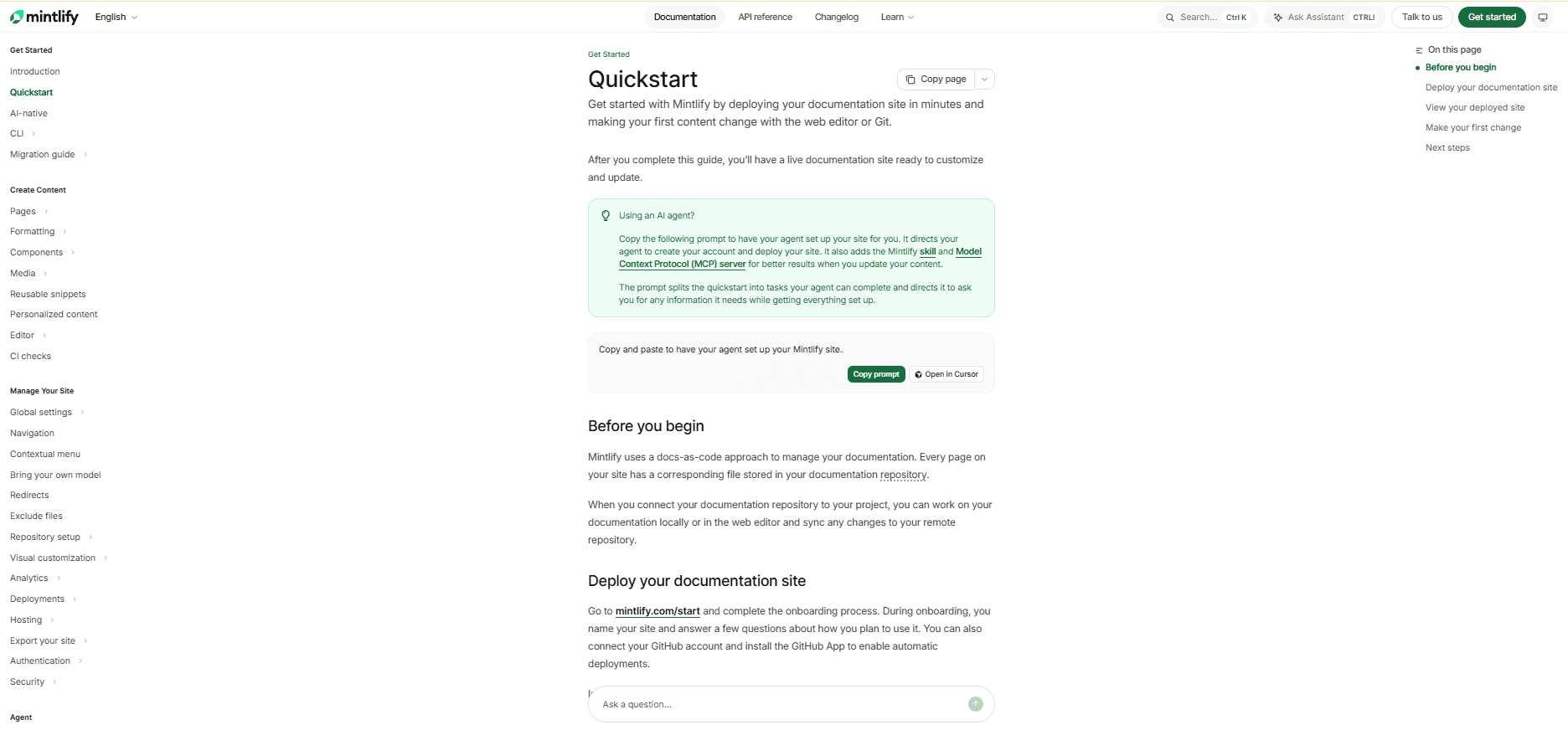
Mintlify’s quickstart takes readers through a complete first documentation workflow, ending with a deployed site and a published content change. CLI and web editor paths run in parallel tabs, so developers and non-developers can reach the same completion point through the interface they already use.
Test the quick start guide with new users
Use a clean environment: Test the guide on a fresh machine and new account so cached credentials, globally installed packages, and existing project state don't hide setup problems new users would encounter.
Match the intended reader: Recruit testers with the same skill level and starting knowledge as the audience the guide was written for. Someone who already knows the product can overlook assumptions that are unclear to a first-time user.
Observe without intervening: Let testers complete the guide without answering questions or correcting mistakes during the run. Record where they pause, reread instructions, or open another page, since those moments show where the guide is failing to carry enough information on its own.
Measure time to first success
Measure the product event
Time to first success should track the interval between account creation and the first successful API call, deployment, session, or other product outcome defined by the quickstart. Product telemetry records that event, and documentation analytics help show which quickstart readers reached it.
Track completion by step
A single abandonment rate shows that readers are dropping off, but step-level completion shows where. A large drop at credential setup points to a different problem than one that appears at the final API call.
Read signals together
Scroll depth, copy events, support tickets, and missing follow-through in product telemetry can help isolate the instruction where readers stall. Mintlify’s analytics surface page views, popular pages, referrers, search queries, and feedback, giving teams documentation-side signals to compare with product completion data.
Interpret metrics in context
A long time on page can indicate engagement or confusion, so read individual metrics against the quickstart’s intended outcome and historical baseline. Mintlify’s guidance on tracking success explains how to combine quantitative and qualitative signals when evaluating documentation performance.
Set a rewrite threshold
Define the completion rate or time-to-first-success threshold that should trigger a review before publishing the guide. Agreeing on the number in advance means a post-release drop in completion opens a review automatically, without anyone having to argue that the guide needs work.
Assign ownership and update triggers
Name an owner: Every quickstart should have someone responsible for keeping the path working. Broken setup steps often go unreported, so name the owner in writing and expect them to rerun the guide when a review trigger fires.
Define review triggers: SDK releases, authentication changes, endpoint or parameter updates, pricing or plan-limit changes, and UI changes that invalidate screenshots should all trigger a review of the guide before the corresponding release ships.
Set a version policy: Decide whether the guide pins a specific version or follows the latest release. Pinning improves consistency but creates a clear update obligation, while an unpinned guide needs closer monitoring for drift when dependencies change.
Review on a schedule: Run the guide periodically in a clean environment even when no release has touched it. A quarterly check can catch expired credentials, changed plan defaults, and upstream dependency changes that would otherwise surface only when a new reader fails.
Also read: Best documentation maintenance tools
Publish quick start guides in Mintlify
Mintlify provides the components and publishing workflow needed to turn the quickstart principles above into a working documentation page.
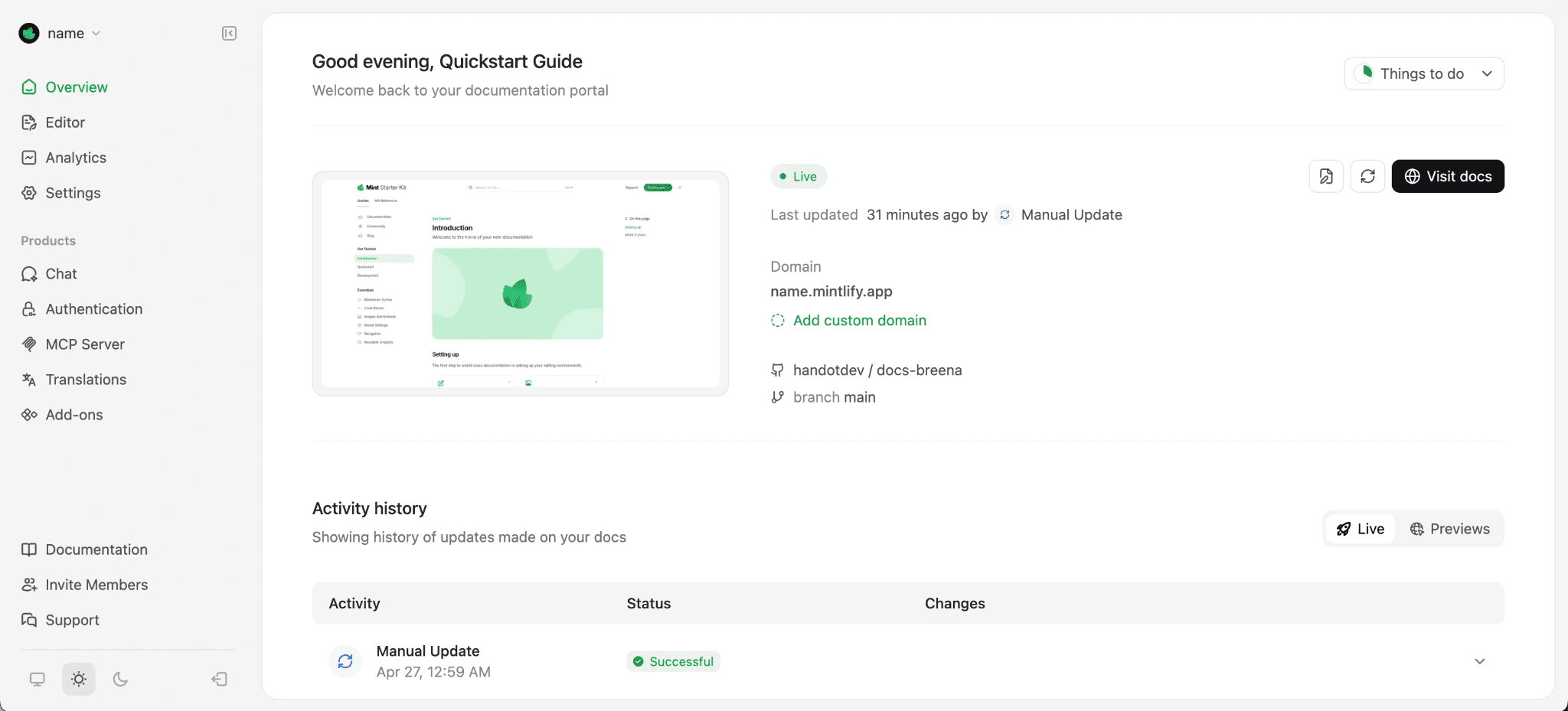
Step 1: Build the core path with Steps
Use Steps to place each required action in sequence. Keep every step focused on one action that moves the reader closer to the first successful result.
Step 2: Add language or platform variants
Use Code groups when the same request needs examples in multiple languages, and Tabs when readers follow different platform or interface paths. Mintlify’s own quickstart uses parallel CLI and web editor tabs that lead to the same published result.
Step 3: Add inline recovery where readers can fail
Use Callouts for short notes, warnings, or fixes beside the relevant instruction. Keep longer troubleshooting flows outside the main quickstart path.
Step 4: Publish and keep the guide updated
Because Mintlify publishes from Git, a quickstart fix ships through the same pull request flow as any other docs change. Automations can run on push or on a schedule to support recurring checks as the product changes.
Step 5: Measure how the quickstart performs
Use Mintlify analytics to review page views, search queries, and feedback, then compare those signals with product telemetry to see whether readers are reaching the intended first success.
Build and publish your first quickstart with Mintlify →
FAQs: Quick Start Guides for Software Products (2026)
How long should a quick start guide be?
Aim for a path that a new user can complete in about five minutes. GitHub’s quickstart model uses roughly 600 words as a useful benchmark, and the full completion time should include account setup, approvals, installations, and other prerequisites. Test the complete path from a clean starting state to see how long a first-time user needs.
What is the difference between a quick start guide and a getting started guide?
The terminology varies across documentation sets. A quick start guide typically leads the reader through one focused task to a verifiable result. A getting started section can cover broader onboarding, including orientation, setup, and several first steps. Define each content type clearly and use the same labels consistently throughout the documentation.
How many quick start guides should a product have?
Create a separate quickstart for each distinct path to first success. Different APIs, frameworks, or workflows may need their own guides when the setup and execution steps change substantially. Variants that follow the same sequence can stay together in one guide.
Where should the quick start guide sit in documentation navigation?
Place the quickstart near the top of the primary getting-started section and make it directly accessible from the documentation home page. New users should be able to reach the first working path without searching through the docs. A clear documentation navigation hierarchy also helps readers reach the quickstart from product pages, READMEs, and other entry points.
More to read

Troubleshooting Guide Best Practices for Software Companies
Learn how to write troubleshooting guides with symptom-based diagnosis, safe recovery steps, clear escalation paths, and ongoing maintenance.
September 11, 2026Harkirat Chahal
Growth

8 best context engineering tools for coding agents in 2026
Compare eight context engineering tools for coding agents across documentation, code search, project knowledge, web research, and evaluation.
September 7, 2026Harkirat Chahal
Growth