How to Set Up Documentation Governance with Git and Branch Protection on Mintlify
Harkirat Chahal
Growth
Share this article
Harkirat Chahal
Growth
Share this article

How to build documentation governance on Mintlify using Git branch protection, required reviews, CODEOWNERS, and CI checks, while giving non-developers a browser-based way to review and approve changes before they publish.
Documentation governance works best when it combines clear edit rights, required review before publishing, final approval from the right owner, and a reliable record of every change to documentation. Wikis make those steps easy for non-technical contributors, which works well for internal knowledge bases, but product and developer documentation needs governance that stays connected to the code, release process, and source of truth.
Docs-as-code gives product documentation stronger governance because Git already handles branch protection, required reviews, CODEOWNERS, CI checks, and commit history. Mintlify uses those Git-backed controls while giving product managers, legal reviewers, support leads, and engineers a browser-based way to review and approve documentation changes without moving governance into a separate wiki.
What documentation governance means
Documentation governance defines how changes move from draft to published docs, and who is responsible at each step.
- Edit rights: Define who can make changes in the first place, so only the right contributors can update documentation.
- Review: Gives each proposed update a second set of eyes before the change reaches readers.
- Approval: Gives a specific person or role the authority to publish the final version.
- Change history: Records what changed, who made the change, and when the change happened, so the team can audit a page or restore an earlier version when needed.
Teams often ask for a single feature, such as an approval button, when the real need is a publishing process that cannot be bypassed. A publish gate does little without approval history, and a review step loses value when anyone can edit the live docs directly.
Why teams default to a wiki for governance
Confluence and Notion have become the default for documentation governance because they make approval, permissions, and editing straightforward for non-technical teams. That simplicity is useful, especially for internal knowledge bases, so the wiki model is worth evaluating on its own terms before comparing it with docs-as-code.
- Visible approval steps: Confluence can show page approval status next to the content, so reviewers do not need to understand version control to see whether a page has been approved.
- Granular permissions: Confluence and Notion let admins manage view, edit, and comment access at the space or page level, which helps legal, support, and operations teams own separate areas of internal knowledge.
- Low technical barrier: Product managers, support leads, and other contributors can write, review, and approve pages in the same interface where they read the docs.
Product documentation has a different governance requirement because docs change with code, APIs, releases, and product behavior. Review, ownership, audit history, and publishing control need to stay close to the repository.
When a wiki is still the right choice
A wiki is still the better fit for internal company knowledge that does not change with code, APIs, releases, or product behavior. HR policies, meeting notes, onboarding checklists, and operations docs usually need easy editing, page-level permissions, and broad access across non-technical teams.
A wiki also makes sense when an organization has no existing Git workflow. If the full contributor base is non-technical and no repository already exists for docs, introducing Git only for documentation creates another system to maintain.
Mintlify is built for developers and product documentation, so it fits teams whose docs need review, ownership, version control, and publishing governance alongside code. General internal knowledge bases are usually better served by a wiki.
Why docs-as-code provides stronger governance
Product and developer documentation needs governance before publishing, because every release, API revision, and feature change can alter what a page should say.
| Wiki governance needs | Git control in docs-as-code | Result |
|---|---|---|
| Approval before publish | Required pull request review | A reviewer must approve the documentation change before merging |
| Edit and ownership permissions | Repository access and CODEOWNERS | Authorized contributors can edit docs, and file-specific changes go to the right owner |
| Audit trail of changes | Git commit history | Each published update records the diff, author, timestamp, and approving review |
| Locked published version | Protected deployment branch | Contributors cannot push directly to the live documentation branch |
| Automated quality checks | CI checks on every pull request | Broken links, style issues, and formatting problems can block the merge |
Git changes governance from visible status to enforced merge rules. For teams that ship product documentation alongside code, docs-as-code provides a stronger foundation for review, ownership, audit history, and publishing control than a wiki approval step.
Mintlify respects branch protection, required reviews, CODEOWNERS, commit history, and CI checks from GitHub and GitLab. The repository remains the permission and approval layer, while Mintlify provides documentation contributors with a browser-based way to work within those rules.
How non-developers review and approve documentation
Git can enforce review-and-approval rules, but product managers, legal reviewers, and support leads still need a practical way to review documentation changes without having to become Git users. Mintlify puts the review process in the web editor, while the repository continues to enforce branch protection, approval requirements, and merge history.
A reviewer starts in Mintlify's web editor, where the documentation appears in visual mode and reads like a normal documentation page. When someone edits a page, Mintlify creates a branch for the change and saves the work there, so the published docs stay unchanged during review.
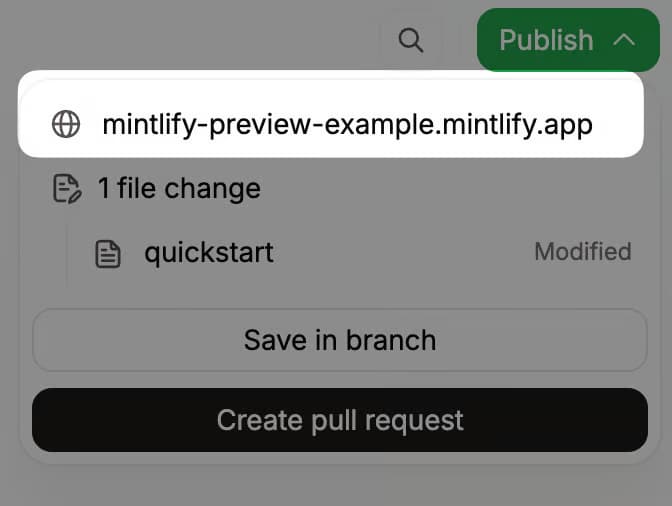
When the edit is ready, the publish menu opens a pull request against the deployment branch. The review panel shows the pull request title and description, the source and target branches, the number of changed files, the approval requirement, and the current review status. A reviewer can see whether the branch needs approval, whether a code owner must approve it, and whether the change is approved, awaiting review, or pending requested changes.
Before signing off, the reviewer can inspect the changed files from the publish menu. Mintlify shows the difference between the branch and the published version, so approval is based on the actual change in the documentation.
For GitHub repositories, a reviewer with permission can select Approve pull request in the Mintlify review panel. Mintlify records the approval on the pull request, changes the review status to approved, and makes Merge and publish available. For GitLab repositories, the reviewer opens the repository in GitLab and approves the merge request there, so teams using GitLab should account for the extra approval step.
Non-developers can approve documentation from the browser, and Git still records a reviewed, attributed, protected merge.
Documentation change management as the product evolves
Review gates protect the publishing process, but governance must also account for documentation drift after a page goes live. A page can pass review and still become inaccurate later when an API changes, a feature moves, or a release updates the product behavior the page describes.
Mintlify helps teams manage that drift with the agent and Workflows. The agent reads the codebase and existing documentation, then drafts a corresponding documentation update when a relevant code change is merged. The proposed update opens as a pull request, so the change enters the same review process as a human edit.
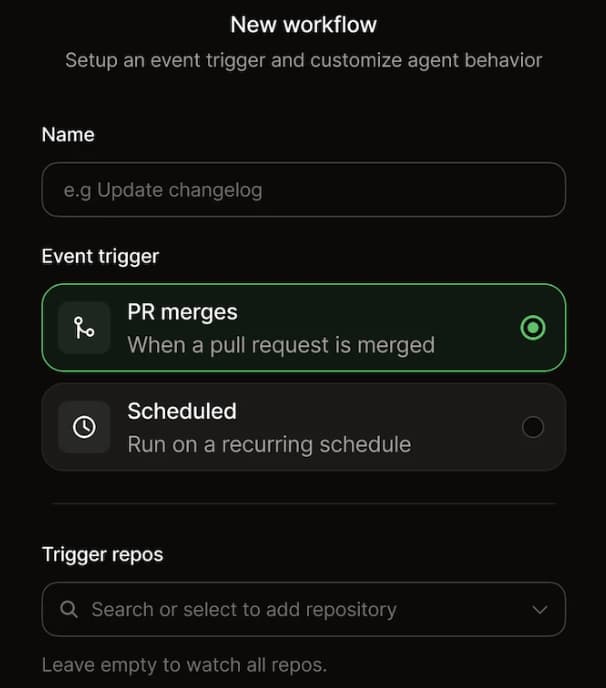
Workflows let teams define recurring documentation maintenance in advance. A team can set up a weekly workflow that scans merged pull requests across selected repositories, writes a changelog entry, and opens a pull request with the drafted update. The workflow handles recurring drafting, while reviewers still inspect and approve the change before anything is published.
The safety boundary is the pull request. Mintlify's agent and Workflows can draft updates, but they do not write directly to the live documentation site. Every generated change still passes through review, approval, and merge controls before reaching readers.
Build Git-based documentation governance in Mintlify
Mintlify documentation governance starts with Git rules and brings the review process into the editor. Configure the repository controls first, then use Mintlify to show review status, approvals, automated drafts, and publishing steps inside the documentation workflow.
- Branch protection rules: Configure branch protection in GitHub or GitLab for the deployment branch (usually main) and require a pull request before merging. Mintlify respects the protected branch, so contributors create a branch and pull request before publishing.
- Required and code-owner reviews: Turn on required reviews in the same branch protection settings, then add a CODEOWNERS file to route specific directories or files to the right reviewers. When a pull request touches an owned area, Mintlify displays the code owner requirement in the review panel and blocks the merge until the owner approves.
- Review and approval in the editor: Reviewers can track the status of reviews in Mintlify. GitHub teams can approve from the web editor, while GitLab teams complete approval in GitLab.
- CI checks: Add checks that run on every pull request, such as broken-link checks or Vale style linting. A failing check blocks the merge before mechanical issues reach human review.
- Workflows: Use Workflows for recurring documentation maintenance that creates reviewable pull requests, so automated updates still pass through approval before publishing.
GitHub or GitLab enforces branch protection, required reviews, CODEOWNERS, and CI checks. Mintlify surfaces review status, GitHub approval, agent output, and Workflows in the editor, so the repository remains the source for permissions and merge rules while non-technical reviewers get a browser-based way to follow the process.
Mintlify is used by teams including Anthropic, Coinbase, Cursor, Vercel, Lovable, and others. Replit uses Mintlify to make documentation a collaborative workflow across engineering and non-engineering teams while keeping docs version-controlled. Start for free on Mintlify and connect your repository in minutes, or talk to the Mintlify team about enterprise controls such as SSO, role-based access, and review workflows to meet stricter approval requirements.
Frequently Asked Questions
Can non-developers approve documentation changes?
Non-developers can review documentation in Mintlify's web editor, inspect the change, and approve the pull request when the docs are connected to GitHub. GitLab teams can still use Mintlify's review flow, but final approval happens in GitLab through the linked merge request.
How does docs-as-code support documentation audits?
Docs-as-code gives each published update a permanent Git record. Teams can trace a documentation change back to the person who made it, the pull request where it was reviewed, and the commit that shipped it, making audits and rollbacks much easier than manually checking a page history.
Can I require reviews before the documentation publishes?
GitHub and GitLab branch protection can require a pull request and approval before merging. Mintlify follows those repository rules, so contributors cannot publish directly to a protected documentation branch when review is required.
What is the difference between governance and linting?
Governance controls who can edit, review, approve, and publish documentation. Linting checks the content itself for issues such as broken links, formatting problems, or style-guide violations. In a docs-as-code workflow, linting usually runs as a CI check before the final review.
More to read

10 best AI observability tools for monitoring and evaluating agents in 2026
A comparison of ten AI observability tools across production tracing, evaluation, human review, deployment models, OpenTelemetry support, and pricing, with guidance on which fits an agent monitoring program.
August 28, 2026Harkirat Chahal
Growth
7 best MCP servers for Codex in 2026
A comparison of seven MCP servers for Codex across documentation retrieval, repository activity, browser automation, production debugging, database inspection, project context, and web research, with setup and access notes for each.
August 28, 2026Harkirat Chahal
Growth