Technical writing examples: 7 annotated samples and why they work
Harkirat Chahal
Growth
Share this article
Harkirat Chahal
Growth
Share this article
Technical writing helps readers understand complex systems and complete tasks accurately. This guide examines seven real examples across major documentation types, from API references and quickstarts to release notes and runbooks. Each sample highlights specific writing choices, explains why they work, and offers a practical principle you can apply to your own documentation.
What is technical writing?
Technical writing explains complex information so readers can understand a system, complete a task, or solve a problem. In software, it covers everything from API behavior and installation instructions to product concepts and incident response. Effective technical writing combines technical accuracy with clear organization, precise language, and information suited to the reader's goal.
The format depends on what the reader needs to accomplish. Seven common types of technical writing in software include:
API references: Document endpoints, methods, parameters, responses, and errors so developers can use an interface correctly.
Tutorials and quickstarts: Guide readers through a working implementation, from initial setup to a verifiable result.
How-to guides: Provide step-by-step instructions for completing a specific task.
Conceptual explainers: Describe how a system works, including its core components, relationships, and behavior.
READMEs: Introduce a project, explain how to install or use it, and direct readers to further resources.
Release notes: Record product changes and explain their impact on existing users.
Runbooks: Provide operational procedures for investigating incidents, resolving known failures, and verifying recovery.
7 technical writing examples, annotated
1. API reference example: Anthropic Messages API
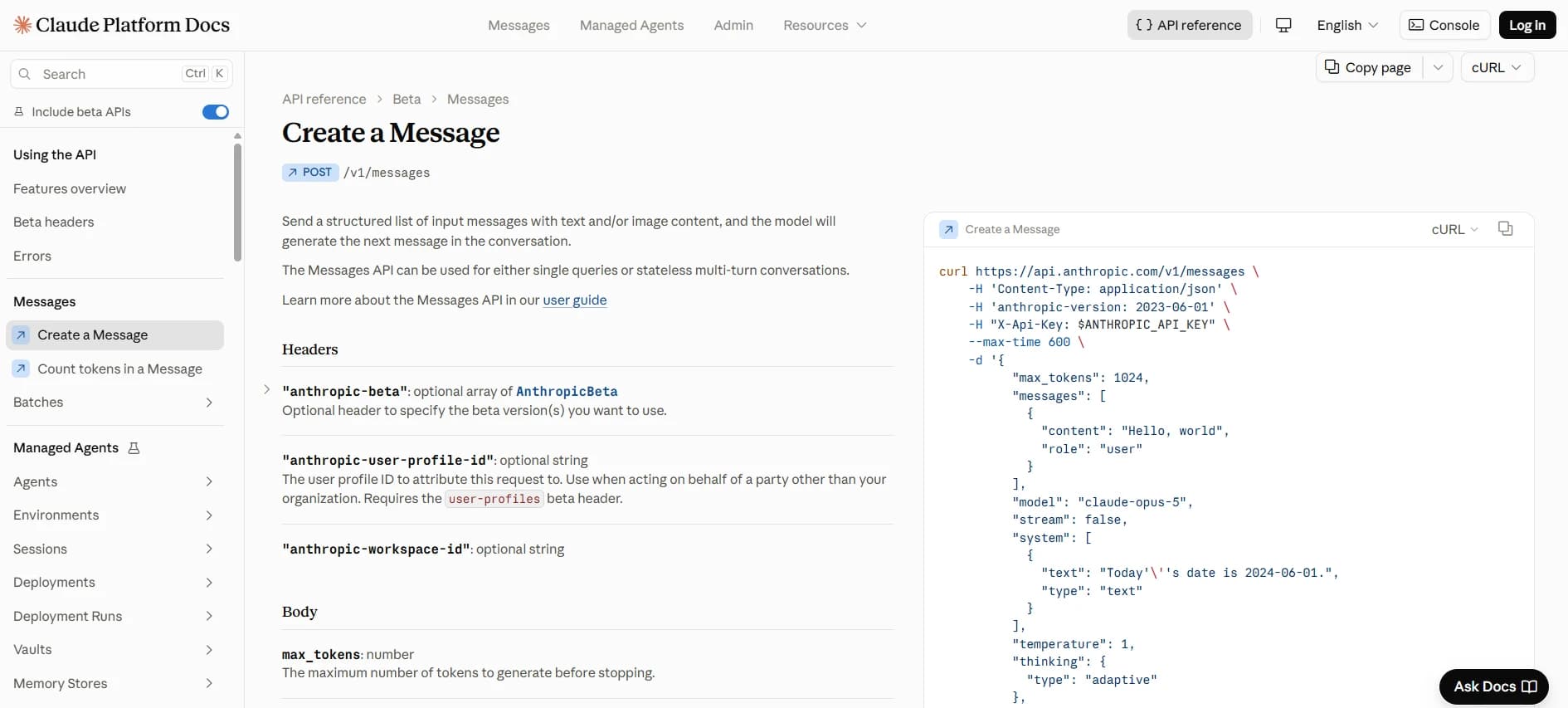
Anthropic's Messages API reference documents the POST /v1/messages endpoint for generating Claude responses. It lists the request parameters, accepted values, constraints, and response structure a developer needs to integrate the API. Anthropic also appears in this roundup of API documentation examples worth studying.
The page opens with the HTTP method, endpoint path, and a description of its purpose. The request body documents parameters individually, including their types, requirements, and explanations. For the messages parameter, Anthropic includes a minimal input example:
[{ "role": "user", "content": "Hello, Claude" }]
The reference also pairs a cURL request with an example 200 response so developers can read both structures side by side.
Why it works: Anthropic places technical requirements next to the parameters they govern. The messages description explains the expected structure and includes examples of single-message and multi-turn conversations. It also documents the 100,000-message request limit, and deprecated parameters such as temperature, top_k, and top_p carry notices explaining model-specific restrictions. Developers can check the requirements directly in the reference when constructing a request or investigating an API error.
Principle: Place parameter requirements, constraints, and examples where developers need them.
2. Quickstart example: Resend's Send emails with Node.js
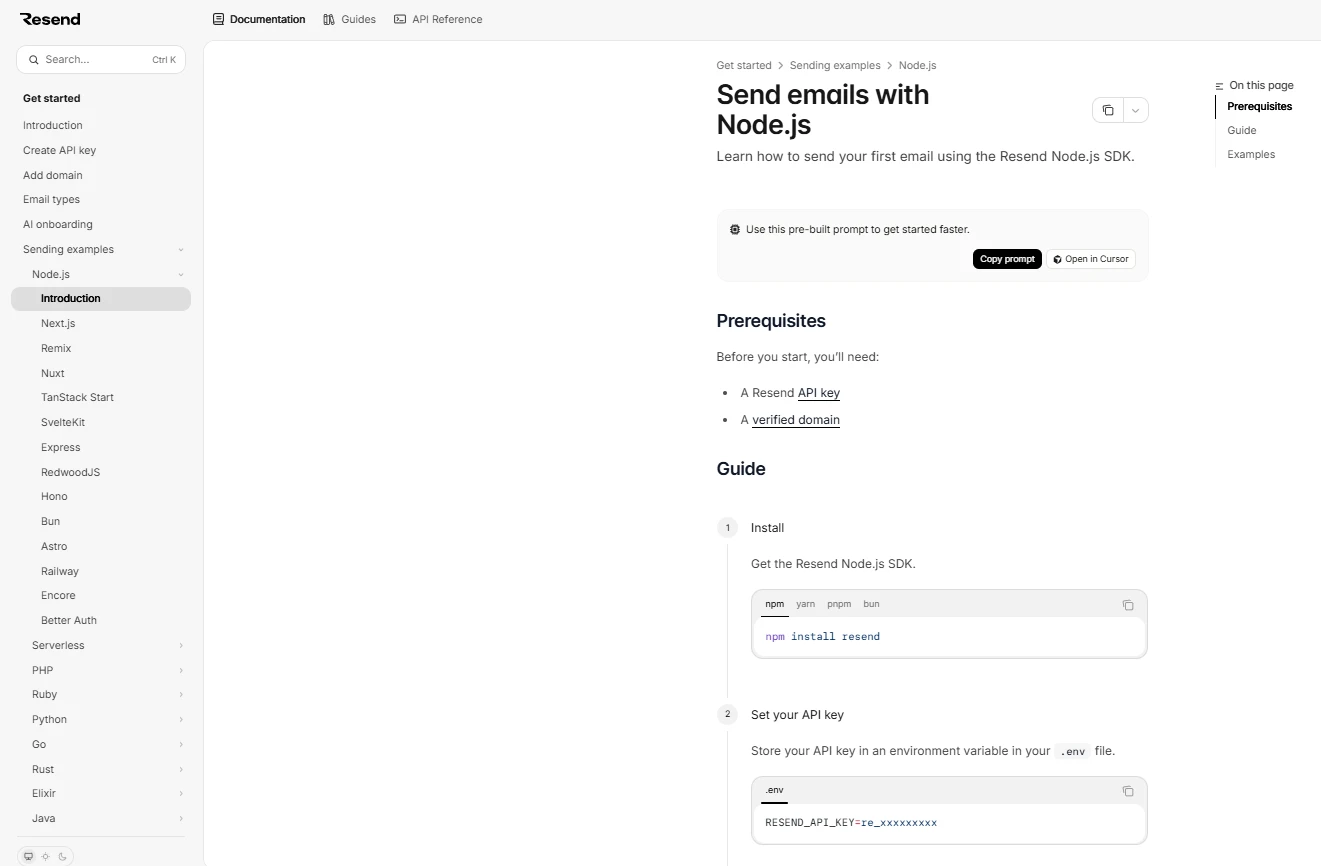
Resend's Node.js quickstart guides developers through sending their first email with the Resend SDK. It targets developers who have created an account and need to complete an initial API interaction, the main job of a quickstart guide.
The page identifies API credentials and domain verification as prerequisites, then organizes the process into three numbered steps: install the SDK, set the API key, and send an email using HTML.
The final step provides a complete Node.js example that initializes the Resend client, sends an email, handles errors, and logs the returned data. Installation commands for npm, yarn, pnpm, and bun appear in selectable tabs.
Why it works: Resend separates setup requirements from the main procedure and gives developers one implementation path to follow. Package-manager variations are contained within tabs, keeping the installation instructions compact. The email example includes both success and error handling, and related resources for attachments, templates, scheduling, and other capabilities appear after the main procedure. Developers can complete the first email request before exploring the rest of the API.
Principle: Guide readers through one working implementation before introducing additional capabilities.
3. How-to guide example: GitHub SSH keys
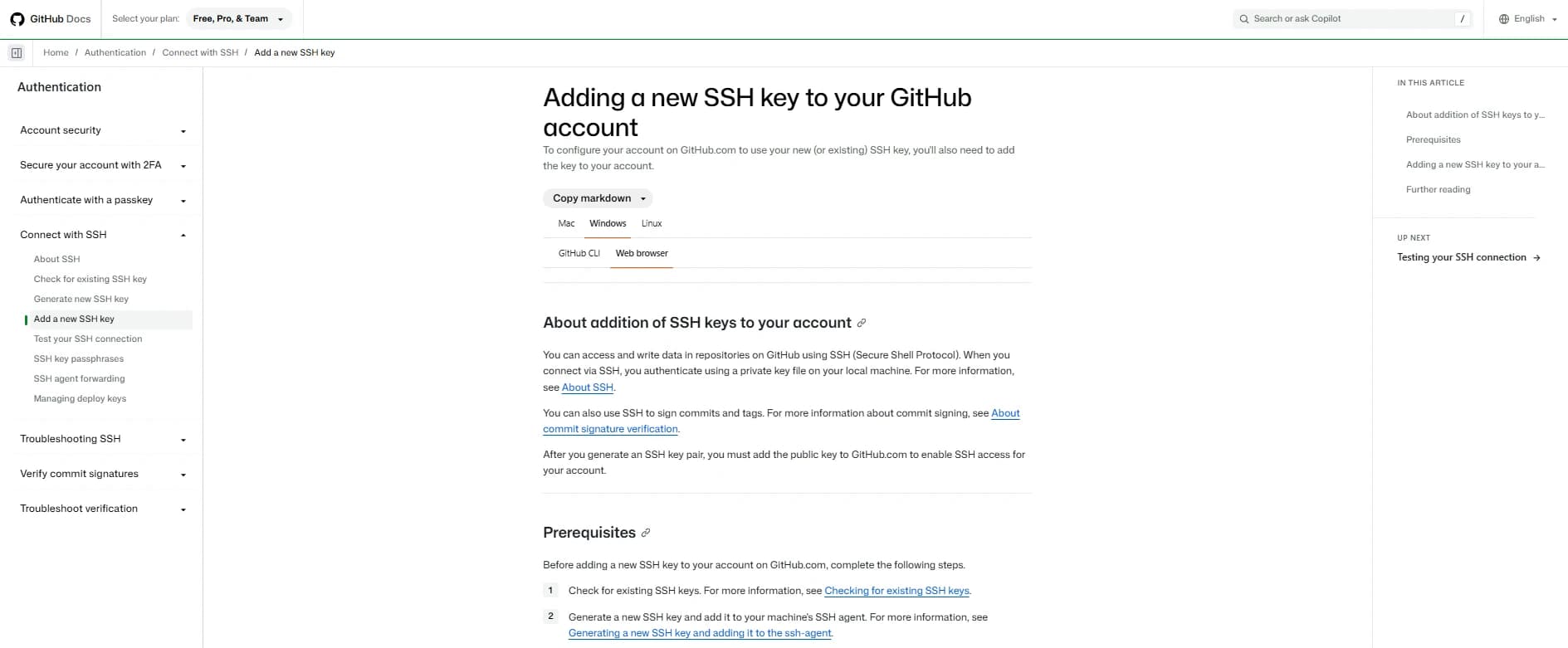
GitHub's SSH key guide explains how to register a public SSH key with a GitHub account. It serves developers who need to configure SSH authentication or commit signing.
The guide names the task in its title and links to instructions for checking existing SSH keys and generating a new key before presenting the procedure. It walks through the task twice, once for GitHub's web interface and once for GitHub CLI.
The web-interface procedure includes this instruction:
In the "Key" field, paste your public key.
The CLI instructions provide the corresponding gh ssh-key add command, along with options for specifying the key type and title.
Why it works: The title matches the task developers want to complete, and the prerequisites identify what must be ready before starting. The web-interface steps follow the order of actions in GitHub's settings, using the actual control names developers will encounter. Separate CLI instructions accommodate another method without interrupting the web-interface procedure. Links to prerequisite guides keep the instructions focused on adding the key.
Principle: Name the task clearly, establish prerequisites, and organize instructions in execution order.
4. Conceptual explainer example: Stripe's Payment Intents lifecycle
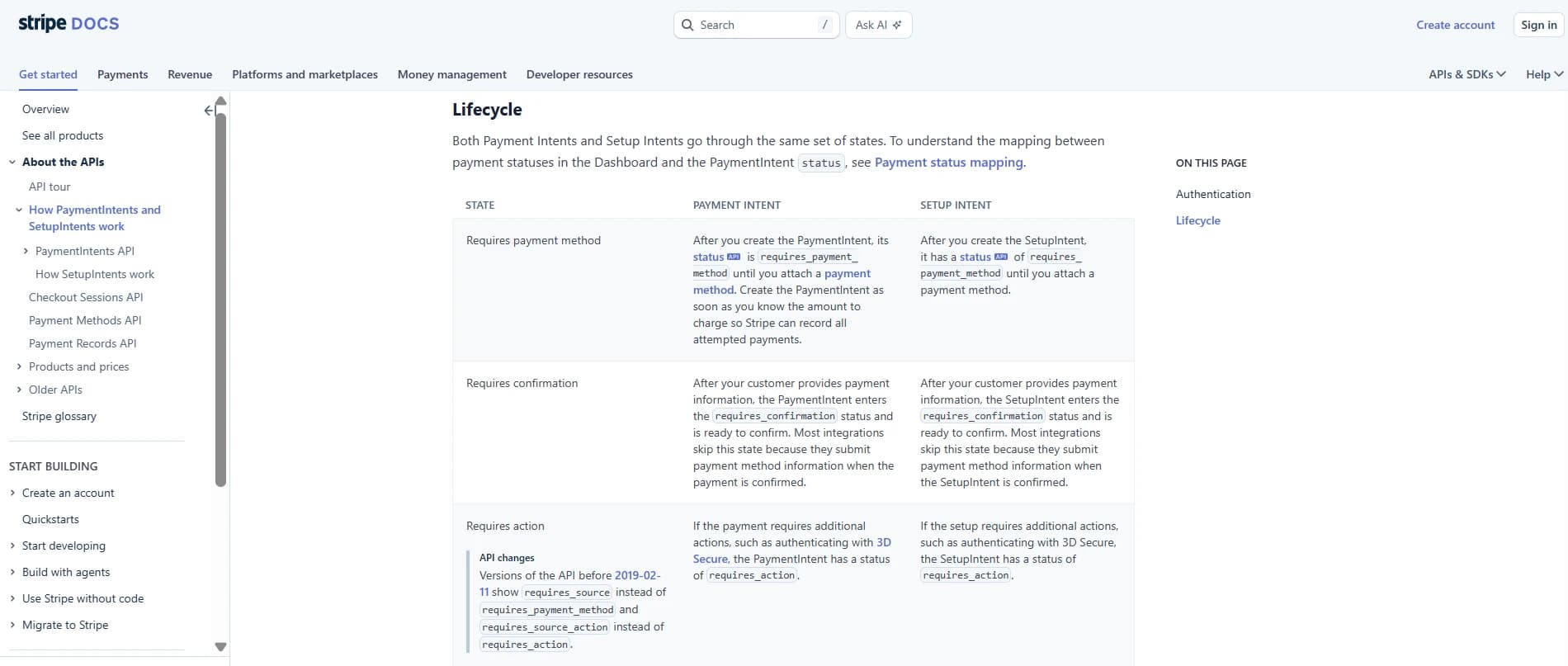
Stripe's Payment Intents and Setup Intents lifecycle guide explains how payment and setup intents move through different states. It serves developers who need to understand payment behavior, including authentication and asynchronous processing, before implementing the relevant integration logic.
The page first distinguishes Payment Intents, which process payments, from Setup Intents, which prepare payment methods for future use.
It then presents a lifecycle table covering states such as requires_payment_method, requires_confirmation, requires_action, processing, succeeded, and canceled.
Each row explains what the state means for Payment Intents and Setup Intents, including relevant differences in behavior and the circumstances that lead to particular states.
Why it works: Stripe establishes the difference between the two objects before explaining their lifecycle. The table then organizes information by state, letting developers compare Payment Intents and Setup Intents without reconstructing the flow from separate paragraphs. The explanations retain the exact API status values, connecting the conceptual model to the values developers encounter during implementation.
Principle: Establish the conceptual model before explaining individual behaviors and implementation details.
5. README example: ripgrep
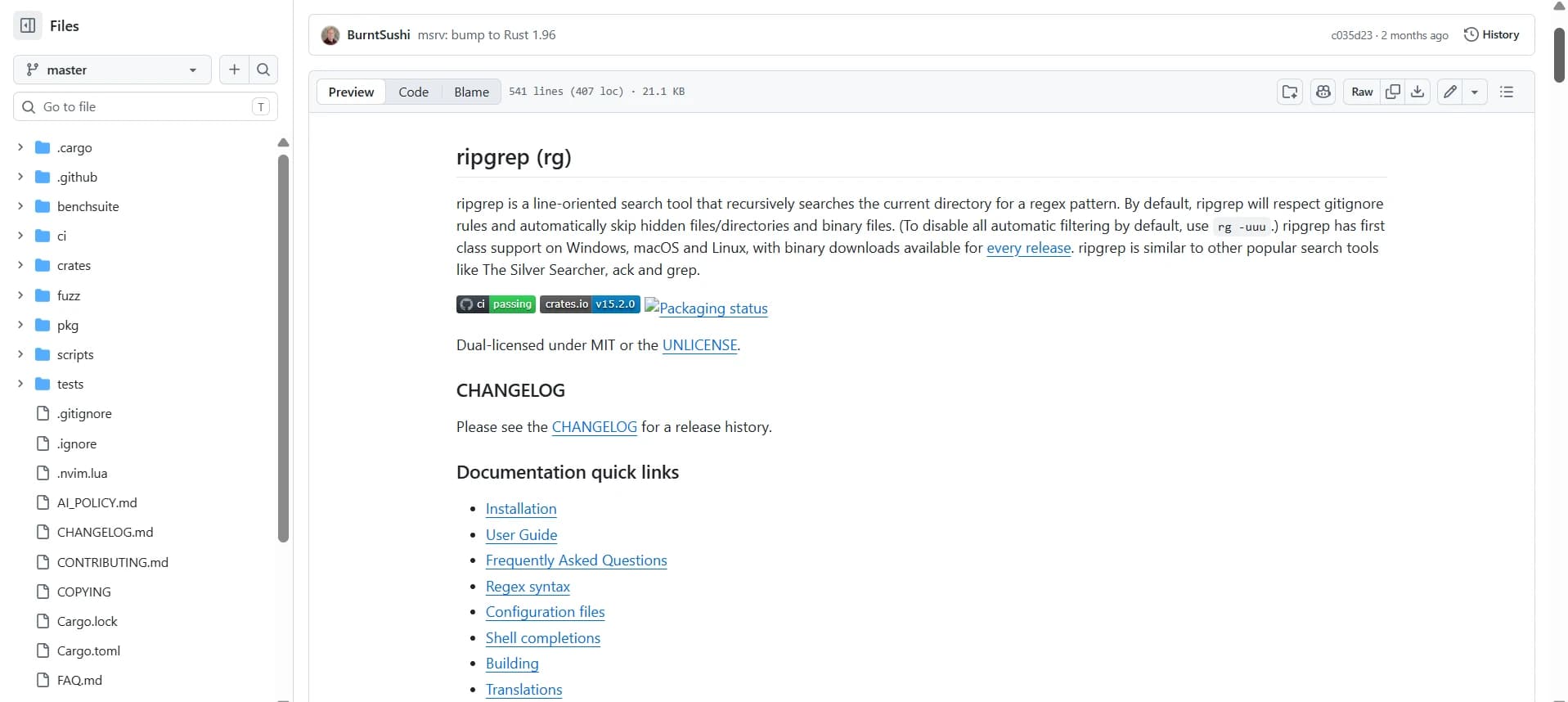
The ripgrep README introduces ripgrep, a command-line tool for recursively searching files with regular expressions. It serves developers evaluating the project, installing the tool, or looking for additional documentation.
The README immediately identifies ripgrep's purpose, explains its default handling of ignored, hidden, and binary files, and names its supported operating systems.
The installation section breaks instructions out by platform, including this Homebrew command:
brew install ripgrep
The document also includes usage information, performance examples, feature explanations, limitations, and links to additional documentation.
Why it works: Readers can identify the project's purpose and default behavior from the opening paragraph, then navigate directly to the information they need. Installation instructions are grouped by platform, with commands provided for the package managers. The README also explains situations where another search tool may be appropriate, giving developers technical context for evaluating the project. Detailed benchmarks and build instructions remain available for readers who need them.
Principle: Establish the project's purpose immediately and organize setup, usage, and deeper technical information into clearly identifiable sections.
6. Release notes example: Cursor CLI changelog
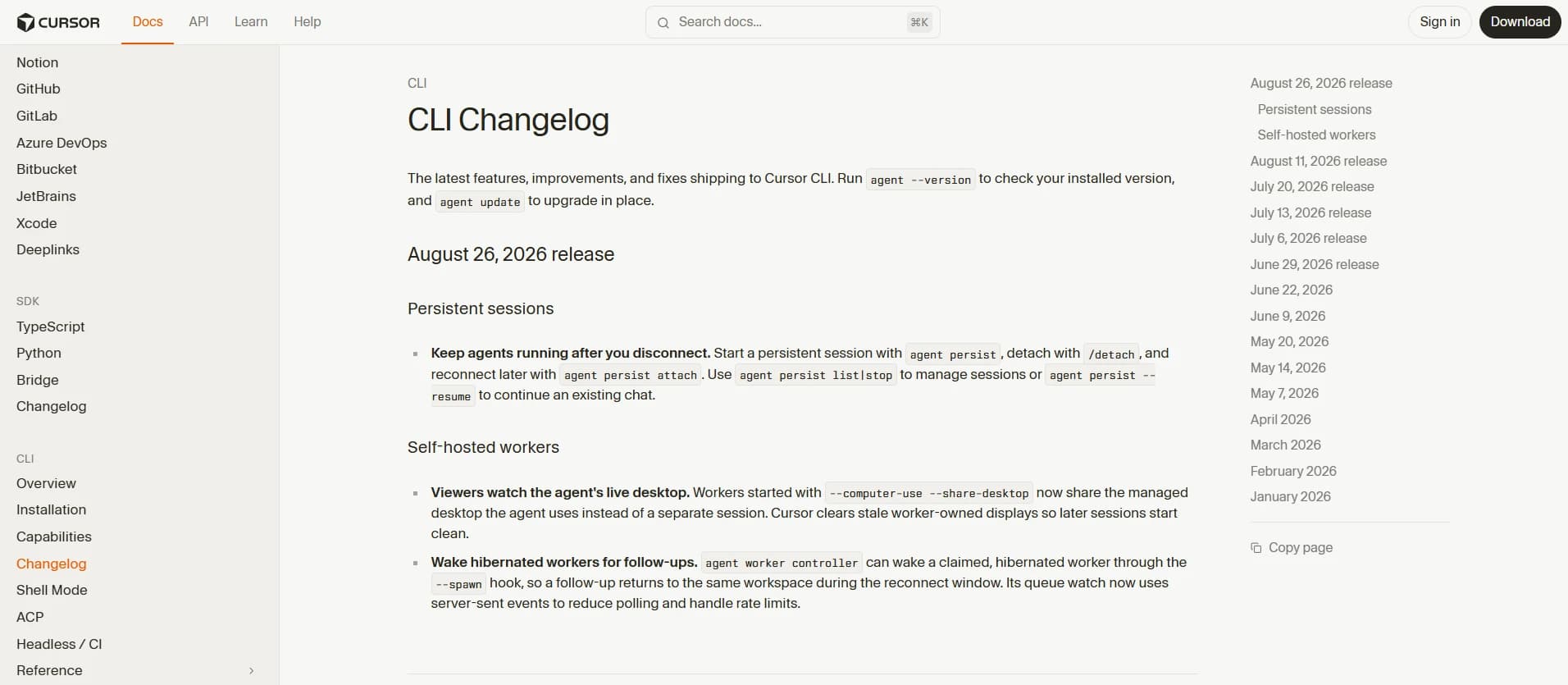
Cursor's CLI changelog records changes to its command-line agent, including new functionality, improvements, and bug fixes. It helps existing users understand what changed and whether an update affects their workflow, the two questions good release notes should answer.
The changelog opens with commands for checking the installed version and upgrading the CLI. Release entries describe individual changes with a short lead statement followed by supporting details.
One entry begins:
--trustworks in interactive sessions.
The explanation then describes the previous behavior and how the flag now handles workspace trust in interactive sessions.
Why it works: Putting the version and upgrade commands at the top means a user can confirm which release they are on before reading what changed in it. Individual entries identify the affected behavior first and then explain what changed. The --trust entry describes the previous restriction, the newly supported interaction, and how workspace trust is recorded. Developers can assess the impact of a change from the entry itself without searching through a separate feature announcement.
Principle: Lead with the observable change and explain its impact on existing users.
7. Runbook example: GitLab's AlertmanagerNotificationsFailing
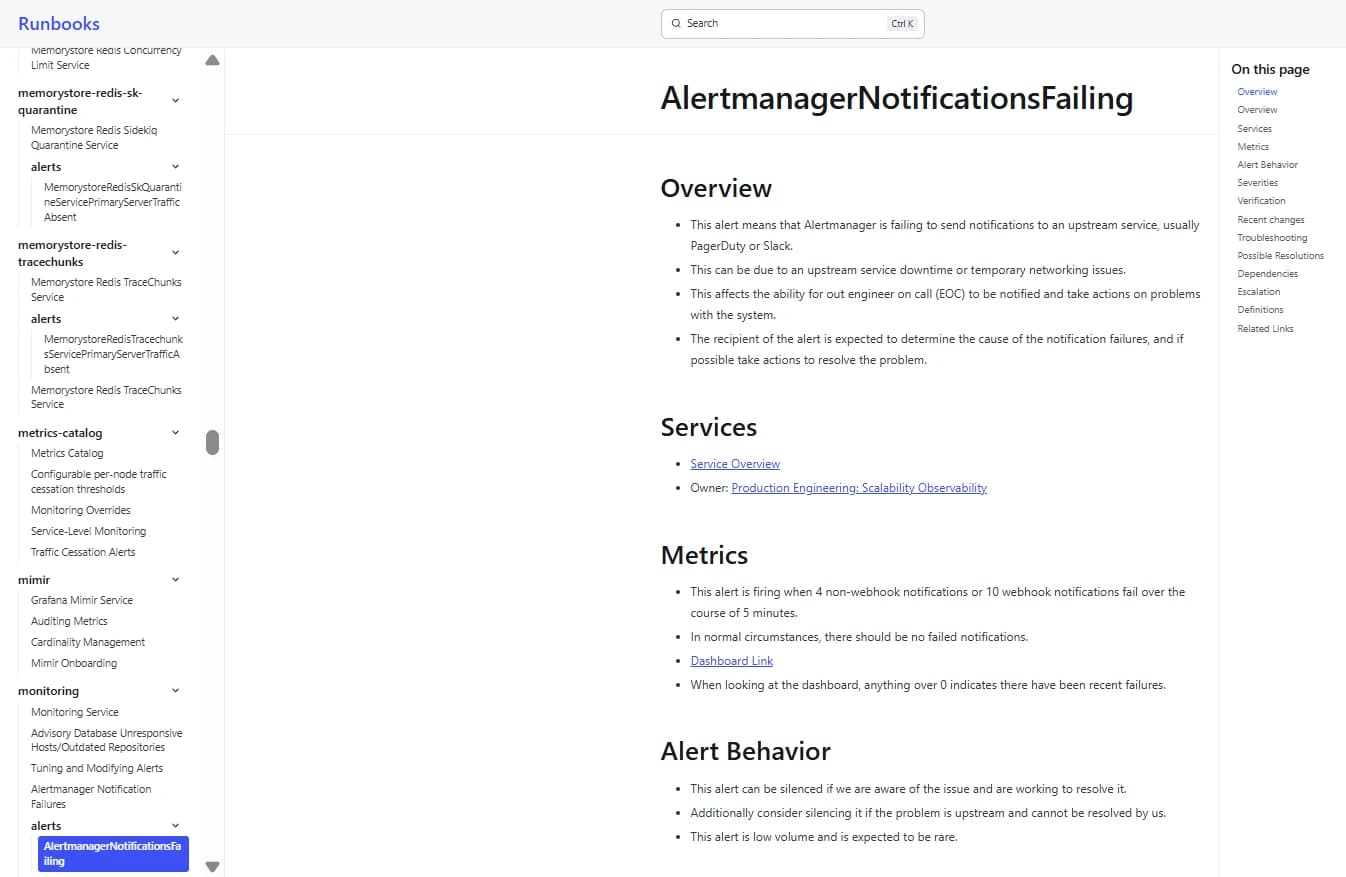
GitLab's AlertmanagerNotificationsFailing runbook covers incidents where Alertmanager fails to deliver notifications to services such as PagerDuty or Slack. It serves on-call engineers investigating failures that could prevent alerts from reaching the people responsible for responding. Like a troubleshooting guide, it pairs likely causes with fixes, but for an incident in progress.
The runbook opens by explaining the alert's meaning, possible causes, operational impact, and expected response. It then documents the alert conditions, severity guidance, verification resources, troubleshooting instructions, possible resolutions, dependencies, and escalation information.
The troubleshooting section directs engineers to inspect Alertmanager container logs in Google Cloud and use a Prometheus query to identify the failing integration. It also identifies upstream service problems as a possible cause.
Why it works: The overview identifies the incident and expected response before the engineer reaches the diagnostic instructions. The troubleshooting section names the services, monitoring tools, and log locations, reducing the need to discover the investigation procedure during an active incident. Severity guidance and escalation information provide additional context for deciding how to respond. The runbook also links to past incidents and related operational resources, giving engineers further material for investigating recurring failures.
Principle: State the incident's impact and expected response first, then provide concrete diagnostic and escalation instructions.
What the best technical writing has in common
Organize content around a reader's task: Identify what readers need to accomplish and include the information required to reach that outcome. In a how-to guide, that means following the task steps in order; in an API reference, it means putting the details a successful request depends on where developers will look for them.
Lead with the reader's goal: State the purpose of a document early so readers can determine whether it answers their question. A quickstart should identify the result developers will achieve, and a runbook should establish the incident and expected response before presenting diagnostic instructions.
Maintain the right level of detail: Match the depth of explanation to the document's purpose. Conceptual guides need enough background to explain system behavior, API references require precise technical specifications, and task guides need actionable instructions. Link to supporting material when additional detail would interrupt the main explanation.
Provide runnable examples: Include complete commands, required dependencies, configuration details, and expected results wherever practical. Test examples against the supported product version so readers can reproduce the documented behavior without guessing which steps are missing.
Use plain, precise language: Choose consistent terminology, explain unfamiliar concepts, and write instructions that identify the required action clearly. Technical accuracy also depends on distinguishing requirements, optional settings, limitations, and expected behavior without ambiguous wording.
Make information easy to scan: Use descriptive headings, numbered procedures, tables, and appropriately labeled code blocks to help readers locate relevant details. Keep related information together, particularly parameter constraints, error explanations, and instructions that must be followed in sequence.
Keep documentation current: Review affected pages when product behavior, dependencies, or supported versions change. Connect documentation updates to the development and release process, and make deprecations, breaking changes, and migration requirements visible to developers.
Apply these principles with Mintlify
Mintlify provides an editing and publishing environment for turning technical information into structured documentation. You can apply the writing principles from the seven examples through five steps, from defining the reader's task to reviewing and publishing accurate content.
Step 1. Define the reader's task and outcome
Identify the audience, the task they need to complete, and the result they should achieve. Gather the prerequisites, technical specifications, working code, and product details before drafting.
For example, a quickstart for an email API might aim to help a new developer authenticate, send an email, and confirm that the request succeeded. Mintlify's audience research guide explains how to identify reader goals and use developer feedback to inform documentation priorities.
Step 2. Structure the page by documentation type
Create a page in Mintlify's web editor and organize the content according to its purpose. Use numbered steps for procedures, code blocks for implementation examples, and tables for structured technical information. Give the page a descriptive title and place it in the appropriate navigation group through docs.json.
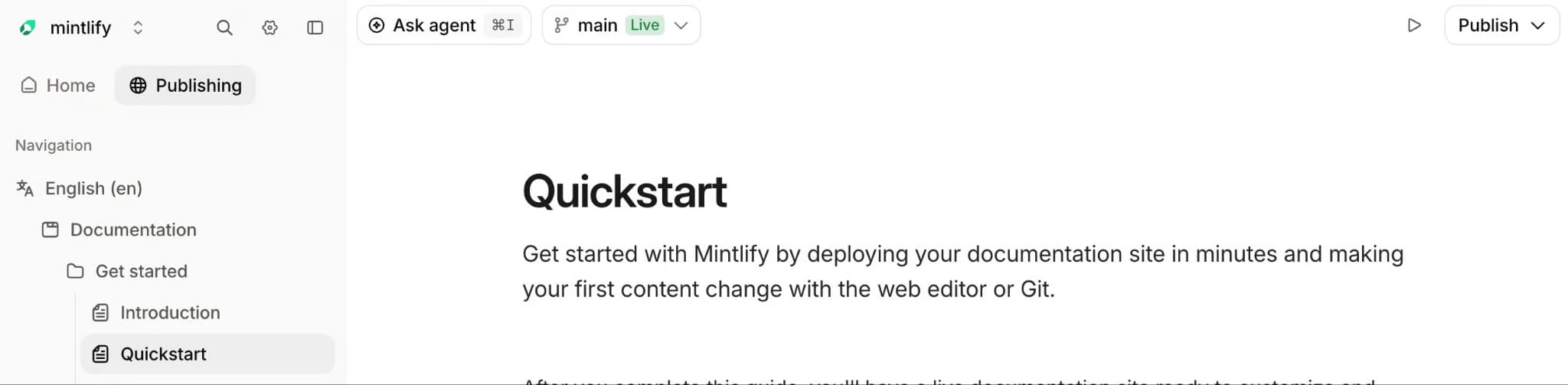
Mintlify's documentation components include steps, tabs, code groups, and other formatting options that help present different types of technical information clearly.
Step 3. Write and verify the working example
Draft the main procedure using complete instructions, required configuration, and expected results. Test every command and code example against the supported product version, then update the instructions to match the verified behavior.
Mintlify supports syntax-highlighted, copyable code blocks and tabbed code groups for different languages. Use the code formatting options to present tested examples with clear language labels and consistent formatting.
Step 4. Review with a fresh reader
Ask someone unfamiliar with the feature to follow the draft using only the published instructions. Check whether they can identify the prerequisites, complete the task, and verify the expected result without additional explanations from the author.
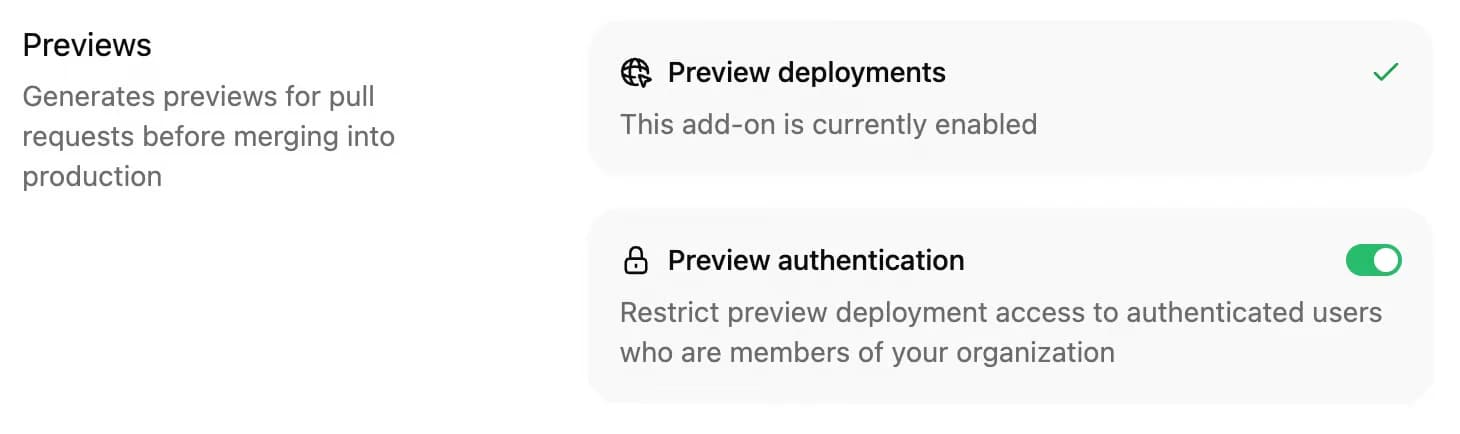
Use a separate branch in Mintlify's web editor to revise the content and request a technical review through a pull request. Teams with preview deployments enabled can also share a rendered version for reviewers to inspect before publication.
Step 5. Publish and maintain the documentation
Merge approved changes into the deployment branch and include documentation reviews in the product release process. Assign an owner to each page and update the instructions whenever API behavior, SDK versions, or product requirements change.
Mintlify's Git-based documentation workflow tracks changes through commits and supports pull request reviews, helping teams maintain a record of documentation updates alongside product development.
Turn good technical writing into great developer docs with Mintlify →
Frequently Asked Questions
What is technical writing?
Technical writing communicates specialized information to a defined audience and often requires accuracy, consistent terminology, and clear instructions. It is used across software, engineering, manufacturing, healthcare, and other fields where readers depend on reliable information to understand or use complex systems.
What are examples of technical writing?
Examples include API endpoint descriptions, software installation instructions, equipment maintenance manuals, security procedures, and incident response playbooks. Technical writing can also include internal engineering specifications, configuration guides, and knowledge-base articles.
What are the types of technical writing?
Technical writing falls into four broad categories: instructional documentation for procedures, reference documentation for precise information, conceptual documentation for understanding systems, and operational documentation for maintenance and incident response. Many software documentation projects, like a typical developer documentation set, use several categories together.
What makes technical writing good?
Good technical writing gives its intended audience accurate, complete, and usable information. A practical test is whether a reader can locate the right page, act on it, and get the documented result on the first attempt.
How do I improve my technical writing?
Practice explaining familiar technical processes to someone with less experience, then ask them to follow your instructions without assistance. Review their questions, identify missing assumptions, and revise the document. Studying well-maintained open-source documentation can also strengthen your organizational and explanatory skills.
More to read

The Complete Guide to Quick Start Guides for Software Products
Learn how to create software quick start guides that take new users from setup to a verifiable first success, with examples and maintenance best practices.
September 11, 2026Harkirat Chahal
Growth

Troubleshooting Guide Best Practices for Software Companies
Learn how to write troubleshooting guides with symptom-based diagnosis, safe recovery steps, clear escalation paths, and ongoing maintenance.
September 11, 2026Harkirat Chahal
Growth