Developer documentation 101: what to include and where to start
Harkirat Chahal
Growth
Share this article
Harkirat Chahal
Growth
Share this article
Developer documentation should give developers a clear path from understanding what a product does to integrating it successfully and running it in production. For a team starting from scratch, that usually means covering the essentials first: product orientation, setup requirements, a quickstart, core concepts, task-based guides, API or SDK reference, working examples, troubleshooting, and product changes.
Each part of the documentation should answer a specific developer question, draw from a reliable source, and have someone responsible for keeping it accurate. The goal is a connected documentation system where developers can understand the product, reach a first working result, complete implementation tasks, look up technical details, and recover when something goes wrong.
Mintlify provides one searchable home for publishing and maintaining the full documentation path from initial evaluation through production use, with support for API references, docs-as-code workflows, versioning, developer feedback, and content accessible to both developers and coding agents.
What developer documentation is and why it matters
Developer documentation is the technical content that helps developers understand, integrate with, and operate a software product through an API, SDK, CLI, or another programmatic interface. It should explain what the product enables, how to set it up, how its core concepts work, how to complete common implementation tasks, and what to do when something fails. Mintlify’s guide to creating developer documentation walks through the documentation types that answer each of those questions.
Developers rely on documentation for exact technical behavior, runnable examples, expected responses, limitations, and failure conditions they can use during implementation. Where end-user help content explains a product interface and marketing pages communicate product value, developer docs need enough technical detail for someone to build against the product with confidence and return later to verify behavior or diagnose an issue.
A developer evaluating two APIs may compare authentication requirements, run each quickstart, inspect the API reference, and check how common errors are documented before contacting either company. Clear documentation makes it easier to understand what the product supports and how much work an integration will require.
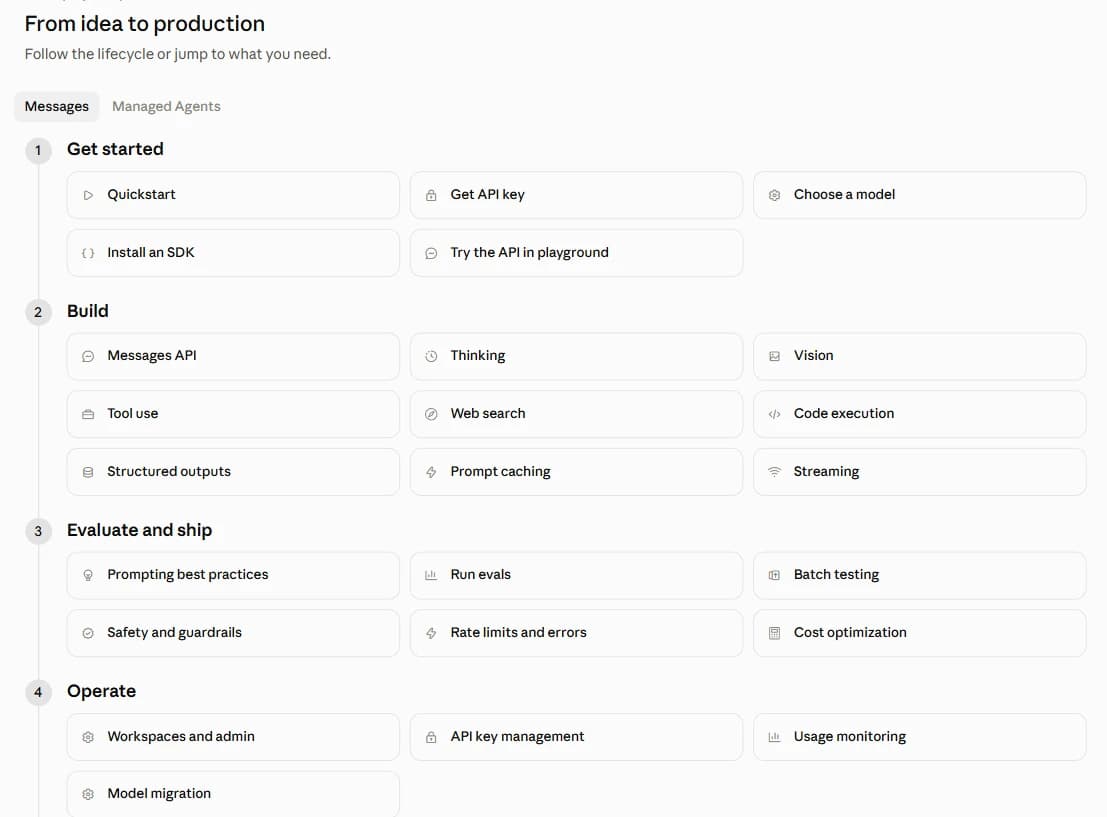
The Claude Platform Docs show how documentation can follow the developer journey from initial setup through production operation, with a “From idea to production” section organized into Get started, Build, Evaluate and ship, and Operate.
The developer journey from evaluation to production
Developers ask different questions as they move from evaluating a product to running an integration in production. Each stage has a documentation type suited to the question developers are asking at that point.
| Stage | Reader question | Documentation type |
|---|---|---|
| Evaluation | What does this product enable, and does it support what I want to build? | Product overview |
| Setup | What do I need before I can start? | Prerequisites |
| First success | How do I get a working result quickly? | Quickstart |
| Learning | How do the main concepts and behaviors work? | Concept pages |
| Implementation | How do I complete a specific task? | Task guides and code examples |
| Lookup | What does this endpoint, method, parameter, or field do? | API or SDK reference |
| Recovery | Why did this fail, and how do I fix it? | Troubleshooting |
| Production operation | What changed, and does it affect my integration? | Changelog and release notes |
The minimum viable developer documentation set
The nine documentation types serve distinct purposes, but they don't always require nine separate pages. A small product might include prerequisites in its quickstart and place short code examples within task guides. The key is to make each answer easy to find without sending readers through unrelated material.
Product overview and orientation
A product overview should explain what the software enables, who it serves, and how its main capabilities relate to one another. Include supported languages and platforms, introduce the primary components, and provide clear routes to the quickstart and API or SDK reference. A simple architecture diagram can help explain how the components interact when the product has several services or dependencies.
Product management can supply the positioning material, with engineering verifying the technical details and the documentation owner maintaining the published overview as the product evolves.
Prerequisites and account setup
Prerequisites should cover everything a developer needs before attempting the first integration, including account creation, API credentials, permissions, supported runtimes, SDK installation, and required environment variables. Specify where to obtain each item and provide the exact installation commands needed for the supported environment.
Use the current authentication flow, SDK package manifests, and onboarding process as sources. The engineers responsible for authentication and SDKs should review the relevant setup instructions whenever those requirements change.
Quickstart guide
A quickstart should take developers from initial setup to one successful result through a short, reproducible sequence. Include the commands needed to install dependencies, authenticate, make the first request, and verify the response. Show the expected output so developers can confirm that the integration works before moving on to more complex tasks.
The documentation owner or developer relations team can write the quickstart using code reviewed by the API or SDK team. Testing the example against the current product, ideally through an automated check, helps catch broken instructions before developers encounter them.
Core concepts
Concept pages explain the product's main objects, their relationships, and the behavior developers need to understand before building more complex integrations. Depending on the product, this may include data models, object lifecycles, authorization, pagination, idempotency, and rate limiting.
Engineering design documents and subsystem owners provide the technical information, with a writer clarifying terminology and explanations for developers unfamiliar with the internal architecture. Keep procedural instructions in task guides and use concept pages to explain how the underlying functionality works.
Task-based guides
Task guides help developers complete specific implementation goals, such as handling webhooks, implementing retry logic, or migrating to a newer API version. Each guide should define the prerequisites, provide the complete sequence of steps, and explain how to verify the result.
Support tickets, developer questions, and sales engineering conversations can identify the tasks worth documenting. Developer relations or the documentation lead can turn recurring questions into guides, with the relevant feature engineer reviewing the implementation.
Mintlify's documentation content templates provide a starting structure for task-based guides, including prerequisites, implementation steps, verification, and troubleshooting.
API and SDK reference
API and SDK references provide the exact technical details developers need during implementation. An API reference should document endpoints, request parameters, authentication requirements, response schemas, defaults, constraints, and error codes. SDK references should cover the corresponding methods, classes, types, and configuration options.
For APIs described by OpenAPI, the specification can serve as the source for generated endpoint documentation. Mintlify supports generating API reference pages from OpenAPI specifications, including endpoint descriptions, parameters, and response information.
The API team should maintain the specification, and SDK owners should maintain the corresponding source documentation. Generated references still need technical review to ensure descriptions, examples, and documented behavior match the product.
Code examples and sample projects
Code examples show developers how to use an API or SDK in their preferred language, with complete requests, authentication, required headers, and expected responses. Include examples for common operations and, where useful, a sample application that demonstrates how multiple API calls work together to implement a feature.
Maintain examples in a repository with tests against supported API and SDK versions. Developer relations can coordinate the examples, with SDK owners reviewing them when implementations or dependencies change.
Troubleshooting and error reference
Troubleshooting documentation should help developers identify why an integration failed and find a practical resolution. Document common errors with their exact messages or codes, likely causes, and corrective steps. Typical issues include invalid credentials, missing permissions, incorrect configuration, and rate-limit responses.
Support tickets and the product's error catalog provide the starting material. Support engineering can identify recurring failures, and the API or feature owner should confirm that the documented causes and fixes are accurate.
Changelog and release notes
A changelog records developer-visible product changes in reverse chronological order, including new capabilities, behavior changes, fixes, and deprecations. Breaking changes should identify the affected functionality, explain the required action, and state any relevant migration deadlines.
Use the product release process as the source of truth, with the engineer responsible for a change contributing its entry and product management reviewing significant announcements. The changelog should begin with the first relevant release and remain part of the release process as the product evolves.
How the docs connect into one developer path
Each page should link to the content a developer needs next, such as authentication instructions before they try a request or a task guide that shows how to use the endpoint. Link the quickstart to relevant concepts and API methods, connect task guides to the reference and troubleshooting pages, and point changelog entries to migration guides when a release introduces breaking changes. Use descriptive link text so readers know what information they'll find on the destination page.
Organize the main navigation around recognizable developer tasks, with groups such as Get started, Guides, API reference, and SDKs. Name pages for the actions or technical details they cover, such as Handle webhooks or Authentication. Mintlify's navigation documentation explains how to configure page groups, tabs, and navigation hierarchy in docs.json.
Where to start building docs from scratch
The order developers read documentation and the order a team creates it are not always the same. Developers may begin with a product overview, but the first pages a documentation team creates often depend on technical sources such as the API specification, SDK behavior, authentication requirements, and a tested first-use flow.
Before the first external developers use the product
Start with the documentation needed to complete and verify one working integration. For an API product, that usually means an API reference and a quickstart that covers authentication, the first request, and the expected response. Add a prerequisites page when setup requires additional permissions, SDK installation, environment configuration, or other steps that would make the quickstart harder to follow.
This initial set gives beta users enough information to test the product and gives the documentation team an early way to identify missing setup instructions, unclear API descriptions, and broken examples.
Before a broader launch
Add the product overview, core concept pages, and the task guides developers need for the most important implementation paths. Questions from beta users, support conversations, and early integration work can help determine which guides to prioritize.
Code examples should also cover the languages and SDKs developers are expected to use. Keep the examples tied to supported product behavior so they can be reviewed and updated alongside the API or SDK.
As developers begin using the product in production
Build troubleshooting documentation from recurring integration failures and support questions. Start recording developer-visible product changes in the changelog, with migration guidance when a release requires developers to update an existing integration.
At this stage, make documentation maintenance part of the product release process. API changes should trigger reference updates, SDK changes should prompt example reviews, and product changes that affect existing integrations should be reflected in the relevant guides or release notes.
Establish reliable sources before expanding the docs
Every page is easier to maintain when the technical information comes from a source the team already keeps up to date. API references can derive from an OpenAPI specification, code examples from tested repositories, concept documentation from engineering design material, and troubleshooting guidance from confirmed support cases.
When no reliable source exists, create or assign one before expanding the documentation to reduce the risk of publishing instructions that quickly drift from the product.
Source material, contributors, and ownership for developer documentation
The documentation lead coordinates writing, reviews, and publishing, while subject-matter experts confirm technical accuracy. Engineers explain product behavior and implementation requirements, support teams identify recurring problems, and product management communicates changes that affect developers. Each contribution should come from a reliable source, such as an API specification, tested code, an engineering design document, or a confirmed support case.
Assign a technical reviewer to each page and include documentation updates in the product development process. In a docs-as-code workflow, engineers can update the relevant documentation in the same pull request as a product change, allowing reviewers to inspect both together. Mintlify's Git workflow guide explains how branches, pull requests, and version history support collaborative documentation reviews.

Before releasing a feature, confirm that the affected reference pages, guides, and examples reflect the new behavior. Breaking changes also require migration instructions and release notes that explain what developers need to update. The engineer responsible for the change should provide the technical details, with the documentation lead checking clarity and completeness before publication.
Quality standards for developer documentation
Accuracy: API parameters, defaults, authentication requirements, and documented behavior must match the current product. Validate generated references against the API specification, test code examples, and review manually written explanations whenever the underlying functionality changes.
Runnable examples: Code samples should include the required dependencies, authentication, headers, and request parameters, along with the expected response. Test examples against supported API or SDK versions and include common error responses where developers need them to implement error handling.
Findability: Use descriptive page titles and searchable terminology that matches developer queries, including endpoint names, SDK methods, error messages, and implementation tasks. A developer searching for an exact error code should be able to find its explanation and resolution without browsing unrelated pages.
Version awareness: Document supported product versions clearly, particularly when API behavior, SDK methods, or configuration requirements differ. Keep documentation for older supported versions accessible and identify deprecated functionality alongside the relevant migration instructions.
Accessibility: Use a logical heading hierarchy, descriptive image alt text, labeled code blocks, sufficient color contrast, and keyboard-accessible navigation. Mintlify's accessibility guide provides specific guidance for creating documentation that works across screen readers, keyboard navigation, and different devices.
Agent-readable content: Write pages with clear descriptions, consistent product terminology, and complete instructions that make sense when accessed individually. Keep essential technical information available as text and provide Markdown versions for machine consumption. An llms.txt index can help AI tools discover documentation pages, with Mintlify supporting automatic generation of the index and Markdown versions of pages.
How to measure developer documentation quality
Documentation quality becomes easier to assess when teams combine usage data, developer feedback, and product outcomes. Six signals show where developers struggle and which pages need attention.
First-success completion: Track how many developers complete the quickstart and reach the expected result. Product analytics can record successful first API calls, and documentation analytics can show quickstart usage. A low completion rate warrants checking setup requirements, authentication instructions, and code examples.
Failed searches: Review queries that return no results or receive few clicks. These searches can reveal missing topics, unfamiliar terminology, or hard-to-find pages. Mintlify's analytics dashboard lists search queries, no-result searches, and click-through rates, which point to likely content gaps.
Recurring support questions: Group support tickets by topic and look for repeated setup problems, misunderstood API behavior, and implementation questions. Recurring issues point to documentation that needs clearer instructions, additional examples, or troubleshooting guidance.
Reader feedback: Review page ratings and written comments for confusing instructions, missing details, and outdated content. Mintlify's feedback features support page ratings and additional feedback options that help teams investigate specific problems.
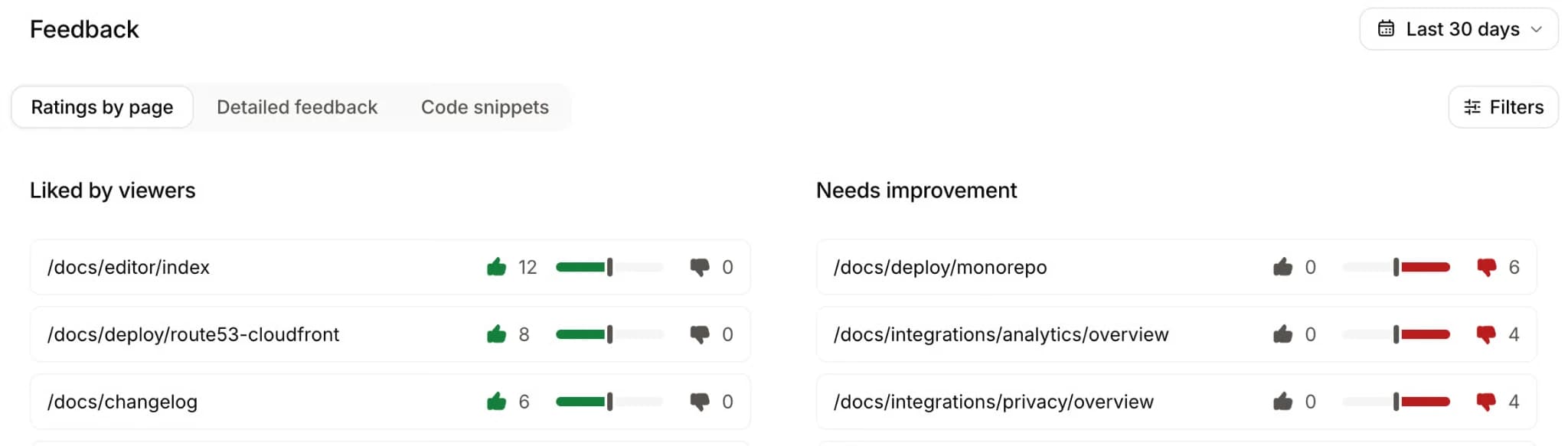
Integration progress: Track how developers move from their first successful API call to completing additional tasks and reaching production usage. Product analytics can reveal where progress slows, giving the documentation team a starting point for investigating the relevant concepts, guides, and API references.
Content freshness: Track when pages were last reviewed and compare those dates against relevant product releases. Prioritize pages affected by API changes, SDK updates, deprecated functionality, or revised setup requirements, and have their owners confirm or update the content.
Publish the complete developer documentation path with Mintlify
Mintlify lets teams publish product overviews, quickstarts, task guides, SDK documentation, and API references in one searchable site. OpenAPI specifications generate endpoint pages, and the interactive API playground lets developers send requests and inspect responses directly from the documentation.
Git-based publishing keeps documentation changes connected to the product development process, with versioned navigation for supported releases. Mintlify Automations can also respond to code changes, draft documentation updates, generate changelogs, and create pull requests for review. Engineering and documentation teams can validate the proposed changes before publication.
Developers can find information through built-in search, with analytics and feedback helping documentation owners identify gaps. Mintlify generates Markdown versions of documentation pages and an llms.txt index, giving coding agents structured access to published content.
Replit uses Mintlify to manage documentation as code, expanding regular contributors from two to more than ten. HubSpot also reports 3× faster documentation builds after migrating its developer docs to Mintlify.
Publish and maintain your developer documentation with Mintlify →
Frequently Asked Questions
What is the difference between developer documentation and API documentation?
API documentation describes how an API works, including its endpoints, parameters, authentication, responses, and errors. Developer documentation has a broader scope, covering the guidance and examples needed to understand a software product, integrate its capabilities, and maintain an implementation. See developer documentation best practices for a practical checklist.
Can a small team combine multiple documentation types into one page?
A small team can combine closely related content, such as prerequisites and a quickstart or troubleshooting instructions within a task guide. Separate them when the combined page becomes difficult to navigate, the content serves different reader questions, or individual sections need frequent updates.
Do you need an OpenAPI specification to start writing developer documentation?
An OpenAPI specification is useful for describing HTTP APIs and generating reference pages, but it is not a prerequisite for writing product overviews, tutorials, or other documentation. Teams without a specification can begin with verified technical information and develop the API specification as part of their documentation process.
Should developer documentation include examples for every programming language?
Prioritize languages officially supported by the product and commonly used by its target developers. Provide complete, tested examples for primary SDKs and expand language coverage according to developer demand, integration requirements, and the team's ability to maintain accurate examples.
Can AI generate developer documentation?
AI can help draft explanations, organize technical material, and produce initial examples from existing specifications or source code. Engineers still need to verify API behavior, execute code samples, and review generated instructions against the current product before publication.
Related resources
More to read

Technical writing examples: 7 annotated samples and why they work
Explore seven annotated technical writing examples, from API references and quickstarts to release notes and runbooks, with practical lessons for your docs.
September 30, 2026Harkirat Chahal
Growth
The Complete Guide to Quick Start Guides for Software Products
Learn how to create software quick start guides that take new users from setup to a verifiable first success, with examples and maintenance best practices.
September 11, 2026Harkirat Chahal
Growth