How to keep documentation up to date with regular reviews
Harkirat Chahal
Growth
Share this article
Harkirat Chahal
Growth
Share this article

Regular documentation reviews check whether published instructions still match the product, including pages left untouched as features change. This guide explains how to organize recurring reviews, identify pages that need attention, and route findings to their owners, with example check prompts, suggested review schedules, and guidance on confirming, updating, or retiring flagged pages.
Regular documentation reviews check whether published instructions still match the product, including pages left untouched as features and workflows change. Scheduling checks by content type and assigning owners helps teams catch outdated guidance that release checks may have missed.
This guide explains how to organize recurring reviews, identify pages that need attention, and route findings to their owners. It includes example check prompts, suggested review schedules, and guidance on confirming, updating, or retiring flagged pages.
Mintlify’s scheduled automations can compare documentation with connected source repositories and propose updates through pull requests. Page feedback and search analytics help teams prioritize content that readers find confusing or difficult to locate.
What is a scheduled documentation review?
A scheduled documentation review is a recurring check of a defined set of pages against current source code, product behavior, or reader reports. It produces proposed corrections and questions for page owners, who decide whether the content needs an update, further verification, or removal.
CI checks validate documentation before a pull request merges, and release checks focus on the pages identified as affected by a product change. Scheduled reviews check for documentation drift across existing content, including pages that were missed during release work. For example, a recurring check of SDK guides can uncover installation instructions that still name an unsupported runtime.
Tan, Wagner, and Treude examined the README files and wiki pages of 918 popular GitHub projects whose documentation contained detectable code references, and found outdated references in 28.9% of them. The references still outdated at the time of analysis had remained so for an average of 4.7 years.
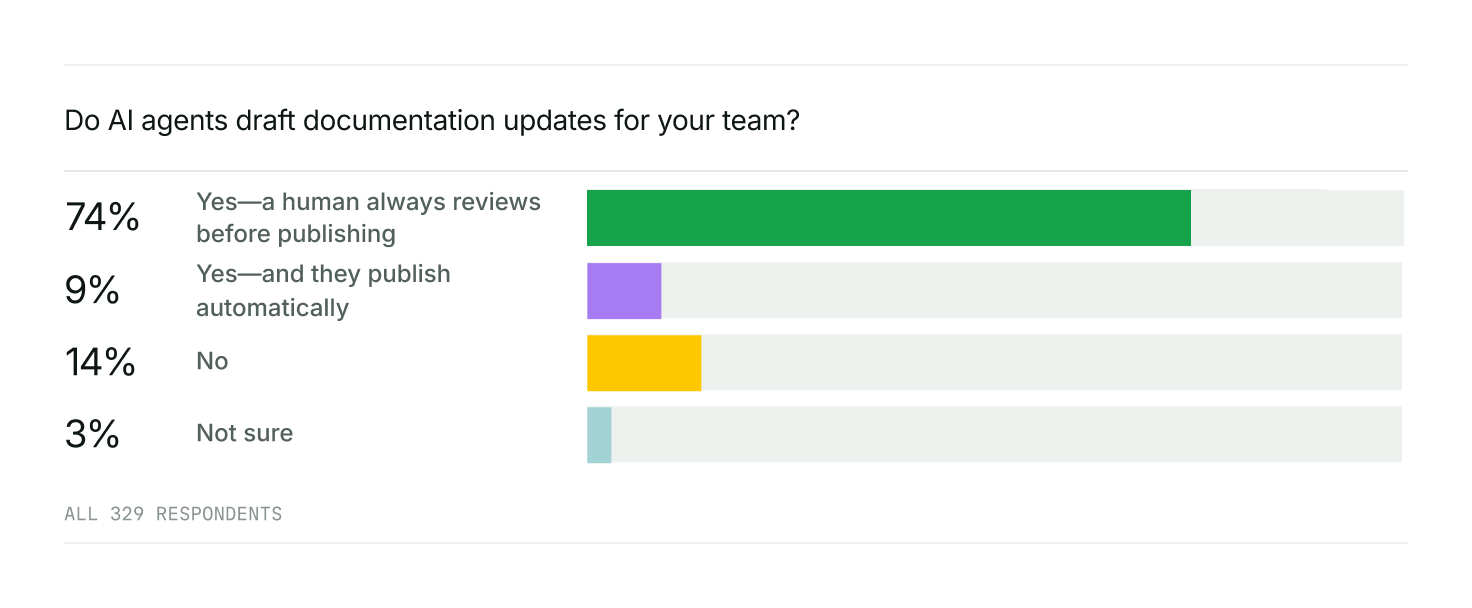
Automation can prepare the review while people keep responsibility for publication. In Mintlify’s 2026 State of Knowledge findings, 74% of survey respondents said agents drafted documentation updates that humans always reviewed before publishing, compared with 9% who allowed automatic publication.
Page age vs. factual accuracy
Mintlify’s Last modified timestamp normally reflects the latest Git commit that changed a page’s source file. A spelling correction can therefore refresh the date even when nobody has checked the page’s parameters, limits, or examples.
The maintenance guide recommends flagging pages that have not been updated in more than 90 days. Use that threshold to select pages for inspection, then determine the action from what the review finds.
| Page state | What the evidence shows | Review action |
|---|---|---|
| Review overdue, no reported problem | Accuracy has not been confirmed recently | Check the content and record the review date |
| Review overdue, a mismatch is confirmed | A documented claim conflicts with the supported product | Correct the claim, or retire the page if it no longer serves supported users |
| Recently edited, related product behavior changed afterward | The edit predates a change that may affect its instructions | Recheck the affected claims |
| Recently verified, no relevant changes since | The content was confirmed against the product | Keep the normal review schedule |
Evidence of stale documentation
Last-reviewed date
Record the date of an accuracy review in a custom lastReviewed field. Mintlify accepts custom YAML frontmatter, so scheduled checks can read a field such as the one below.
---
lastReviewed: '2026-09-30'
---
Your review process must maintain this value by updating it whenever someone verifies the content against the product.
Code changes in linked repositories
A pull request that renames a parameter, changes a default, or removes a response field identifies specific documentation to inspect. Compare the affected claims with the implementation for the version the page covers, since merged code may describe functionality that has not been released.
Mintlify’s Update from code changes automation reads merged pull requests from connected source repositories since its previous scheduled run. It proposes documentation updates through pull requests and cites the source changes so reviewers can trace each suggestion.
Changed product behavior
A feature rollout, revised plan limit, or renamed dashboard menu can invalidate instructions without a change in the repositories your review monitors.
On Enterprise plans, Mintlify’s integrations give automations read-only context from selected issue trackers and feature-flag tools. Supported issue-update events can also trigger custom automations. Confirm the behavior available to the page’s intended users, because a ticket may describe planned work that has not shipped.
Broken links
When a link fails, check whether its destination moved or was removed, then confirm that the surrounding instructions still direct readers to the correct resource.
Mintlify’s CI checks validate internal links on GitHub pull requests. To check external destinations between releases, run the following command on a schedule.
mint broken-links --check-external
The Fix broken links automation can also check internal and external links on a recurring schedule.
Negative page feedback
Mintlify collects page ratings, written comments, and code snippet feedback when feedback is enabled. Repeated negative ratings identify pages to investigate, while comments can explain whether readers encountered an incorrect step, an incomplete example, or unclear wording.
The Mintlify CLI can return feedback aggregated by page as JSON.
mint analytics feedback --type page --format json
The Improve docs from user feedback automation reviews ratings and comments, focusing on pages with recurring negative signals.
AI agents connected to your site’s Search MCP server can also report incorrect or outdated content through submit_feedback. These reports appear in the dashboard’s detailed feedback view and can be selected with the Agent feedback filter.
Search misses and unanswered questions
Mintlify’s search analytics lists queries that return no results and tracks click-through rates. Review unsuccessful queries to determine whether content is missing or whether an existing page uses different terminology from readers’ searches. Missing content calls for new guidance, while a terminology mismatch calls for revising the existing page so readers' searches reach it.
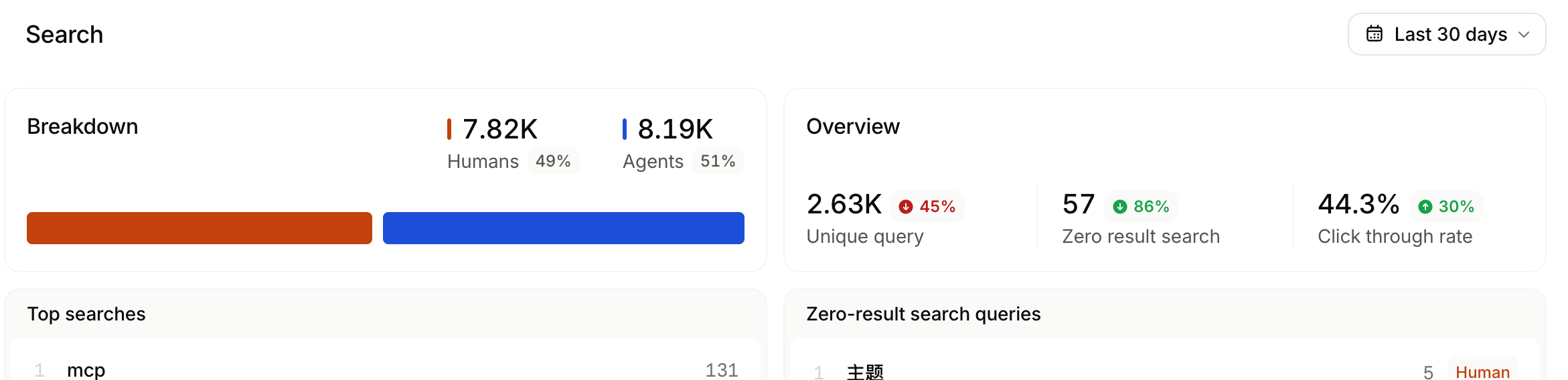
Questions sent to the Mintlify assistant can reveal procedures or details that the documentation does not explain. The Fill gaps from assistant conversations automation reviews question trends and proposes content through pull requests. Check those proposals against supported product behavior before publishing.
Also read: Documentation linting guide
How to scope each scheduled documentation check
Mintlify’s Use automations guide recommends giving each automation a narrow task. Define the documentation area and review objective before configuring the run, such as checking one SDK’s installation guides against its source repository. A narrow scope keeps related findings together for review.
Map documentation directories to source repositories
Identify the repositories and source files that support each documentation directory. API guides may depend on a service repository and its specification, while SDK pages may depend on the corresponding SDK repository.
A Mintlify automation's agent can read up to 10 context repositories during its review. Add the repositories needed to verify the selected pages.
For checks that also run after code merges, a GitHub Code change trigger supports up to 50 repositories and can filter pull requests by changed paths. The path filters control when the automation starts, so the automation's instructions should separately identify the documentation paths to review.
Group pages by content type
Use Mintlify’s documentation content types to group pages that need the same verification method.
| Content type | Review focus |
|---|---|
| Tutorials | Run the complete example with the stated prerequisites and confirm the expected result. |
| How-to guides | Follow the procedure and check that each step still completes the named task. |
| Reference pages | Compare documented options, defaults, and limits with the implementation or specification. |
| Explanations | Confirm that descriptions of architecture and design decisions still reflect the product. |
An explanation page may need revision after an architectural change even if its examples and links still work. Choose its review scope according to the systems it describes.
Prioritize pages by traffic and review date
Use traffic to order pages with comparable review urgency. Mintlify’s page views endpoint returns counts by page path, separated into human and AI traffic. Include both when identifying frequently accessed content.
Give confirmed errors that block setup, authentication, or another essential task priority over traffic totals. Among pages with similar impact and usage, review those with the oldest last-reviewed dates first. Keep pages without a recorded review date visible in the queue.
Define exclusions for each check
Exclusions should depend on what the check verifies. Historical changelog entries can be excluded from comparisons against current product behavior, but they may still need corrections for inaccurate release details or broken links.
For API pages generated from an OpenAPI specification, review and correct the specification that supplies the content. Include separately maintained guides, examples, and custom page content in the appropriate review.
Keep deprecated pages in scope for as long as they serve supported users. Pages approved for removal can move to a separate retirement queue.
Use .mintignore to keep drafts and internal files out of the published site. State the review exclusions explicitly in the automation’s instructions, including any unpublished files it should skip.
Scheduled check prompts, rules, and output
For a custom automation, the Prompt field defines the task instructions used on every run. Specify what the agent should verify, what it may change, and how it should report findings that need a person’s judgment.
Rules every scheduled check should follow
Include these requirements in each check’s instructions.
-
Define the result. State whether the run should propose corrections, list findings for owners, or produce both.
-
Give an ordered procedure. Name the files to inspect and explain how to compare them with the supplied evidence.
-
Require evidence. Each proposed correction should cite the source file, commit, or feedback item that supports it.
-
Preserve unverified claims. Record questions for the owner when the available sources cannot establish whether a statement is accurate.
-
Choose the update mode. Use Modify and wait for review for changes to technical meaning. Reserve Update and merge changes for verified, mechanical fixes.
The examples below record unresolved findings in reviews/queue.md, a team-maintained file that should be excluded from publishing through .mintignore. Preserve unresolved entries, avoid duplicate findings, and leave the file unchanged when a run finds nothing new.
The directory paths and the owner and lastReviewed fields are examples to adapt to your repository.
Code drift check for API and SDK guides
Select the Every Monday schedule, connect the relevant API and SDK repositories as context, and use Modify and wait for review.
Review the pages in /guides/api and /sdks.

1. Identify the product or SDK version each page documents. Compare its examples, parameters, defaults, and response fields with the source for that version.
2. Correct discrepancies supported by that source. Do not apply unreleased changes to instructions for a released version.
3. Cite the source file path and commit supporting each correction in the pull request description.
4. For claims you cannot verify, record the page path, claim, and evidence needed in reviews/queue.md. Do not change those claims.
5. Only modify pages in the named directories and reviews/queue.md. Preserve unresolved queue entries and avoid duplicates.
6. If an open pull request from this same automation covers this check, append the findings to it. Otherwise, open a new pull request when there are changes.
Review-due check for conceptual guides
Configure a monthly Custom cron schedule and connect the repositories that describe the architecture covered by these pages. Keep this check in Modify and wait for review mode.
Read the frontmatter of every page in /concepts.

1. Select pages whose lastReviewed date is missing or more than 90 days old.
2. Compare their architectural claims with the context repositories for the product version each page describes.
3. Record each selected page in reviews/queue.md with its path, owner, and lastReviewed value. Identify confirmed discrepancies and claims that need owner verification separately. Cite source files for any discrepancies.
4. Preserve unresolved entries and avoid duplicates. Only modify reviews/queue.md; do not edit the conceptual pages.
5. Append new findings to an open pull request from this same automation when one covers this check. Otherwise, open a new pull request when the queue changes.
Unowned and orphaned page check
Run this inventory check monthly across the documentation repository. It checks ownership and navigation coverage without rewriting page content.
Identify documentation pages in .mdx and .md files. Exclude files ignored by Mintlify, reusable snippets, /changelog, and /reviews.

1. Compare page paths with the navigation in docs.json. List pages absent from navigation and identify any evidence that they are intentionally hidden. Do not restore them automatically.
2. List pages without an owner field.
3. Report missing title or description fields as metadata findings, not build errors.
4. Add new findings to reviews/queue.md, grouped by directory. Preserve unresolved entries and avoid duplicates. Only modify the queue file.
5. Append findings to an open pull request from this same automation when one covers this check. Otherwise, open a new pull request when the queue changes.
Pages omitted from navigation can remain accessible through their URLs. Confirm their intended visibility before treating their absence as an error. Missing metadata also needs interpretation because Mintlify can generate a page title from its file path.
What a scheduled check returns
Use the Runs tab to inspect the prompt, changed files, and associated pull requests.
| Status | Meaning |
|---|---|
| Review needed | The proposed changes await review and merging. |
| Accepted | The changes were merged. |
| Closed | The proposed changes were rejected. |
| Failed | The automation could not complete the run. |
| No action needed | The run found nothing to update. |
| Modified PR | The run added changes to an existing pull request. |
A custom automation can open zero, one, or several pull requests, and it opens new ones by default. Instructions can request appended updates, but the agent can only update pull requests opened by that same automation and sees up to five of its open pull requests.
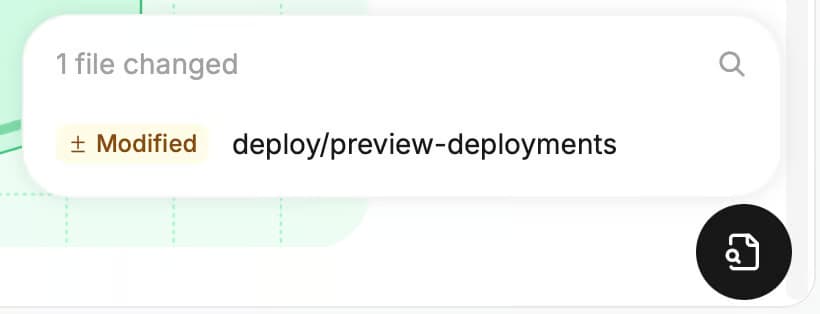
When a run has a linked preview deployment, inspect the rendered changes before merging.
Documentation review cadence by content type
Use the following intervals as starting points, then adjust them to your release frequency and the impact of inaccurate instructions. Checks that identify overdue pages or missing owners can run more frequently than a full accuracy review.
| Content type | Suggested review cadence | Additional review trigger |
|---|---|---|
| API reference generated from OpenAPI | Monthly review of the source specification | Specification or implementation change |
| API and SDK guides | Weekly | New API or SDK version |
| Quickstarts and getting-started pages | Weekly | Setup, authentication, or onboarding change |
| How-to guides | Monthly | Change to the feature or procedure covered |
| Troubleshooting pages | Monthly | Changed error messages, defaults, or workarounds |
| Conceptual guides | Quarterly | Architecture or pricing model change |
| Changelog entries | At publication | Correction to a release entry |
| Deprecated pages | Monthly until removal | Changed support status or removal date |
Configure weekly checks with Mintlify’s schedule presets and use Custom cron for monthly or quarterly runs. Include an annual audit of accuracy, coverage, duplication, and obsolete guidance across the full site.
Tie scheduled checks to product releases
A release should trigger a documentation check without waiting for the next scheduled review. Mintlify’s Trigger automation endpoint queues an on-demand run for an automation configured with a Custom schedule trigger. Each on-demand run picks up changes made since the automation's last completed run.
Mintlify publishes the following GitHub Actions example for .github/workflows/trigger-docs.yml. It runs on every push to main, including pushes resulting from merged pull requests.
on:
  push:
    branches: [main]

jobs:
  trigger:
    runs-on: ubuntu-latest
    steps:
      - run: |
          curl -fsS -X POST \
            "https://api.mintlify.com/v1/workflow/$PROJECT_ID/$WORKFLOW_ID/trigger" \
            -H "Authorization: Bearer ${{ secrets.MINTLIFY_API_KEY }}"
        env:
          PROJECT_ID: ${{ vars.MINTLIFY_PROJECT_ID }}
          WORKFLOW_ID: ${{ vars.MINTLIFY_WORKFLOW_ID }}
Set MINTLIFY_PROJECT_ID and MINTLIFY_WORKFLOW_ID as repository variables containing the project ID and automation ID. Store an admin API key with write access in the MINTLIFY_API_KEY repository secret.
For products released separately from merges, make the API request from the successful release job, so the check follows shipped behavior. The trigger endpoints share a limit of 10 requests per 10 seconds per organization.
Use a Webhook trigger for a custom check that runs when your release tooling calls it. Each webhook request uses the automation’s saved prompt and reads the full repository history, and Mintlify ignores the request body.
Owner assignment and the review queue
Record page owners in frontmatter and CODEOWNERS
Use the team-defined owner field from the scheduled checks to identify the person or team responsible for each page. Map the corresponding documentation paths to their GitHub owners in a CODEOWNERS file.
Place CODEOWNERS in .github/, the repository root, or docs/ on the pull request’s base branch. Listed individuals and teams need write access to the repository, and teams must be visible. GitHub automatically requests their review when a pull request is ready for review and changes a matching file.
Enable Require review from Code Owners in branch protection to require approval from a matching owner. Update both the frontmatter value and the ownership mapping when responsibility changes.
Route flagged pages to the right reviewer
For GitHub automations that use source repositories as context, Mintlify assigns reviewers from the authors of the source changes behind the update. These reviewers can verify the product behavior supporting a proposed correction. Assign reviewers manually for GitLab merge requests.
CODEOWNERS evaluates changed file paths, so a pull request that only updates reviews/queue.md reaches the queue file’s owner. Assign that file to the documentation lead, who routes each finding to the page owner listed in the entry. Pages mentioned inside the queue do not receive automatic review requests through their own ownership mappings.
Track the review queue and reminders
Record an assigned reviewer and target review date for each queue entry, along with a link to its originating automation run. Set a review window for each content area, such as one week for API guides, so the documentation lead can identify overdue assignments.
With the Mintlify Slack app connected and notification channels selected, Mintlify posts when an automation opens a pull request, when it has waited three days for review, and when changes merge or a run fails. Use the three-day reminder to follow up with the assigned reviewer.
Each team member can enable email notifications for successful and failed automation runs in their personal settings.
Confirm, update, or retire flagged pages
Confirm an accurate page
If the flagged claim matches the supported product version, record the evidence you checked, update the page’s lastReviewed field, and remove the finding from the active queue. Dismiss related feedback only when the submission is inaccurate or irrelevant. A technically correct page may still need clearer instructions to address a reader’s difficulty.
If your team wants the displayed timestamp to represent the last content change, set lastUpdatedDate to that date. lastUpdatedDate overrides the Git-derived date, so a commit that only records a review leaves the displayed timestamp unchanged.
---
title: 'Page title'
lastUpdatedDate: '2026-08-13'
---
Update this value whenever the content changes. Leaving it pinned after subsequent edits would give readers an incorrect modification date.
Update an inaccurate page
Check that the proposed correction applies to the documented version, then review the rendered page and test any affected instructions or examples. Once the correction is ready, accept the changes from the Runs tab or merge the reviewed pull request.
If the proposal needs revision, continue the run in the editor through View changes in its Slack notification or notification email. This option remains available while the pull request is open. The editor opens on the automation’s branch, and the agent retains the original prompt and the context of its changes.
For findings without a proposed edit, the assigned owner prepares the correction in a documentation pull request. Record the new review date in the same change, and close the queue entry once the correction is published.
Retire an obsolete page
Keep a page available while it serves a supported version. Add deprecated: true to its frontmatter to display a deprecated label beside the title.
When the page no longer serves a supported use case, remove the obsolete content and its navigation entry. If a replacement or migration guide addresses the same need, configure a redirect from the old URL to that page.
Search the documentation for references to the retired path and update internal links to their current destinations. Then check the remaining links and configured redirect destinations.
mint broken-links --check-redirects
Keep documentation up to date with Mintlify
Mintlify's automations run recurring checks and draft corrections, which cuts the manual work of preparing a documentation review. Engineering and non-engineering contributors can then review the proposed changes in the browser through Mintlify's Git-based review controls, so approving a fix never requires working directly in the repository.
Anthropic runs a comparable workflow on documentation that averages more than 10 million visits a month, where one technical content engineer manages all Claude Code docs. Custom scheduled jobs collect page feedback and broken code sample reports through Mintlify's analytics API every few hours, and an agent identifies which reports require documentation fixes, giving Claude the context to draft improvements.
For an existing documentation site, the Mintlify switch program offers a free preview using your current content. Mintlify also assists with migration by preparing the content, reviewing the new site, and supporting the launch.
Try Mintlify Pro for free to start running scheduled documentation reviews.
Frequently Asked Questions
How often should documentation be reviewed?
As a starting point, review API guides, SDK guides, and quickstarts weekly; how-to and troubleshooting pages monthly, and conceptual guides quarterly. Shorten the interval when incorrect instructions could block setup, break an integration, or affect security, and lengthen it for stable material when successive reviews find few substantive changes. Mintlify’s schedule settings let you adjust the frequency for each content area as the product evolves.
What is the difference between a documentation review and a content audit?
A review might establish that an authentication guide uses the wrong parameter. An audit might reveal that three authentication guides overlap, give conflicting instructions, and leave readers unsure where to start. The review produces a specific correction, and the audit informs decisions about what to consolidate, reorganize, or create.
How do you track stale pages and unowned content in a docs-as-code repository?
Record an owner and a last-reviewed date in each page's frontmatter, then run a scheduled check that lists pages missing either field or past their review window. Report missing owners separately from overdue reviews so each finding has a clear resolution. An ownership gap closes when someone accepts responsibility for the page, and an overdue review closes when the required verification is complete. Retain the completed findings in an issue history or review log so you can identify recurring delays and unresolved responsibilities.
Which documentation platforms support ownership assignment and last-reviewed timestamps?
Mintlify supports custom owner and review-date fields in page metadata, alongside Git-based review rules. You define how those fields are maintained and connect ownership to the appropriate reviewers through repository configuration. When evaluating any documentation platform, check whether ownership changes reach the right people and whether review dates record completed verification independently of ordinary edits.
Can documentation reviews run automatically when a release ships?
A successful release event can call Mintlify’s automation trigger API for an automation configured with a custom schedule. The response confirms that the run is queued, so the pipeline should also track its outcome. Keep documentation required for launch in the release approval process, since an automatically triggered check still needs time to run and its proposed corrections may require review.
More to read
How to know which docs to update after a code change
Learn how to find the documentation pages a code change affects, filter out changes that need no update, and review proposed docs edits before they merge.
October 9, 2026Harkirat Chahal
Growth
Best documentation maintenance tools in 2026
A comparison of eight documentation maintenance tools across four detection models: scheduled content review, API specification quality checks, Git-connected documentation, and product-change-aware maintenance.
August 7, 2026Harkirat Chahal
Growth