Evolution of HTTP
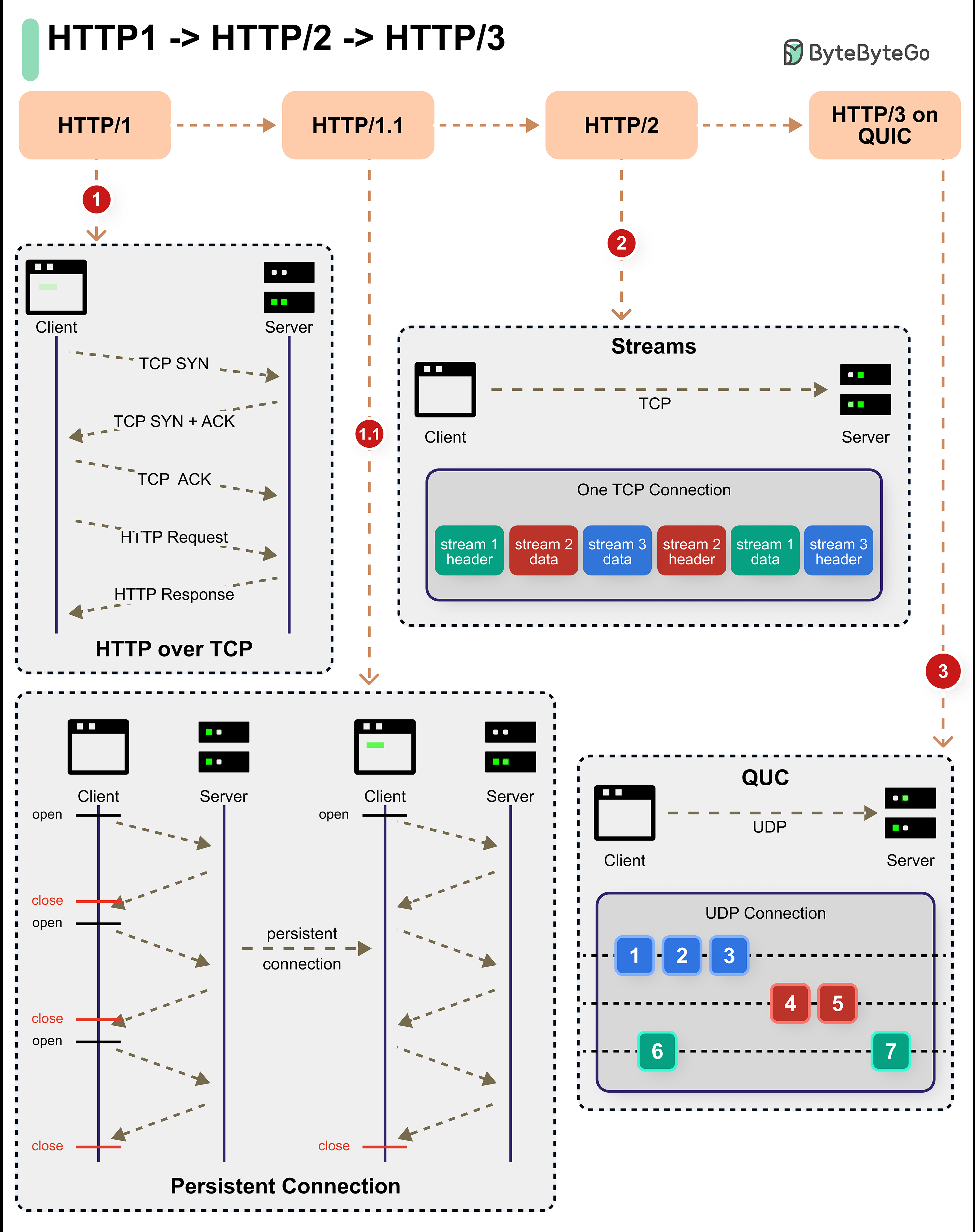 HTTP (Hypertext Transfer Protocol) has evolved significantly over the past three decades:
- 1996: HTTP/1.0 introduced
- 1997: HTTP/1.1 released (still widely used)
- 2015: HTTP/2 standardized
- 2019: HTTP/3 finalized
HTTP/1.x
HTTP/1.0 and HTTP/1.1 Features
HTTP/1 introduced fundamental features that shaped the web:Persistent Connections (HTTP/1.1)
Reuse TCP connections for multiple requests instead of opening a new connection for each request.Benefits:
- Reduced latency
- Lower CPU and memory usage
- Fewer TCP handshakes
Pipelining (HTTP/1.1)
Send multiple requests without waiting for responses (though rarely implemented).Limitation: Head-of-line blocking
HTTP/1.x Limitations
Despite being over 25 years old, HTTP/1.1 is still widely used, but it has significant performance limitations for modern web applications.
- Head-of-Line Blocking: Requests must complete in order
- Multiple Connections: Browsers open 6-8 connections per domain
- Uncompressed Headers: Repeated header data wastes bandwidth
- No Server Push: Server can’t proactively send resources
- Text-Based Protocol: Less efficient parsing
HTTP/1.1 Request Example
HTTP/2
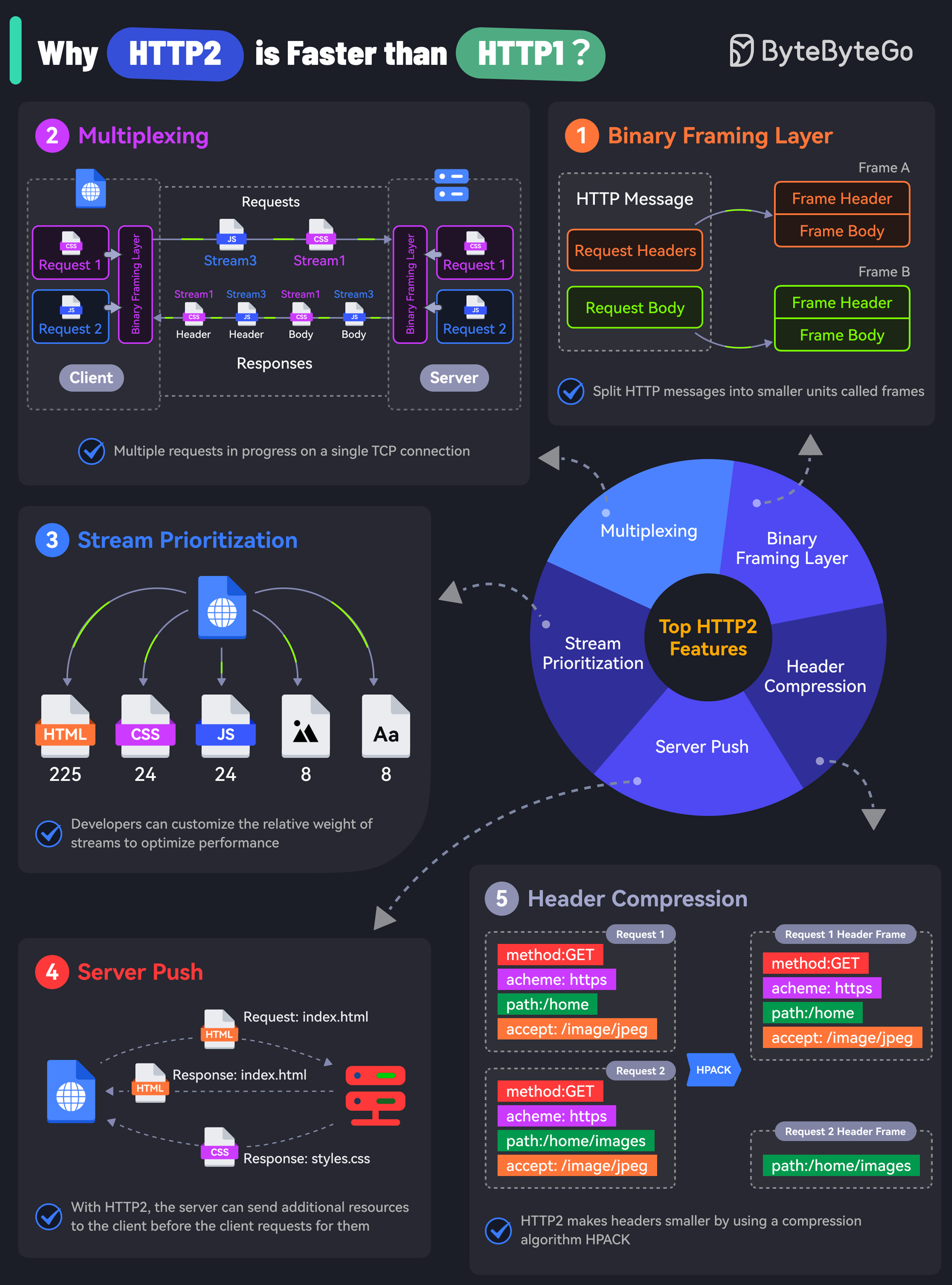 HTTP/2 brought revolutionary improvements while maintaining backward compatibility with HTTP/1.1.
Key Features of HTTP/2
Binary Framing Layer
HTTP/2 encodes messages into binary format instead of text.Benefits:
- More efficient processing
- Smaller message size
- Less error-prone parsing
- Enables multiplexing
Multiplexing
The binary framing allows full request and response multiplexing over a single TCP connection.Benefits:
- Eliminates head-of-line blocking at application layer
- No need for multiple connections
- Better utilization of single connection
- Reduced latency
Stream Prioritization
Developers can customize the relative weight of requests to optimize loading.Use Cases:
- Load critical CSS before images
- Prioritize above-the-fold content
- Optimize perceived performance
Server Push
Server can send additional resources along with the requested page.Benefits:
- Reduced round trips
- Faster page loads
- Better resource utilization
Server push was removed in HTTP/3 due to complexity and limited adoption.
HTTP/2 Performance Gains
HTTP/2 delivers significant performance improvements:- Faster Page Loads: 30-50% improvement in typical scenarios
- Better Mobile Performance: Fewer connections reduce battery drain
- Improved Bandwidth Utilization: Header compression and multiplexing
- Reduced Latency: Fewer round trips required
HTTP/2 Still Uses TCP
While HTTP/2 solved application-level head-of-line blocking, it still suffers from TCP-level head-of-line blocking.
HTTP/3
HTTP/3 represents a fundamental shift by moving away from TCP to UDP-based QUIC protocol.QUIC Protocol
QUIC (Quick UDP Internet Connections) is Google’s protocol built on top of UDP.Key Advantages of HTTP/3
HTTP/3 Adoption
HTTP/3 is being rapidly adopted:- Google: All services use HTTP/3
- Facebook: Enabled for most traffic
- Cloudflare: Default for all customers
- Major CDNs: Widespread support
- Chrome/Edge: Full support
- Firefox: Full support
- Safari: Full support
Protocol Comparison
| Feature | HTTP/1.1 | HTTP/2 | HTTP/3 |
|---|---|---|---|
| Transport | TCP | TCP | UDP (QUIC) |
| Encryption | Optional | Optional | Mandatory |
| Multiplexing | No | Yes | Yes |
| Header Compression | No | HPACK | QPACK |
| Server Push | No | Yes | No |
| HOL Blocking | Yes (App) | No (App), Yes (TCP) | No |
| Connection Setup | 3 RTT | 3 RTT | 1 RTT (0-RTT) |
| Stream Priority | No | Yes | Yes |
| Format | Text | Binary | Binary |
| Connection Migration | No | No | Yes |
HTTP Request Methods
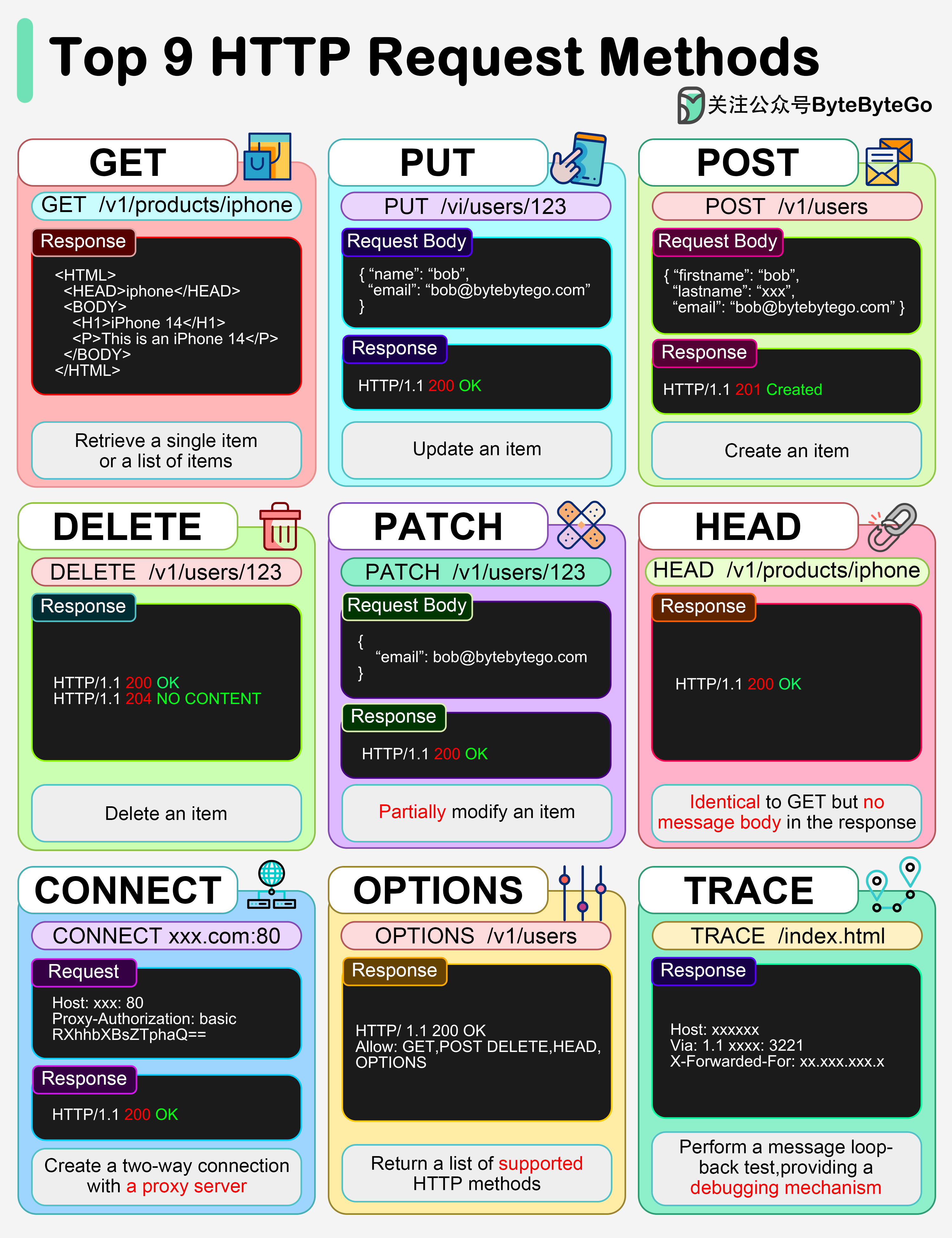 HTTP methods are consistent across all versions:
Additional Methods
- HEAD: Like GET but returns only headers
- OPTIONS: Describes communication options
- CONNECT: Establishes tunnel (for proxies)
- TRACE: Performs message loop-back test
HTTP Status Codes
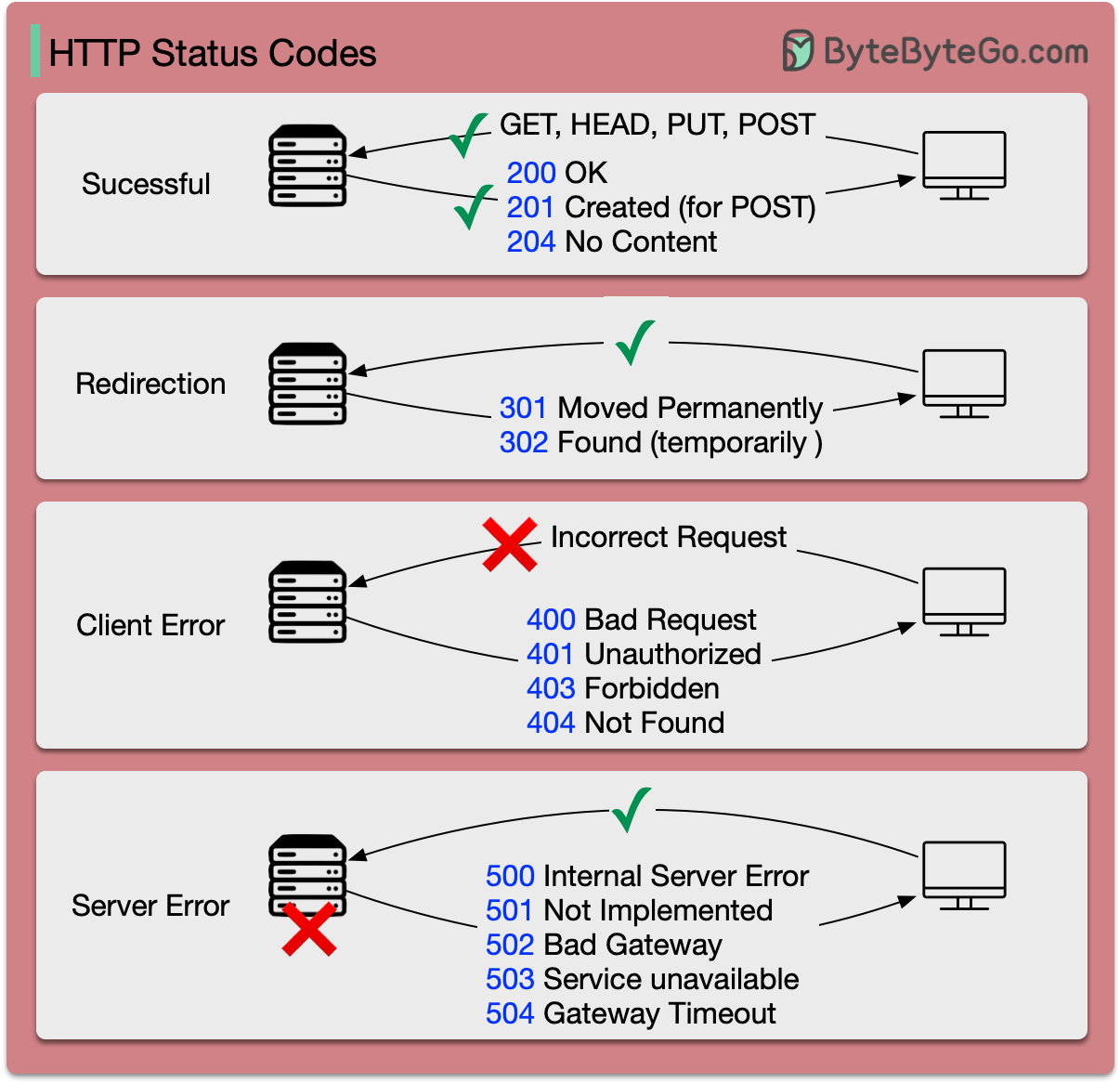 HTTP status codes indicate request results:
1xx Informational
- 100 Continue: Client should continue request
- 101 Switching Protocols: Server switching protocols
2xx Success
- 200 OK: Request succeeded
- 201 Created: Resource created successfully
- 204 No Content: Success with no response body
3xx Redirection
- 301 Moved Permanently: Resource permanently moved
- 302 Found: Temporary redirect
- 304 Not Modified: Cached version still valid
4xx Client Error
- 400 Bad Request: Invalid request syntax
- 401 Unauthorized: Authentication required
- 403 Forbidden: No permission
- 404 Not Found: Resource doesn’t exist
- 429 Too Many Requests: Rate limit exceeded
5xx Server Error
- 500 Internal Server Error: Generic server error
- 502 Bad Gateway: Invalid response from upstream
- 503 Service Unavailable: Server temporarily unavailable
- 504 Gateway Timeout: Upstream timeout
HTTPS and Security
 HTTPS (HTTP Secure) uses TLS to encrypt data transmission.
TLS Handshake Process
Client Hello
Client sends:
- Supported cipher suites
- Maximum TLS version
- Random number
- Chosen cipher suite
- TLS version
- SSL certificate (with public key)
Certificate Validation
Client validates the SSL certificate:
- Check certificate authority (CA)
- Verify hostname matches
- Check expiration date
- Validate certificate chain
Key Exchange
- Client generates session key
- Encrypts session key with server’s public key
- Server decrypts with private key
- Both now share the same session key
Why Symmetric Encryption for Data?
HTTPS uses asymmetric encryption (public/private keys) for the handshake, then switches to symmetric encryption for data transmission.
- Security: Asymmetric encryption is one-way; symmetric encryption provides bidirectional security
- Performance: Symmetric encryption is much faster with less computational overhead
When to Use Each HTTP Version
HTTP/1.1
Use when:- Legacy system compatibility required
- Simple, low-traffic applications
- Client doesn’t support HTTP/2+
HTTP/2
Use when:- Modern web applications
- Multiple resources per page
- Need multiplexing benefits
- Browser-based applications
- Wide client compatibility needed
HTTP/3
Use when:- Mobile applications (connection migration)
- High-latency networks
- Video streaming
- Real-time applications
- Modern infrastructure
- Best possible performance needed
Most modern servers support protocol negotiation, allowing clients to use the best version they support.
Migration Considerations
Upgrading to HTTP/2
Adopting HTTP/3
Key Takeaways
HTTP continues to evolve, with each version bringing significant performance and security improvements while maintaining backward compatibility.
- HTTP/1.1 pioneered persistent connections and is still widely used (25+ years)
- HTTP/2 introduced multiplexing, header compression, and binary framing
- HTTP/3 moves to UDP/QUIC, eliminating transport-layer head-of-line blocking
- Each version maintains the same HTTP semantics (methods, status codes)
- HTTPS encryption is mandatory in HTTP/3, optional in earlier versions
- Modern applications should use HTTP/2 minimum, HTTP/3 when possible
- Protocol negotiation allows clients to use the best supported version