What is OAuth 2.0?
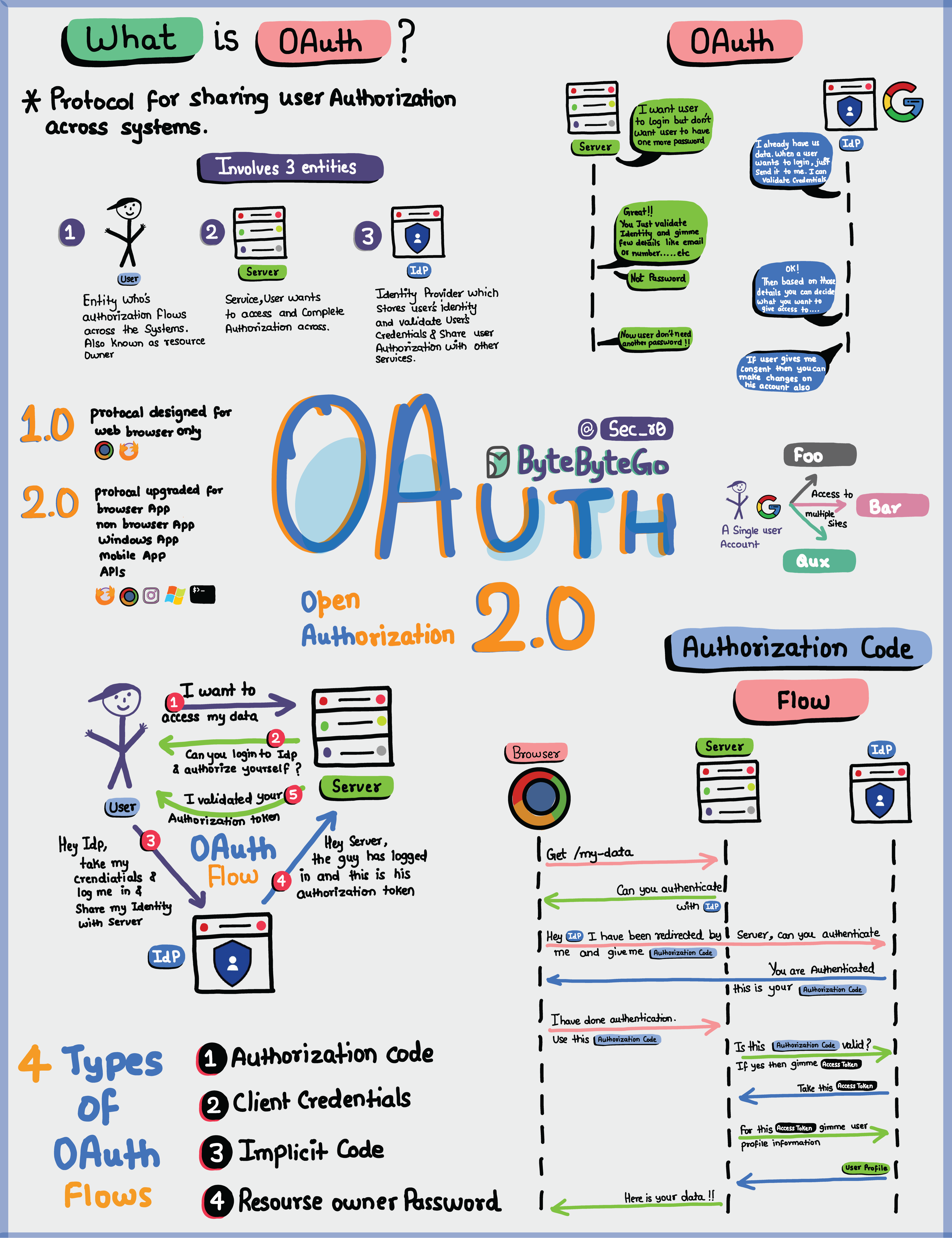 OAuth 2.0 is an authorization framework that enables applications to obtain limited access to user accounts on an HTTP service. It works by delegating user authentication to the service that hosts the user account and authorizing third-party applications to access that user account.
Key Entities in OAuth 2.0
The OAuth 2.0 framework involves three main entities:- User (Resource Owner) - The person who owns the data
- Server (Resource Server) - The application that hosts the protected resources
- Identity Provider (Authorization Server) - The service that authenticates the user and issues tokens
What Can an OAuth Token Do?
When you use OAuth, you get an OAuth token that represents your identity and permissions. This token can accomplish several important tasks:1. Single Sign-On (SSO)
With an OAuth token, you can log into multiple services or apps using just one login, making life easier and safer. Benefits:- Improved user experience
- Reduced password fatigue
- Centralized authentication
- Easier account management
2. Authorization Across Systems
The OAuth token allows you to share your authorization or access rights across various systems, so you don’t have to log in separately everywhere. Use cases:- Access Google services (Gmail, Drive, Calendar) with one login
- Use social login (“Sign in with Google/Facebook”)
- Grant limited access to third-party applications
3. Accessing User Profile
Apps with an OAuth token can access certain parts of your user profile that you allow, but they won’t see everything. Scope control:- Read-only access to profile information
- Limited access to specific resources
- User-controlled permissions
OAuth 2.0 is all about keeping you and your data safe while making your online experiences seamless and hassle-free across different applications and services.
OAuth 2.0 Flows
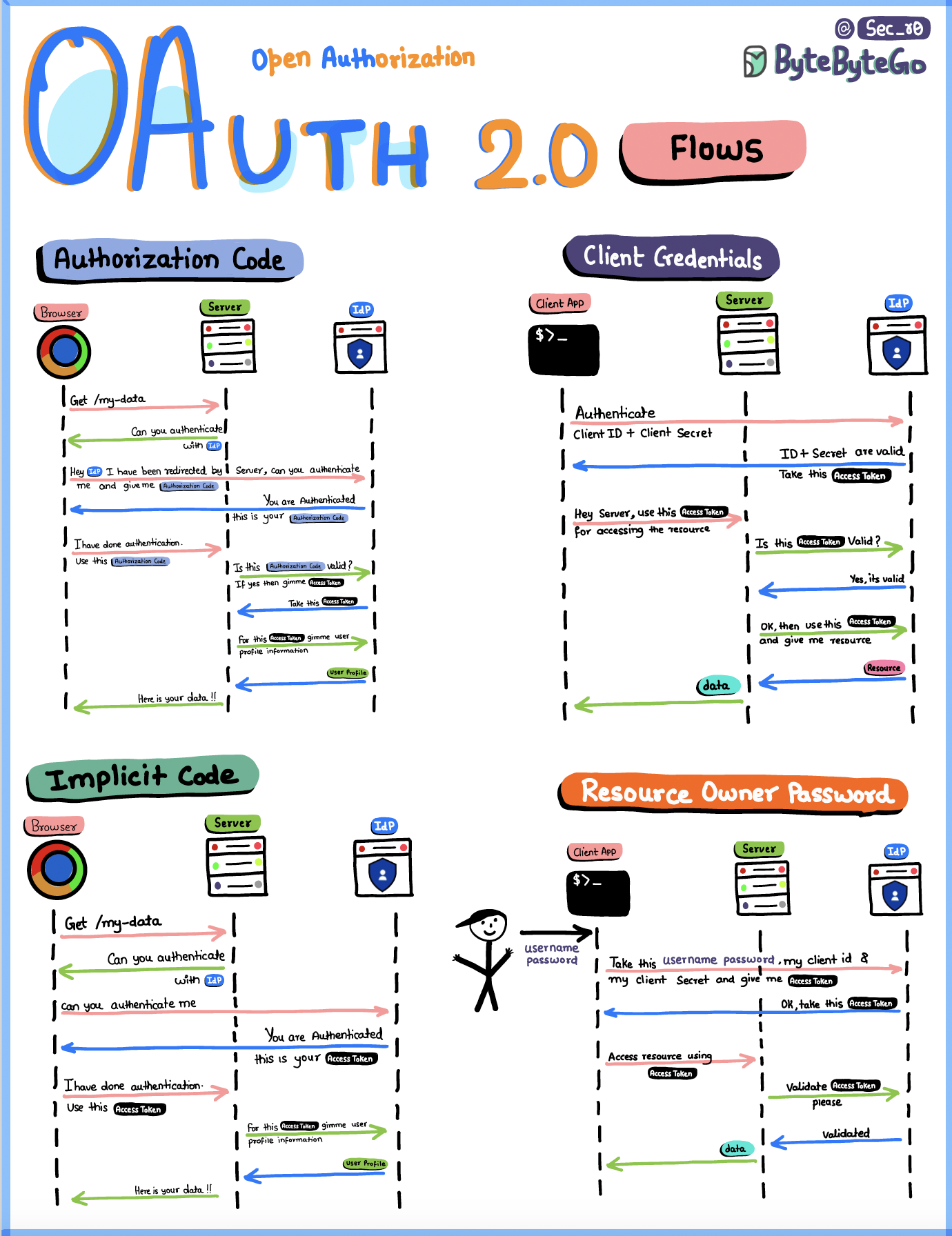 OAuth 2.0 defines several authorization flows (also called grant types) for different use cases:
1. Authorization Code Flow
The most common and secure OAuth flow, recommended for most applications. How it works:- User clicks “Login with [Provider]”
- User is redirected to the authorization server
- User authenticates and grants permissions
- Authorization server redirects back with an authorization code
- Client exchanges the code for an access token and refresh token
- Client uses access token to access protected resources
- Web applications with a backend
- Mobile applications
- Applications that can securely store client secrets
- Client secret never exposed to user
- Authorization code is single-use
- Supports refresh tokens for long-term access
This is the most secure flow because the access token is never exposed to the user’s browser.
2. Client Credentials Flow
Designed for machine-to-machine communication where no user is involved. How it works:- Client sends client ID and client secret to authorization server
- Authorization server validates credentials
- Authorization server returns access token
- Client uses token to access protected resources
- Backend services communicating with APIs
- Microservices authentication
- Scheduled jobs and batch processes
- CLI tools
- No user interaction required
- Client acts on its own behalf
- Typically used for server-to-server communication
3. Implicit Flow
Originally designed for single-page applications (SPAs), this flow returns the access token directly to the client without an intermediate authorization code. Why it’s deprecated:- Access token exposed in browser URL
- No refresh token support
- More vulnerable to token theft
- Better alternatives exist (PKCE)
4. Resource Owner Password Credentials Flow
Allows users to provide their username and password directly to the client, which then exchanges them for an access token. How it works:- User enters username and password into client app
- Client sends credentials to authorization server
- Authorization server validates credentials
- Authorization server returns access token
- Client is highly trusted (first-party app)
- Other flows are not available
- Migrating legacy systems to OAuth
5. Authorization Code Flow with PKCE
An enhanced version of the Authorization Code Flow designed for public clients (mobile and single-page apps). PKCE (Proof Key for Code Exchange) adds:- Code verifier and code challenge
- Protection against authorization code interception
- Suitable for apps that cannot securely store client secrets
- Single-page applications (SPAs)
- Mobile applications
- Any public client
OAuth 2.0 vs Other Authentication Methods
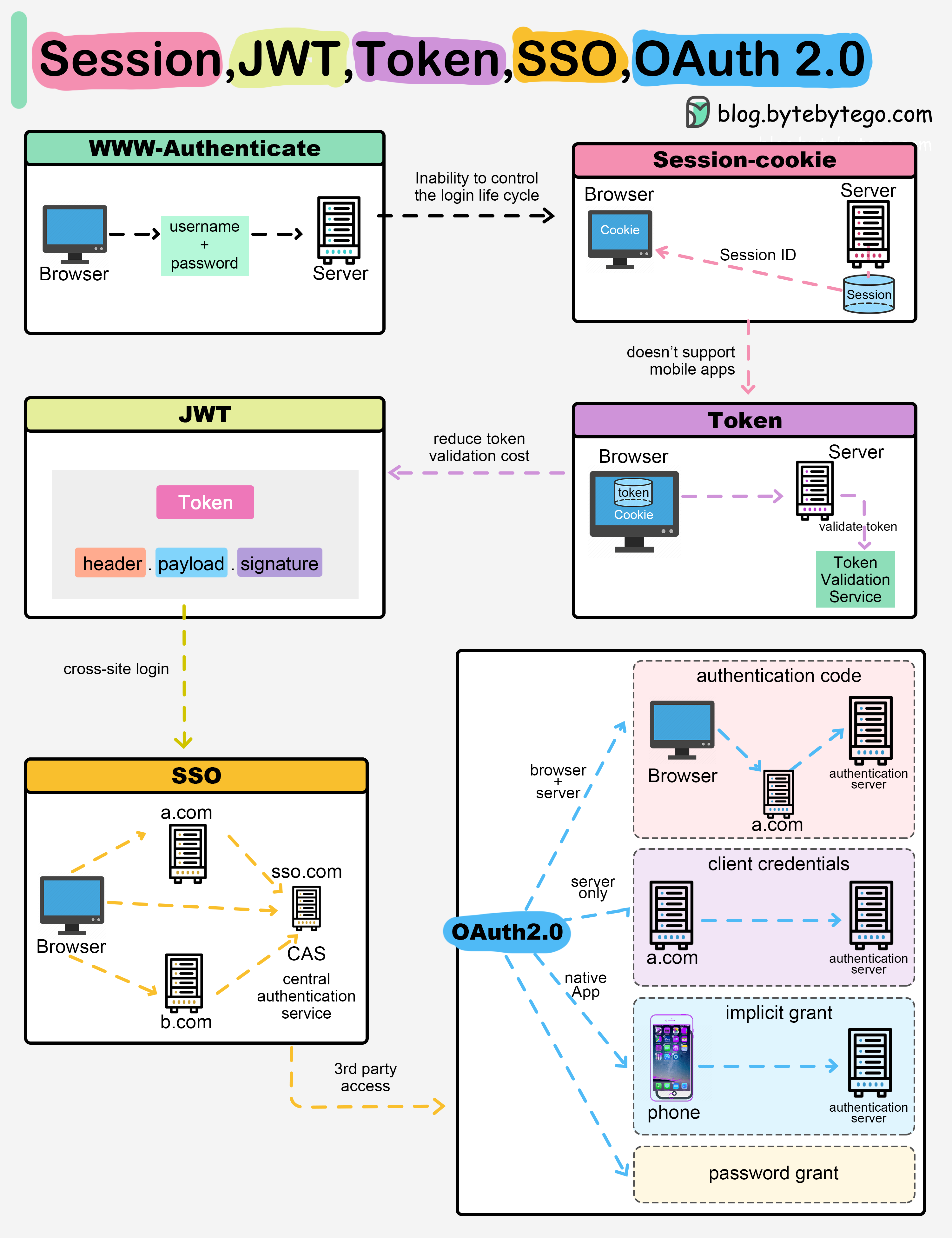
OAuth 2.0 vs Sessions
| Feature | OAuth 2.0 | Sessions |
|---|---|---|
| Storage | Token-based (client-side) | Session ID (server-side) |
| Scalability | Excellent | Challenging in distributed systems |
| Cross-domain | Yes | Limited |
| Third-party access | Yes | No |
| Token lifetime | Configurable | Typically short-lived |
OAuth 2.0 vs JWT
OAuth 2.0 and JWT are complementary:- OAuth 2.0 is an authorization framework (defines the flow)
- JWT is a token format (defines the structure)
Learn more about JWT in the JWT guide.
OAuth 2.0 vs API Keys
| Feature | OAuth 2.0 | API Keys |
|---|---|---|
| User context | Yes | No |
| Granular permissions | Yes (scopes) | Limited |
| Expiration | Yes | Usually no |
| Revocable | Yes | Yes |
| User consent | Required | Not applicable |
OAuth 2.0 Components
Access Tokens
Credentials used to access protected resources. Characteristics:- Short-lived (typically 1 hour)
- Bearer tokens (whoever has it can use it)
- Should be transmitted over HTTPS only
- Can be opaque or self-contained (JWT)
Refresh Tokens
Long-lived tokens used to obtain new access tokens without user interaction. Characteristics:- Long-lived (days, weeks, or months)
- Must be stored securely
- Can be revoked by authorization server
- Only available in certain flows
Scopes
Define the level of access granted to the client. Examples:read:user- Read user profile informationwrite:posts- Create and modify postsadmin:org- Administrative access to organization
- Request minimal scopes needed
- Use granular, specific scopes
- Document all available scopes
- Allow users to review and modify granted scopes
Implementing OAuth 2.0
As an OAuth Provider
If you’re building an OAuth provider:-
Implement Authorization Server
- User authentication endpoint
- Token endpoint
- Token introspection endpoint
- Token revocation endpoint
-
Secure Token Generation
- Use cryptographically secure random generators
- Implement proper token expiration
- Support token refresh mechanism
-
Protect Resources
- Validate tokens on every request
- Implement scope checking
- Use rate limiting
As an OAuth Client
If you’re integrating with an OAuth provider:-
Register Your Application
- Obtain client ID and client secret
- Configure redirect URIs
- Define required scopes
-
Choose Appropriate Flow
- Authorization Code Flow for web apps with backend
- PKCE for SPAs and mobile apps
- Client Credentials for service-to-service
-
Handle Tokens Securely
- Never expose access tokens in URLs
- Store tokens securely
- Implement token refresh logic
- Handle token expiration gracefully
Security Best Practices
1. Always Use HTTPS
2. Validate Redirect URIs
Always validate redirect URIs to prevent authorization code interception:- Use exact string matching
- Don’t use wildcards
- Register all redirect URIs with the provider
3. Implement State Parameter
Use thestate parameter to prevent CSRF attacks:
4. Rotate Tokens Regularly
- Implement short-lived access tokens
- Use refresh tokens to obtain new access tokens
- Revoke tokens when no longer needed
- Implement token rotation on refresh
5. Implement Token Introspection
Validate tokens on the server side:- Check token signature (for JWTs)
- Verify token hasn’t expired
- Confirm token hasn’t been revoked
- Validate scopes match required permissions
6. Monitor and Audit
- Log all token issuance and usage
- Monitor for suspicious patterns
- Implement anomaly detection
- Alert on unusual activity
Regularly review and audit OAuth token usage to detect potential security issues early.
Common OAuth 2.0 Mistakes
1. Using Implicit Flow
Problem: Tokens exposed in browser URLSolution: Use Authorization Code Flow with PKCE
2. Storing Tokens Insecurely
Problem: Tokens in local storage vulnerable to XSSSolution: Use httpOnly cookies or secure backend storage
3. Not Validating Redirect URIs
Problem: Open redirect vulnerabilitySolution: Strictly validate registered redirect URIs
4. Overly Broad Scopes
Problem: Apps with excessive permissionsSolution: Request minimal scopes, implement granular permissions
5. Missing CSRF Protection
Problem: Authorization code can be interceptedSolution: Always use the
state parameter
Real-World OAuth Providers
Popular OAuth 2.0 Providers
- Google - Gmail, Drive, Calendar, YouTube
- Microsoft - Office 365, Azure AD, Outlook
- Facebook - Social login, Graph API
- GitHub - Repository access, user information
- Twitter - Tweet on behalf of users
- LinkedIn - Profile access, job postings
Integration Examples
Social Login:- “Sign in with Google”
- “Continue with Facebook”
- “Login with GitHub”
- Granting Trello access to Google Drive
- Allowing Zapier to access your email
- Enabling CI/CD tools to deploy to cloud providers
Next Steps
Explore related topics:- JWT - Learn about JSON Web Tokens used with OAuth
- Authentication - Understand authentication mechanisms
- HTTPS/SSL - Secure communication protocols
- Encryption - Data encryption techniques