What is a CDN?
A Content Delivery Network (CDN) refers to geographically distributed servers (also called edge servers) that provide fast delivery of static and dynamic content.CDNs are distributed server networks that help improve the performance, reliability, and security of content delivery on the internet.
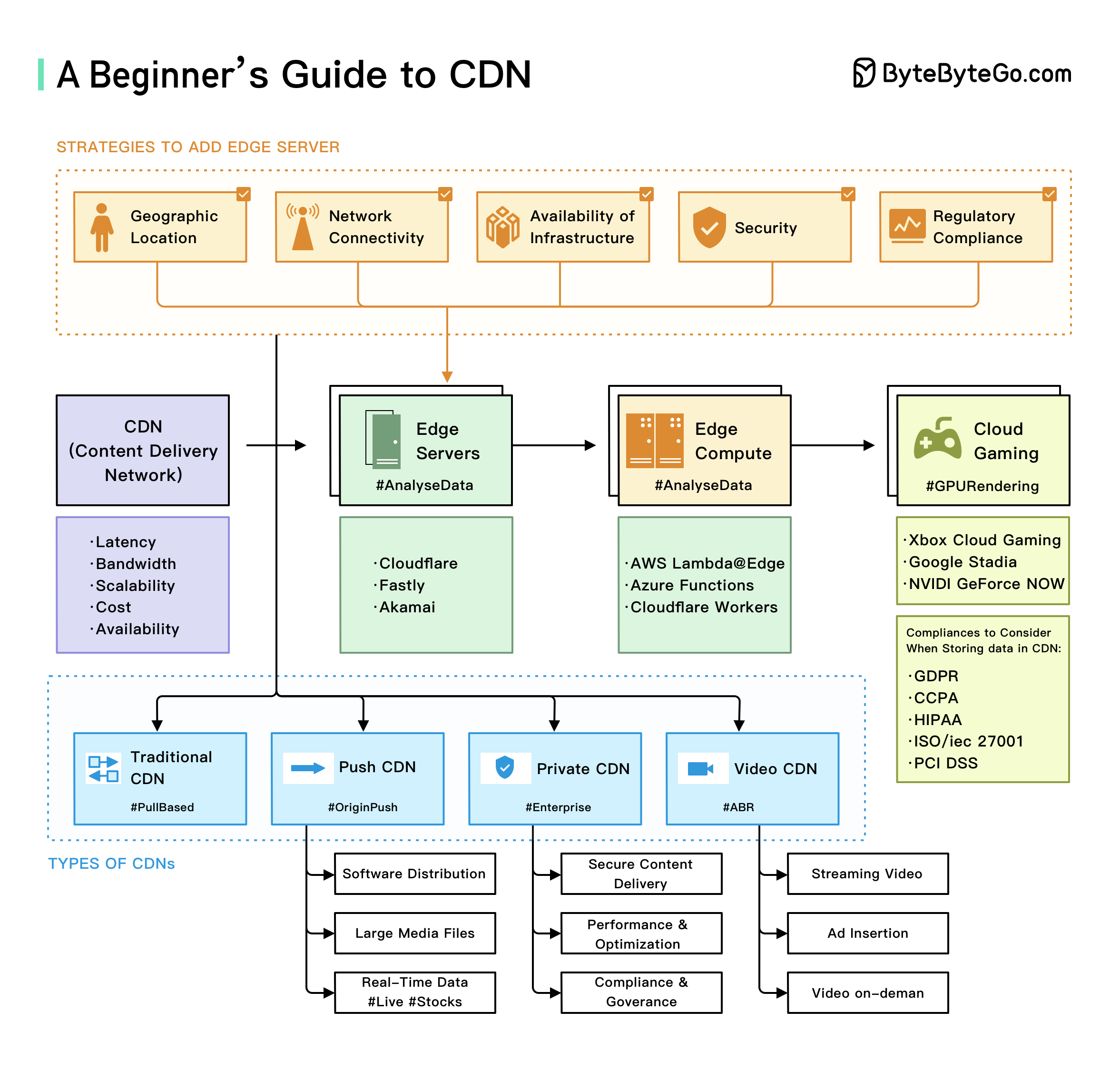
How CDN Works
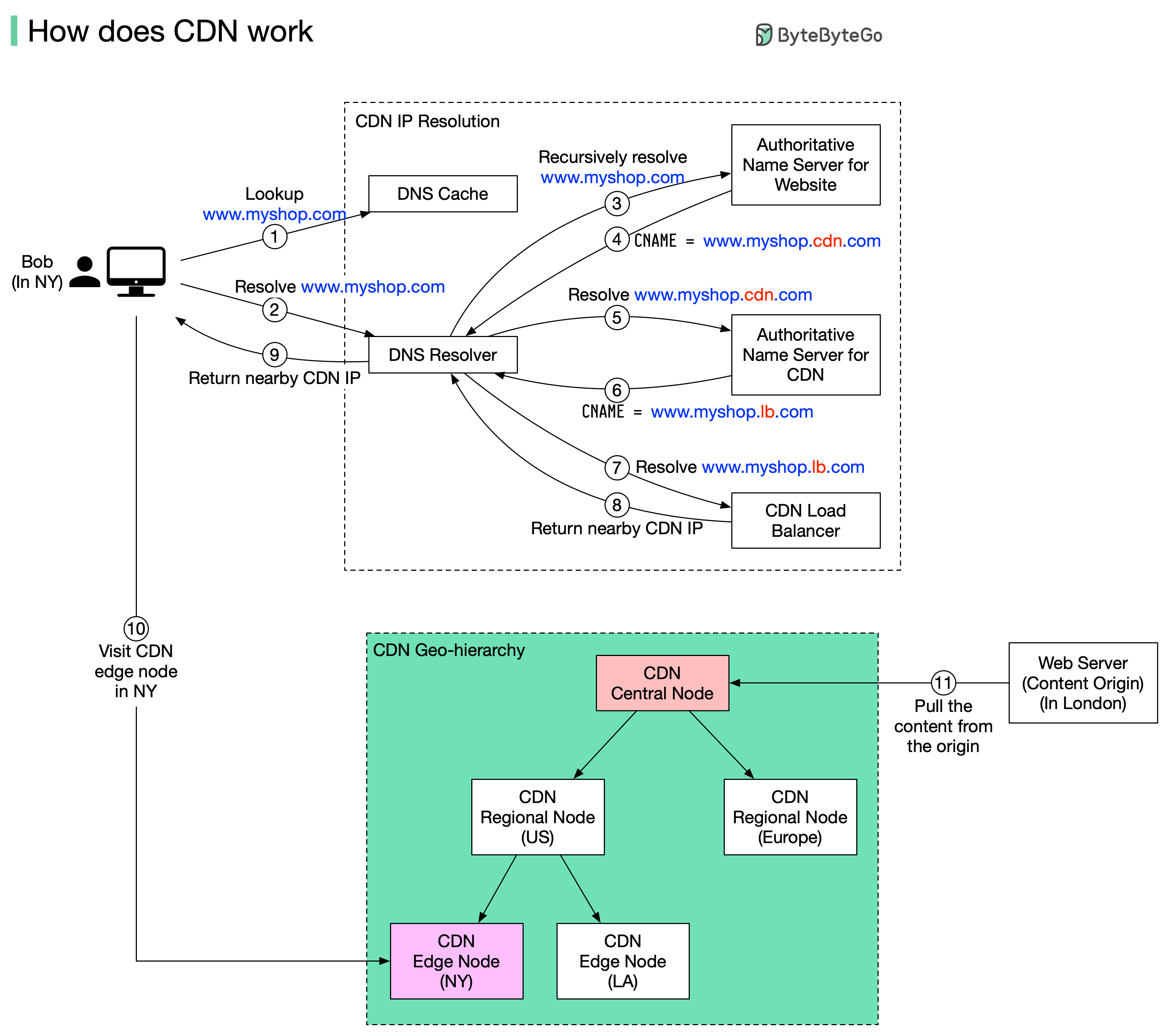 Suppose Bob in New York wants to visit an eCommerce website deployed in London. Without a CDN, the request would go to London servers, resulting in slow response times. With a CDN, content is loaded from a nearby CDN server.
CDN Request Flow
Here’s what happens when a user requests content through a CDN:User enters URL
Bob types
www.myshop.com in the browser. The browser looks up the domain name in the local DNS cache.DNS Resolution
If not in local cache, the browser queries the DNS resolver (usually at the ISP) to resolve the domain name.
Recursive DNS Lookup
The DNS resolver recursively resolves the domain name and asks the authoritative name server.
CDN Alias
The authoritative name server returns an alias pointing to
www.myshop.cdn.com (the CDN domain) instead of the origin server.CDN Domain Resolution
The DNS resolver asks the authoritative name server to resolve
www.myshop.cdn.com.Load Balancer Response
The authoritative name server returns the domain for the CDN load balancer
www.myshop.lb.com.Optimal Edge Server Selection
The CDN load balancer chooses an optimal edge server based on:
- User’s IP address
- User’s ISP
- Content requested
- Server load
CDN Distribution Network
If the edge CDN server cache doesn’t contain the requested content:CDN Cache Hierarchy
CDN Cache Hierarchy
- Edge Server (closest to user) - First check
- Regional CDN Server - If not found at edge
- Central CDN Server - If not found at regional
- Origin Server - Final fallback (e.g., London web server)
Types of Cached Content
Static Content
- Static HTML pages
- Images and graphics
- Videos and media files
- CSS stylesheets
- JavaScript files
- Fonts
Dynamic Content
- Edge computing results
- Personalized content
- API responses
- Real-time data
- Geolocation-based content
Key CDN Concepts
Edge Servers
Edge servers are located closer to end users than traditional servers, which helps:- Reduce latency: Shorter physical distance = faster response times
- Improve performance: Less network hops between user and content
- Handle traffic spikes: Distribute load across multiple servers
- Increase availability: Redundancy through geographic distribution
Edge Computing
Edge computing processes data closer to the end user rather than in a centralized data center.- Benefits
- Use Cases
- Reduced latency for real-time applications
- Lower bandwidth usage to origin
- Better user experience
- Support for compute-intensive tasks at the edge
CDN Benefits
Performance Improvement
Performance Improvement
Faster Load Times:
- Content served from geographically closer servers
- Reduced network latency
- Optimized delivery paths
Reliability & Availability
Reliability & Availability
High Availability:
- Multiple redundant servers
- Automatic failover
- No single point of failure
- Distributed architecture absorbs attacks
- Rate limiting at edge
- Anomaly detection
Scalability
Scalability
Handle Traffic Spikes:
- Distribute load across many servers
- Automatic scaling
- Reduced origin server load
- Lower bandwidth costs at origin
- Reduced infrastructure needs
- Pay for what you use
Security
Security
Enhanced Security:
- SSL/TLS termination at edge
- Web Application Firewall (WAF)
- Bot mitigation
- Certificate management
Popular CDN Use Cases
Video Streaming
- Adaptive bitrate streaming
- Reduced buffering
- Lower latency for live streams
- Global reach for content
Website Acceleration
API Acceleration
Software Distribution
CDNs excel at distributing:- Software updates
- Mobile app bundles
- Game patches
- Operating system images
CDN Cache Control
HTTP Cache Headers
Cache Invalidation
- Time-based
- Manual Purge
- Versioning
Content automatically expires after TTL:
Cloud Gaming and Streaming
Cloud gaming uses CDN technology to provide users with high-quality, low-latency gaming experiences:Low Latency
Edge servers reduce input lag for responsive gameplay
High Bandwidth
Deliver high-quality video streams for 4K gaming
Global Reach
Enable gaming from anywhere in the world
Scalability
Handle millions of concurrent players
Real-World CDN Architecture
Major CDN Providers
Cloudflare
Cloudflare
- 300+ edge locations
- Free tier available
- DDoS protection included
- Workers for edge computing
AWS CloudFront
AWS CloudFront
- 450+ Points of Presence
- Deep AWS integration
- Lambda@Edge for compute
- Pay-as-you-go pricing
Akamai
Akamai
- 4,100+ PoPs worldwide
- Enterprise-focused
- Advanced security features
- Media delivery expertise
Fastly
Fastly
- Real-time purging
- Edge computing platform
- Instant configuration updates
- Developer-friendly
Best Practices
Set appropriate TTLs
Balance freshness with cache efficiency. Static assets can have longer TTLs (days/weeks), while dynamic content needs shorter TTLs (minutes/hours).
Implement cache warming
Pre-populate CDN caches with frequently accessed content before traffic spikes.
Monitor cache performance
Track key metrics:
- Cache hit ratio
- Origin offload percentage
- Edge response times
- Bandwidth savings
Performance Optimization
- Image Optimization
- Compression
- HTTP/2 & HTTP/3
- Automatic format conversion
- Responsive image sizing
- Lazy loading support
CDNs are transforming how we access and consume digital content, providing faster, more reliable, and more immersive experiences for users worldwide.
Next Steps
Redis Caching
Learn about in-memory caching with Redis
Caching Strategies
Explore different caching patterns
Cache Eviction
Understand cache eviction policies