Overview
Since its inception in 2006, AWS has rapidly evolved from simple offerings like S3 and EC2 to an expansive, versatile cloud ecosystem. Today, AWS provides a highly reliable, scalable infrastructure platform with over 200 services in the cloud, powering hundreds of thousands of businesses in 190 countries around the world. For both newcomers and seasoned professionals, navigating the broad set of AWS services is no small feat. From computing power, storage options, and networking capabilities to database management, analytics, and machine learning, AWS provides a wide array of tools that can be daunting to understand and master.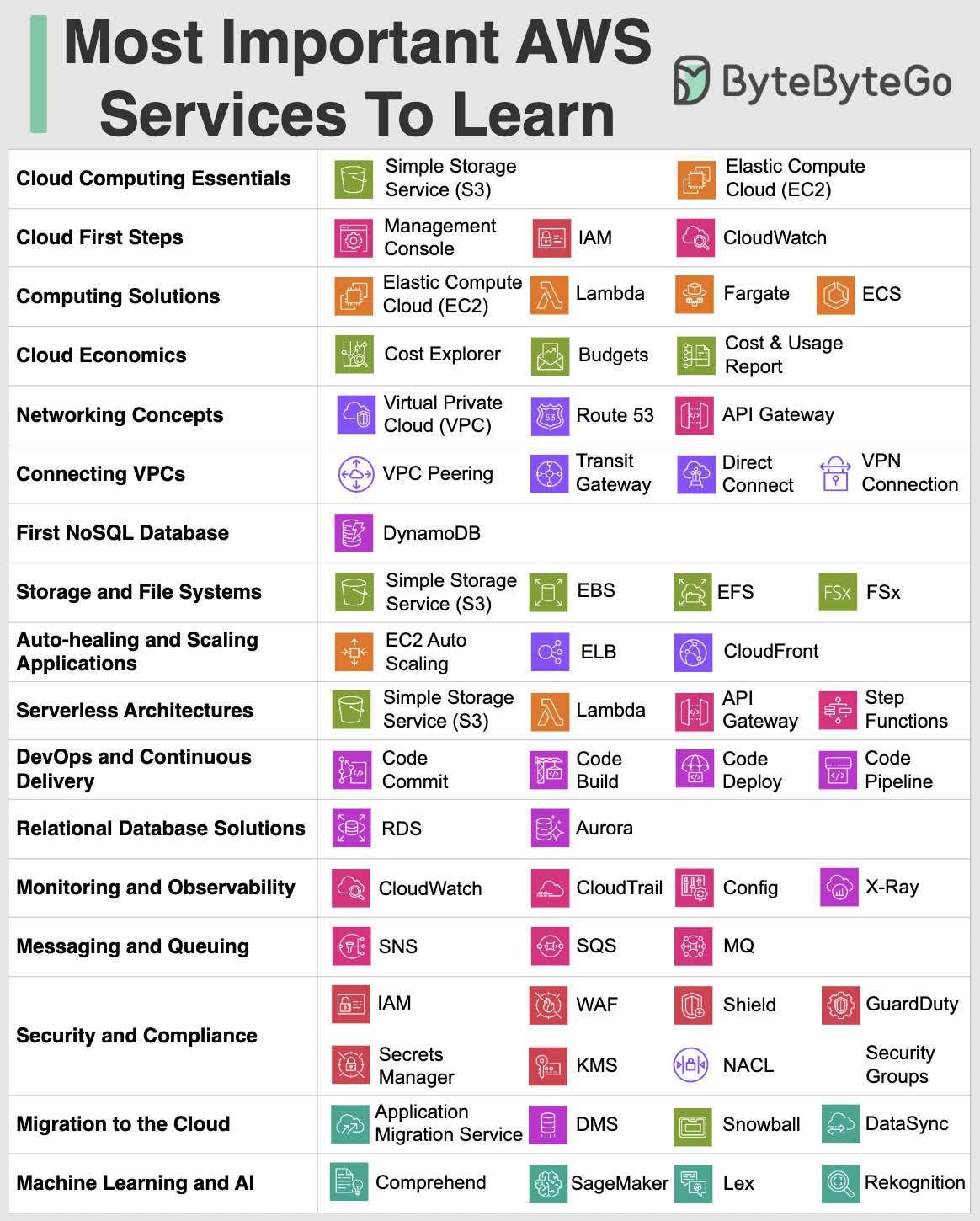
Core AWS Services
Compute Services
EC2 (Elastic Compute Cloud)- Virtual servers in the cloud
- Scalable computing capacity
- Multiple instance types for different workloads
- Serverless compute service
- Run code without managing servers
- Pay only for compute time consumed
- Container orchestration services
- ECS: AWS-native container management
- EKS: Managed Kubernetes service
Storage Services
S3 (Simple Storage Service)- Object storage with high durability
- Scalable and cost-effective
- Multiple storage classes for different use cases
- Block-level storage for EC2 instances
- Persistent storage with snapshots
- High-performance volumes
- Scalable file storage for EC2
- Shared file system across multiple instances
- Automatic scaling
Database Services
RDS (Relational Database Service)- Managed relational databases
- Support for MySQL, PostgreSQL, Oracle, SQL Server
- Automated backups and patching
- NoSQL database service
- Single-digit millisecond latency
- Automatic scaling
- In-memory caching service
- Support for Redis and Memcached
- Sub-millisecond latency
Networking Services
VPC (Virtual Private Cloud)- Isolated cloud resources
- Complete control over virtual networking
- Security groups and network ACLs
- Content delivery network (CDN)
- Low latency content delivery
- Global edge locations
- Scalable DNS and domain registration
- Health checking and routing policies
- High availability
AWS Network Architecture
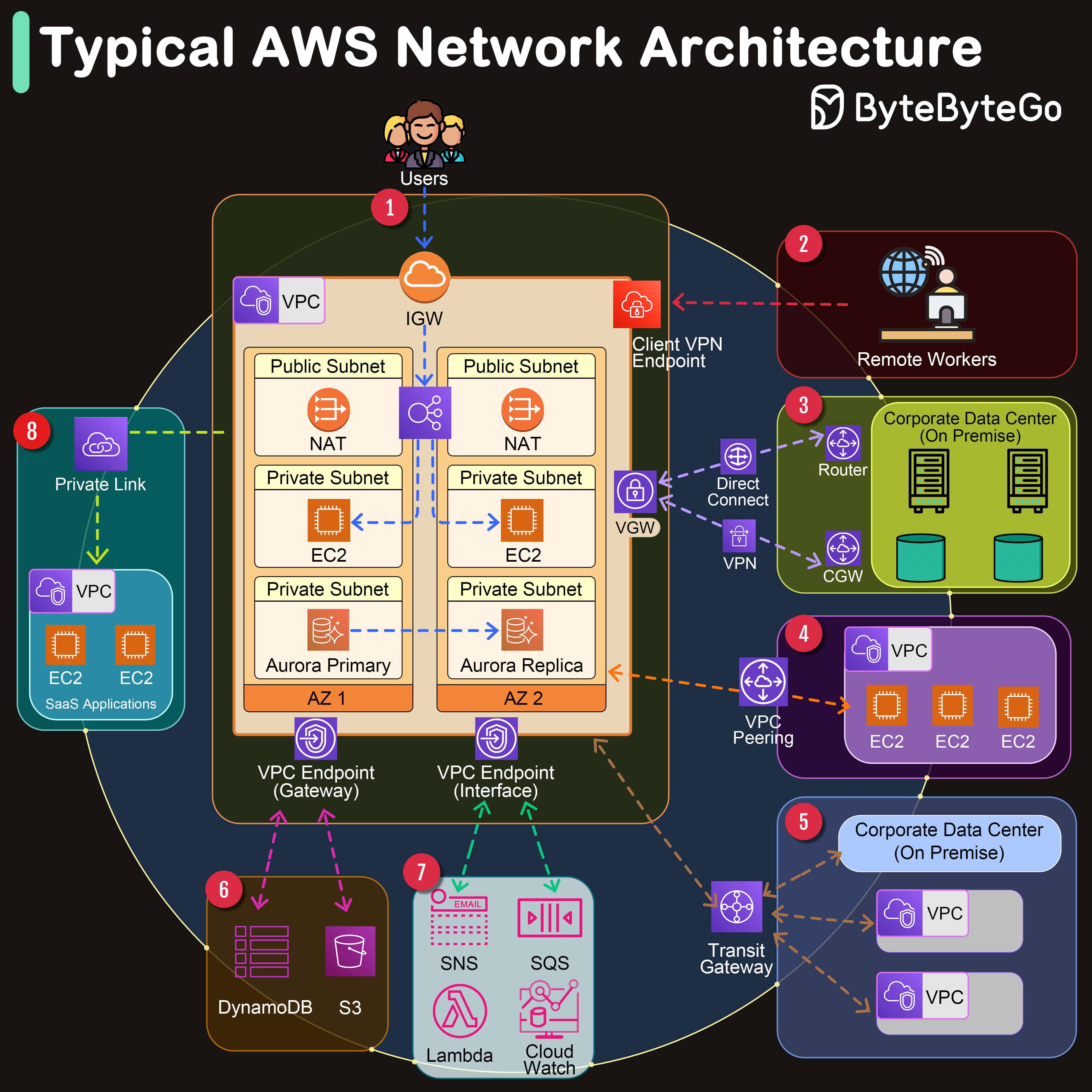 Amazon Web Services offers a comprehensive suite of networking services designed to provide businesses with secure, scalable, and highly available network infrastructure.
Key Components
VPC
A logically isolated section of the AWS Cloud where you can launch AWS resources in a virtual network that you define.
Availability Zones
One or more discrete data centers with redundant power, networking, and connectivity in an AWS Region.
Internet Gateway
Serves as the doorway between your AWS VPC and the internet, facilitating bidirectional communication.
Transit Gateway
Acts as a network transit hub, enabling you to connect multiple VPCs, VPNs, and AWS accounts together.
Network Connectivity Options
1. Internet Gateway (IGW) Facilitates bidirectional communication between your VPC and the internet. 2. Client VPN Endpoint Enables remote workers to access AWS resources or an on-premises network securely over the internet. 3. Virtual Gateway (VGW) The VPN concentrator on the Amazon side of the Site-to-Site VPN connection between your network and your VPC. 4. VPC Peering Connects two VPCs, enabling you to route traffic between them using private IPv4 or IPv6 addresses. 5. VPC Endpoints- Gateway Endpoints: For S3 and DynamoDB without internet gateway
- Interface Endpoints: For private connections to AWS services via PrivateLink
AWS Lambda Deep Dive
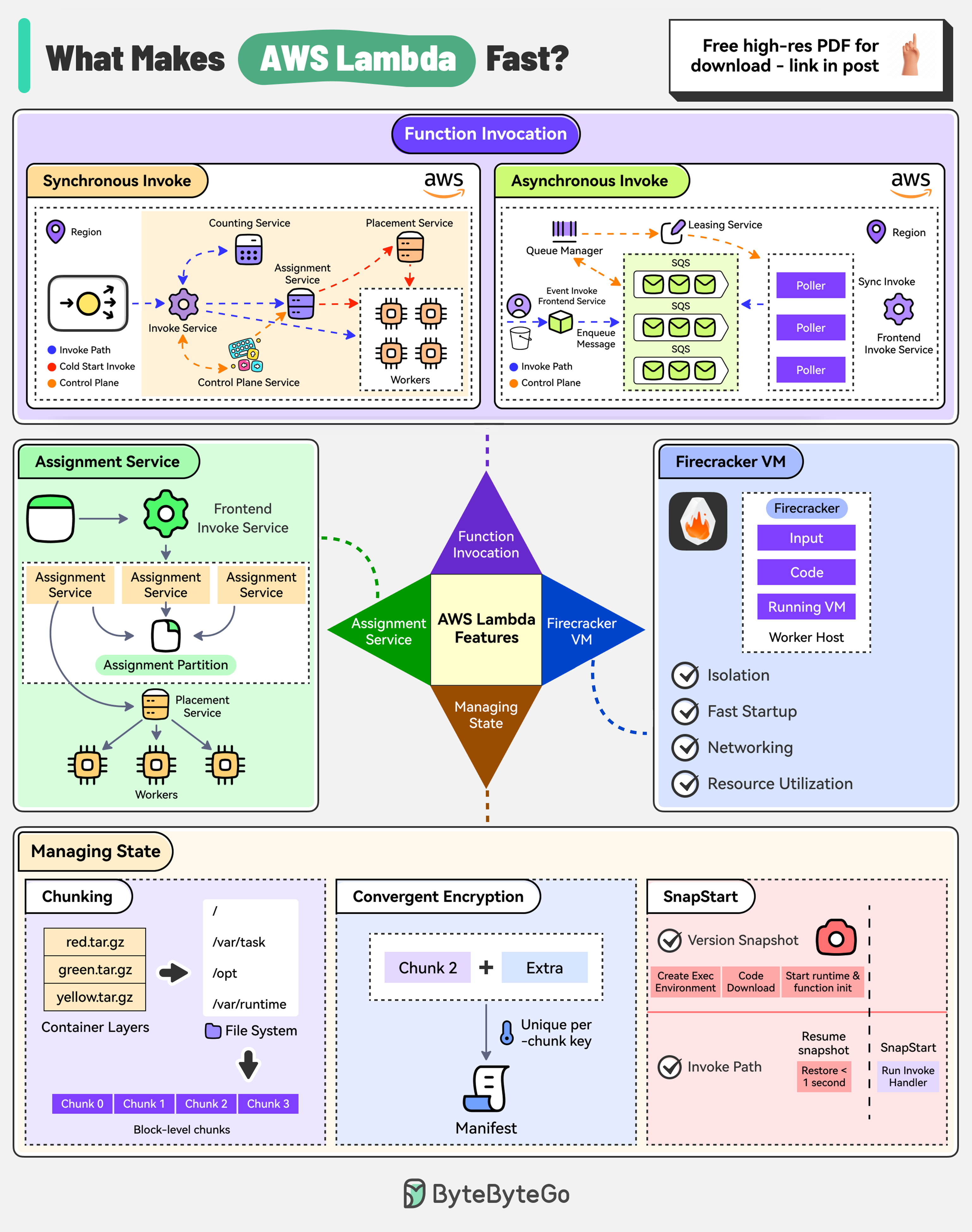
What Makes AWS Lambda So Fast?
There are 4 main pillars:Function Invocation
AWS Lambda supports synchronous and asynchronous invocation:- Synchronous: Caller directly calls the Lambda function using AWS CLI, SDK, or other services
- Asynchronous: Request is authorized and an event is placed in an internal SQS queue. Pollers read messages from the queue and send them for processing
Assignment Service
The Assignment Service manages the execution environments:- Written in Rust for high performance
- Divided into multiple partitions with a leader-follower approach for high availability
- State of execution environments is written to an external journal log
Firecracker MicroVM
Firecracker is a lightweight virtual machine manager:- Designed for running serverless workloads
- Uses Linux’s Kernel-based virtual machine
- Creates and manages secure, fast-booting microVMs
Component Storage
AWS Lambda uses multiple optimization techniques:- Chunking: Store container images more efficiently
- Convergent encryption: Secure shared data by appending additional data to compute a more robust hash
- SnapStart: Reduce cold start latency by pre-initializing the execution environment
Amazon S3 Architecture
Key Concepts
Bucket
Bucket
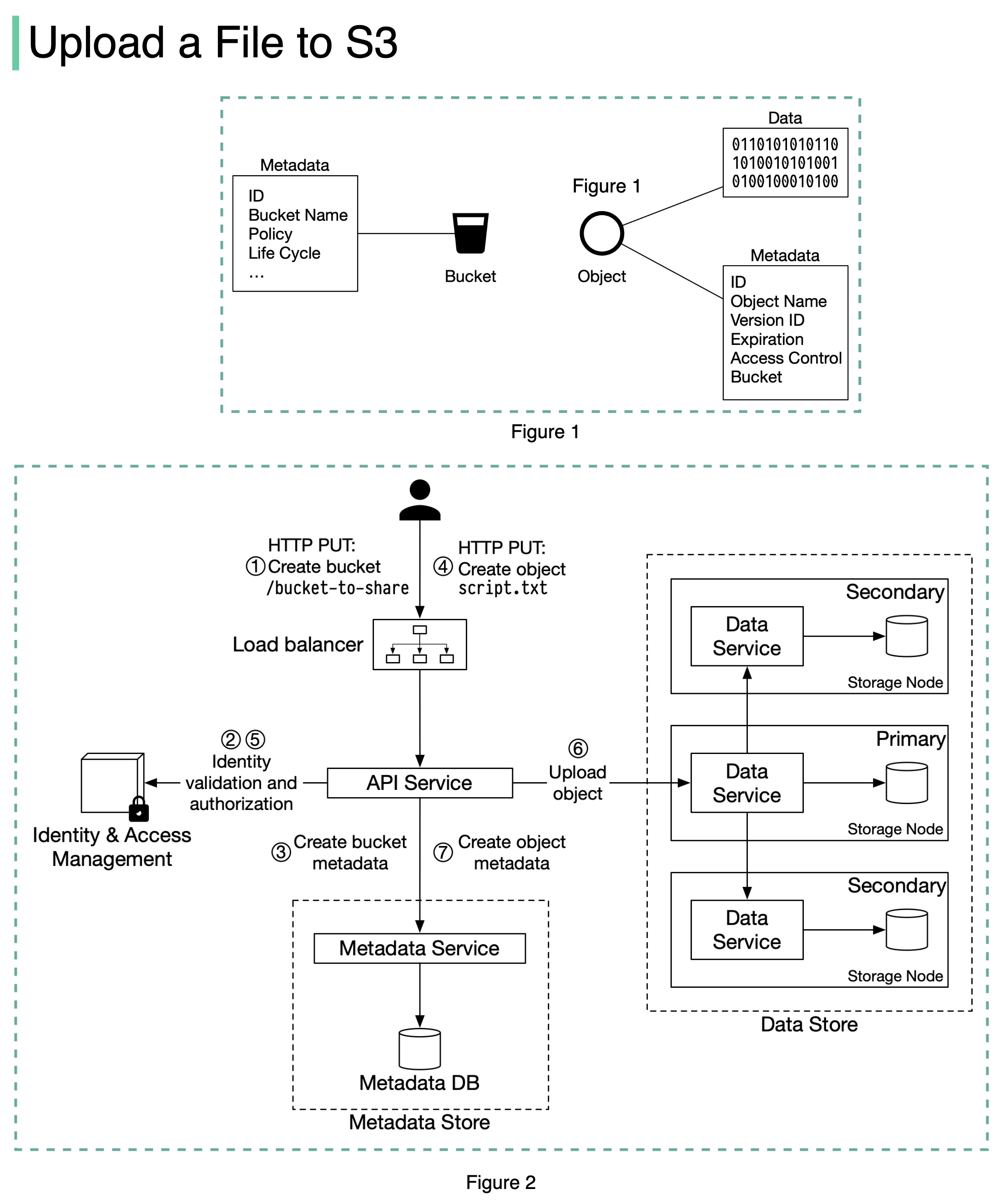
A logical container for objects. The bucket name is globally unique. To upload data to S3, you must first create a bucket.
Object
Object
An individual piece of data stored in a bucket. Contains:
- Metadata: Mutable attributes (ID, bucket name, object name, etc.)
- Object data: Immutable actual data content
File Upload Process
When uploading a file to S3:- Create Bucket: Client sends HTTP PUT request to create a bucket
- Authorization: API service calls IAM to verify user permissions
- Metadata Storage: Bucket info stored in metadata database
- Upload Object: Client sends HTTP PUT request with object data
- Validation: API service verifies identity and WRITE permissions
- Data Storage: Object data persisted to data store, UUID returned
- Metadata Update: API service creates entry in metadata database with object details
AWS Services Cheat Sheet
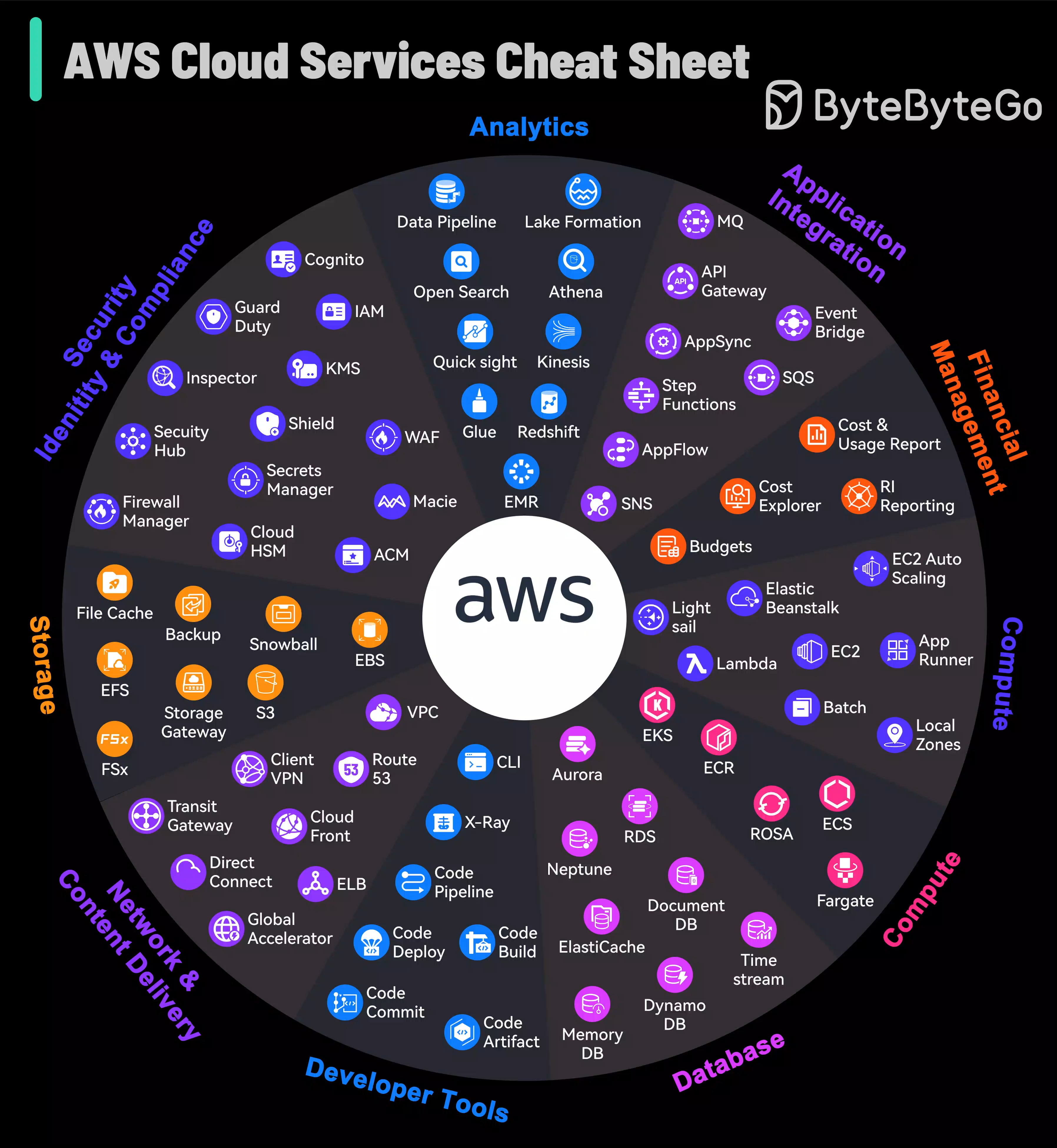 AWS grew from an in-house project to the market leader in cloud services. The platform not only caters to foundational cloud needs but also stays at the forefront of emerging technologies such as machine learning and IoT.
This visual guide simplifies the exploration of AWS’s expansive landscape, making it accessible for users to identify and leverage the right tools for their cloud-based endeavors.
Best Practices
Security
Use IAM roles and policies, enable MFA, encrypt data at rest and in transit
Cost Optimization
Use Reserved Instances, monitor spending with Cost Explorer, implement auto-scaling
Reliability
Deploy across multiple AZs, implement backups, use CloudWatch monitoring
Performance
Choose appropriate instance types, use CDN for content delivery, implement caching
Additional Resources
AWS Documentation
Official AWS documentation and guides
AWS Well-Architected Framework
Best practices for building on AWS