What is HTTPS?
 HTTPS transmits encrypted data using Transport Layer Security (TLS), formerly known as Secure Sockets Layer (SSL). If data is intercepted during transmission, attackers only see encrypted binary code, not the actual content.
Why HTTPS Matters
Protection against:- Eavesdropping - Prevents attackers from reading transmitted data
- Man-in-the-middle attacks - Ensures you’re communicating with the intended server
- Data tampering - Detects if data has been modified during transmission
- Impersonation - Verifies server identity through certificates
- User trust and confidence
- SEO ranking boost (Google favors HTTPS sites)
- Required for modern browser features (geolocation, service workers)
- Compliance with security standards
How HTTPS Works
HTTPS combines the standard HTTP protocol with TLS encryption. Here’s the complete flow:Step 1: TCP Connection
The client (browser) and server establish a TCP connection using the three-way handshake.Step 2: TLS Handshake
The client and server negotiate encryption parameters: Client Hello:- TLS version the client supports
- List of cipher suites (encryption algorithms)
- Random data for key generation
- Selected TLS version
- Selected cipher suite
- Random data for key generation
- SSL certificate containing:
- Server’s public key
- Domain name (hostname)
- Certificate expiration date
- Issuing Certificate Authority (CA)
- Digital signature
- Check if certificate is issued by trusted CA
- Verify certificate hasn’t expired
- Confirm domain name matches
- Validate digital signature
Browsers maintain a list of trusted Certificate Authorities (CAs) to validate certificates.
Step 3: Session Key Exchange
After validating the certificate, the client generates a session key:- Client generates a random session key
- Client encrypts session key with server’s public key (from certificate)
- Client sends encrypted session key to server
- Server decrypts session key using its private key
This process uses asymmetric encryption (public/private key pair) for the key exchange, then switches to symmetric encryption for data transmission.
Step 4: Secure Data Transmission
Once both parties have the session key, they use symmetric encryption for all subsequent communication:Why Switch to Symmetric Encryption?
HTTPS uses asymmetric encryption for the handshake but switches to symmetric encryption for data transmission. Here’s why:
1. Security
Asymmetric encryption is one-way:- Server can encrypt with private key → anyone can decrypt with public key
- Public key is public, so no secrecy for server-to-client messages
- Not suitable for two-way secure communication
- Both parties use the same key
- Key is kept secret between client and server
- Enables secure bidirectional communication
2. Performance
Asymmetric encryption:- Computationally expensive
- Involves complex mathematical operations
- Not suitable for large amounts of data
- Can slow down long sessions significantly
- Much faster
- Lower computational overhead
- Suitable for streaming data
- Better for long-lived connections
Asymmetric encryption can be 1000x slower than symmetric encryption. That’s why HTTPS uses it only for the initial handshake.
SSL/TLS Handshake Explained
 Let’s dive deeper into the cryptographic protocols that establish a secure connection:
Complete TLS 1.3 Handshake
TLS 1.3 Improvements
TLS 1.3 (the latest version) improves upon previous versions: Faster handshake:- 1-RTT (Round Trip Time) instead of 2-RTT
- 0-RTT for resumed sessions
- Removed weak cipher suites
- Forward secrecy by default
- Encrypted handshake messages
- Fewer cipher suite options
- Cleaner protocol design
SSL Certificates
What’s in an SSL Certificate?
An SSL certificate contains:- Subject - Domain name(s) the certificate is issued for
- Issuer - Certificate Authority that issued it
- Valid From/To - Certificate validity period
- Public Key - Server’s public key
- Signature Algorithm - Algorithm used to sign the certificate
- Digital Signature - CA’s signature of the certificate
Types of SSL Certificates
By Validation Level
1. Domain Validation (DV)- Validates domain ownership only
- Issued quickly (minutes to hours)
- Lowest cost
- Suitable for blogs, personal sites
- Validates domain and organization
- Requires business verification
- Moderate cost and time
- Suitable for business websites
- Strict validation process
- Highest trust level
- Shows organization name in browser
- Most expensive
- Suitable for e-commerce, banking
By Coverage
1. Single Domain- Covers one domain (e.g., example.com)
- Most common type
- Covers domain and all subdomains (e.g., *.example.com)
- Covers www.example.com, api.example.com, etc.
- Covers multiple different domains
- Subject Alternative Names (SAN)
- Example: example.com, example.org, example.net
Certificate Authorities (CAs)
Trusted organizations that issue SSL certificates: Popular CAs:- Let’s Encrypt (Free, automated)
- DigiCert
- GlobalSign
- Sectigo (formerly Comodo)
- GoDaddy
Let’s Encrypt provides free SSL certificates with automated renewal. Perfect for most websites.
Is HTTPS Safe?
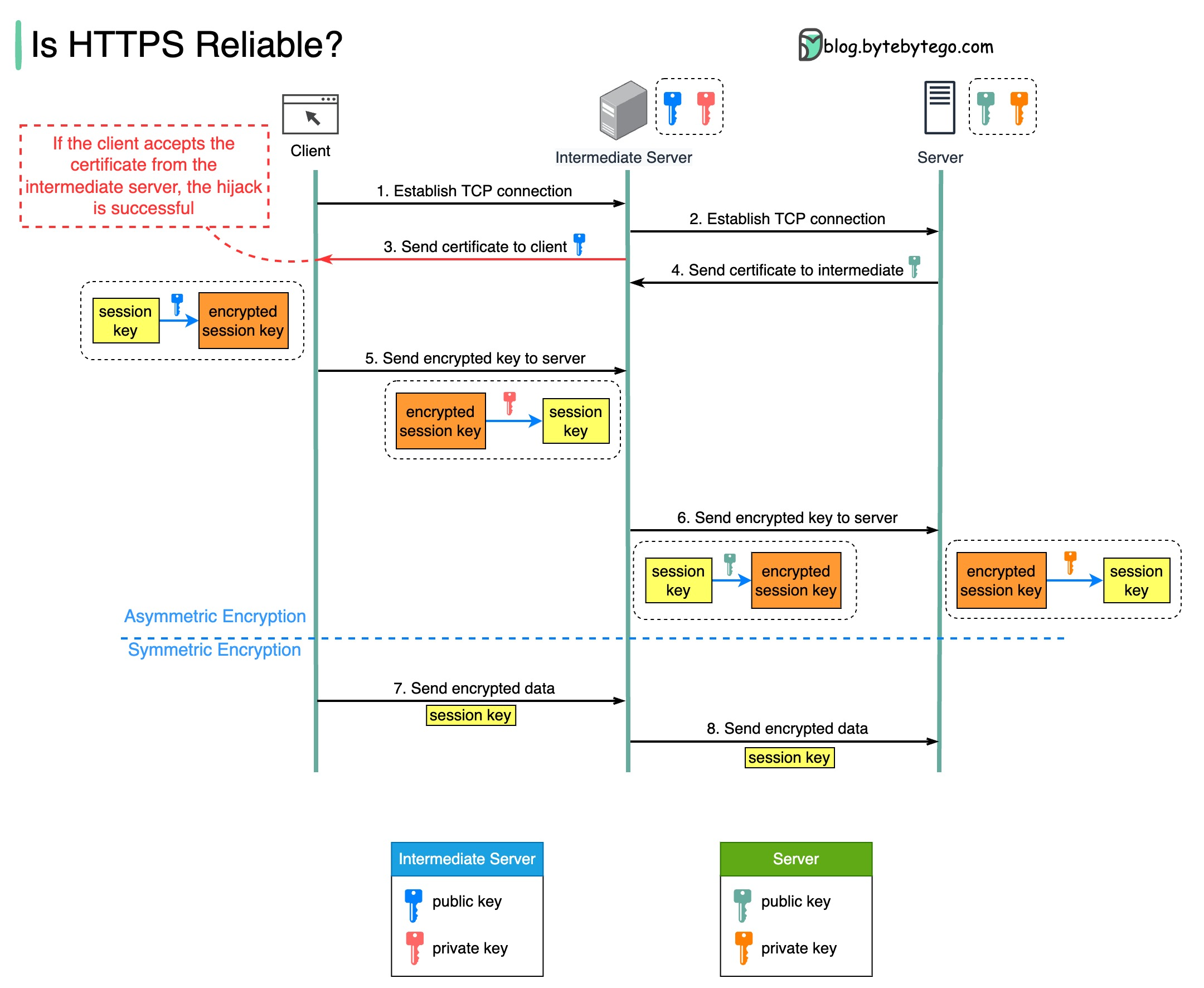 While HTTPS is generally secure, it can be compromised if intermediate servers hijack packets.
How HTTPS Can Be Intercepted
Prerequisite: The attacker’s root certificate must be installed in the client’s trust store. Attack scenario:- Client attempts HTTPS connection to server
- Request is routed to malicious intermediate server
- Intermediate establishes separate HTTPS connections:
- One with the client (using attacker’s certificate)
- One with the real server (as a legitimate client)
- Intermediate decrypts traffic from both sides
- Intermediate can read, modify, or log all data
When This Happens
Legitimate use cases:- Corporate proxy servers for monitoring
- Parental control software
- Security analysis tools (Fiddler, Wireshark)
- Development debugging tools
- Man-in-the-middle attacks
- Certificate authority compromise
- Government surveillance
Protection Against Interception
Best practices:- Certificate Pinning - App only accepts specific certificates
- HSTS - HTTP Strict Transport Security forces HTTPS
- Certificate Transparency - Public log of all issued certificates
- Mutual TLS - Both client and server verify certificates
- Monitor installed certificates - Remove unknown/suspicious ones
Encryption Types
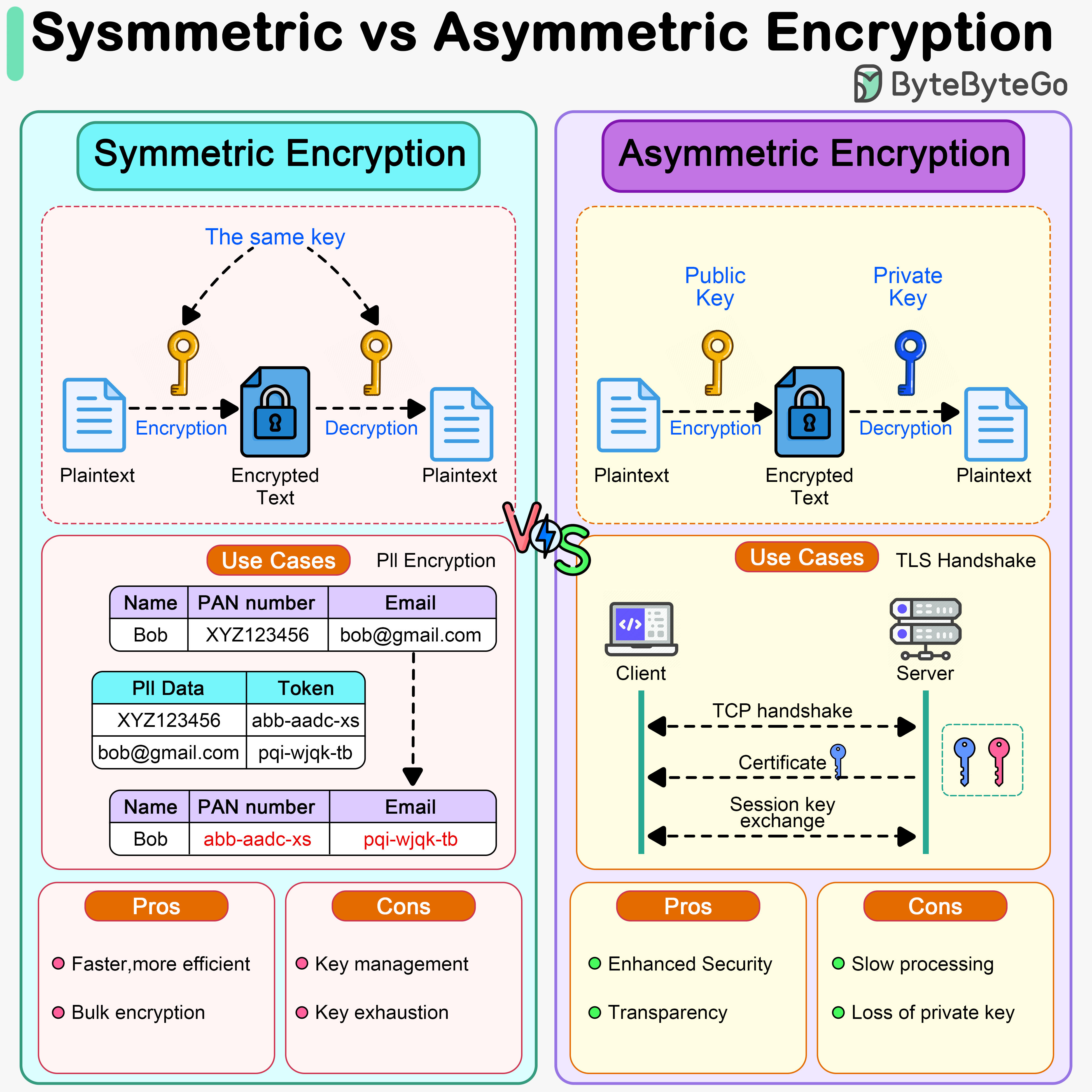
Symmetric Encryption
A single key is used for both encryption and decryption. Characteristics:- Fast and efficient
- Suitable for large amounts of data
- Key must be kept secret
- Key distribution is challenging
- AES (Advanced Encryption Standard) - Most widely used
- ChaCha20 - Modern alternative to AES
- DES/3DES - Legacy, not recommended
- Bulk data encryption
- File encryption
- Database encryption
- Encrypted sessions in HTTPS
Asymmetric Encryption
Uses a pair of keys: public key (encrypt) and private key (decrypt). Characteristics:- Slower than symmetric
- Solves key distribution problem
- Enables digital signatures
- Smaller data limits
- RSA - Most popular
- ECC (Elliptic Curve Cryptography) - Faster, smaller keys
- DSA - Digital signatures
- TLS handshake
- Digital signatures
- Email encryption (PGP)
- Cryptocurrency transactions
HTTPS uses asymmetric encryption to exchange keys during handshake, then symmetric encryption for actual data transmission.
Common HTTPS Issues
1. Certificate Errors
“Your connection is not private”- Expired certificate
- Self-signed certificate
- Domain name mismatch
- Untrusted certificate authority
- Renew expired certificates
- Use certificates from trusted CAs
- Ensure certificate matches domain name
2. Mixed Content
HTTPS page loading HTTP resources (images, scripts, etc.). Problem: Browser blocks or warns about insecure content Solution:3. Performance Impact
HTTPS adds overhead from encryption/decryption. Mitigation strategies:- Use HTTP/2 (optimized for HTTPS)
- Implement session resumption
- Use OCSP stapling
- Enable TLS 1.3
- Optimize cipher suite selection
Modern hardware and TLS 1.3 make HTTPS performance impact negligible for most applications.
Implementing HTTPS
1. Obtain SSL Certificate
Using Let’s Encrypt (Free):2. Configure Web Server
Nginx:3. Automate Certificate Renewal
Security Headers
Enhance HTTPS security with additional headers:1. Strict-Transport-Security (HSTS)
Forces browsers to always use HTTPS:2. Content-Security-Policy
Prevents mixed content and XSS:3. X-Frame-Options
Prevents clickjacking:4. X-Content-Type-Options
Prevents MIME sniffing:Best Practices
- Use TLS 1.3 - Latest, fastest, most secure
- Disable old protocols - No SSLv3, TLS 1.0, TLS 1.1
- Use strong cipher suites - Prefer ECDHE and AES-GCM
- Enable HSTS - Force HTTPS usage
- Implement OCSP Stapling - Faster certificate validation
- Use HTTP/2 - Better performance with HTTPS
- Automate certificate renewal - Prevent expiration
- Monitor certificate expiration - Set up alerts
- Use certificate transparency - Detect misissued certificates
- Test configuration - Use SSL Labs to verify
Test your HTTPS configuration at SSL Labs to identify potential issues.
Next Steps
Explore related security topics:- Encryption - Deep dive into encryption techniques
- Authentication - User authentication methods
- OAuth 2.0 - Secure authorization framework
- JWT - Token-based authentication