Types of Encryption
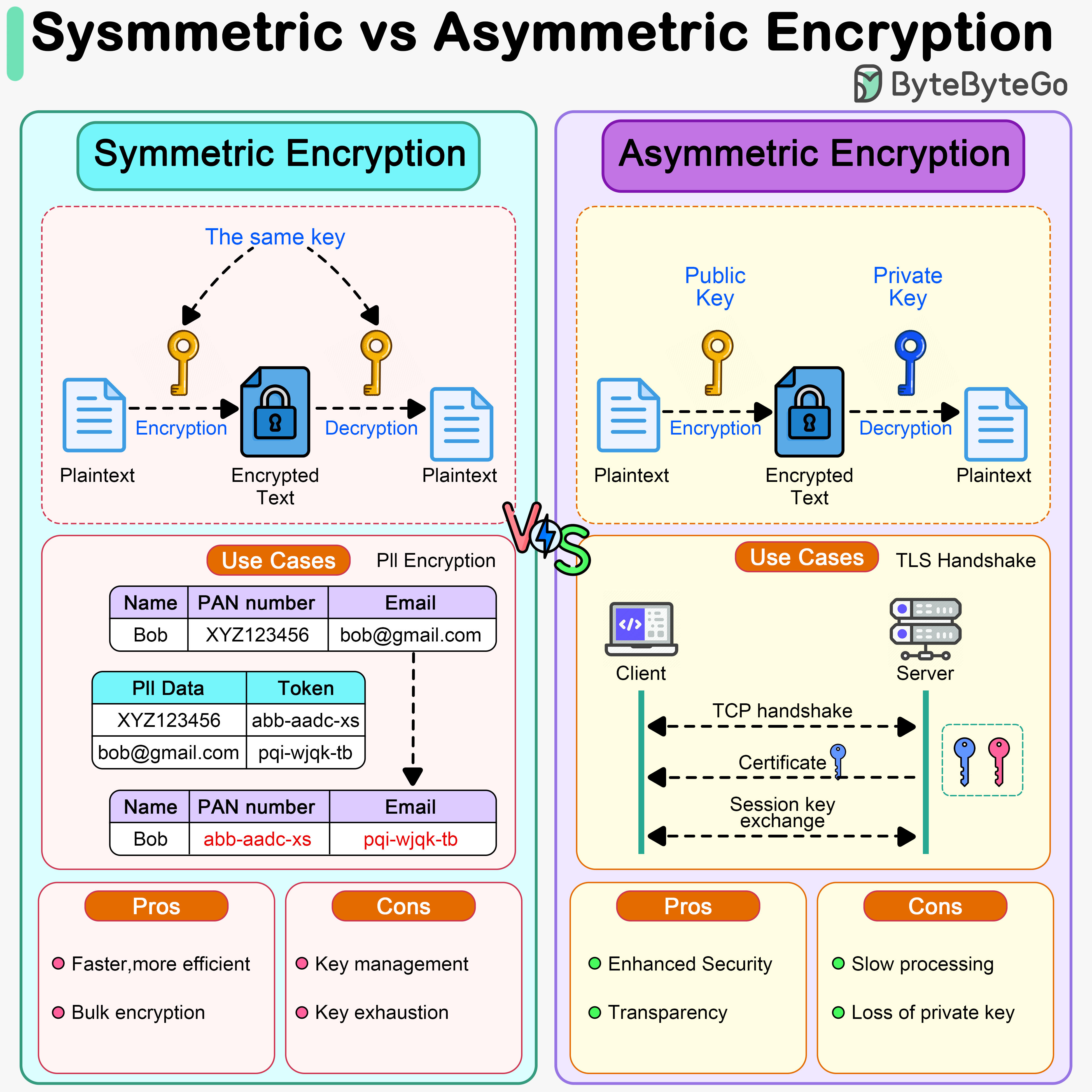 There are two main types of encryption used in system design:
Symmetric Encryption
A single key is used for both encryption and decryption of data. How it works:- Sender and receiver share a secret key
- Sender encrypts data with the key
- Receiver decrypts data with the same key
- Fast and efficient
- Lower computational overhead
- Suitable for bulk data encryption
- Key distribution is challenging
- Both parties must keep the key secret
- AES (Advanced Encryption Standard) - Industry standard, extremely secure
- AES-128, AES-192, AES-256 (key sizes in bits)
- ChaCha20 - Modern alternative to AES, optimized for mobile
- Blowfish - Older but still secure
- DES/3DES - Legacy, no longer recommended
- Encrypting large amounts of data (PII, databases)
- File encryption
- Disk encryption
- VPN tunnels
- Secure messaging (after key exchange)
- HTTPS data transmission (after handshake)
AES-256 is considered virtually unbreakable with current technology. It would take billions of years to crack using brute force.
Asymmetric Encryption
Uses a pair of keys: a public key for encryption and a private key for decryption. How it works:- Receiver generates a key pair (public + private)
- Receiver shares public key openly
- Sender encrypts data with receiver’s public key
- Only receiver can decrypt with their private key
- More secure for key distribution
- Private key never shared
- Slower than symmetric encryption
- Computationally expensive
- Not suitable for large amounts of data
- Enables digital signatures
- RSA (Rivest-Shamir-Adleman) - Most widely used
- Key sizes: 2048, 3072, 4096 bits
- ECC (Elliptic Curve Cryptography) - Smaller keys, faster
- ECDSA (Digital Signature Algorithm)
- ECDH (Diffie-Hellman key exchange)
- DSA (Digital Signature Algorithm) - For digital signatures
- TLS/SSL handshake (HTTPS)
- Digital signatures
- Email encryption (PGP/GPG)
- SSH authentication
- Cryptocurrency transactions
- Software code signing
Comparison: Symmetric vs Asymmetric
| Feature | Symmetric | Asymmetric |
|---|---|---|
| Speed | Very fast | Slower (1000x+) |
| Key Management | Difficult (shared secret) | Easier (public key distribution) |
| Key Size | Smaller (128-256 bits) | Larger (2048-4096 bits) |
| Use Case | Bulk encryption | Key exchange, signatures |
| Security | Secure if key is secret | Secure even if public key is known |
| Examples | AES, ChaCha20 | RSA, ECC |
| Data Size | Unlimited | Limited |
Modern systems use both: asymmetric encryption for key exchange, then symmetric encryption for data transmission.
Encoding vs Encryption vs Tokenization
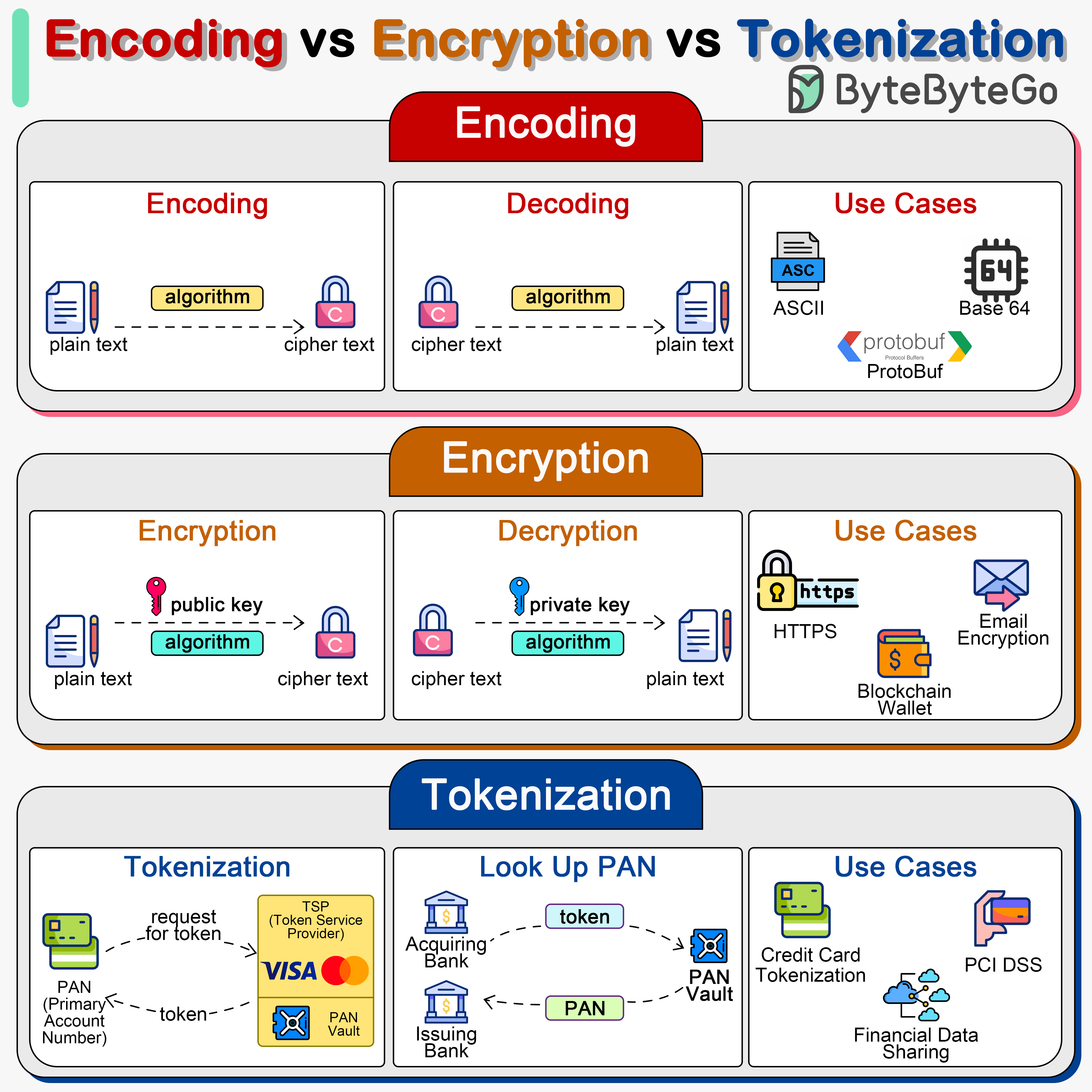 It’s important to understand the differences between these three data handling approaches:
Encoding
Converts data into a different format using a publicly available scheme. Purpose:- Data transmission
- Data storage compatibility
- Not for security
- Easily reversible
- No key required
- Anyone can decode
- Not secure
- Base64 - Encodes binary to ASCII text
- URL encoding - Encodes special characters for URLs
- UTF-8 - Character encoding
- ASCII - Text encoding
Encryption
Transforms data into an unreadable format using a secret key. Purpose:- Protect data confidentiality
- Prevent unauthorized access
- Secure data transmission
- Requires secret key
- Reversible (with correct key)
- Computationally difficult to break
- Maintains data format/size (approximately)
- Symmetric: AES, ChaCha20
- Asymmetric: RSA, ECC
- Encrypting passwords (with proper hashing)
- Protecting sensitive files
- Securing network traffic
- Database encryption
Tokenization
Replaces sensitive data with non-sensitive placeholders (tokens). Purpose:- Data protection
- PCI DSS compliance
- Reduce security scope
- Original data stored securely in token vault
- Tokens are meaningless outside the system
- Cannot be reverse-engineered
- Maintains data format (optional)
- Original data sent to tokenization system
- System generates random token
- System stores mapping in secure vault
- Token returned for use in applications
- Original data retrieved only when needed
- Credit card number protection
- Social security numbers
- Personal identification numbers
- Healthcare records (HIPAA compliance)
- Payment processing (PCI DSS compliance)
Tokenization is highly secure because tokens cannot be reverse-engineered. Even if the token is stolen, it’s useless without access to the token vault.
When to Use Each
Use Encoding when:- You need to transmit binary data over text-based protocols
- You need to ensure data compatibility
- Security is not a concern
- You need to protect data confidentiality
- Data needs to be reversible
- You have secure key management
- You need to encrypt large amounts of data
- You need compliance (PCI DSS, HIPAA)
- You want to reduce security scope
- You’re storing payment card data
- You need format-preserving protection
Digital Signatures
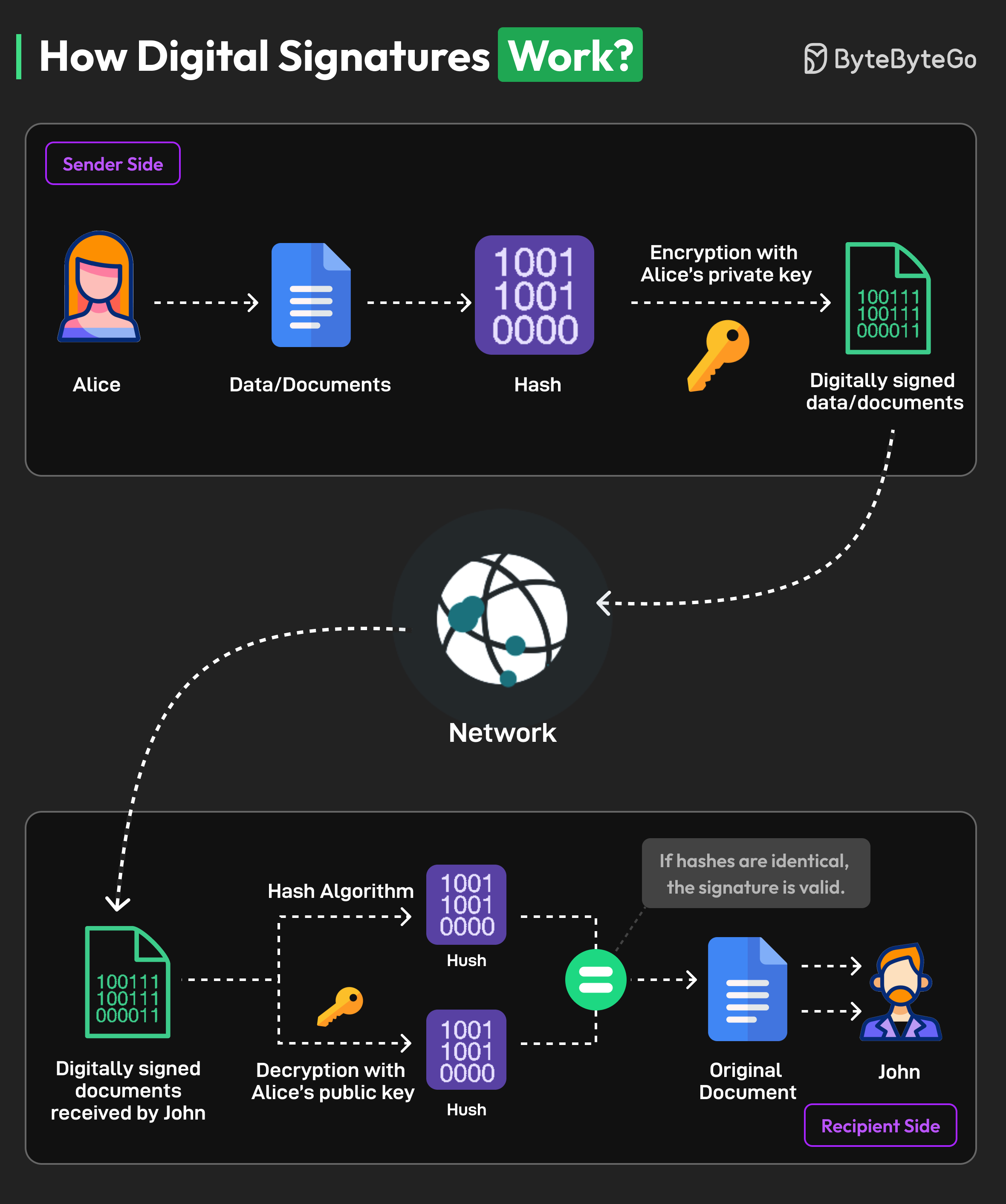 Digital signatures use asymmetric encryption to verify authenticity and integrity of documents.
How Digital Signatures Work
Signing process (Alice signs a document):-
Generate key pair
- Alice creates public key and private key
- Private key kept secret, public key distributed
-
Create hash
- Alice uses hash function (SHA-256) to create unique hash of document
- Hash is fixed-length representation of document content
-
Encrypt hash
- Alice encrypts hash with her private key
- This encrypted hash is the digital signature
-
Attach signature
- Digital signature is attached to document
- Both are sent to recipient (John)
-
Extract signature and document
- John receives document and digital signature
-
Decrypt signature
- John uses Alice’s public key to decrypt the signature
- This produces the original hash value
-
Calculate new hash
- John calculates a new hash of the received document
- Uses same hashing algorithm as Alice
-
Compare hashes
- If calculated hash == decrypted hash:
- Document is authentic (from Alice)
- Document hasn’t been tampered with
- If hashes don’t match:
- Document has been modified
- Or signature is invalid
- If calculated hash == decrypted hash:
Benefits of Digital Signatures
Authentication:- Verifies identity of the signer
- Proves document came from claimed sender
- Detects any changes to document
- Even single character change invalidates signature
- Signer cannot deny signing
- Only person with private key could create signature
- Equivalent to handwritten signatures in many jurisdictions
- Accepted for contracts, agreements, etc.
Use Cases
- Software distribution (code signing)
- Email signing (S/MIME, PGP)
- PDF document signing
- Blockchain transactions
- SSL/TLS certificates
- Software updates verification
Encryption Best Practices
1. Use Strong Algorithms
Recommended:- Symmetric: AES-256, ChaCha20
- Asymmetric: RSA-2048+ (prefer 4096), ECC-256+
- Hashing: SHA-256, SHA-3, bcrypt, Argon2
2. Proper Key Management
Key generation:- Use cryptographically secure random number generators
- Never use predictable seeds
- Sufficient key length (256 bits for symmetric, 2048+ for RSA)
- Never hardcode keys in source code
- Use environment variables or key management services
- Encrypt keys at rest
- Use Hardware Security Modules (HSM) for critical keys
- Rotate keys regularly (annually or more frequently)
- Automate rotation process
- Maintain key version history
- Use secure channels for key exchange
- Never send keys via email or unencrypted channels
- Use key derivation functions (KDF) when appropriate
Use services like AWS KMS, Azure Key Vault, or HashiCorp Vault for enterprise key management.
3. Encrypt Data at Rest and in Transit
Data at rest:- Database encryption (TDE - Transparent Data Encryption)
- File system encryption
- Backup encryption
- Mobile device encryption
- Always use TLS/SSL (HTTPS)
- Never transmit sensitive data over HTTP
- Use VPNs for remote access
- Encrypt email (PGP, S/MIME)
4. Use Authenticated Encryption
Combine encryption with authentication to prevent tampering: Recommended modes:- AES-GCM (Galois/Counter Mode) - Most popular
- ChaCha20-Poly1305 - Modern alternative
- AES-CCM (Counter with CBC-MAC)
- Prevents tampering attacks
- Detects if ciphertext was modified
- Protects against chosen-ciphertext attacks
5. Protect Against Common Attacks
Padding oracle attacks:- Use authenticated encryption (GCM)
- Don’t reveal padding errors in responses
- Use constant-time comparison functions
- Avoid early returns based on decryption success
- Include timestamps or nonces
- Implement message counters
- Use session tokens
- Always verify certificates
- Implement certificate pinning
- Use mutual TLS for critical services
Encryption in Practice
Encrypting Passwords
Wrong:Encrypting Sensitive Data
Node.js example (AES-256-GCM):Database Encryption
Column-level encryption:- Encrypts entire database at storage level
- Transparent to application
- Protects against physical theft
- Available in most modern databases (MySQL, PostgreSQL, SQL Server)
File Encryption
OpenSSL command line:Performance Considerations
Hardware Acceleration
Modern CPUs have built-in encryption acceleration: AES-NI (AES New Instructions):- Hardware acceleration for AES
- 3-10x faster than software implementation
- Available on Intel/AMD processors since 2010
- Minimal performance impact
- Makes encryption practical for all data
- Reduces CPU overhead
Optimization Strategies
- Use hardware acceleration - Enable AES-NI support
- Batch operations - Encrypt multiple items together
- Cache decrypted data - Balance security vs performance
- Choose appropriate algorithms - ChaCha20 for mobile, AES for servers
- Async encryption - Don’t block main thread
With modern hardware, encryption overhead is typically less than 5% for most applications.
Compliance and Regulations
Many industries require encryption by law:PCI DSS (Payment Card Industry)
- Encrypt cardholder data
- Use strong cryptography (AES-256)
- Secure key management
- Regular key rotation
HIPAA (Healthcare)
- Encrypt patient health information
- Both at rest and in transit
- Access controls and audit logs
GDPR (EU Data Protection)
- Encrypt personal data
- Pseudonymization requirements
- Right to be forgotten
- Data breach notification
SOC 2
- Encryption of sensitive data
- Key management procedures
- Access controls
- Regular security audits
Next Steps
Explore related security topics:- HTTPS/SSL - Learn how encryption secures web traffic
- Authentication - Secure user authentication
- JWT - Token-based authentication
- OAuth 2.0 - Secure authorization framework