Introduction Have you noticed that the largest incidents are usually caused by something very small? A minor error starts the snowball effect that keeps building up. Suddenly, everything is down.
Building resilient systems requires understanding failure modes and implementing patterns that minimize the impact of failures. This guide covers essential strategies for creating robust, fault-tolerant systems.
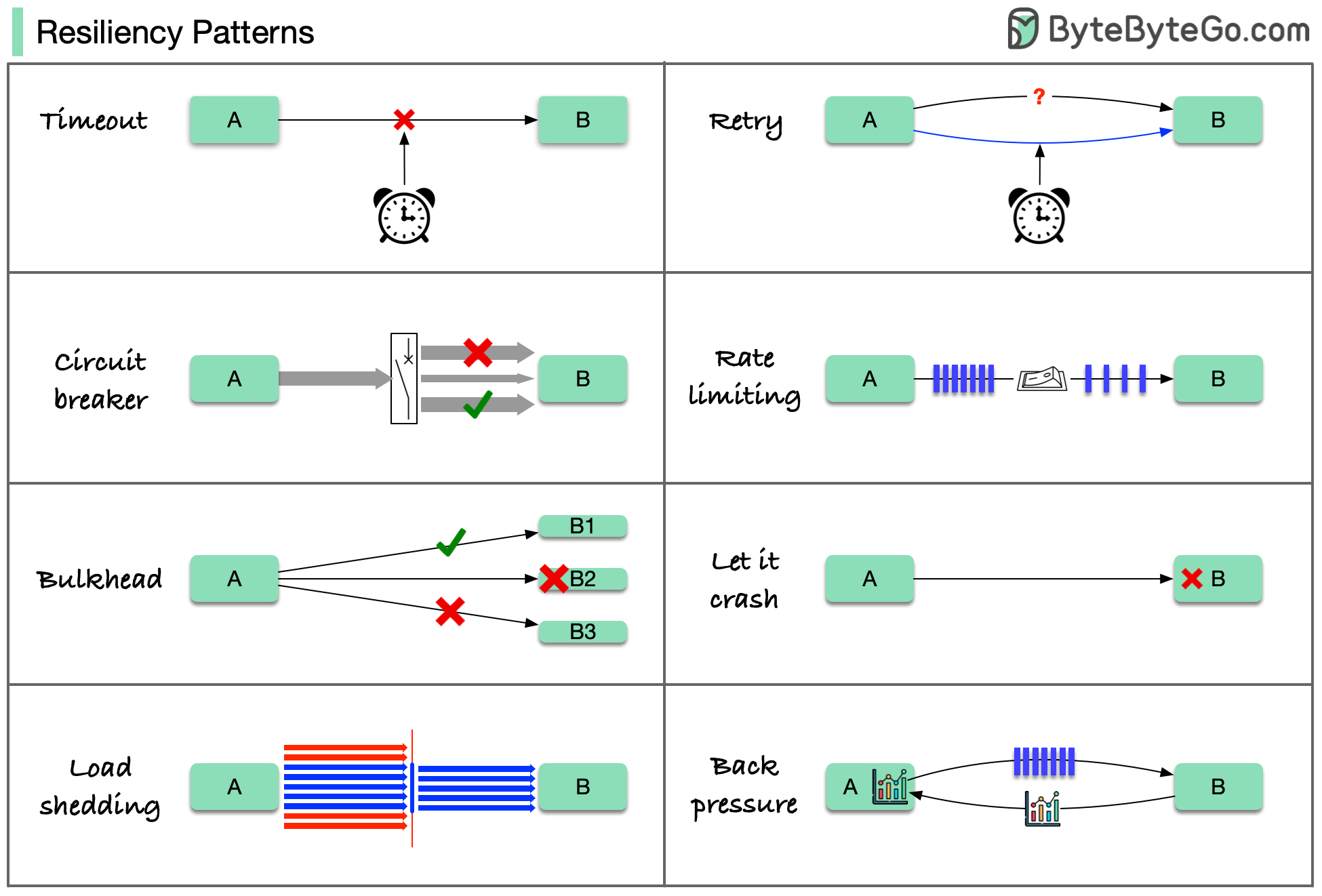
8 Cloud Design Patterns for Resilience Here are 8 cloud design patterns to reduce the damage done by failures:
Timeout
Retry
Circuit Breaker
Rate Limiting
Load Shedding
Bulkhead
Back Pressure
Let it Crash
These patterns are usually not used alone. To apply them effectively, we need to understand why we need them, how they work, and their limitations.
1. Timeout Pattern Set maximum time limits for operations to prevent indefinite waiting.
Purpose:
Prevent resource exhaustion
Fail fast instead of hanging
Free up resources for other requests
Improve user experience
Implementation: Connection Timeout
Request Timeout
Idle Timeout
Time to establish a connection to the server. Typical values : 5-10 seconds
Time to receive a response after connection is established. Typical values : 30-60 seconds
Time a connection can remain idle before closing. Typical values : 60-300 seconds
Best Practices:
Set aggressive timeouts for non-critical operations
Use longer timeouts for critical operations
Make timeouts configurable
Log timeout events for monitoring
Shopify’s experience: Lower timeouts help services fail early. They use read timeout of 5 seconds and write timeout of 1 second.
2. Retry Pattern Automatically retry failed operations with intelligent backoff strategies.
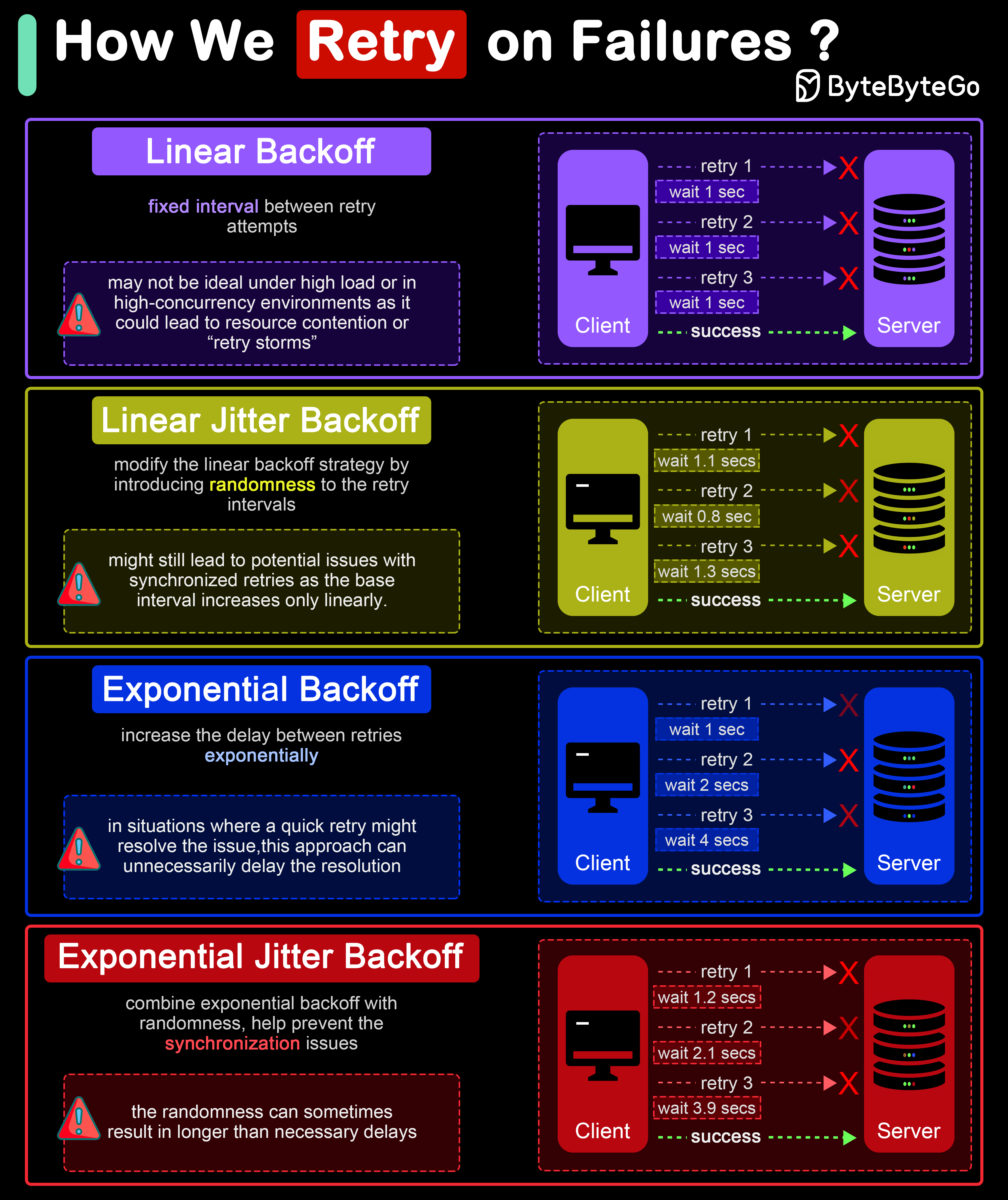
Retry Strategies
Wait for progressively increasing fixed interval between retries. Example : 1s, 2s, 3s, 4s, 5sPros : Simple to implement and understandCons : May cause retry storms under high load
Linear backoff with added randomness. Example : 1s±0.5s, 2s±1s, 3s±1.5sPros : Reduces synchronized retriesCons : Still somewhat predictable
Delay increases exponentially between retries. Example : 1s, 2s, 4s, 8s, 16sPros : Significantly reduces system loadCons : May delay resolution for transient issues
Exponential Jitter Backoff
Exponential backoff with randomness (recommended). Example : 1s±0.5s, 2s±1s, 4s±2s, 8s±4sPros : Best balance, reduces collisions significantlyCons : Randomness can cause longer delays
Retry Best Practices
Idempotency Ensure operations can be safely retried without side effects.
Max Attempts Set a maximum number of retry attempts (typically 3-5).
Retry Conditions Only retry transient failures (network errors, timeouts, 5xx errors).
Circuit Breaking Combine with circuit breaker to stop retrying when service is down.
Errors to Retry:
Network timeouts
Connection failures
HTTP 429 (Too Many Requests)
HTTP 503 (Service Unavailable)
Temporary database unavailability
Errors NOT to Retry:
HTTP 4xx (except 429)
Authentication failures
Validation errors
Resource not found
3. Circuit Breaker Pattern Prevent cascading failures by stopping requests to failing services.
Covered in detail in the Distributed Patterns Guide Shopify’s Approach Shopify developed Semian to protect services with circuit breakers:
Net::HTTP protection
MySQL protection
Redis protection
gRPC services protection
Key Configuration:
Fast failure with low timeouts
Circuit breaker thresholds tuned per service
Automatic recovery testing
4. Rate Limiting Pattern Control the rate of requests to protect system resources.
Algorithms: Token Bucket
Leaky Bucket
Fixed Window
Sliding Window
Tokens added at fixed rate, requests consume tokens. Best for : Smooth traffic with occasional bursts
Requests processed at constant rate. Best for : Strict rate enforcement
Count requests in fixed time windows. Best for : Simple implementation
Weighted count based on current time. Best for : Smooth rate limiting
Rate Limiting Strategies:
Per User : Limit requests per user/API keyPer IP : Limit requests per IP addressGlobal : System-wide rate limitsEndpoint Specific : Different limits per endpoint
Response Handling: HTTP 429 Too Many Requests Retry-After: 60 X-RateLimit-Limit: 1000 X-RateLimit-Remaining: 0 X-RateLimit-Reset: 1640000000
5. Load Shedding Pattern Drop low-priority requests when system is overloaded to maintain service for high-priority requests.
Priority Levels:
Critical
Core business operations, never shed Examples: Payment processing, order creation
High
Important features, shed only under extreme load Examples: User authentication, checkout
Medium
Standard features, can be shed under moderate load Examples: Search, recommendations
Low
Nice-to-have features, shed first Examples: Analytics, thumbnails, tracking
Implementation Strategies:
Queue-based : Drop from queue tail when fullProbabilistic : Randomly drop based on load levelAdmission Control : Reject at entry pointGraceful Degradation : Reduce quality/features
6. Bulkhead Pattern Isolate system resources to prevent cascading failures.
Concept:
Like compartments in a ship’s hull, failures in one area don’t sink the entire system.Implementation:
Thread Pool Isolation Separate thread pools for different operations. One slow operation doesn’t block all threads.
Connection Pool Isolation Separate connection pools per client/tenant. One heavy user doesn’t exhaust all connections.
Process Isolation Run services in separate processes. Process crash doesn’t affect others.
Resource Limits Set CPU, memory, disk limits per component. Prevent resource monopolization.
Example Configuration: Services : critical-service : thread_pool_size : 100 connection_pool_size : 50 cpu_limit : 2000m memory_limit : 2Gi non-critical-service : thread_pool_size : 20 connection_pool_size : 10 cpu_limit : 500m memory_limit : 512Mi
7. Back Pressure Pattern Signal to upstream services when downstream is overloaded.
Mechanisms:
Use fixed-size queues that block or reject when full. Provides natural back pressure to producers.
Explicit signals to slow down/pause sending. Common in streaming protocols (gRPC, HTTP/2).
Publisher-subscriber with demand signaling. Subscriber controls how much data it can handle.
Share load metrics with clients. Clients adjust request rate based on feedback.
Benefits:
Prevents memory exhaustion
Maintains system stability
Better resource utilization
Coordinated flow control
8. Let it Crash Pattern Allow processes to fail and restart rather than trying to handle every error.
Philosophy:
Design for failure and recovery
Supervision trees restart failed processes
Clean state after restart
Simple error handling
Requirements:
Fast startup time
Stateless design or external state storage
Health checks and monitoring
Supervision and orchestration (Kubernetes, Nomad)
Erlang/Elixir Example: This pattern originated from Erlang’s “Let it crash” philosophy:
Processes are lightweight
Supervisors monitor and restart
System remains available
Proven in telecom systems (99.9999999% availability)
High Availability Architecture What is High Availability? In system design, availability means all (non-failing) nodes are available for queries. When you send requests to nodes, a non-failing node returns a reasonable response within a reasonable time (no error or timeout).
Target : For 4-9’s (99.99%), services can only be down for 52.5 minutes per year.Availability guarantees you will receive a response, but doesn’t guarantee the data is the most up-to-date.
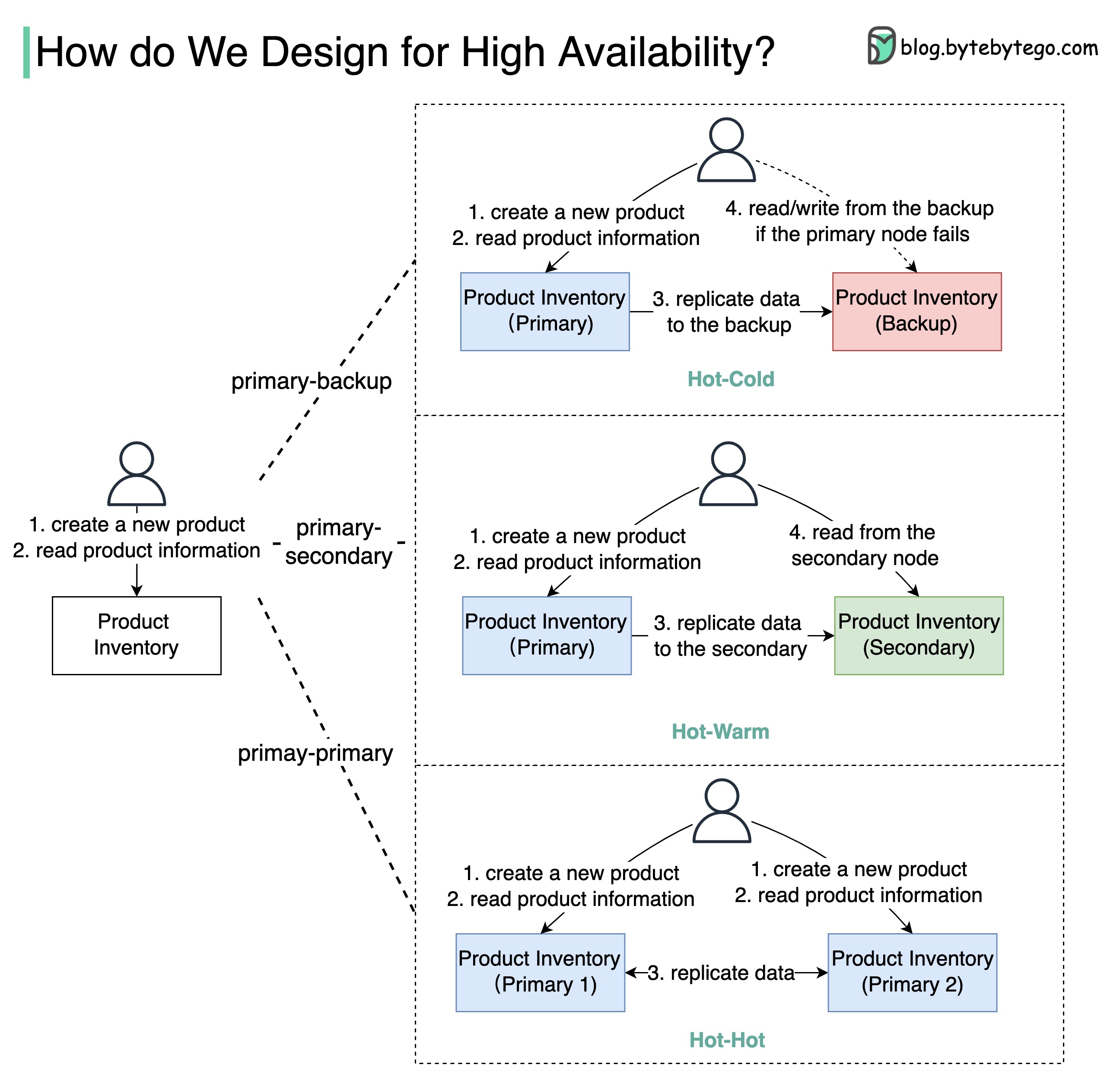
High Availability Architectures Primary-Backup
Primary-Secondary
Primary-Primary
Setup:
Backup node is stand-by
Data replicated from primary to backup
Manual failover when primary fails
Pros : Simple, data integrityCons : Backup resources underutilized, manual failoverAvailability : 90% → 99% (if deployed on EC2)Setup:
Secondary takes read requests
Primary handles writes
Automatic or manual failover
Pros : Better resource utilization, load distributionCons : Eventual consistency, replication lagAvailability : 90% → 99%Setup:
Both nodes handle reads and writes
Bidirectional replication
Active-active configuration
Pros : Higher throughput, better resource usageCons : Complex conflict resolution, limited use casesWarning : Use with caution! Can lead to data inconsistencies.Multi-Region Deployment Benefits:
Lower latency for global users
Disaster recovery
Regulatory compliance
Higher availability
Challenges:
Data consistency across regions
Increased complexity
Higher costs
Latency between regions
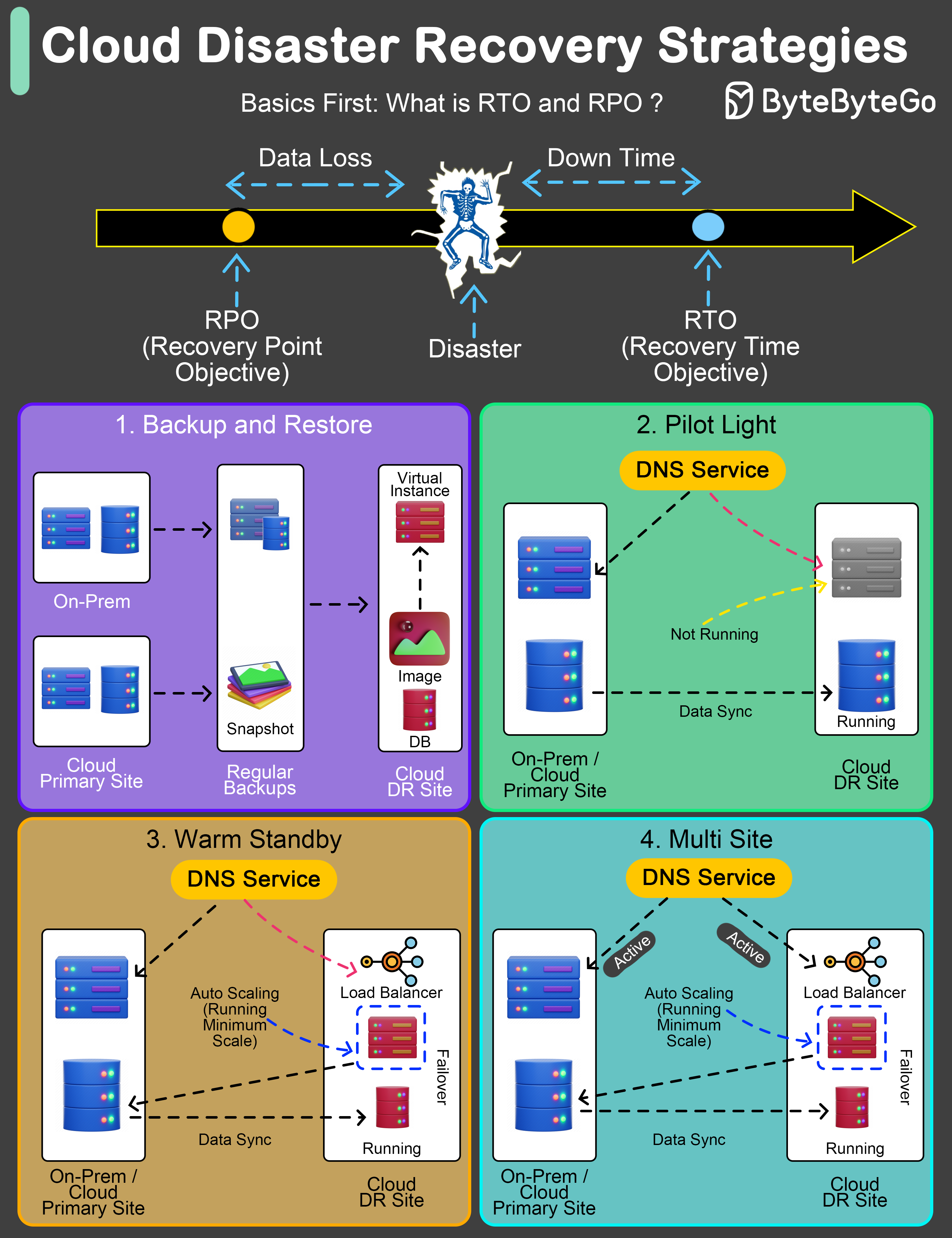
Disaster Recovery Strategies An effective Disaster Recovery (DR) plan is not just a precaution; it’s a necessity.
Key Metrics
RTO Recovery Time Objective Maximum acceptable time application can be offline after a disaster.
RPO Recovery Point Objective Maximum acceptable amount of data loss measured in time.
DR Strategies
Regular backups to facilitate post-disaster recovery. RTO : Several hours to daysRPO : Hours to last backupCost : LowestUse case : Non-critical systems, archival
Critical components in ready-to-activate mode. RTO : Minutes to several hoursRPO : Depends on data sync frequencyCost : Low to mediumUse case : Important but not critical systems
Semi-active environment with current data. RTO : Minutes to hoursRPO : Last few minutes to hoursCost : Medium to highUse case : Business-critical applications
Fully operational duplicate environment running in parallel. RTO : Almost immediate (minutes)RPO : Minimal (seconds)Cost : HighestUse case : Mission-critical systems (banking, healthcare)
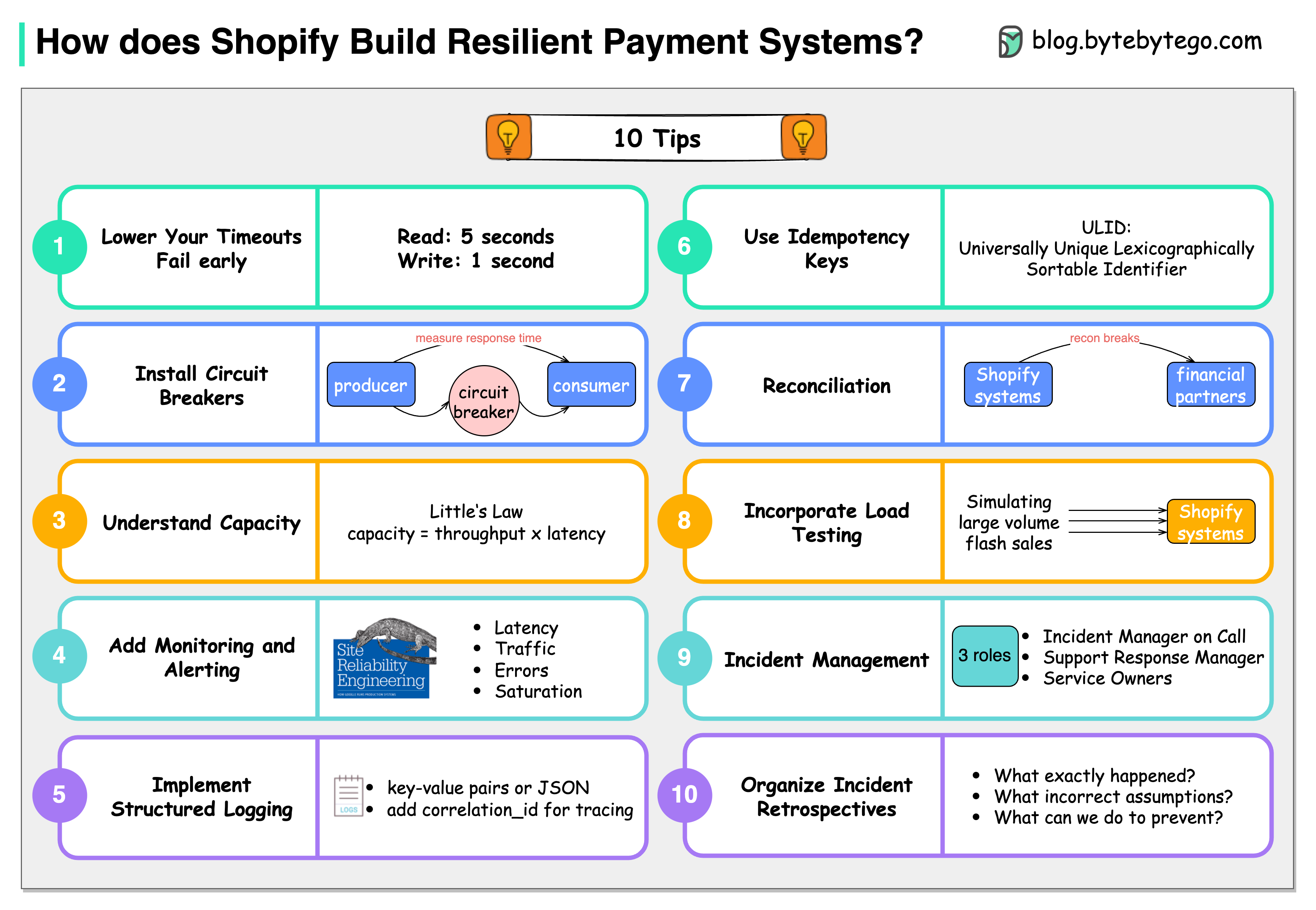
10 Principles from Shopify Shopify has valuable tips for building resilient payment systems that apply broadly:
Lower the timeouts
Let services fail early. Use read timeout of 5s and write timeout of 1s.
Install circuit breakers
Use tools like Semian to protect services (Net::HTTP, MySQL, Redis, gRPC).
Capacity management
Understand throughput: 50 requests in queue, 100ms processing = 500 req/sec.
Add monitoring and alerting
Monitor four golden signals: latency, traffic, errors, and saturation.
Implement structured logging
Store logs centrally and make them easily searchable.
Use idempotency keys
Use ULID (Universally Unique Lexicographically Sortable Identifier) for idempotency.
Be consistent with reconciliation
Store reconciliation breaks with financial partners in database.
Incorporate load testing
Regularly simulate high-volume scenarios to get benchmark results.
Get on top of incident management
Define clear roles: Incident Manager, Support Response Manager, Service Owners.
Organize incident retrospectives
Ask three questions: What happened? What assumptions were wrong? How to prevent?
Observability and Monitoring Four Golden Signals (Google SRE)
Latency Time to service a request. Track p50, p95, p99 percentiles.
Traffic Demand on your system. Requests per second, transactions per second.
Errors Rate of failed requests. Track error types and frequencies.
Saturation How “full” your service is. CPU, memory, disk, network utilization.
Distributed Tracing Components:
Trace : End-to-end request flowSpan : Individual operationTags : Metadata for filteringLogs : Time-stamped events
Popular Tools:
Jaeger
Zipkin
AWS X-Ray
Google Cloud Trace
Datadog APM
Structured Logging Best Practices:
Use JSON format
Include correlation IDs
Add contextual information
Centralize logs (ELK, Splunk, CloudWatch)
Set appropriate log levels
Chaos Engineering Proactively test system resilience by introducing failures.
Principles:
Build a hypothesis around steady state behaviorVary real-world events (server failures, network issues)Run experiments in production (carefully)Automate experiments to run continuouslyMinimize blast radius to limit potential impact
Common Experiments:
Kill random instances
Introduce network latency
Simulate network partitions
Exhaust resources (CPU, memory, disk)
Inject errors in dependencies
Tools:
Chaos Monkey (Netflix)
Gremlin
Chaos Toolkit
LitmusChaos
AWS Fault Injection Simulator
Testing for Resilience
Load Testing Test system behavior under expected load. Tools: JMeter, Gatling, k6
Stress Testing Push system beyond normal capacity. Identify breaking points.
Soak Testing Run at normal load for extended period. Detect memory leaks, resource exhaustion.
Spike Testing Sudden increase in load. Test auto-scaling, surge capacity.
Best Practices Summary Design for Failure : Assume everything will fail eventually. Build systems that can handle partial failures gracefully.
Key Principles:
✅ Implement multiple layers of resilience
✅ Use timeouts and circuit breakers
✅ Design for graceful degradation
✅ Implement comprehensive monitoring
✅ Practice incident response
✅ Use load testing and chaos engineering
✅ Document failure modes and runbooks
✅ Implement automated recovery
✅ Use bulkheads to isolate failures
✅ Regular disaster recovery drills
Resilience is not a feature you add at the end. It must be designed into the system from the beginning.
AWS Services Learn about AWS services for resilient systems
Scalability Scale systems while maintaining resilience
Distributed Patterns Patterns for building distributed systems