What is Kubernetes?
Kubernetes (k8s) is a container orchestration system used for container deployment and management. Its design is greatly impacted by Google’s internal system Borg.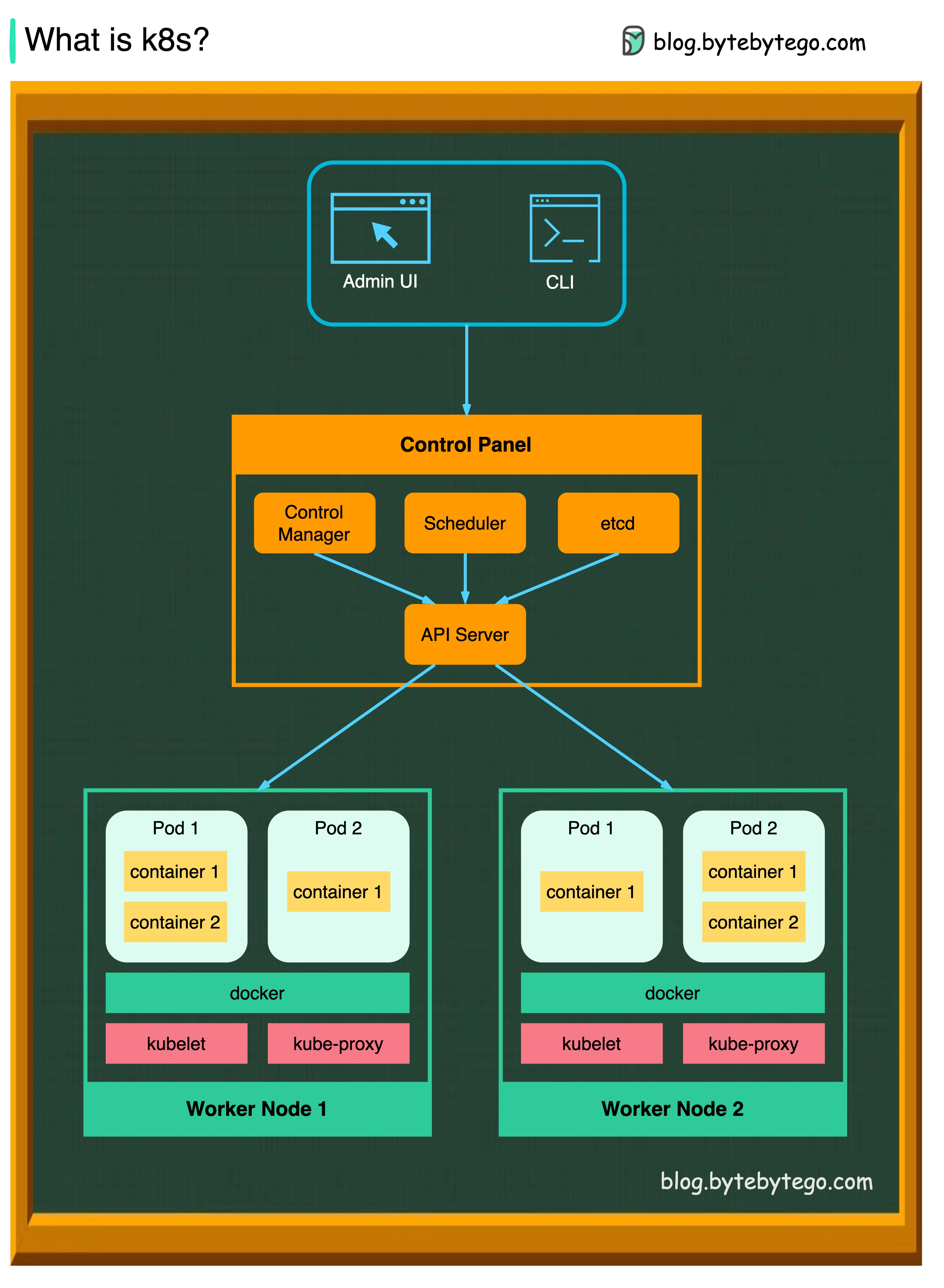 A Kubernetes cluster consists of a set of worker machines, called nodes, that run containerized applications. Every cluster has at least one worker node. In production environments, the control plane usually runs across multiple computers and a cluster usually runs multiple nodes, providing fault tolerance and high availability.
Kubernetes is now maintained by CNCF (Cloud Native Computing Foundation) and has become the de facto standard for container orchestration.
Kubernetes Architecture
Control Plane Components
The control plane manages the worker nodes and the Pods in the cluster. API Server The API server talks to all the components in the Kubernetes cluster. All operations on pods are executed by talking to the API server. It’s the front-end for the Kubernetes control plane. Scheduler The scheduler watches the workloads on pods and assigns loads on newly created pods. It selects optimal nodes for pods based on resource requirements and constraints. Controller Manager The controller manager runs the controllers, including:- Node Controller - monitors node health
- Job Controller - manages batch jobs
- EndpointSlice Controller - manages endpoints
- ServiceAccount Controller - manages service accounts
Node Components
Pods A pod is a group of containers and is the smallest unit that Kubernetes administers. Pods have a single IP address applied to every container within the pod. Kubelet An agent that runs on each node in the cluster. It ensures containers are running in a Pod and communicates with the API server. Kube Proxy kube-proxy is a network proxy that runs on each node in your cluster. It routes traffic coming into a node from the service and forwards requests for work to the correct containers.Kubernetes Service Types
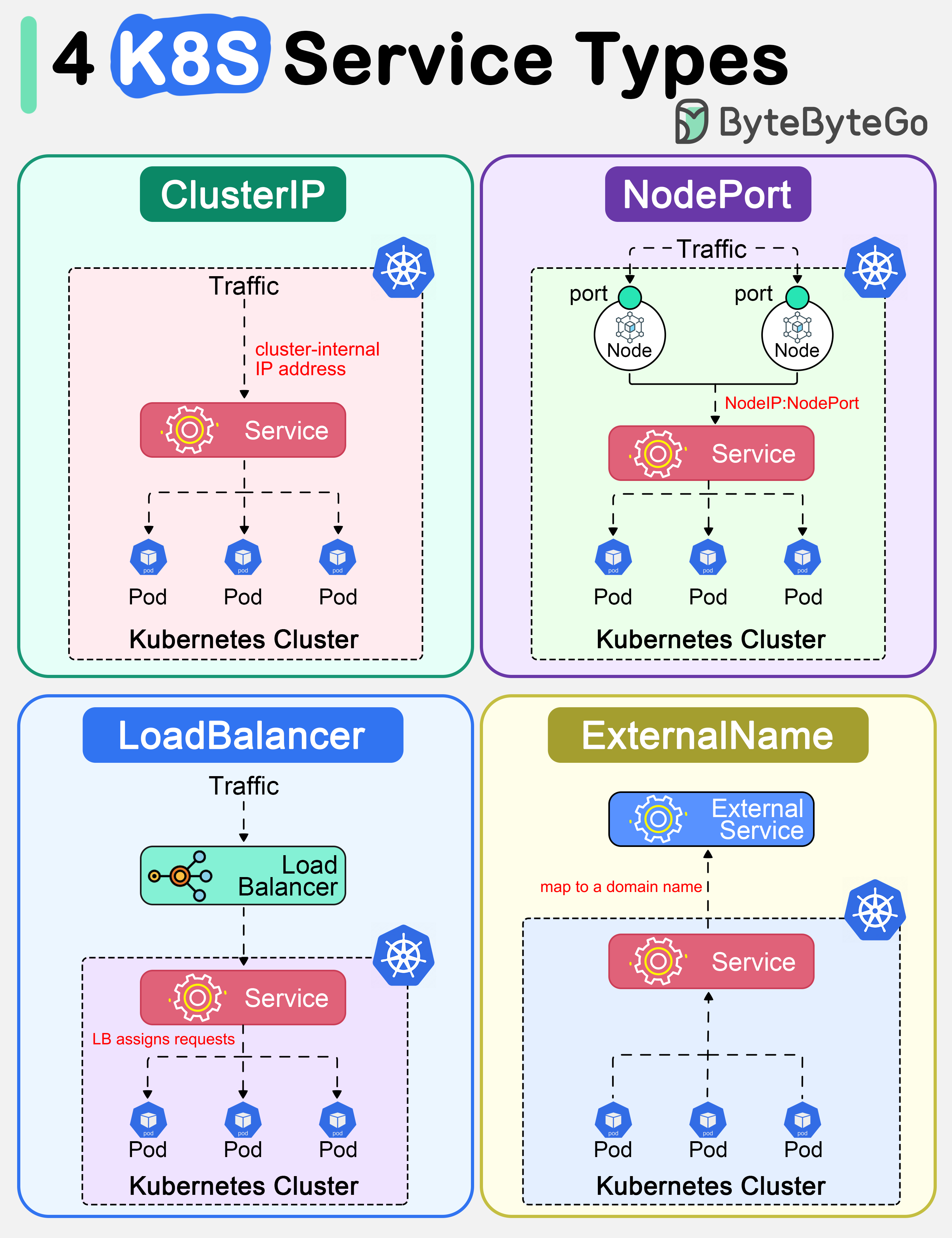 In Kubernetes, a Service is a method for exposing a network application in the cluster. There are 4 types of Kubernetes services:
ClusterIP
ClusterIP is the default and most common service type.NodePort
NodeIP:NodePort.
LoadBalancer
ExternalName
Kubernetes Design Patterns
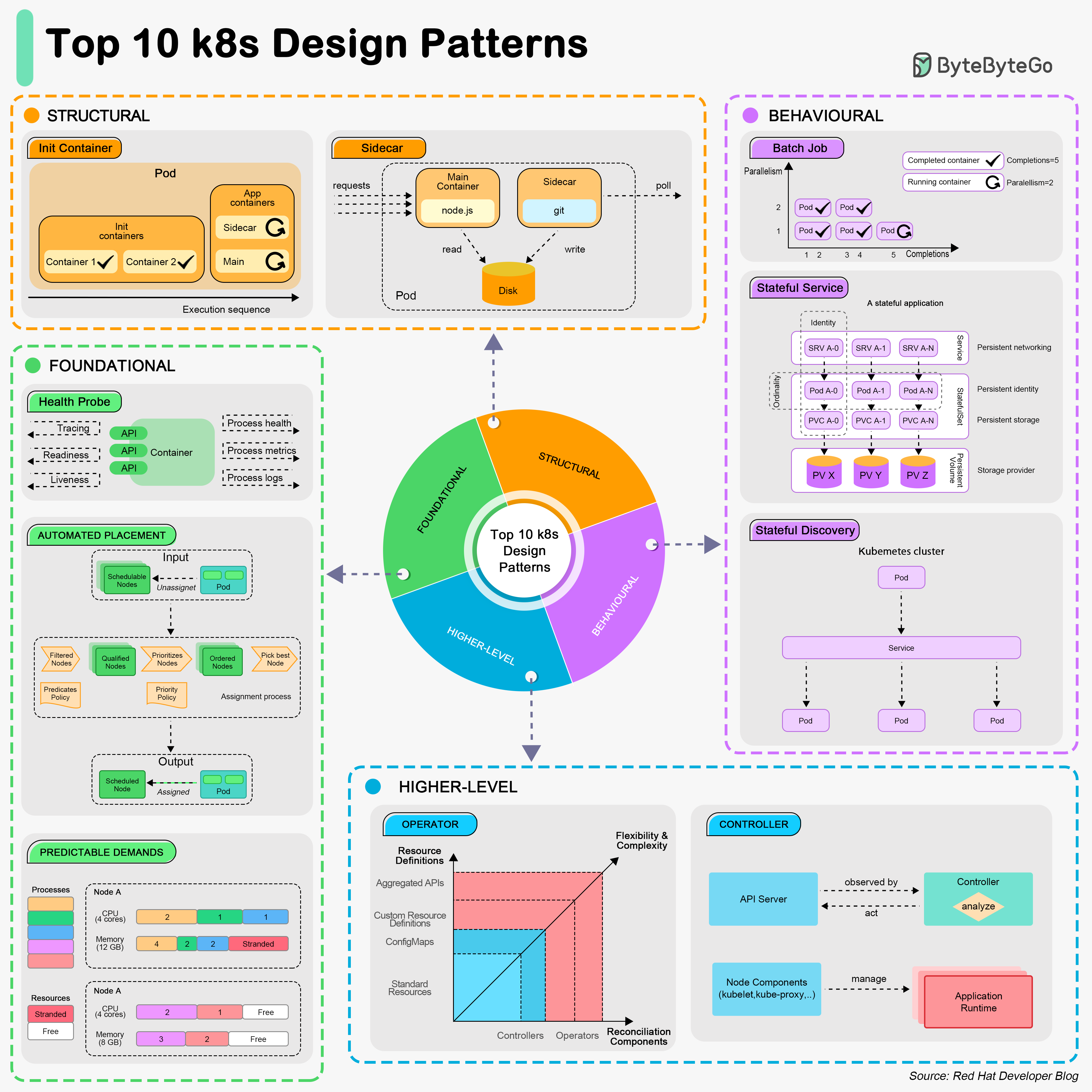
Foundational Patterns
These patterns are the fundamental principles for applications to be automated on Kubernetes. Health Probe Pattern Every container must implement observable APIs for the platform to manage the application.Structural Patterns
These patterns focus on structuring and organizing containers in a Pod. Init Container Pattern Has a separate life cycle for initialization-related tasks.Behavioral Patterns
These patterns describe the life cycle management of a Pod. Batch Job Pattern Used to manage isolated atomic units of work. Stateful Service Pattern Creates distributed stateful applications using StatefulSets. Service Discovery Pattern Describes how clients discover services in the cluster.Higher-Level Patterns
Controller Pattern Monitors the current state and reconciles with the declared target state. Operator Pattern Defines operational knowledge in an algorithmic and automated form.Kubernetes Tools Ecosystem
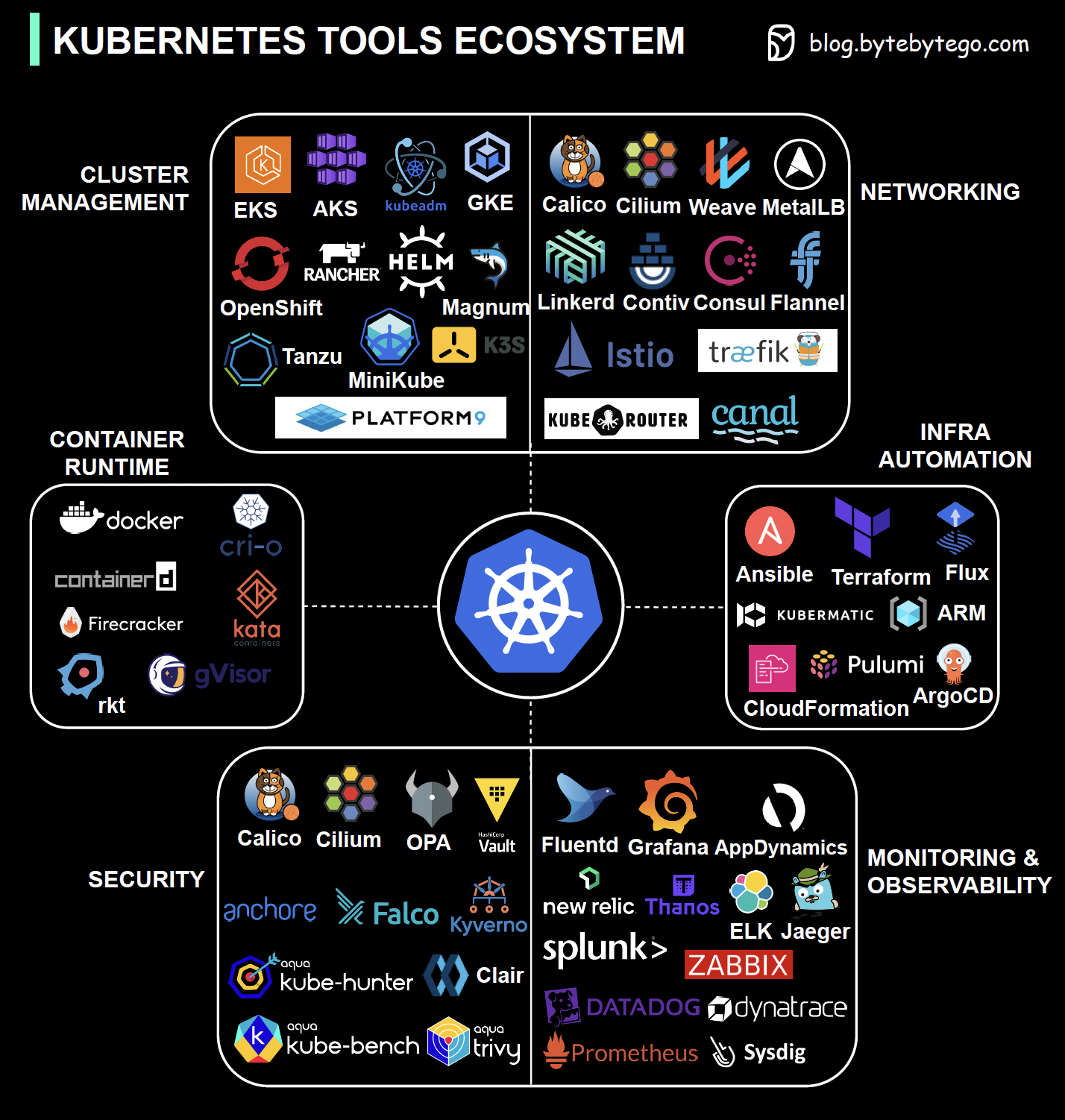 Kubernetes boasts a vast ecosystem covering:
- Security: RBAC, Pod Security, Network Policies
- Networking: CNI plugins, Service Mesh (Istio, Linkerd)
- Container Runtime: containerd, CRI-O, Docker
- Cluster Management: kubectl, Helm, Kustomize
- Monitoring: Prometheus, Grafana, ELK Stack
- Infrastructure Orchestration: Terraform, Pulumi
Essential Kubernetes Commands
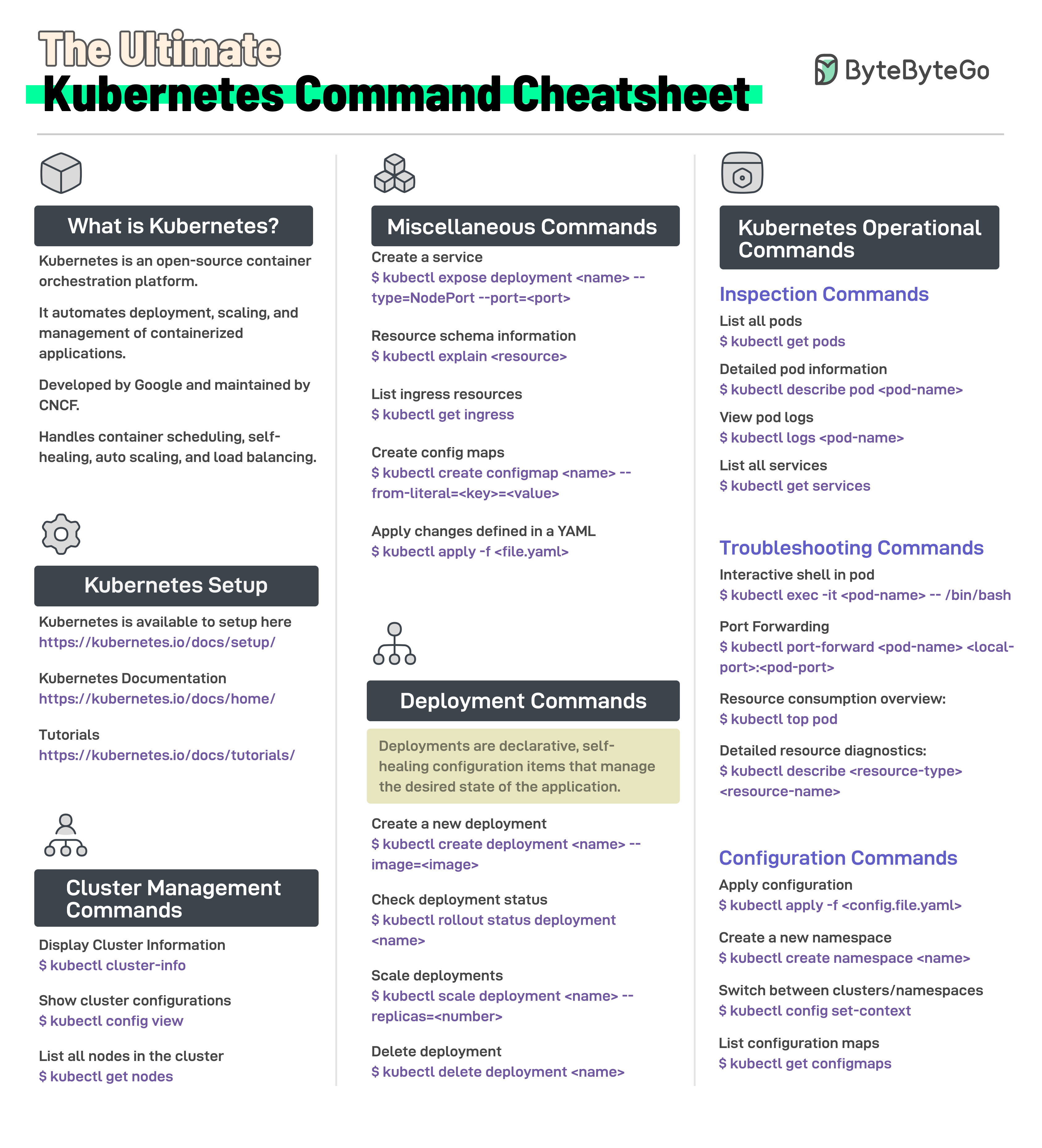
Cluster Management
Pod Management
Deployment Management
Service Management
Troubleshooting
Best Practices
1. Resource Management
- Always define resource requests and limits
- Use namespaces for resource isolation
- Implement resource quotas
2. High Availability
3. Security
- Use RBAC for access control
- Run containers as non-root users
- Enable Pod Security Standards
- Use network policies to restrict traffic
- Scan images for vulnerabilities
4. Monitoring and Logging
- Implement centralized logging
- Use Prometheus for metrics
- Set up alerting for critical issues
- Monitor resource usage
Kubernetes is a powerful platform that requires understanding of its core concepts. Start with simple deployments and gradually adopt more advanced patterns as your needs grow.