What is JWT?
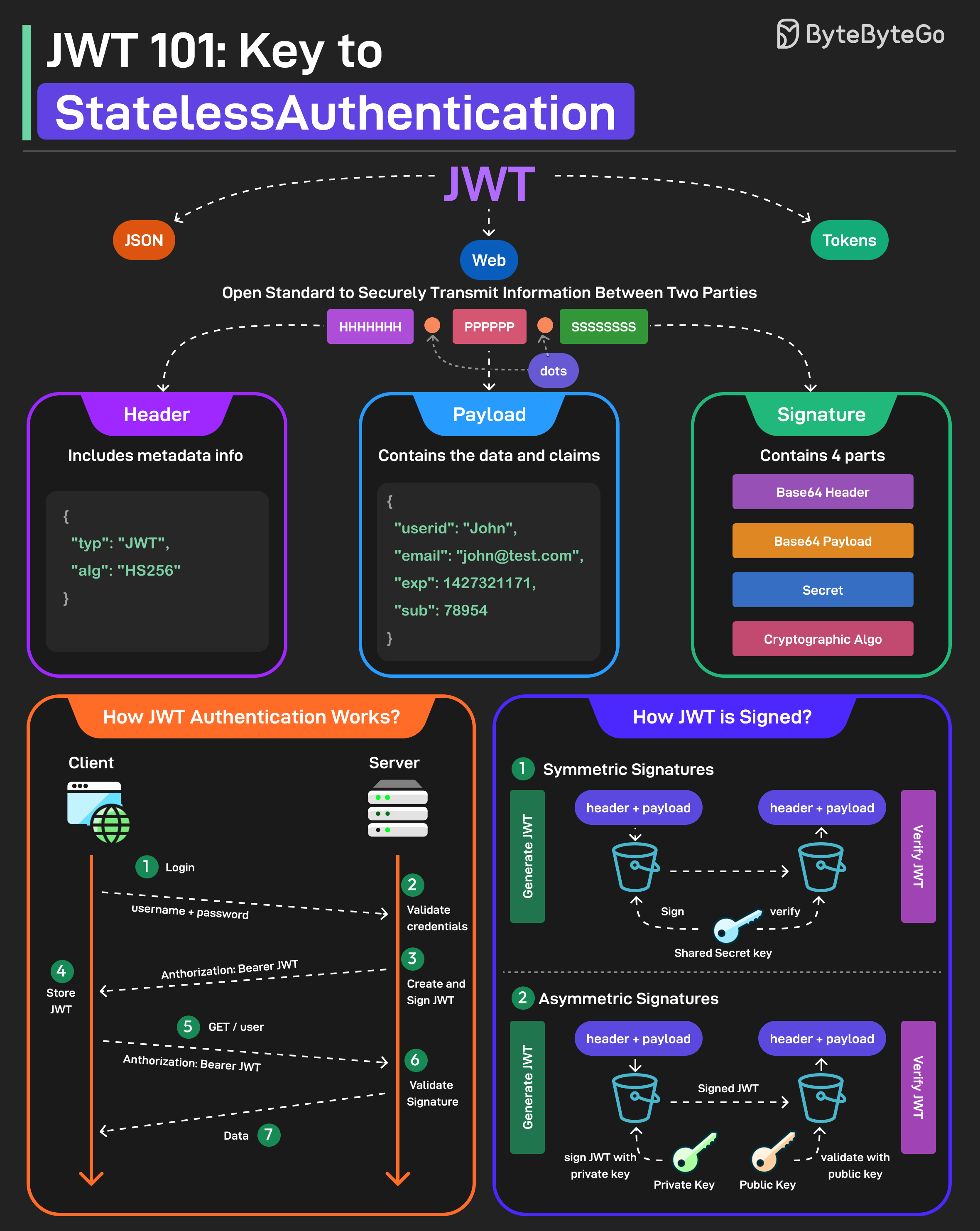 JWT (pronounced “jot”) is a compact, URL-safe means of representing claims to be transferred between two parties. The claims in a JWT are encoded as a JSON object that is used as the payload of a JSON Web Signature (JWS) structure or as the plaintext of a JSON Web Encryption (JWE) structure.
Why Use JWT?
Benefits:- Stateless - No server-side session storage required
- Self-contained - Token contains all user information
- Scalable - Works well in distributed systems
- Cross-domain - Can be used across different domains
- Mobile-friendly - Easy to use in mobile applications
- User authentication
- Information exchange
- Authorization
- Single Sign-On (SSO)
- API authentication
JWT Structure
A JWT consists of three parts separated by dots (.):1. Header
The header typically consists of two parts:- Token type (JWT)
- Signing algorithm (e.g., HMAC SHA256, RSA)
Base64Url encoding is similar to Base64 but uses URL-safe characters.
2. Payload
The payload contains the claims, which are statements about an entity (typically the user) and additional data. Example:Types of Claims
1. Registered Claims Predefined claims recommended by the JWT specification:iss(issuer) - Who issued the tokensub(subject) - Subject of the token (usually user ID)aud(audience) - Intended recipientexp(expiration time) - When token expires (Unix timestamp)nbf(not before) - Token not valid before this timeiat(issued at) - When token was issuedjti(JWT ID) - Unique identifier for the token
3. Signature
The signature is created by taking the encoded header, encoded payload, a secret key, and the algorithm specified in the header, then signing it. Example (using HMAC SHA256):- The token hasn’t been tampered with
- The token was issued by a trusted party (if using asymmetric signing)
JWT Signing Methods
JWTs can be signed using two different approaches:Symmetric Signatures (HMAC)
Uses a single secret key for both signing the token and verifying it.
How it works:
- Server signs JWT with secret key
- Client receives JWT
- Server verifies JWT with same secret key
- HS256 (HMAC with SHA-256)
- HS384 (HMAC with SHA-384)
- HS512 (HMAC with SHA-512)
- Fast and efficient
- Simple to implement
- Smaller signatures
- Secret must be shared between all parties
- Any party with the secret can create valid tokens
- Not suitable for scenarios where multiple parties need to verify tokens
- Single server authentication
- Microservices within same organization
- Internal APIs
Asymmetric Signatures (RSA/ECDSA)
Uses a private key to sign the token and a public key to verify it. How it works:- Server signs JWT with private key
- Client receives JWT
- Anyone with public key can verify JWT
- Only private key holder can create valid tokens
- RS256 (RSA with SHA-256)
- RS384 (RSA with SHA-384)
- RS512 (RSA with SHA-512)
- ES256 (ECDSA with SHA-256)
- ES384 (ECDSA with SHA-384)
- ES512 (ECDSA with SHA-512)
- Private key never shared
- Public key can be distributed freely
- Suitable for multiple verifiers
- Higher security
- Slower than symmetric
- Larger signatures
- More complex key management
- Multiple services need to verify tokens
- Third-party integrations
- OAuth 2.0 implementations
- Public APIs
Choose HMAC for simplicity and speed in internal systems. Choose RSA/ECDSA when you need to distribute public keys for verification.
JWT Workflow
Here’s how JWT works in a typical authentication flow:1. User Login
2. Accessing Protected Resources
JWT vs Sessions
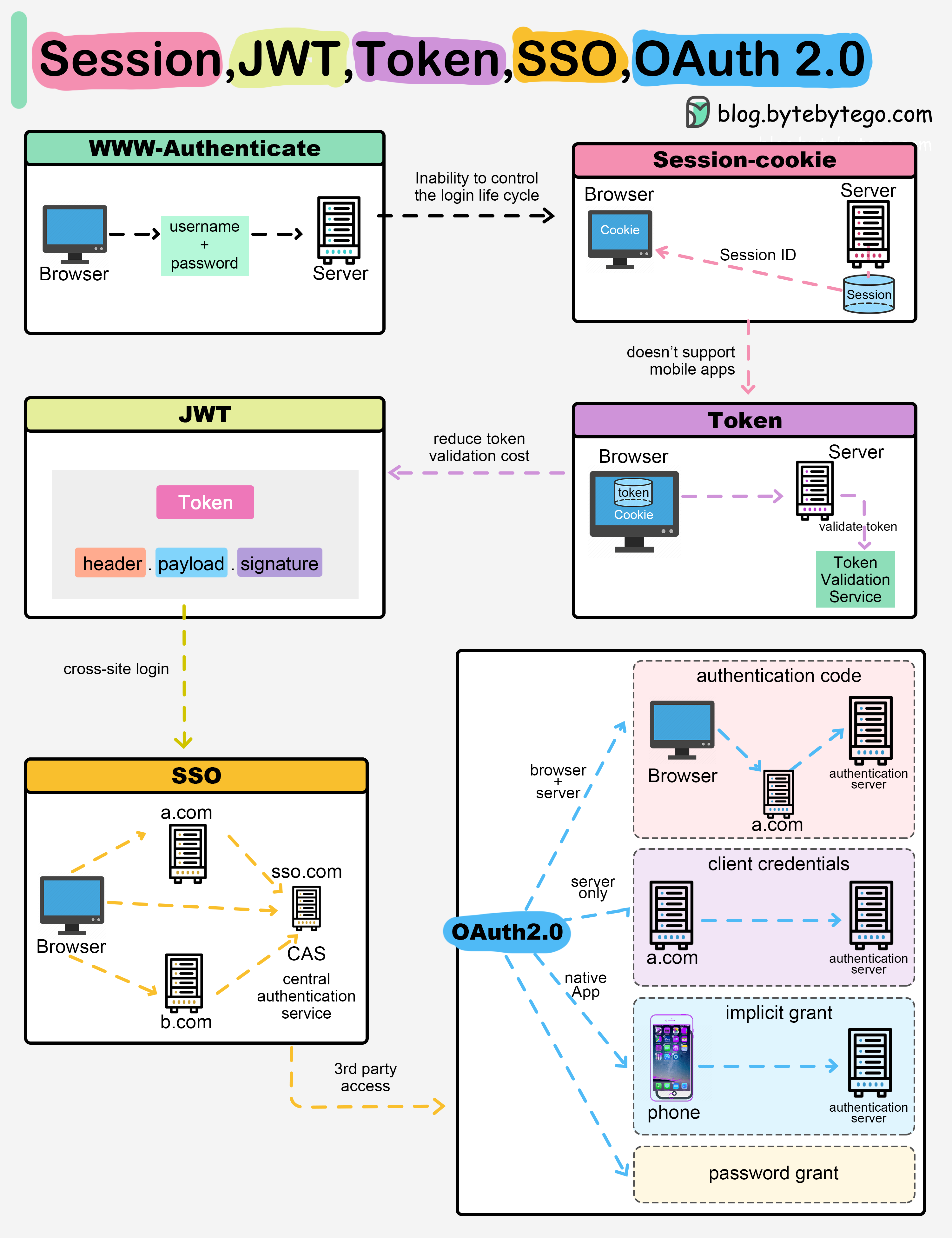
Session-Based Authentication
Flow:- User logs in
- Server creates session, stores in database
- Server returns session ID cookie
- Client sends cookie with each request
- Server looks up session in database
- Server has full control
- Easy to invalidate
- Can store any data server-side
- Requires server-side storage
- Doesn’t scale well horizontally
- Doesn’t work well across domains
- Not ideal for mobile apps
JWT-Based Authentication
Flow:- User logs in
- Server generates JWT
- Server returns JWT
- Client stores JWT (usually in memory or storage)
- Client sends JWT with each request
- Server verifies JWT signature
- No server-side storage
- Scales horizontally
- Works across domains
- Mobile-friendly
- Stateless
- Cannot easily invalidate
- Larger payload than session IDs
- Need to handle token refresh
- Vulnerable if not handled properly
Many modern applications use a hybrid approach: JWT for authentication and sessions for sensitive operations.
Security Best Practices
1. Use Strong Secrets
Good:2. Set Short Expiration Times
Keep JWT lifetimes short to minimize the impact of token theft:- Access tokens: 15 minutes to 1 hour
- Refresh tokens: 7 to 30 days
3. Use HTTPS Only
4. Validate All Claims
When verifying JWTs, validate:- Signature is valid
- Token hasn’t expired (
expclaim) - Token is not used before valid time (
nbfclaim) - Issuer is expected (
issclaim) - Audience matches your application (
audclaim)
5. Don’t Store Sensitive Data
JWTs are encoded, not encrypted. Anyone can decode and read the payload.6. Implement Token Refresh
Use refresh tokens to obtain new access tokens:7. Store JWTs Securely
Client-side storage options:| Storage | Pros | Cons | Best for |
|---|---|---|---|
| Memory | Most secure | Lost on refresh | SPAs |
| HttpOnly Cookie | Secure from XSS | Vulnerable to CSRF | Server-rendered apps |
| Local Storage | Persistent | Vulnerable to XSS | Not recommended |
| Session Storage | Cleared on tab close | Vulnerable to XSS | Not recommended |
For SPAs, store JWTs in memory and implement token refresh. For server-rendered apps, use httpOnly cookies with CSRF protection.
8. Implement Token Blacklisting
For logout and security, maintain a blacklist of invalidated tokens:Common JWT Vulnerabilities
1. Algorithm None Attack
Attack: Change algorithm to “none” to bypass signature verification Vulnerable code:2. Algorithm Confusion Attack
Attack: Change algorithm from RS256 to HS256, using public key as HMAC secret Mitigation:- Explicitly specify allowed algorithms
- Use separate keys for different algorithms
- Validate algorithm in header matches expected
3. Token Sidejacking
Attack: Steal JWT from client-side storage or network traffic Mitigation:- Use HTTPS only
- Store tokens securely
- Implement short expiration times
- Use refresh tokens
4. Weak Secrets
Attack: Brute force or dictionary attack on weak secrets Mitigation:- Use strong, random secrets (256+ bits)
- Rotate secrets regularly
- Use asymmetric signing for public APIs
JWT Libraries
Node.js
Python
Java
Next Steps
Explore related security topics:- OAuth 2.0 - OAuth uses JWTs for tokens
- Authentication - Broader authentication concepts
- HTTPS/SSL - Secure token transmission
- Encryption - Encrypting sensitive data