What is Redis?
Redis (Remote Dictionary Server) is a multi-modal database that provides sub-millisecond latency. The core idea behind Redis is that a cache can also act as a full-fledged database.Redis is one of the most popular data stores in the world, adopted by high-traffic websites like Airbnb, Uber, and Slack.
Why is Redis So Fast?
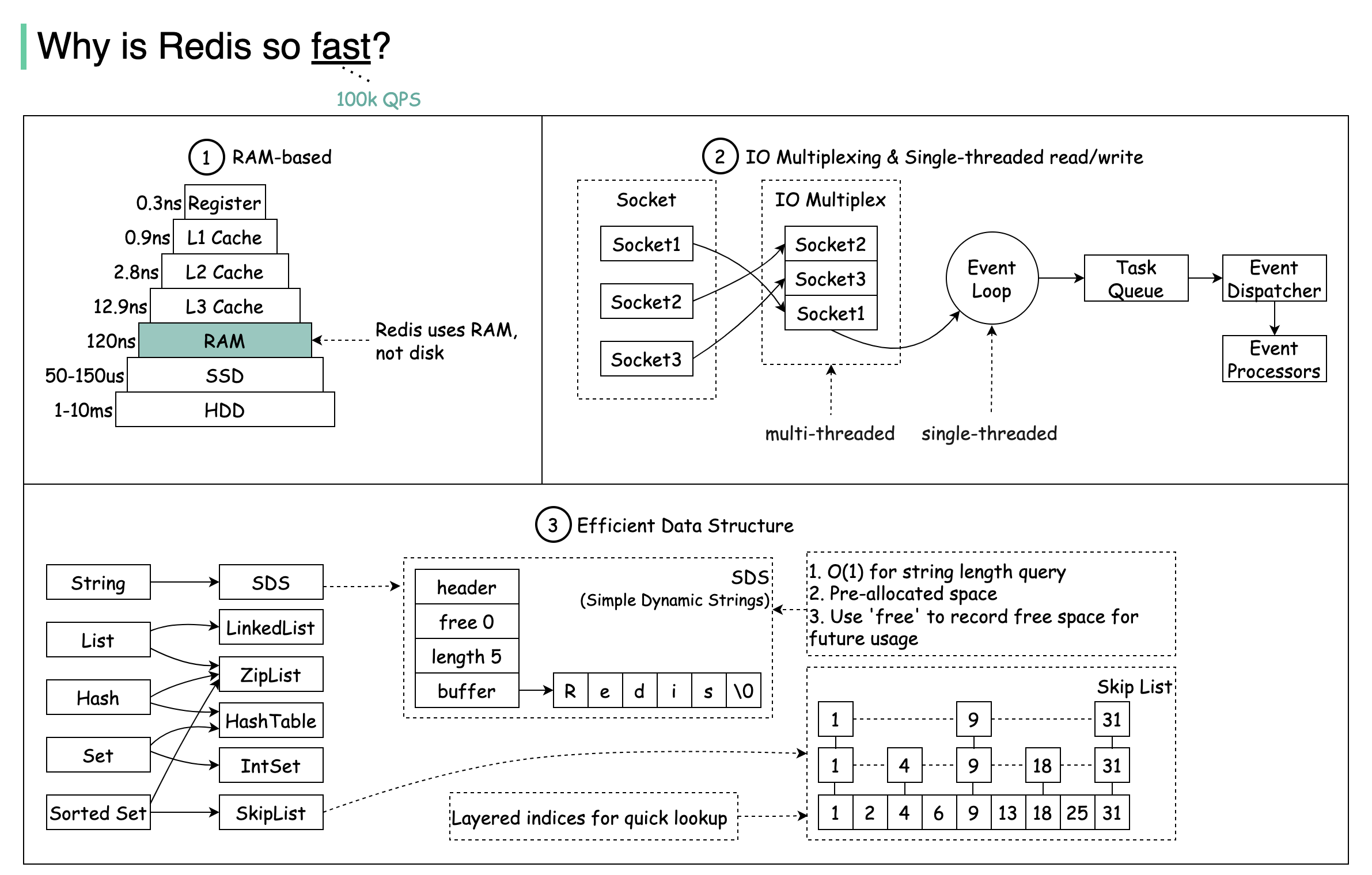 There are three main reasons why Redis delivers exceptional performance:
RAM-Based Storage
Redis stores data in RAM, which is at least 1000 times faster than random disk access.
IO Multiplexing
Leverages IO multiplexing and single-threaded execution loop for execution efficiency.
Optimized Data Structures
Uses several efficient lower-level data structures for fast operations.
Redis Data Structures
Redis stores data in key-value format and supports various data structures:- Strings: Simple key-value pairs
- Bitmaps: Efficient for tracking binary states
- Lists: Ordered collections
- Sets: Unordered collections of unique items
- Sorted Sets: Sets with scores for ranking
- Hash: Key-value pairs within a key
- JSON: Native JSON support
Common Use Cases
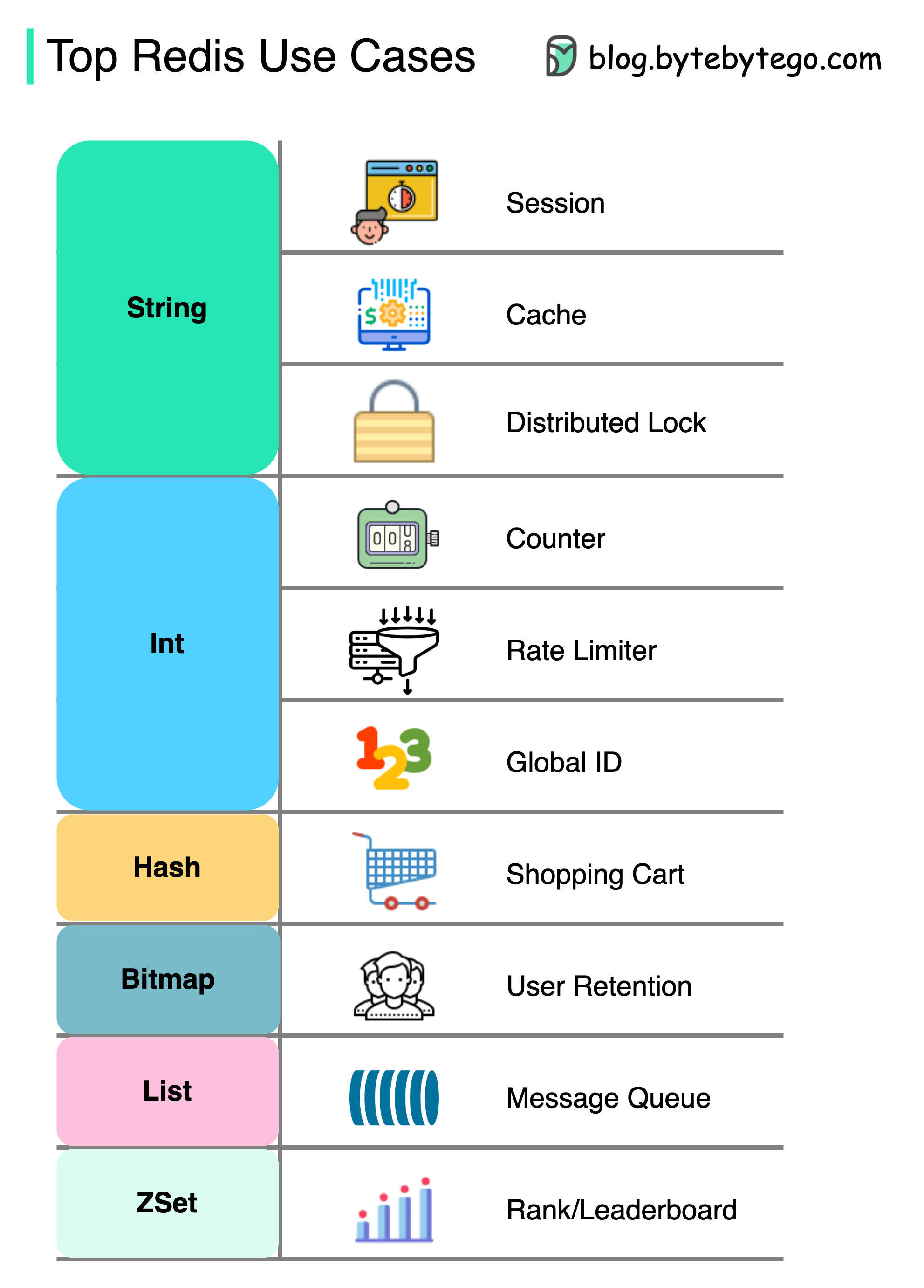 Redis can be used in a variety of scenarios beyond just caching:
Session Management
Share user session data among different services for consistent user experiences across your application.Caching
Cache objects or pages, especially for hotspot data that’s frequently accessed.Distributed Lock
Use a Redis string to acquire locks among distributed services, ensuring only one service can execute a critical section at a time.Counter and Rate Limiter
- Counter
- Rate Limiter
Count metrics like article views or likes:
Shopping Cart
Use Redis Hash to represent key-value pairs in a shopping cart.Ranking Systems
Use ZSet (Sorted Sets) to sort and rank items:Message Queue
Use List data structure for implementing a simple message queue.User Retention Tracking
Use Bitmap to represent daily user login and calculate retention:Data Persistence
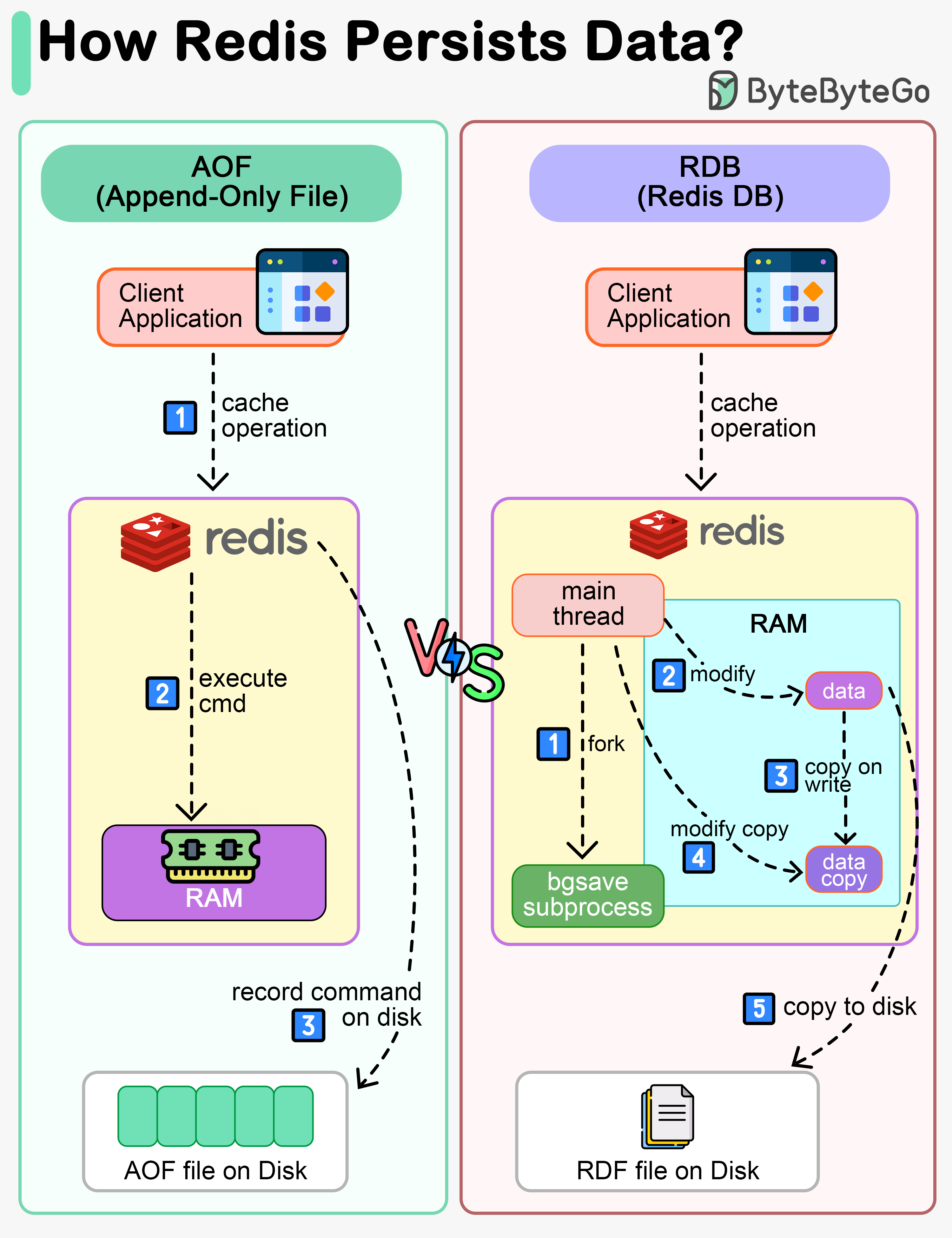 While Redis is an in-memory database, it provides mechanisms to persist data to disk:
AOF (Append-Only File)
AOF (Append-Only File)
Redis executes commands to modify data in memory first, then writes to the log file. AOF records the commands instead of the data, simplifying recovery.Pros:
- More durable - logs every write operation
- Easy to understand and debug
- Larger file size
- Slower recovery for large datasets
RDB (Redis Database)
RDB (Redis Database)
Records snapshots of data at specific points in time. When recovery is needed, the snapshot is loaded into memory.How it works:
- Main thread forks a ‘bgsave’ sub-process
- Sub-process reads data and writes to RDB file
- Main thread continues serving requests
- If data is modified, a copy is created (copy-on-write)
- Fast recovery
- Compact file size
- Potential data loss between snapshots
Mixed Approach (Recommended)
Mixed Approach (Recommended)
In production systems, use RDB to record snapshots periodically and AOF to record commands since the last snapshot. This provides both fast recovery and minimal data loss.
Data persistence is not performed on the critical path and doesn’t block the write process in Redis.
Redis Architecture Evolution
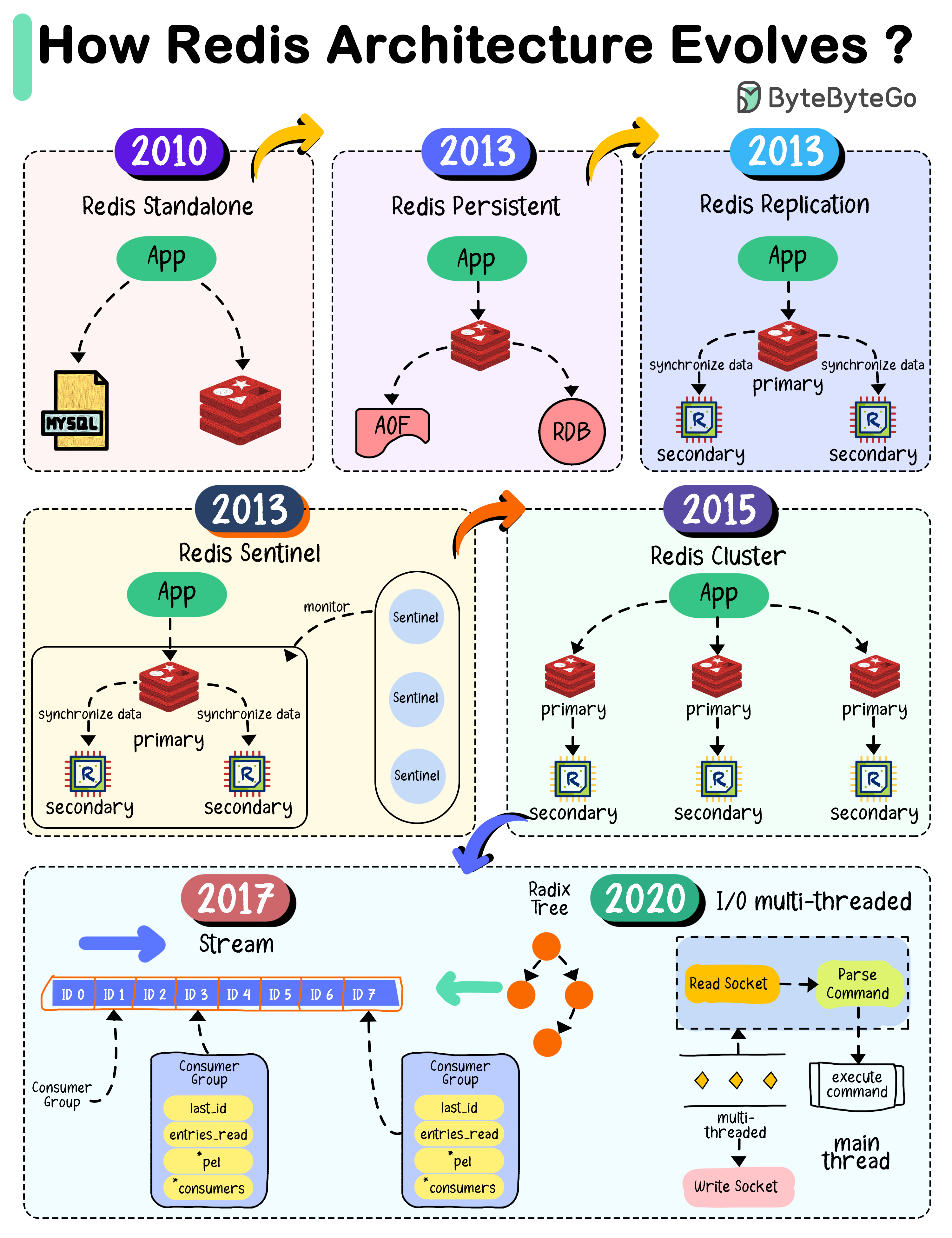
2010 - Standalone Redis
When Redis 1.0 was released, the architecture was simple - a single instance used as cache. However, restarting Redis meant losing all data.2013 - Persistence & Replication
Redis 2.8 introduced:- RDB snapshots to persist data
- AOF (Append-Only-File) logging
- Replication with primary-replica architecture for high availability
2013 - Sentinel
Redis 2.8 added Sentinel to monitor instances and perform:- Monitoring
- Notification
- Automatic failover
- Configuration management
2015 - Cluster
Redis 3.0 introduced distributed database solution through sharding:- Data divided into 16,384 slots
- Each node responsible for portion of slots
- Automatic resharding support
Modern Redis (2017-2020)
- Redis 5.0: Added Stream data type for event sourcing
- Redis 6.0: Introduced multi-threaded I/O in network module
Redis Modules
Redis modules extend functionality beyond core features:RediSearch
Full-text search, secondary indexing, and query engine
RedisJSON
Native JSON document storage and manipulation
RedisGraph
Graph database for relationship queries
RedisBloom
Probabilistic data structures (Bloom filters, Cuckoo filters)
RedisTimeSeries
Time-series data storage and queries
RedisAI
Machine learning model serving
Best Practices
Choose the right data structure
Select the appropriate Redis data type for your use case - don’t default to strings for everything.
Next Steps
Caching Strategies
Learn different caching patterns and when to use them
Cache Eviction
Understand how to manage cache size with eviction policies
CDN Caching
Explore content delivery networks for edge caching