Why Deployment Strategies Matter
Deploying or upgrading services is risky. The right deployment strategy can minimize downtime, reduce risk, and enable faster recovery from issues. This guide explores various risk mitigation strategies for production deployments.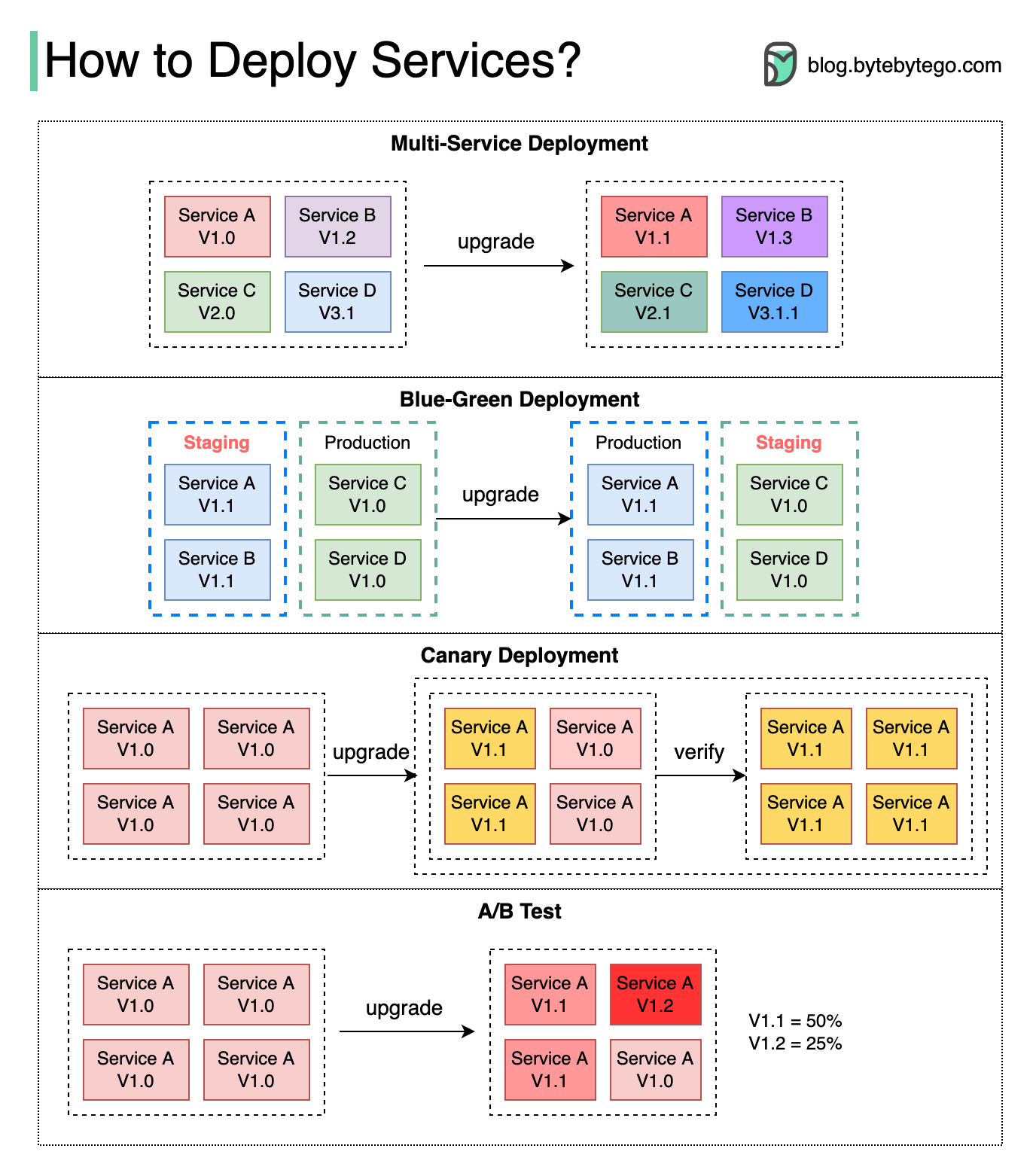
Common Deployment Strategies
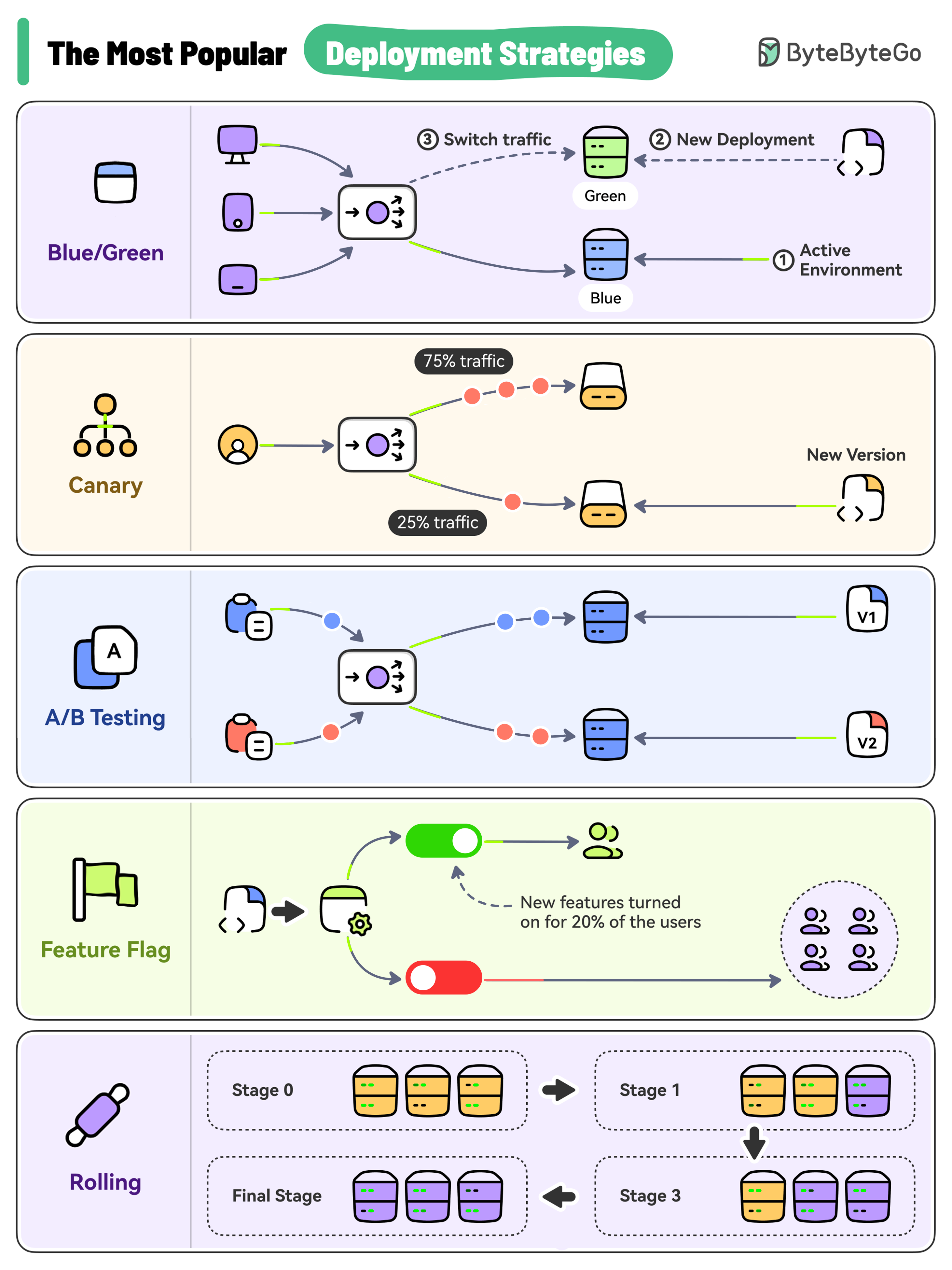 Here are the most-used deployment strategies:
- Big Bang Deployment (Multi-Service)
- Rolling Deployment
- Blue-Green Deployment
- Canary Deployment
- A/B Testing
- Feature Toggle
Multi-Service (Big Bang) Deployment
Overview
In this model, we deploy new changes to multiple services simultaneously. All services are upgraded at the same time in one big release.Characteristics
When to Use
- Small applications with few services
- Non-critical systems
- Development/testing environments
- Scheduled maintenance windows
Risk Level: High - All services change at once, making it difficult to isolate issues.
Rolling Deployment
Overview
Application instances are updated one by one or in small batches, ensuring high availability during the process.Characteristics
Configuration Example
When to Use
- Downtime: No
- Use case: Periodic releases, regular updates
- Best for applications that can handle multiple versions running simultaneously
Blue-Green Deployment
Overview
Two identical environments are maintained:- Blue: Current production version
- Green: New version prepared for release
Characteristics
Implementation Example
When to Use
- Downtime: No
- Use case: High-stake updates, critical applications
- Best when instant rollback is critical
- Suitable for applications with sufficient budget for dual infrastructure
Canary Deployment
Overview
The new version is released to a small subset of users or servers for testing before broader deployment. Named after “canary in a coal mine” - an early warning system.Characteristics
Implementation Example
Canary Metrics to Monitor
- Error rate increase
- Response time degradation
- CPU/Memory usage
- Business metrics (conversion rate, etc.)
- User complaints/feedback
When to Use
- Downtime: No
- Use case: Impact validation on subset of users
- Best for risk-averse organizations
- Ideal when you have good monitoring and can test in production
Canary deployments are used by Netflix, Facebook, and Google to safely roll out changes to millions of users.
A/B Testing
Overview
Different versions of services run in production simultaneously. Each version runs an “experiment” for a subset of users to compare performance or user experience.A/B Testing vs Canary
Implementation Example
Characteristics
When to Use
- Downtime: Not directly applicable
- Use case: Optimizing user experience, feature validation
- Testing new features or UI changes
- Measuring business impact before full rollout
Feature Toggle (Feature Flags)
Overview
Features are deployed to production but hidden behind toggles. They can be enabled/disabled without redeployment.Types of Feature Flags
Implementation Example
Best Practices
- Name flags clearly: Use descriptive names like
enable-new-checkout - Set expiration: Plan to remove flags after rollout
- Monitor flag usage: Track which flags are active
- Limit flag count: Too many flags create complexity
- Document flags: Explain purpose and expected lifecycle
Kubernetes Deployment Strategies
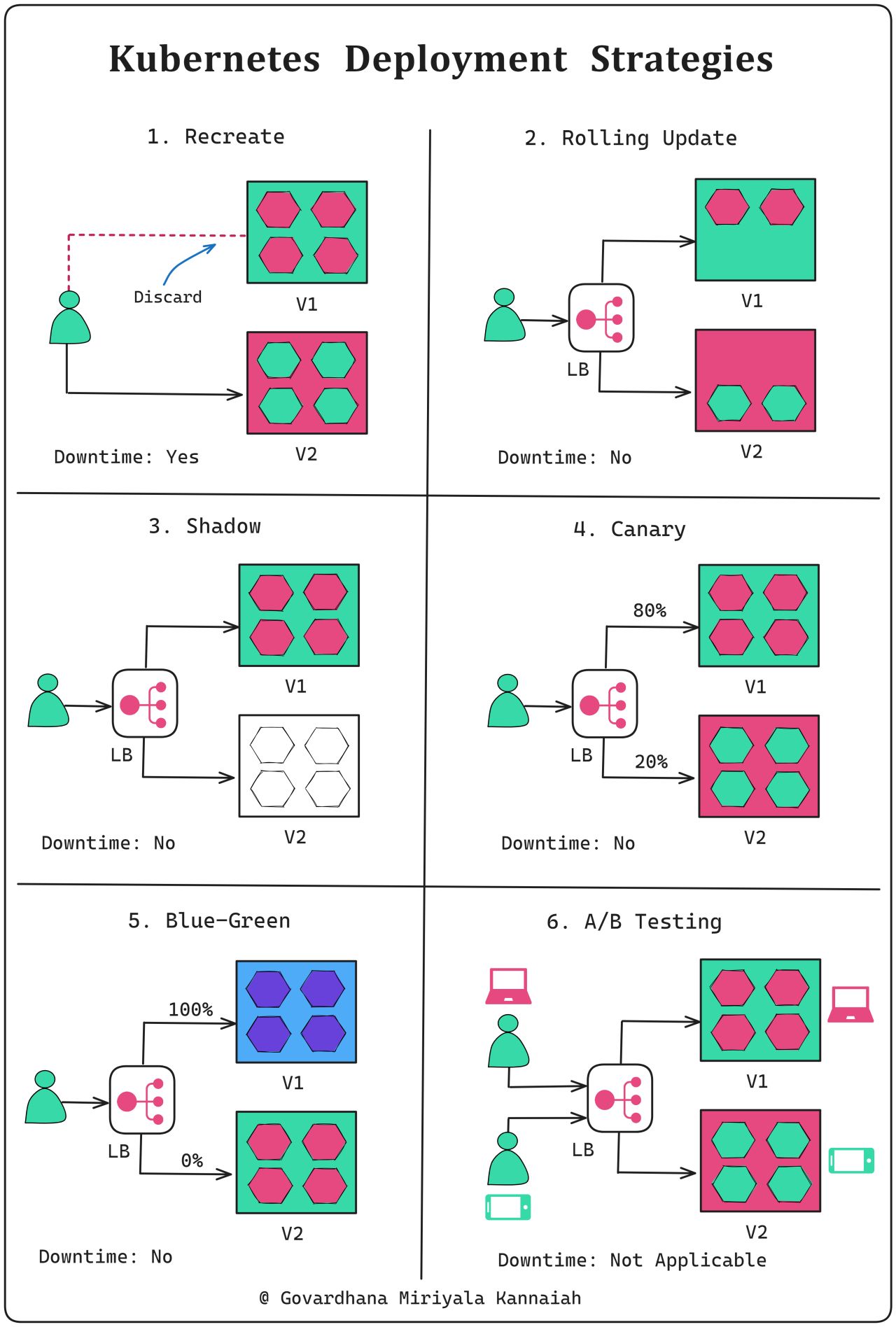 Kubernetes supports several deployment strategies natively:
Recreate Strategy
Rolling Update (Default)
See Rolling Deployment section above.Shadow Deployment
A copy of live traffic is redirected to the new version for testing without affecting production users.Choosing the Right Strategy
The right deployment strategy depends on your:
- Risk tolerance
- Budget constraints
- Application architecture
- Team capabilities
- User base size
Decision Matrix
| Strategy | Downtime | Complexity | Cost | Rollback Speed | Risk |
|---|---|---|---|---|---|
| Big Bang | High | Low | Low | Slow | High |
| Rolling | None | Medium | Low | Medium | Medium |
| Blue-Green | None | Medium | High | Instant | Low |
| Canary | None | High | Medium | Fast | Low |
| A/B Test | None | High | Medium | Fast | Low |
Recommendations
Best Practices Across All Strategies
1. Automate Everything
- Use CI/CD pipelines
- Automate testing
- Automate rollbacks
- Infrastructure as Code
2. Monitor Continuously
3. Test Thoroughly
- Unit tests
- Integration tests
- Load tests
- Smoke tests
- Chaos engineering
4. Plan for Rollback
- Always have a rollback plan
- Test rollback procedures
- Keep previous versions accessible
- Document rollback steps
5. Communicate
- Notify stakeholders
- Maintain status pages
- Document changes
- Post-mortem after incidents
Successful deployment strategies combine technical implementation with good communication, monitoring, and process discipline.