Top Authentication Mechanisms
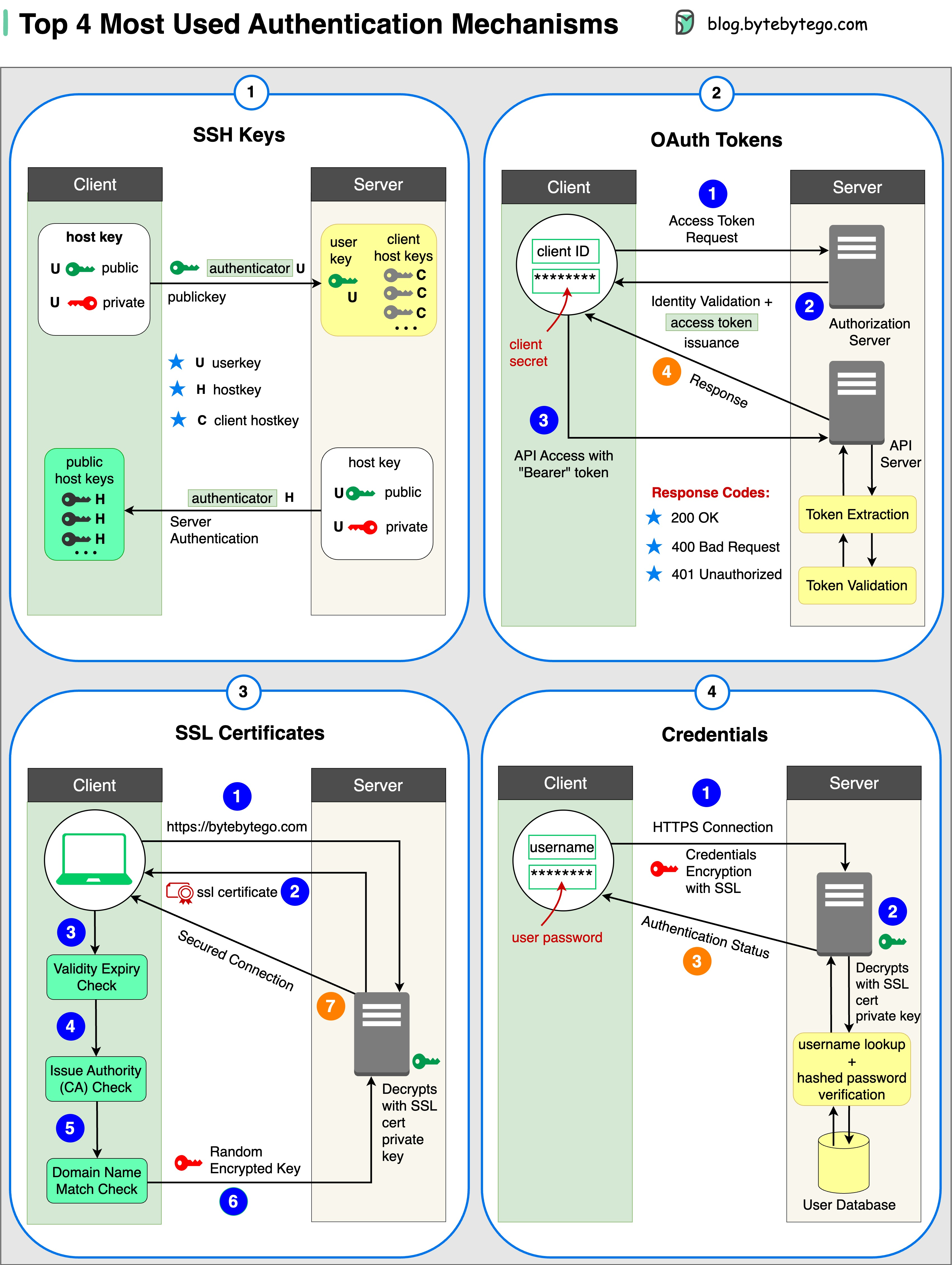 There are four primary authentication mechanisms used in modern systems:
1. SSH Keys
Cryptographic keys are used to access remote systems and servers securely. SSH (Secure Shell) keys provide a more secure alternative to password-based authentication. Key benefits:- Eliminates password vulnerabilities
- Supports automated, secure server access
- Resistant to brute-force attacks
2. OAuth Tokens
Tokens that provide limited access to user data on third-party applications without sharing passwords. Use cases:- Third-party application integration
- Single Sign-On (SSO) implementations
- Mobile and web application authentication
3. SSL Certificates
Digital certificates ensure secure and encrypted communication between servers and clients. Applications:- HTTPS website security
- Email encryption
- VPN connections
4. Credentials
User authentication information (username and password) used to verify and grant access to various systems and services.Session vs Token vs JWT
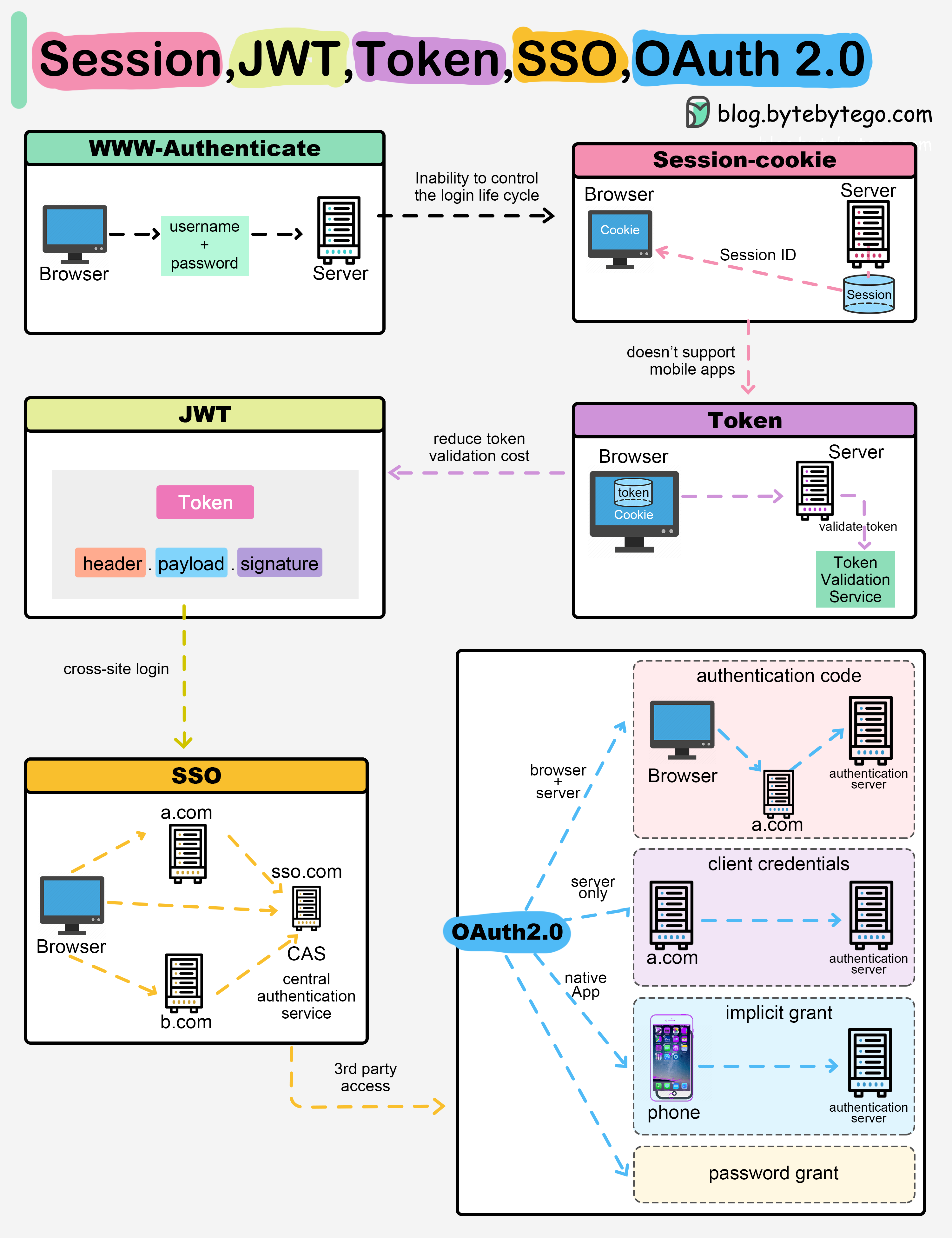 When you login to a website, your identity needs to be managed. Here’s how different solutions work:
Session-Based Authentication
The server stores your identity and gives the browser a session ID cookie. This allows the server to track login state. Pros:- Server has full control over sessions
- Easy to invalidate sessions
- Simple to implement
- Requires server-side storage
- Doesn’t work well across devices
- Scalability challenges in distributed systems
Token-Based Authentication
Your identity is encoded into a token sent to the browser. The browser sends this token on future requests for authentication. Pros:- No server session storage required
- Works across devices and domains
- Scales well in distributed systems
- Requires encryption/decryption
- Cannot be easily invalidated
- Token size can be large
JWT (JSON Web Tokens)
JSON Web Tokens standardize identity tokens using digital signatures for trust. The signature is contained in the token so no server session is needed. Advantages:- Stateless authentication
- Self-contained (includes user info)
- Industry standard
- Works across different domains
Learn more about JWT implementation in the JWT guide.
Multi-Factor Authentication (2FA)
 Multi-factor authentication adds an extra layer of security by requiring two or more verification methods.
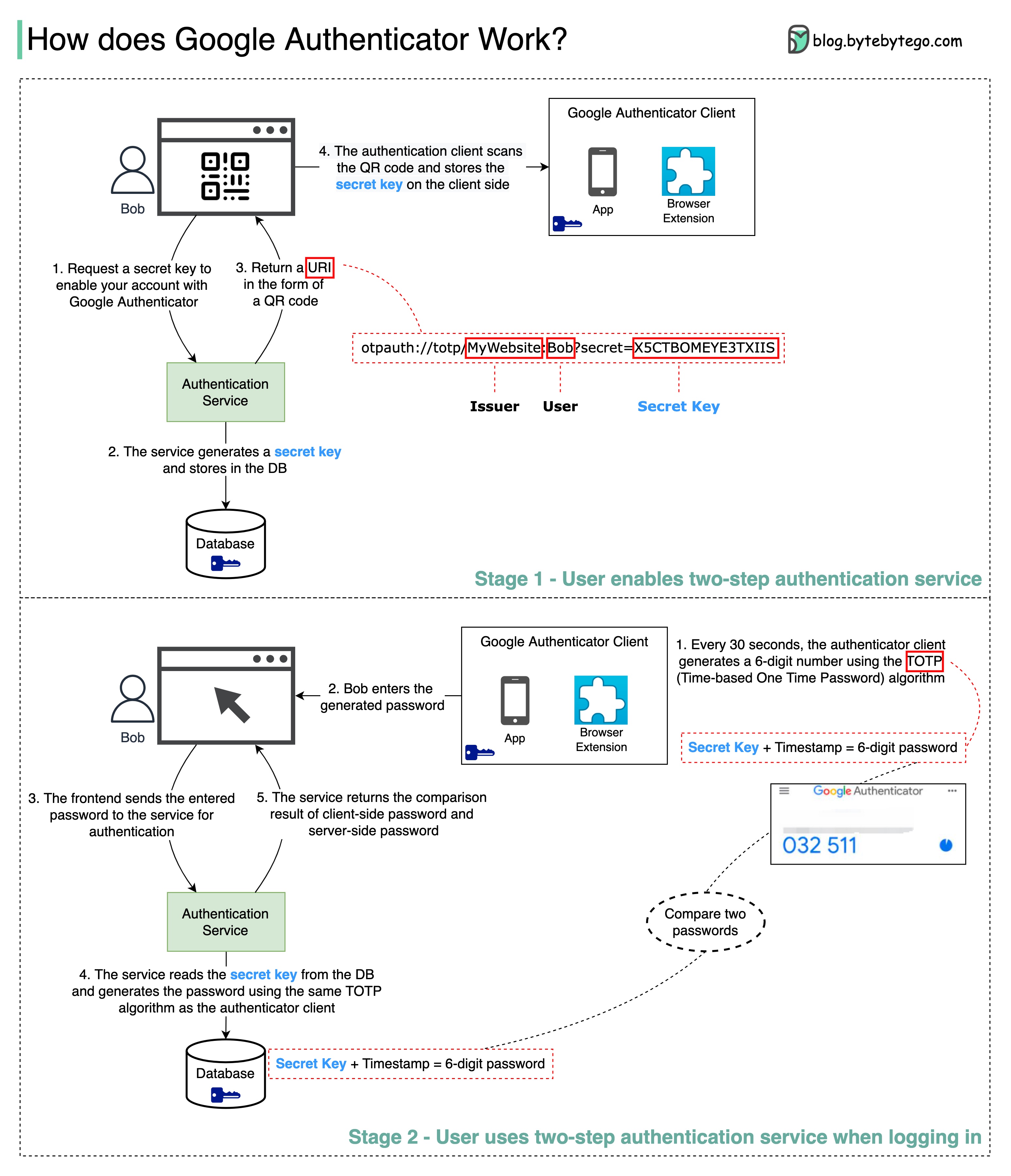
How Google Authenticator Works
Google Authenticator implements Time-based One-Time Password (TOTP) algorithm: Stage 1: Setup- User enables two-step verification
- Authentication service generates a secret key
- Secret key is displayed as a QR code
- User scans QR code with authenticator app
- Secret key is stored in the app
- Every 30 seconds, the app generates a 6-digit code using TOTP
- User enters the code during login
- Server generates the same code using stored secret key
- Server compares both codes
- Access granted if codes match
The 6-digit password has 1 million potential combinations and changes every 30 seconds, making it extremely difficult for hackers to guess.
Password Storage Best Practices
What NOT to Do
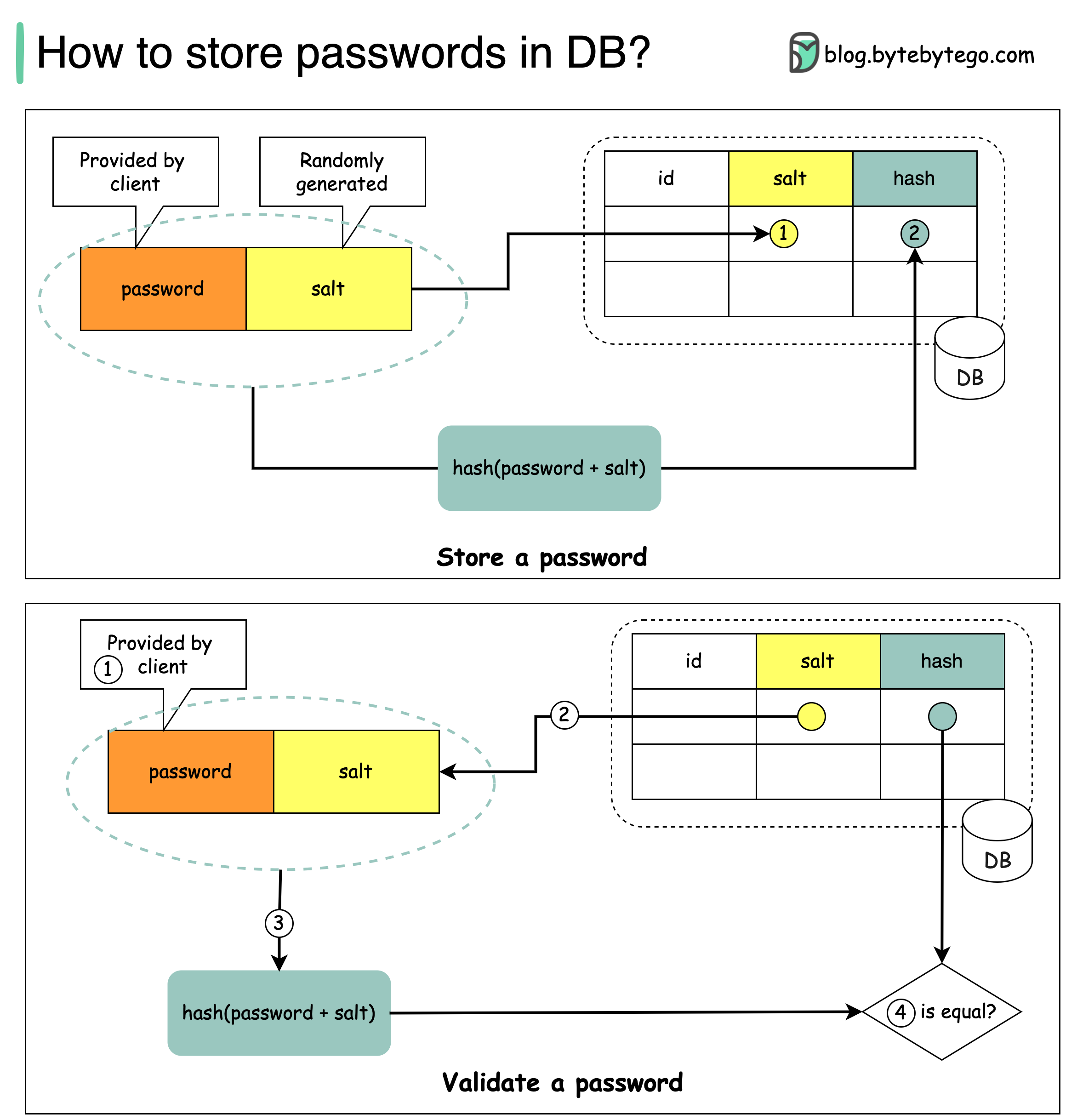
Using Salt for Security
According to OWASP guidelines, “a salt is a unique, randomly generated string that is added to each password as part of the hashing process”. How to store passwords:- Generate a unique random salt for each password
- Store salt in plain text in the database (it’s not secret)
- Store password as:
hash(password + salt)
- Client enters password
- System fetches corresponding salt from database
- System appends salt to password and hashes it (H1)
- System compares H1 with stored hash (H2)
- If H1 == H2, password is valid
Recommended Hashing Algorithms
- bcrypt - Adaptive hash function with built-in salt
- scrypt - Memory-hard function resistant to hardware attacks
- Argon2 - Winner of Password Hashing Competition (recommended)
Single Sign-On (SSO)
SSO uses a central authentication service that allows a single login to work across multiple sites and applications. Benefits:- Improved user experience
- Reduced password fatigue
- Centralized access control
- Simplified user management
- SAML 2.0
- OAuth 2.0 + OpenID Connect
- CAS (Central Authentication Service)
Learn more about OAuth 2.0 in the OAuth guide.
Best Practices
For API Authentication
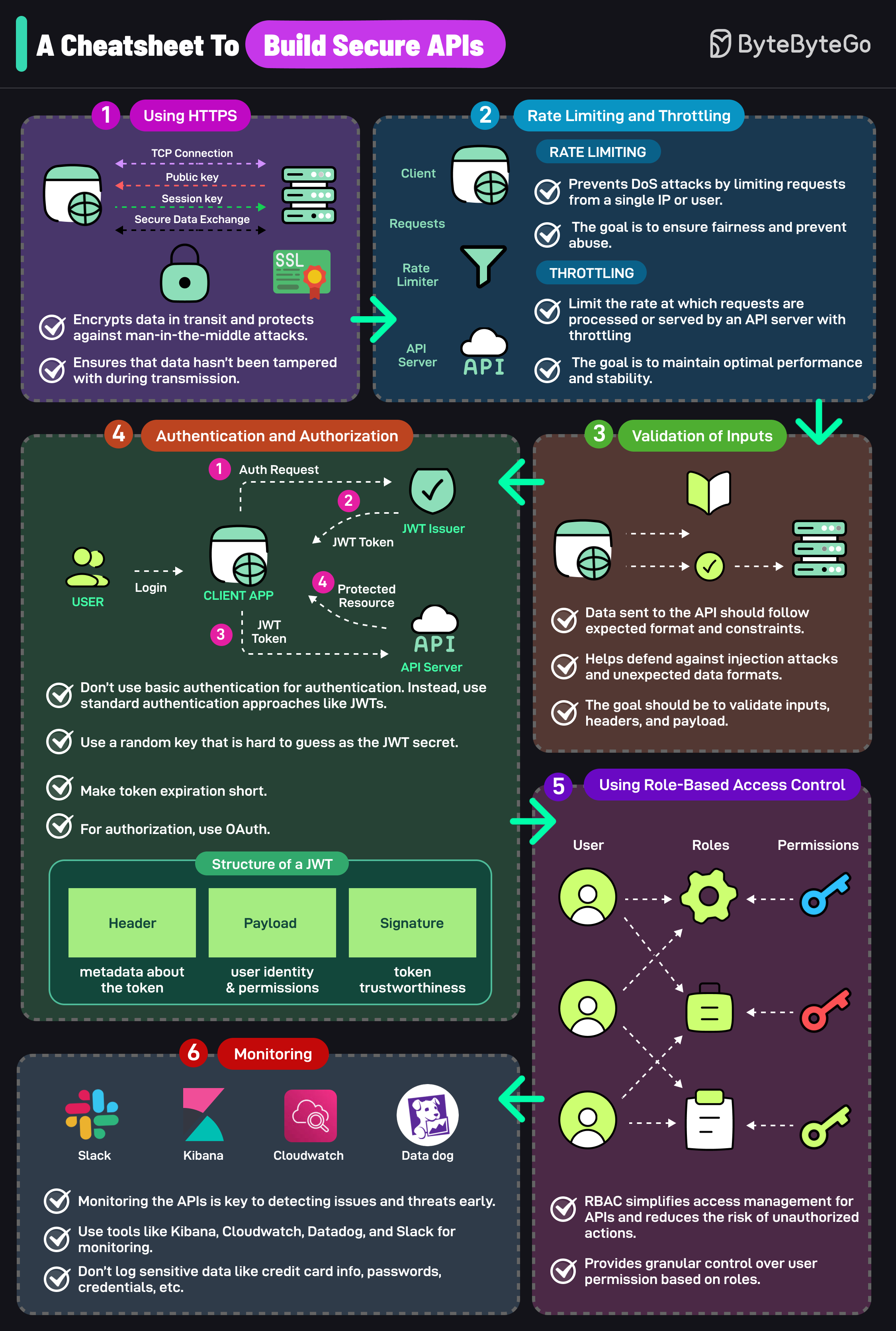
- Don’t use basic auth - Use JWTs or OAuth tokens instead
- Use random JWT secrets - Make them long and hard to guess
- Set short token expiration - Balance security with user experience
- Implement rate limiting - Prevent brute-force attacks
- Validate all inputs - Prevent injection attacks
- Use HTTPS only - Never transmit credentials over HTTP
Security Key Management
Instead, use:- Environment variables
- Secrets management services (AWS Secrets Manager, HashiCorp Vault)
- Encrypted configuration stores
- Hardware Security Modules (HSM) for critical keys
Monitoring and Logging
- Log all authentication attempts
- Monitor for suspicious patterns (multiple failed attempts)
- Set up alerts for unusual authentication activity
- Never log sensitive data (passwords, tokens, PII)
Use tools like Kibana, CloudWatch, Datadog, or Slack for authentication monitoring and alerting.
Authentication vs Authorization
Authentication answers: “Who are you?”- Verifies user identity
- Happens first in the security flow
- Examples: Login, 2FA, biometrics
- Determines access permissions
- Happens after authentication
- Examples: Role-based access control (RBAC), permissions
Common Authentication Vulnerabilities
1. Credential Stuffing
Attack: Using leaked username/password pairs from other breaches Mitigation: Implement rate limiting, use 2FA, monitor for breach databases2. Session Hijacking
Attack: Stealing session tokens to impersonate users Mitigation: Use secure cookies (HttpOnly, Secure flags), implement session timeout3. Brute Force Attacks
Attack: Systematically trying all possible passwords Mitigation: Account lockout, rate limiting, CAPTCHA, strong password policies4. Man-in-the-Middle (MITM)
Attack: Intercepting authentication credentials in transit Mitigation: Always use HTTPS/TLS, implement certificate pinningDesigning Secure Authentication Systems
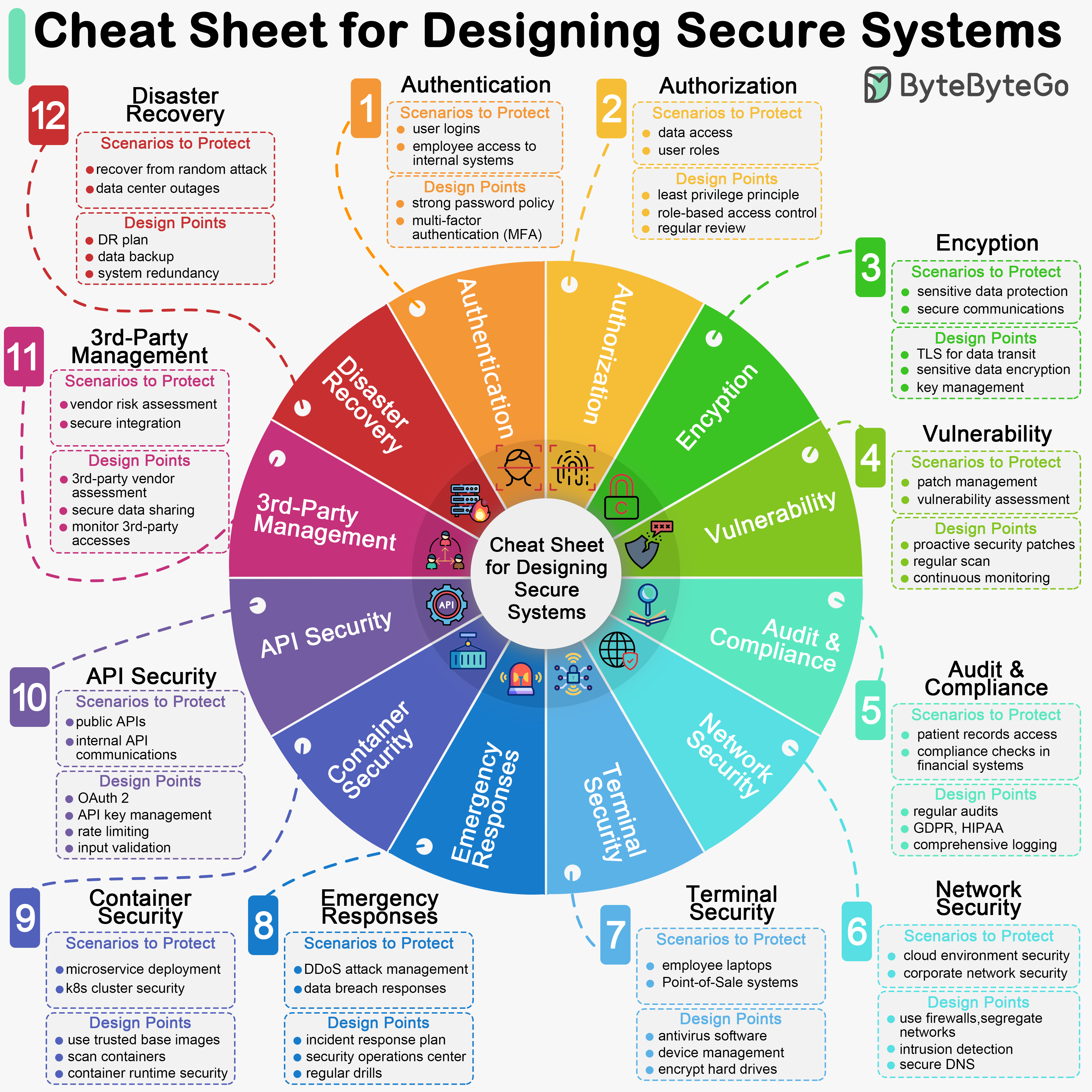 Key considerations for secure authentication design:
- Defense in Depth - Multiple layers of security
- Principle of Least Privilege - Grant minimal necessary access
- Fail Secure - Default to denying access on errors
- Audit Trail - Log all authentication events
- Regular Updates - Keep authentication libraries current
- Security Testing - Regular penetration testing and vulnerability scans
Next Steps
Explore related security topics:- OAuth 2.0 - Learn about OAuth flows and implementations
- JWT - Deep dive into JSON Web Tokens
- HTTPS/SSL - Understand secure communication
- Encryption - Learn about encryption techniques