What is a Load Balancer?
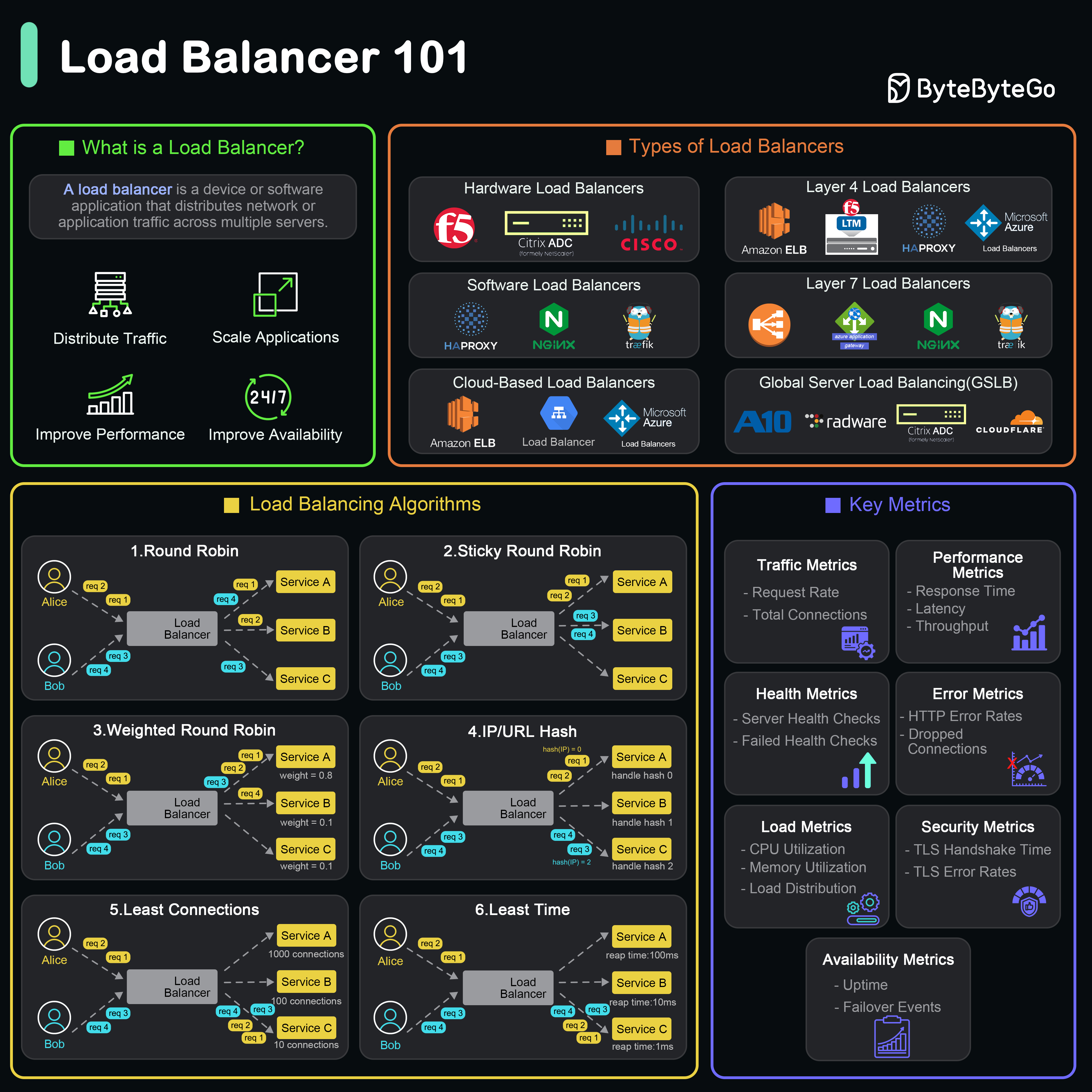 A load balancer is a device or software application that distributes network or application traffic across multiple servers to optimize resource utilization, maximize throughput, minimize response time, and avoid overload of any single server.
Load balancers ensure high availability and reliability by routing traffic only to healthy servers and distributing load efficiently.
What Does a Load Balancer Do?
Distributes Traffic
Evenly spreads incoming requests across multiple servers to prevent any single server from becoming a bottleneck.Ensures Availability and Reliability
Monitors server health and automatically reroutes traffic away from failed or unhealthy servers, ensuring uninterrupted service.Improves Performance
Reduces response time by distributing load and preventing server overload, providing faster user experiences.Scales Applications
Facilitates horizontal scaling by managing traffic across newly added servers without client configuration changes.Types of Load Balancers
By Deployment Type
Hardware Load Balancers
Physical devices designed specifically for traffic distribution.Pros:
- High performance and throughput
- Dedicated hardware resources
- Vendor support
- Expensive
- Limited scalability
- Requires physical space
Software Load Balancers
Applications installed on standard hardware or virtual machines.Examples: NGINX, HAProxy, TraefikPros:
- Cost-effective
- Flexible configuration
- Easy to scale
- Shares resources with host
- May require more maintenance
By OSI Layer
Global Server Load Balancing (GSLB)
Distributes traffic across multiple geographical locations for:- Disaster recovery
- Global redundancy
- Latency optimization
- Geographic traffic distribution
Top 6 Load Balancing Algorithms
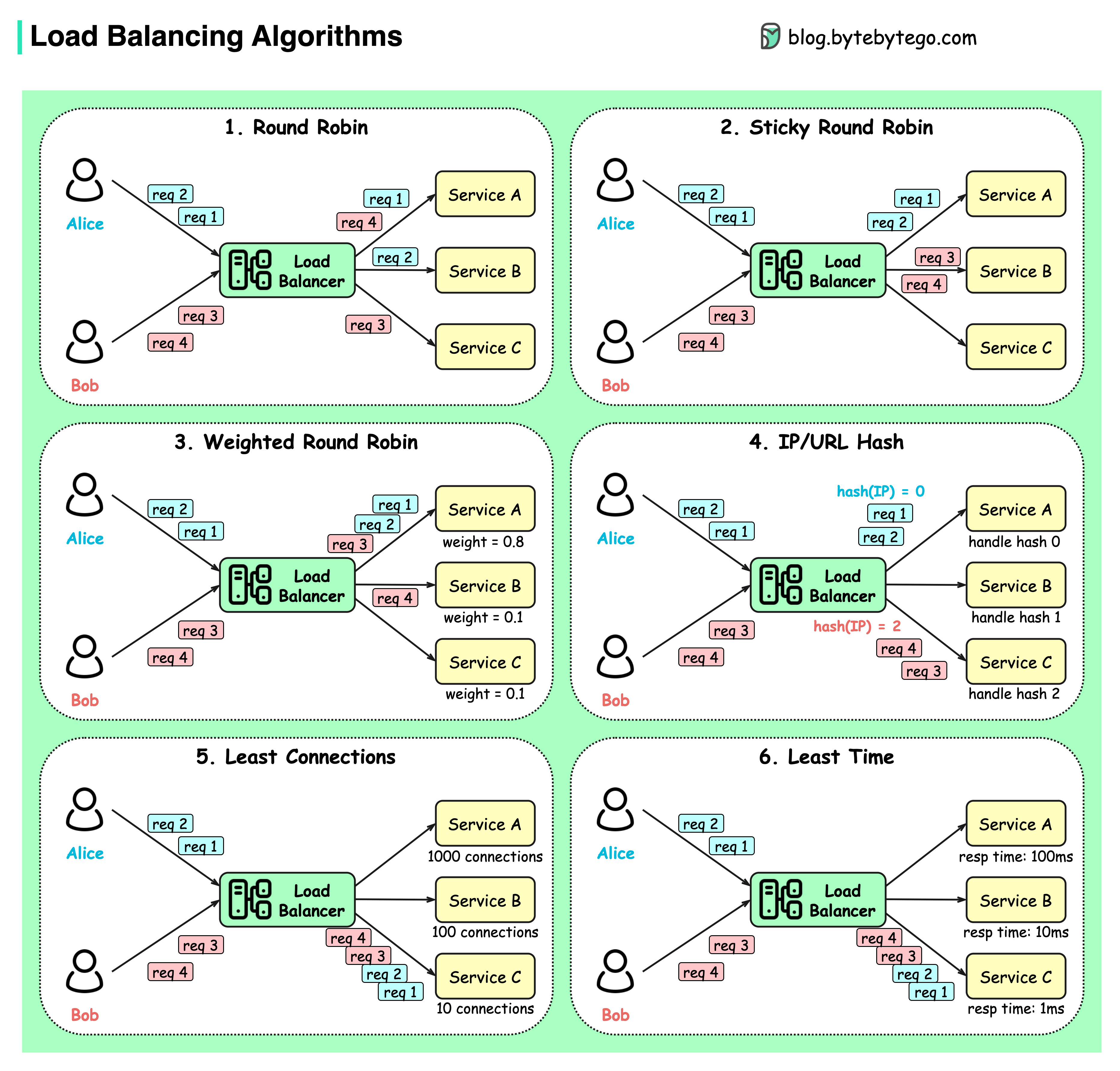
Static Algorithms
Predetermined routing decisions not based on current server state.Round Robin
Client requests are sent to different service instances in sequential order.Best for: Stateless services with equal capacity servers
Sticky Round Robin
Improvement of round-robin where subsequent requests from the same client go to the same server.Best for: Session-based applications
Also called “Session Persistence” or “Session Affinity”
Weighted Round Robin
Admin assigns weights to servers based on capacity. Higher weight servers handle more requests.Best for: Heterogeneous server capacities
Dynamic Algorithms
Routing decisions based on current server state and performance.Least Connections
New requests sent to the server with the fewest active connections.Best for: Varying request processing times
Key Use Cases for Load Balancers
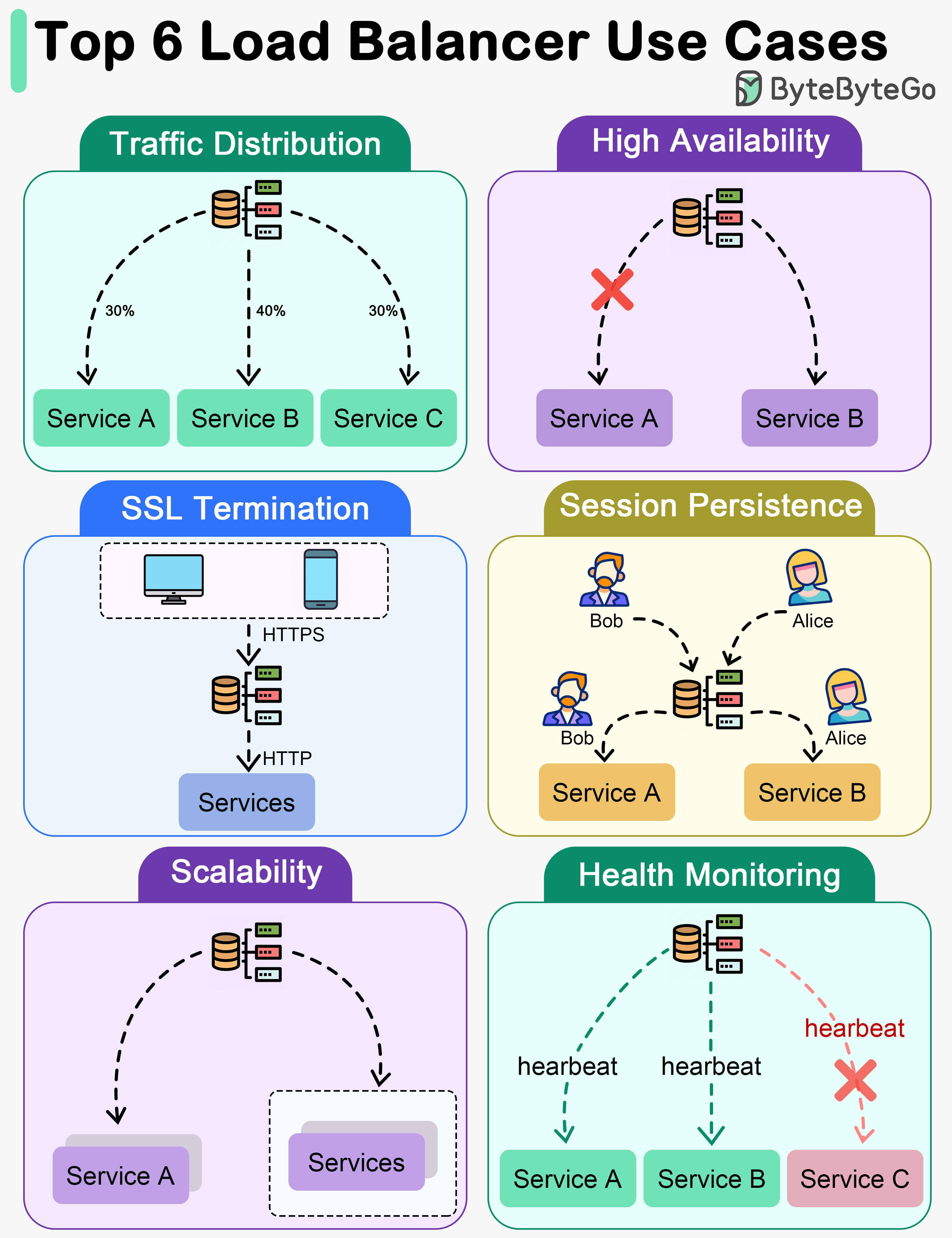
1. Traffic Distribution
Load balancers evenly distribute incoming traffic among multiple servers, preventing any single server from becoming overwhelmed. Benefits:- Optimal performance
- Better resource utilization
- Improved scalability
- Consistent response times
2. High Availability
Load balancers enhance system availability by rerouting traffic away from failed or unhealthy servers to healthy ones.3. SSL Termination
Load balancers offload SSL/TLS encryption and decryption from backend servers.- Reduced backend server workload
- Centralized certificate management
- Improved overall performance
- Simplified backend configuration
4. Session Persistence
For applications requiring user sessions on specific servers, load balancers ensure subsequent requests go to the same server.5. Scalability
Load balancers facilitate horizontal scaling by managing traffic across all servers.6. Health Monitoring
Load balancers continuously monitor server health and performance.Realistic Load Balancer Use Cases
Failure Handling
Automatically redirects traffic away from malfunctioning elements to maintain continuous service.Instance Health Checks
Continuously evaluates instance functionality, directing requests only to operational servers.Platform-Specific Routing
Routes requests from different device types to specialized backends.SSL Termination
Handles encryption/decryption of SSL traffic, reducing backend processing burden.Cross-Zone Load Balancing
Distributes traffic across various geographic or network zones.User Stickiness
Maintains session integrity by consistently directing specific users to designated servers.Load Balancer Configuration Example
NGINX Configuration
HAProxy Configuration
Load Balancer vs API Gateway
| Feature | Load Balancer | API Gateway |
|---|---|---|
| Primary Function | Traffic distribution | API management |
| OSI Layer | Layer 4 or 7 | Layer 7 |
| Routing | Simple (IP, port, path) | Complex (headers, auth, transforms) |
| Authentication | No | Yes |
| Rate Limiting | Basic | Advanced |
| Protocol Translation | No | Yes |
| API Composition | No | Yes |
| Best For | Server distribution | API orchestration |
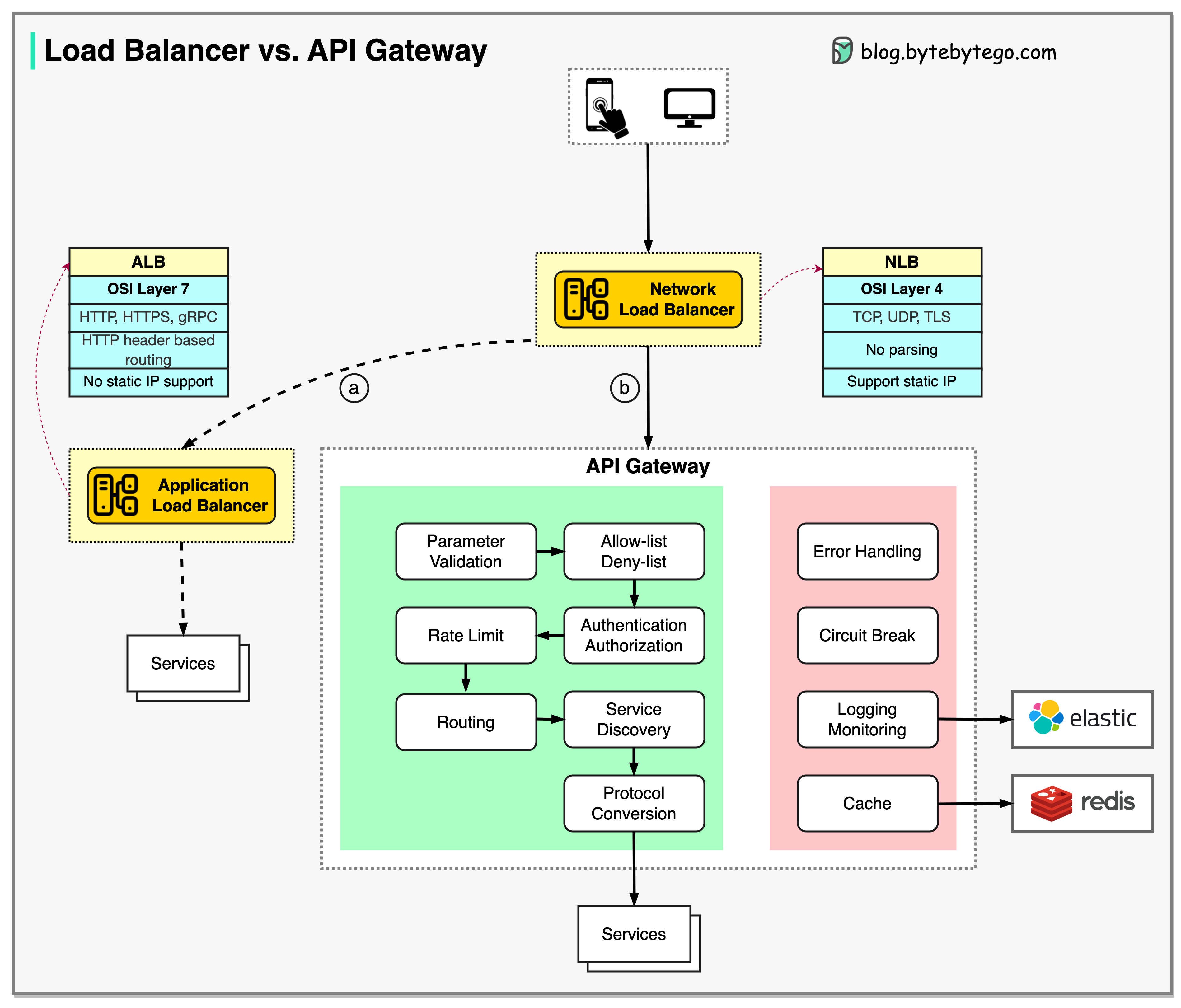
Load balancers and API gateways are often used together: LB distributes traffic, API Gateway manages API-specific concerns.
Best Practices
Monitor Key Metrics
Track:
- Request rate
- Active connections
- Backend response times
- Error rates
- Health check status
Common Pitfalls to Avoid
Single Point of Failure
Deploy load balancers in high-availability pairs to avoid the load balancer itself becoming a single point of failure.
Inadequate Capacity Planning
- Monitor load balancer capacity
- Plan for peak traffic
- Consider auto-scaling
Poor Health Check Configuration
Ignoring Session Persistence Requirements
- Understand application session needs
- Choose appropriate persistence mechanism
- Plan for session replication or external session storage
Advanced Features
Connection Pooling
Reuse connections to backend servers for better performance.Request Buffering
Buffer client requests before forwarding to reduce slow client impact.Compression
Compress responses to reduce bandwidth usage.WAF Integration
Integrate Web Application Firewall for security.Rate Limiting
Limit requests per client to prevent abuse.Key Takeaways
Load balancers are essential for high-availability, scalable systems. Choose the right type and algorithm based on your specific requirements.
- Load balancers distribute traffic across multiple servers for reliability and performance
- Layer 4 (NLB) is faster; Layer 7 (ALB) provides richer routing capabilities
- Static algorithms (round-robin) work for uniform workloads
- Dynamic algorithms (least connections) adapt to varying loads
- Health monitoring ensures traffic goes only to healthy servers
- SSL termination offloads encryption work from backend servers
- Often used in combination with API gateways for complete traffic management